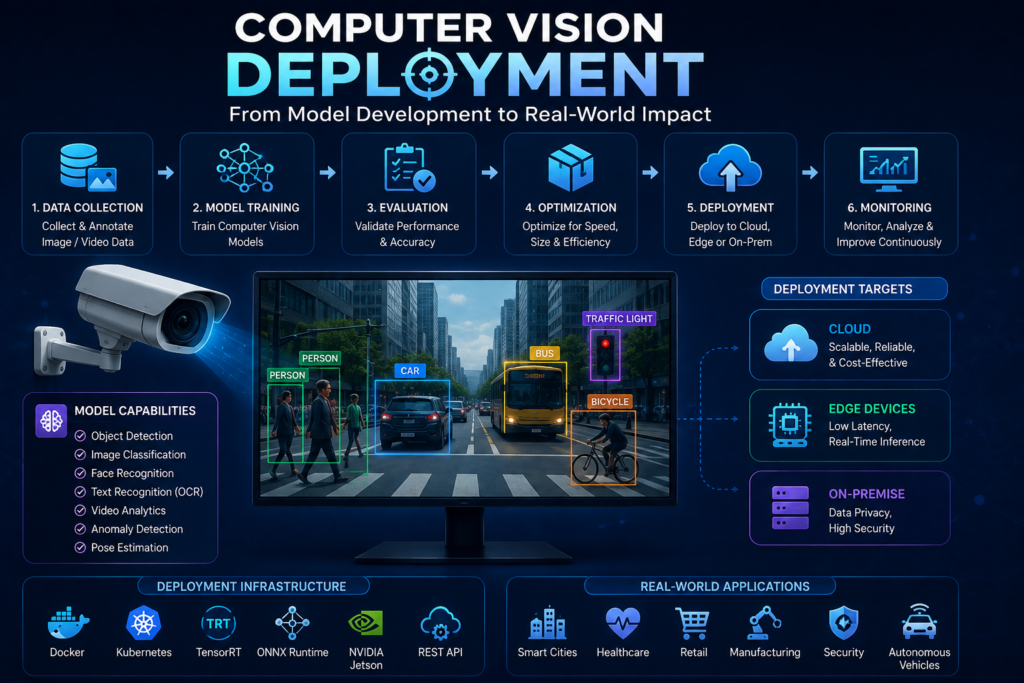
👁️ Computer Vision Deployment: The Complete Enterprise Guide to Building Production-Ready Vision AI Systems
The 3:00 AM Factory Floor Wake-Up Call
It’s 3:00 AM at an automotive manufacturing plant. The night shift is running at full speed. A computer vision system that worked flawlessly in the lab—achieving 98% accuracy on the test dataset—is now missing defects on the production line. The quality team is scrambling. The model is still the same. The code hasn’t changed. But the real world has: lighting conditions shifted, the camera lens accumulated dust, and the parts being inspected are slightly different from the training data.
This scenario plays out in enterprises every single day. Computer vision deployment is the hard part. The model that hits high accuracy on a clean test set is not the same thing as a system that runs reliably in a plant, a rail yard, or a logistics center, day after day, in conditions no one fully controls . Most enterprise vision efforts stall in exactly that gap. It works in the lab, and then it does not survive contact with the real world.
This guide covers everything you need to know about computer vision deployment—from foundational concepts to enterprise-grade architecture, from model optimization to production monitoring. Whether you’re deploying a single YOLO model on an edge device or orchestrating hundreds of vision pipelines across global facilities, you’ll find practical strategies for building reliable, scalable, and production-ready vision AI systems.
📖 What Is Computer Vision Deployment?
Computer vision deployment is the process of taking a trained computer vision model and making it available for real-world use in production environments. Instead of running only in a training environment or a local notebook, the model is set up so applications can send images or videos to it and receive predictions in return .
The Three-Part Deployment Problem
According to Joseph Nelson, co-founder and CEO of Roboflow, a production computer vision deployment can be broken into three parts, and a stall usually traces back to one of them :
- Data and Eyes on the Problem: Do you have video or images of the thing you want to improve? No footage of the problem, no model.
- A Model That Understands Your Slice of the World: You make a product no one else makes, so an off-the-shelf model rarely clears the bar. Most teams fine-tune or train their own model on their own parts and their own defects.
- Turning Insight into Action: A model that spots four screws where there should be eight is only useful if that signal reaches the systems that run the business. That means running the model close to the problem and wiring its output into the manufacturing execution system, the transportation operating system, or the inventory catalog.
Why Deployment Is the Hardest Part
Unlike testing setups where conditions are predictable, real-world scenarios involve varying lighting, changing inputs, and unpredictable workloads, making deployment one of the most challenging parts of the vision workflow .
Deployment involves more than just making a model available for use. It requires :
- Setting up processes that can handle real-world data
- Ensuring everything runs smoothly as usage grows
- Tracking performance and maintaining reliability over time
- Managing infrastructure and dependencies
🏗️ Computer Vision Architecture: The Complete Pipeline
End-to-End Deployment Pipeline
text
┌─────────────────────────────────────────────────────────────────┐
│                    DATA CAPTURE                                 │
│  Cameras, IoT devices, drones, existing CCTV infrastructure    │
└─────────────────────────────────────────────────────────────────┘
                               │
                               ▼
┌─────────────────────────────────────────────────────────────────┐
│                    PREPROCESSING                                │
│  Resizing, normalization, formatting, frame extraction         │
└─────────────────────────────────────────────────────────────────┘
                               │
                               ▼
┌─────────────────────────────────────────────────────────────────┐
│                    MODEL INFERENCE                              │
│  ┌────────────────────────────────────────────────────────────┐│
│  │  • Object Detection (YOLO, Faster R-CNN, SSD)             ││
│  │  • Image Classification (ResNet, EfficientNet, ViT)       ││
│  │  • Instance Segmentation (Mask R-CNN, YOLO-Seg)           ││
│  │  • Pose Estimation (YOLO-Pose, MediaPipe)                 ││
│  │  • OCR (Tesseract, EasyOCR, Document AI)                  ││
│  └────────────────────────────────────────────────────────────┘│
└─────────────────────────────────────────────────────────────────┘
                               │
                               ▼
┌─────────────────────────────────────────────────────────────────┐
│                    POST-PROCESSING                              │
│  • Confidence thresholding                                     │
│  • Non-maximum suppression                                     │
│  • Tracking (SORT, DeepSORT)                                   │
│  • Event detection                                             │
└─────────────────────────────────────────────────────────────────┘
                               │
                               ▼
┌─────────────────────────────────────────────────────────────────┐
│                    ACTION & INTEGRATION                         │
│  ┌────────────────────────────────────────────────────────────┐│
│  │  • Alerts & notifications                                 ││
│  │  • Dashboard updates                                      ││
│  │  • MES / ERP integration                                  ││
│  │  • Automated workflows                                    ││
│  └────────────────────────────────────────────────────────────┘│
└─────────────────────────────────────────────────────────────────┘
                               │
                               ▼
┌─────────────────────────────────────────────────────────────────┐
│                    MONITORING & FEEDBACK                        │
│  • Performance metrics (latency, throughput)                   │
│  • Model drift detection                                       │
│  • Active learning feedback                                    │
│  • Error tracking                                              │
└─────────────────────────────────────────────────────────────────┘
Key Architectural Decisions
| Decision Point | Options | Trade-offs |
|---|---|---|
| Deployment Location | Edge, Cloud, Hybrid | Edge: low latency, privacy; Cloud: high compute, scalability |
| Inference Engine | TensorRT, ONNX, OpenVINO | Performance vs. compatibility |
| Serving Framework | Triton, TorchServe, TensorFlow Serving | Multi-framework support vs. specialization |
| Orchestration | Kubernetes, Docker Compose, Serverless | Flexibility vs. complexity |
| Model Format | PyTorch, ONNX, TensorFlow | Ecosystem support vs. portability |
🚀 Deployment Options: Cloud vs. Edge
Cloud Deployment
Cloud deployment runs models on centralized infrastructure. In most real-world systems, this happens through an API or inference endpoint. An application sends an image to the model, the model processes it, and it returns a prediction within milliseconds .
Advantages:
- Scalable compute resources
- Access to high-end GPUs (A100, H100)
- Global deployment with low latency
- Managed infrastructure
Use Cases: Enterprise-scale applications, document processing, batch analytics
Edge AI Deployment
Edge AI runs models directly on devices like smartphones, cameras, and embedded systems. Models can be deployed on edge devices such as Raspberry Pi and NVIDIA Jetson, mobile apps, Docker containers, and custom infrastructure .
Advantages:
- Ultra-low latency (sub-15ms)
- Data privacy (sensitive data stays local)
- Works offline
- Lower bandwidth costs
Use Cases: Autonomous vehicles, robotics, manufacturing inspection, smart cameras
Hybrid Deployment
Many enterprises use a hybrid approach: edge for low-latency inference and cloud for heavy computation, model retraining, and cross-facility analytics.
🛠 Model Optimization for Production
Model Export Formats
Ultralytics Platform supports export to 17 different formats, making it possible to run models across a wide range of environments :
| Format | Best For | Key Benefit |
|---|---|---|
| TensorRT | NVIDIA GPUs | Maximum performance, kernel fusion |
| ONNX | Cross-platform inference | Framework-agnostic, hardware acceleration |
| CoreML | Apple devices | Native iOS/macOS performance |
| TFLite | Mobile and embedded | Lightweight, mobile-optimized |
| OpenVINO | Intel hardware | CPU/GPU/VPU optimization |
Quantization for Performance
Options like FP16 and INT8 quantization can further reduce model size and improve throughput, which is especially useful for edge deployments .
| Precision | Memory Reduction | Speed Gain | Best For |
|---|---|---|---|
| FP32 | Baseline | Baseline | Training, maximum accuracy |
| FP16 | ~50% | ~2x | General inference |
| INT8 | ~75% | ~4x | Production deployments |
| INT4 | ~87% | ~8x | Edge/constrained devices |
📦 Deployment Infrastructure
Ultralytics Platform: End-to-End Deployment
Ultralytics Platform provides multiple deployment options to support different stages of the computer vision deployment workflow :
1. Predict Tab (Validation)
Run inference directly in the browser without any setup. Results appear instantly with visual overlays, confidence scores, and detailed outputs, giving you a clear view of how the model behaves .
2. Shared Inference (Testing)
Send data to your model and receive predictions through simple REST APIs. Requests are automatically routed to the nearest available service. Great for development, testing, and lighter usage .
3. Dedicated Endpoints (Production)
Models run as single-tenant services across 43 global regions. Each endpoint runs with its own allocated compute resources and a unique API URL. Deploy closer to end users to reduce latency .
4. Model Export (Edge)
Run models outside the platform on edge devices, mobile apps, or custom infrastructure .
Multi-Region Deployment
Deploying models across 43 global regions helps :
- Reduce latency (models closer to users)
- Meet data privacy and data residency requirements
- Maintain consistent performance across locations
Monitoring Deployed Models
Ultralytics Platform provides built-in monitoring tools that give teams visibility into how deployed endpoints are performing :
| Metric | What It Measures | Why It Matters |
|---|---|---|
| P95 Latency | 95th percentile server-side response time | Identifies performance slowdowns |
| Error Rate | Percentage of failed requests | Detects problems quickly |
| Total Requests | Number of inference requests processed | Understands traffic levels |
| Model Health | Whether endpoint is responding correctly | Ensures system reliability |
🏭 Real-World Deployment Use Cases
Manufacturing: Quality Inspection & Safety
Computer vision in manufacturing uses advanced AI models trained on camera and sensor data to detect safety risks, defects, and equipment problems on the shop floor in real time .
Key Use Cases:
Real Example: A Dubai power generation manufacturer achieved a 65% improvement in forklift operation safety, preventing pedestrian collisions using an AI safety solution .
Automotive: Quality Control
Manufacturers producing electric-vehicle batteries use vision AI to inspect cross-sections of batteries, installation steps, and stamping presses. Active learning helps the system improve over time as it encounters new defect patterns .
Logistics: Container Tracking
BNSF Railway uses computer vision to track millions of containers and inspect track and wheels across tens of thousands of miles .
Healthcare: Medical Imaging
Vision AI powers medical imaging analysis for radiology, pathology, and surgical guidance. Compliance requirements (HIPAA) make edge deployment critical for data privacy.
Retail: Inventory Management
Vision AI enables cashierless retail, inventory tracking, and shelf analysis. Edge deployment keeps sensitive data local while maintaining low latency.
Agriculture: Crop Monitoring
Drone-based computer vision monitors crop health, detects disease, and optimizes irrigation. Edge AI enables real-time decision-making in remote fields.
🔧 Code Examples
FastAPI + YOLO Deployment
python
from fastapi import FastAPI, File, UploadFile
import cv2
import numpy as np
from ultralytics import YOLO

app = FastAPI()

# Load model once at startup
model = YOLO("yolov8n.pt")

@app.post("/detect")
async def detect_objects(file: UploadFile = File(...)):
    """
    Endpoint for object detection using YOLO.
    Accepts an image file, runs inference, returns detections.
    """
    # Read image
    contents = await file.read()
    nparr = np.frombuffer(contents, np.uint8)
    img = cv2.imdecode(nparr, cv2.IMREAD_COLOR)

    # Run inference
    results = model(img)

    # Extract detections
    detections = []
    for r in results:
        boxes = r.boxes.xyxy.cpu().numpy()
        confidences = r.boxes.conf.cpu().numpy()
        class_ids = r.boxes.cls.cpu().numpy().astype(int)

        for box, conf, class_id in zip(boxes, confidences, class_ids):
            detections.append({
                "bbox": box.tolist(),
                "confidence": float(conf),
                "class": int(class_id),
                "class_name": model.names[class_id]
            })

    return {"detections": detections}
TensorRT Optimization
python
import tensorrt as trt
import pycuda.driver as cuda

# Build TensorRT engine
def build_tensorrt_engine(onnx_path, engine_path):
    logger = trt.Logger(trt.Logger.WARNING)
    builder = trt.Builder(logger)
    network = builder.create_network(1 << int(trt.NetworkDefinitionCreationFlag.EXPLICIT_BATCH))

    parser = trt.OnnxParser(network, logger)
    with open(onnx_path, "rb") as model:
        parser.parse(model.read())

    # Build optimization profile
    config = builder.create_builder_config()
    config.set_memory_pool_limit(trt.MemoryPoolType.WORKSPACE, 1 << 30)

    # Enable FP16 for faster inference
    if builder.platform_has_fast_fp16:
        config.set_flag(trt.BuilderFlag.FP16)

    # Build engine
    engine = builder.build_serialized_network(network, config)
    with open(engine_path, "wb") as f:
        f.write(engine)
Kubernetes Deployment
yaml
apiVersion: apps/v1
kind: Deployment
metadata:
  name: yolo-inference
  namespace: computer-vision
spec:
  replicas: 3
  selector:
    matchLabels:
      app: yolo-inference
  template:
    metadata:
      labels:
        app: yolo-inference
    spec:
      containers:
      - name: inference
        image: yolo-inference:latest
        ports:
        - containerPort: 8000
        resources:
          limits:
            nvidia.com/gpu: 1
            memory: "8Gi"
            cpu: "4"
          requests:
            nvidia.com/gpu: 1
            memory: "4Gi"
            cpu: "2"
        env:
        - name: MODEL_PATH
          value: "/models/yolov8n.pt"
        volumeMounts:
        - name: model-storage
          mountPath: /models
      volumes:
      - name: model-storage
        persistentVolumeClaim:
          claimName: model-pvc
📈 Best Practices
🎯 Start with One Concrete Win
Deployments fail when they try to do everything at once. Pair executive buy-in and a big-picture vision with one concrete, material first win on a single line. Then use that proof point to expand .
🏗️ Build for Active Learning
A deployed model can sample its own production inferences—especially the low-confidence and novel ones—and feed them back into the dataset for review and retraining. The longer the system runs, the more accurate it gets .
🖥️ Treat Computer Vision as a Systems Problem
The real challenge isn’t just building models—it’s keeping them moving . Production systems require:
- Pipeline-based architectures for building and managing applications
- Benchmarking frameworks that validate models against Golden Truth datasets before deployment
- Automated deployment systems that confirm pipelines are running—not just submitted
- Operational visibility into what the system is doing in production
📊 Choose the Right Deployment Option
| Stage | Option | When to Use |
|---|---|---|
| Validation | Predict Tab | Right after training, testing on new data |
| Integration | Shared Inference | Development, testing integrations |
| Production | Dedicated Endpoints | Production workloads, global scale |
| Edge | Model Export | Edge devices, mobile apps, offline scenarios |
🔍 Monitor Everything
Once a vision system is deployed, you need visibility into :
- What data the system is processing
- Whether detections are happening
- If the model has drifted
- Whether pipelines are still operating correctly
🏢 Build a Center of Excellence
Stand up a hub-and-spokes team that collects use cases, ranks them by effort versus value, embeds into business units, and builds the flywheel where wins beget wins. The long-term goal is for the technology to diffuse until the center of excellence is no longer needed .
⚠️ Common Mistakes
🔮 Future Trends
🧠 Real-Time Transformer Models
Advances in transformers and real-time vision enable inspection at machine speed. RF-DETR, for example, runs at 30 to 60-plus frames per second on the edge, even offline in remote environments like oil rigs and rail yards .
🤖 Active Learning Pipelines
Deployed models that sample low-confidence predictions and feed them back for retraining are becoming standard. This turns a deployment from a fixed asset into a living one .
🌍 Multi-Region Global Deployments
Platforms supporting 43 global regions make it practical to deploy models close to users, reducing latency and meeting data residency requirements .
📊 Vision Language Models (VLMs)
VLMs combine computer vision with natural language understanding, enabling robots to go beyond programmed tasks. An operator making a mistake can get real-time guidance on how to fix it .
⚡ Real-Time Edge AI
With 5G and edge computing, real-time vision AI is becoming practical in remote environments like oil rigs, rail yards, and autonomous vehicles.
🏥 Vision AI in Healthcare
Computer vision is expanding in medical imaging, surgical robotics, and patient monitoring, with edge deployment enabling privacy-preserving inference.
🏁 Conclusion
Computer vision deployment is the bridge between a promising model and a production system that delivers real business value. The model that hits high accuracy on a clean test set is not the same thing as a system that runs reliably in the real world .
Key Takeaways
- Deployment is a three-part problem: data, model, and integration into business systems
- Production vision systems fail on infrastructure, not models: Video ingestion, pipeline orchestration, and monitoring are where most projects stall
- Active learning keeps models alive: Deployed models should get better over time as they encounter new data
- Choose the right deployment option: Predict tab for validation, shared inference for testing, dedicated endpoints for production, export for edge
- Monitor everything: Without visibility into what the system is doing, failures remain hidden
Implementation Checklist
- □ Identify a concrete first use case with measurable ROI
- □ Collect and annotate representative real-world data
- □ Train and validate a model on domain-specific data
- □ Test in the predict tab before deployment
- □ Deploy to dedicated endpoints or edge devices
- □ Implement monitoring and alerting
- □ Set up active learning feedback loops
- □ Track model performance and data drift over time
This article draws on production experience from teams deploying computer vision systems at enterprise scale, with insights from Roboflow, Ultralytics, Plainsight, and viAct.

Leave a Reply