Docker for AI Applications
A machine learning model that works perfectly on your laptop suddenly fails in production. A teammate cannot reproduce your experiment because of different package versions. A deployment breaks after a dependency update. These common AI development challenges are known as environment drift.
Docker solves these problems by packaging the complete AI application—including code, models, dependencies, and runtime—inside lightweight containers that behave identically across development, testing, and production. Rather than configuring environments repeatedly, developers can build once and deploy anywhere with confidence.
Docker eliminates dependency conflicts, ensures reproducibility, improves collaboration, and provides a consistent execution environment for AI applications across local machines, cloud platforms, and enterprise infrastructure.
What Is Docker for AI Applications?
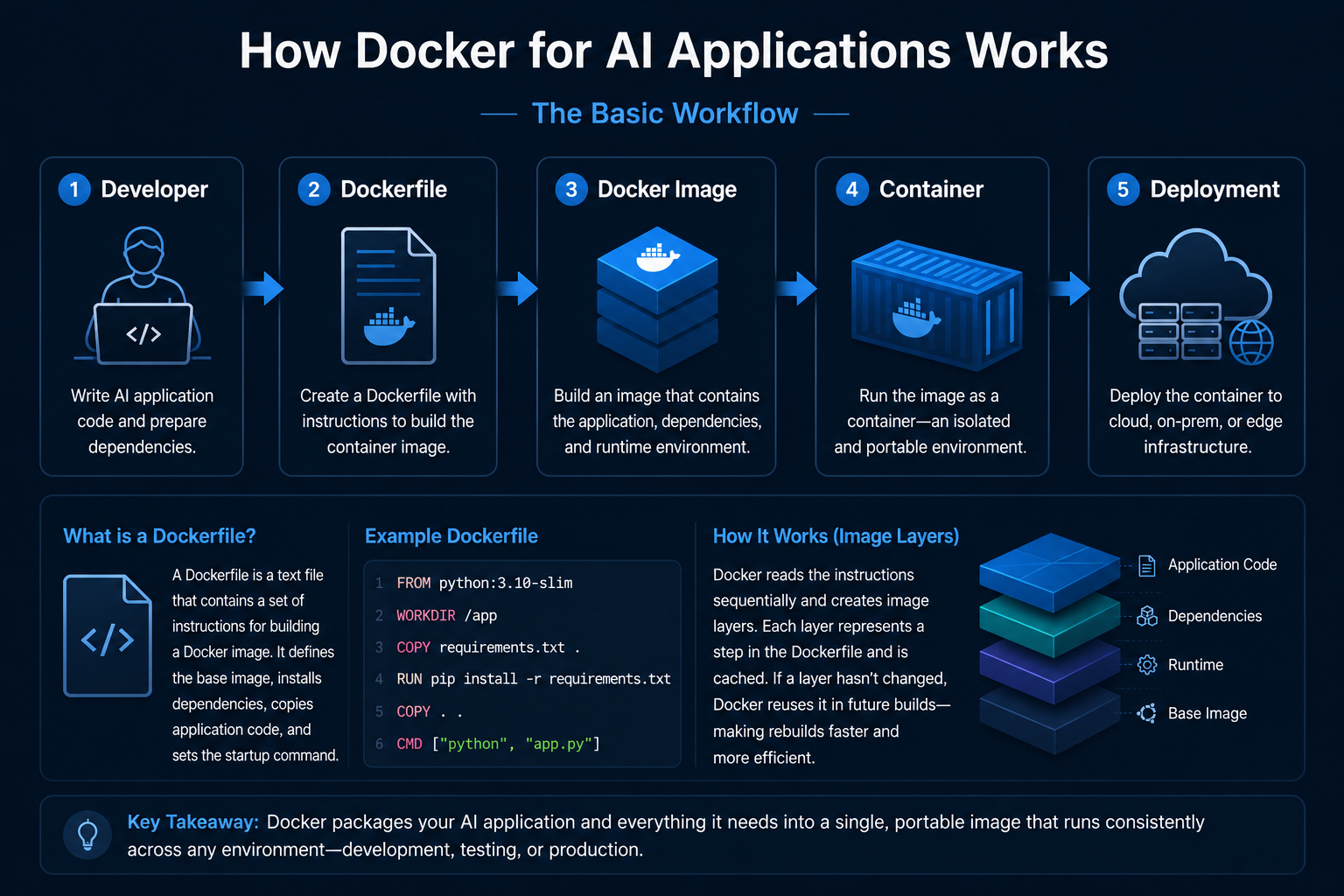
Docker for AI refers to using container technology to package, deploy, and run artificial intelligence workloads in isolated environments. Every container includes the application code, runtime, libraries, frameworks, and system dependencies needed to execute consistently regardless of where it is deployed.
ImagesRead-only templates containing application code, dependencies, runtime libraries, and operating system packages. |
ContainersRunning instances of Docker images that execute applications in isolated environments. |
VolumesPersistent storage that preserves AI models, datasets, logs, and checkpoints beyond the container lifecycle. |
NetworkingSecure communication between AI services using Docker networking and port mapping. |
Why Docker Matters for AI
Package once and run identically across Windows, Linux, macOS, cloud servers, and Kubernetes clusters.
Prevent conflicts between Python packages, CUDA versions, operating systems, and AI frameworks.
Deploy AI workloads seamlessly across AWS, Azure, Google Cloud, edge devices, or on-premises infrastructure.
Integrate with Kubernetes to automatically scale inference and training workloads as demand increases.
Core Docker Concepts for AI
Docker provides a collection of building blocks that simplify AI application development and deployment. Together, these components create portable, reproducible, and scalable environments for machine learning workloads.
A Dockerfile acts as the blueprint for an AI container. It defines the base image, installs dependencies, copies source code, and specifies the startup command required to launch the application.
Docker images are reusable templates containing the application and all required dependencies. Containers are isolated running instances of those images that execute AI workloads consistently.
Since containers are temporary by nature, Docker Volumes provide persistent storage for datasets, trained models, checkpoints, logs, and experiment outputs.
Using the NVIDIA Container Toolkit, Docker containers can securely access host GPUs, enabling accelerated model training and inference with CUDA-enabled frameworks like TensorFlow and PyTorch.
Docker Compose for Multi-Container AI Stacks
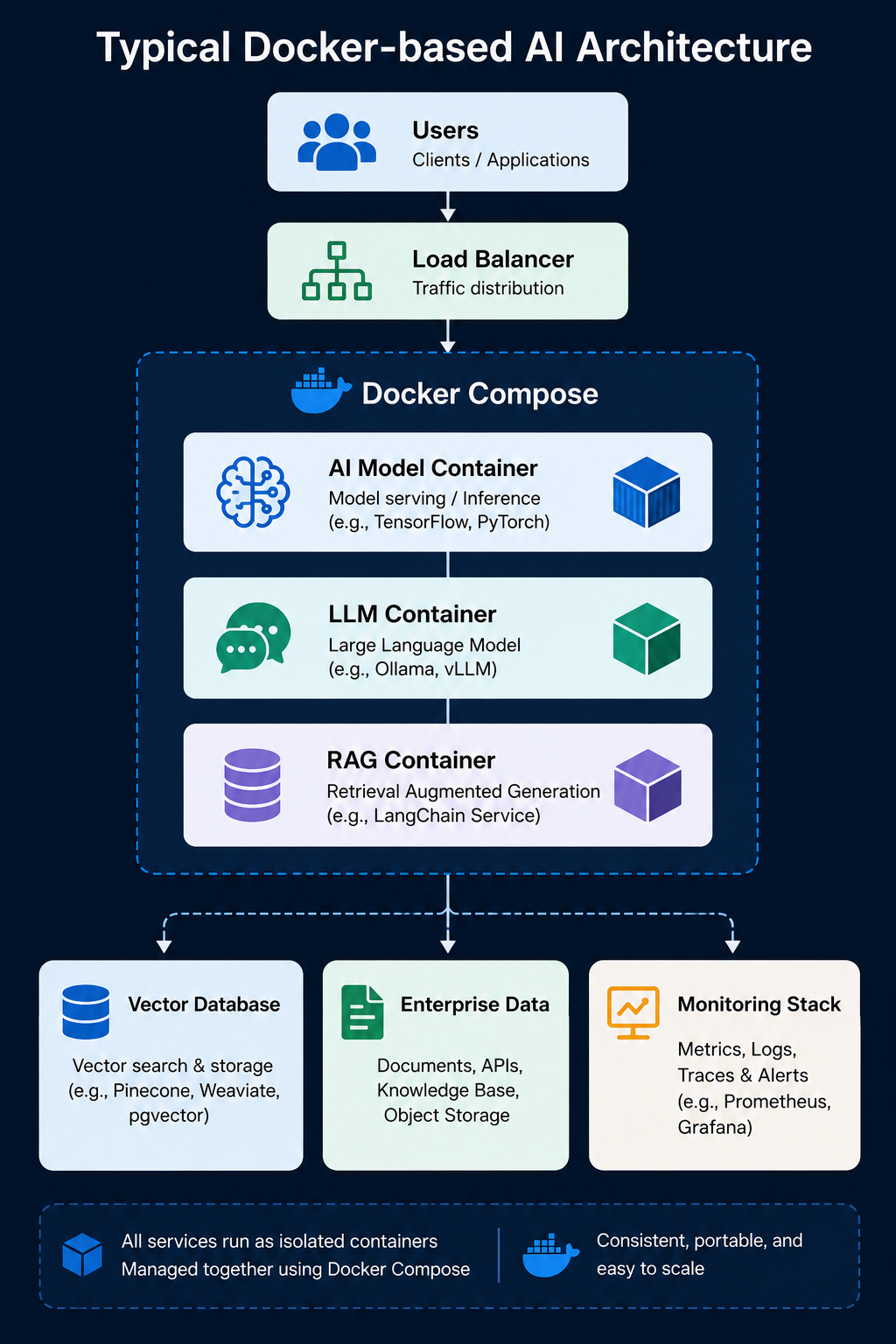
Modern AI systems rarely consist of a single application. A typical Generative AI solution includes multiple interconnected services such as an LLM, vector database, monitoring tools, APIs, and orchestration frameworks. Docker Compose allows developers to define and launch the complete stack using a single YAML configuration.
Example AI Stack
↓
Docker Compose
↓
Ollama (LLM)
↓
LangChain
↓
Neo4j / Vector Database
With Docker Compose, the complete AI environment—including databases, APIs, model servers, and supporting services—can be launched using a single command:
Docker AI Architecture
↓
Docker Container
↓
Model Serving API
↓
Vector Database / Storage
↓
GPU Infrastructure
Docker vs Traditional AI Deployment
| Aspect | Traditional | Docker |
|---|---|---|
| Environment | Machine-dependent | Identical everywhere |
| Dependencies | Version conflicts | Fully isolated |
| Portability | Limited | Runs anywhere |
| Scalability | Manual | Kubernetes-ready |
| Startup Time | Minutes | Seconds |
Enterprise Use Cases
Docker has become the foundation for deploying AI applications across enterprise environments. From generative AI and computer vision to edge AI and recommendation systems, Docker enables organizations to package complex AI workloads into portable, scalable containers that can run consistently anywhere.
Deploy Large Language Models (LLMs) consistently across development, testing, and production using Docker containers and Docker Model Runner.
Package trained AI models into lightweight containers for reliable inference across cloud, edge, and on-premises environments.
Standardize AI development environments to ensure reproducible model training, testing, validation, and deployment pipelines.
Deploy image recognition, video analytics, speech processing, and natural language applications with GPU acceleration and consistent runtime environments.
Run lightweight AI containers on edge devices for low-latency inference close to where data is generated.
Benefits of Docker for AI
| Benefit | Business Impact |
|---|---|
| Consistency | Same execution environment across development, staging, and production. |
| Isolation | Dependencies remain independent with no package conflicts. |
| Portability | Deploy seamlessly across cloud providers and on-premises infrastructure. |
| Scalability | Supports Kubernetes for automatic scaling of AI workloads. |
| Reproducibility | Experiments and deployments can be recreated exactly at any time. |
| GPU Support | Leverages NVIDIA Container Toolkit for accelerated AI training and inference. |
Challenges
AI frameworks and GPU libraries often create large container images. Multi-stage builds and lightweight base images help minimize image size.
CUDA versions, drivers, and GPU runtime compatibility require careful configuration using NVIDIA Container Toolkit.
Large AI datasets require efficient volume management, storage planning, and high-performance data access strategies.
Teams unfamiliar with containers may require time to understand Dockerfiles, networking, Compose, and container orchestration.
Technologies Behind Docker for AI
A complete Docker-based AI ecosystem consists of multiple technologies working together to simplify development, deployment, orchestration, and GPU acceleration. Each technology serves a specific role within the AI lifecycle.
| Technology | Purpose |
|---|---|
| Docker Engine | Container runtime and application execution. |
| Docker Compose | Deploy multi-container AI applications. |
| Docker Model Runner | Run LLMs locally using OpenAI-compatible APIs. |
| NVIDIA Container Toolkit | Provides GPU access inside Docker containers. |
| BuildKit | Fast image building with intelligent caching. |
| envd & JovyKit | Simplify containerized environments for Data Science. |
Best Practices
Separate build dependencies from runtime dependencies to create lightweight production images.
Install dependencies before copying application code to maximize Docker cache efficiency.
Use slim base images, remove unnecessary files, and configure
.dockerignore properly.
Run containers as non-root users, pin dependency versions, and scan images for vulnerabilities.
Use Docker HEALTHCHECK instructions to automatically monitor container health and availability.
How MHTECHIN Supports Docker for AI Applications
Building reliable AI containers requires expertise in AI engineering, cloud-native infrastructure, DevOps, GPU acceleration, and enterprise deployment strategies. MHTECHIN helps organizations package and deploy AI applications using scalable, secure, and production-ready Docker environments.
- Containerized deployment of Machine Learning and Generative AI models
- Performance optimization for AI containers
- Secure container image management and deployment workflows
- Hybrid cloud and Edge AI container deployments
- Enterprise AI modernization using scalable container architectures
Future Trends
Docker Compose is increasingly used to deploy AI agents, MCP-compatible tools, and autonomous multi-agent applications.
The same Docker Compose configuration can now be deployed across Azure, Google Cloud, AWS, and hybrid infrastructures.
Advancements such as Docker Offload and NVIDIA Container Toolkit simplify GPU-enabled AI development at scale.
Conclusion
Docker has become a foundational technology for modern AI development. By packaging applications together with their dependencies, Docker eliminates environment drift, simplifies collaboration, and enables reliable deployment across development, testing, and production. Combined with orchestration platforms and GPU acceleration, Docker provides the flexibility and scalability required for enterprise AI.
Key Takeaways
- Docker packages AI applications with all required dependencies.
- Containers provide consistent execution across every environment.
- Docker Compose simplifies deployment of multi-container AI stacks.
- GPU acceleration is enabled using NVIDIA Container Toolkit.
- Best practices include multi-stage builds, layer caching, security hardening, and health monitoring.
- MHTECHIN helps organizations build scalable, secure, and enterprise-ready Docker-based AI platforms.

Leave a Reply