Introduction
Imagine asking an AI assistant to book a flight, update your CRM, and send a follow-up email to a client—all in one conversation. A traditional language model, no matter how sophisticated, cannot do this. It exists in a frozen state, limited to its training data, unable to interact with the outside world. It can describe how to book a flight, but it cannot actually book it.
This is where tool use—also called function calling or tool calling—transforms everything. Tool use provides the critical I/O layer that breaks LLM isolation, allowing models to output structured instructions that external systems can execute . It bridges the gap between probabilistic reasoning and deterministic execution, turning passive chatbots into active agents that can access real-time data, modify system states, and complete complex workflows.
According to Skywork.ai’s 2026 guide, “Modern agent systems don’t just ‘chat.’ They plan, call tools, browse, and synthesize grounded outputs you can audit. Done well, they feel like reliable coworkers” .
In this comprehensive guide, you’ll learn:
- What tool use is and why it’s the foundation of agentic AI
- The anatomy of tool calls: from discovery to execution
- How to design robust tool interfaces with strict schemas
- The Model Context Protocol (MCP) and its role as the “USB-C for AI”
- Security, sandboxing, and governance for production deployments
- Step-by-step implementation with OpenAI, Anthropic, and Google Gemini
- Real-world enterprise patterns and evaluation strategies
Let’s dive into the mechanics of giving AI agents the ability to act.
Part 1: What Is Tool Use in AI Agents?
Definition and Core Concept
Tool use (also called function calling or tool calling) is the mechanism that enables large language models to output structured data—typically JSON—that instructs an external system to perform an action, rather than generating free text . This capability bridges three critical gaps:
| Capability | Description | Example |
|---|---|---|
| Real-Time Data Access | Overcomes training cutoffs by fetching live information | Weather API, stock prices, database queries |
| Action Execution | Transforms LLM from passive observer to active participant | Sending emails, updating CRMs, deploying code |
| Structured Interoperability | Forces probabilistic reasoning into deterministic, machine-readable formats | JSON schemas for legacy system integration |
Without tool use, LLMs are isolated reasoning engines. With tool use, they become active agents that can perceive, plan, and act in the digital world .
The Mental Model: From Text Generation to Structured Output
The shift from traditional prompting to tool use requires a mental model change. Instead of asking the model to know things, you ask it to look things up or do things .
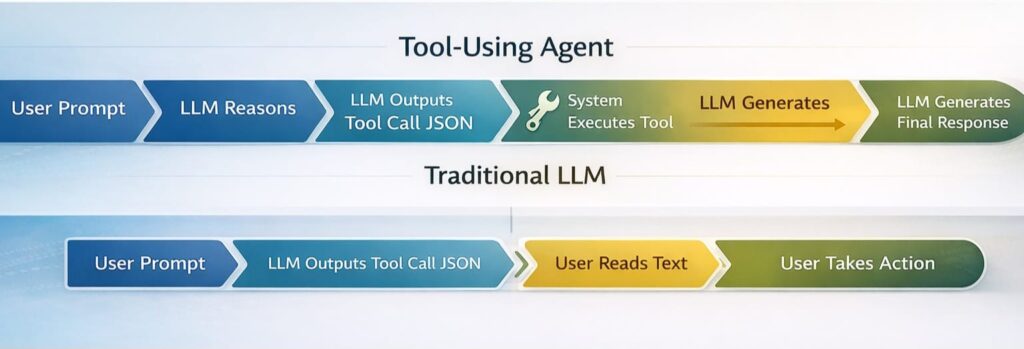
*Figure 1: Traditional LLMs generate text for humans to act upon; tool-using agents generate structured instructions for systems to execute*
A Taxonomy of Tool-Using Agents
Tool-using agents typically combine three patterns, often blended within one workflow :
| Pattern | Description | Best For |
|---|---|---|
| Function/Tool Calling | Model outputs structured JSON to invoke predefined functions | Single-step actions, API calls |
| ReAct (Reason + Act) | Interleaves observation, reasoning, and action in a loop | Multi-step, exploratory tasks |
| Plan-and-Execute | Creates full plan upfront, then executes steps | Complex workflows, cost optimization |
Part 2: The Anatomy of Tool Calling – A 6-Step Agentic Loop
Early documentation described a simple 5-step loop. In modern production environments using dynamic discovery, this loop has evolved into a 6-step process .
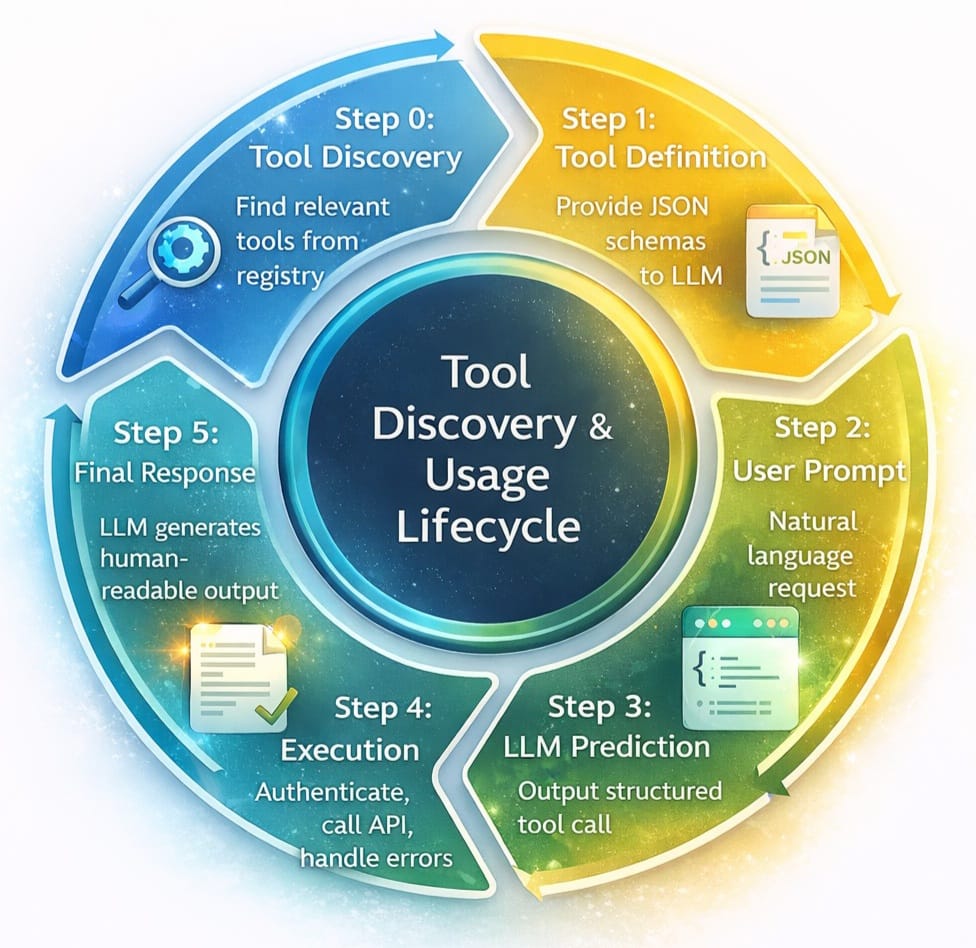
*Figure 2: The 6-step agentic loop for production tool calling*
Step 0: Tool Discovery
Before the LLM can call a tool, the system must find the right tools from potentially thousands of options. Loading definitions for 50+ tools into the system prompt creates two problems: cost and latency (58 tools can consume ~55k tokens) and accuracy degradation (more options = lower selection accuracy) .
Solutions like Anthropic’s Tool Search address this by allowing the model to “search” for tools rather than having them all pre-loaded . The impact:
- Token Reduction: Dynamic loading reduces token usage by 85% (from ~77k to ~8.7k)
- Accuracy Improvement: Accuracy improved from 79.5% to 88.1% with extensive tool catalogs
Step 1: Tool Definition (JSON Schema)
Tools are defined using JSON schemas that act as deterministic contracts between the LLM and your system . A well-defined schema includes:
json
{
  "name": "update-hotel",
  "description": "Updates an existing hotel booking with new dates",
  "parameters": {
    "type": "object",
    "additionalProperties": false,
    "required": ["booking_id", "checkin_date", "checkout_date"],
    "properties": {
      "booking_id": {"type": "string", "minLength": 1},
      "checkin_date": {"type": "string", "format": "date"},
      "checkout_date": {"type": "string", "format": "date"},
      "room_type": {"type": "string", "enum": ["standard", "deluxe", "suite"]}
    }
  },
  "timeouts": {"call_ms": 20000, "retries": 2}
}
Step 2: User Prompt
The user provides a natural language request that implies the need for external action.
Step 3: LLM Prediction
The model analyzes the prompt against the available tool definitions and outputs a structured JSON payload—the “tool call” .
Step 4: Execution (The Bottleneck)
This is the most complex step in production. The application code receives the JSON, handles authentication, executes the logic against the external API, and manages errors. As Composio’s 2026 guide notes, “Knowing which tool to call is trivial compared to the infrastructure required to call it successfully” .
Step 5: Final Response
The tool output feeds back to the LLM to generate the human-readable confirmation.
Part 3: Designing Robust Tool Interfaces
Tools as Contracts
In production systems, tools are contracts first, code second. Make the contract unambiguous, validate strictly, and fail safely .
Implementation Checklist:
| Requirement | Description |
|---|---|
| Strict Schemas | Use additionalProperties: false, enums, min/max bounds |
| Pre-Call Validation | Validate JSON against schema before execution |
| Post-Call Verification | Verify output shape and sanity |
| Timeouts | Set explicit timeouts per tool (e.g., 20 seconds) |
| Retries | Exponential backoff for transient failures |
| Idempotency | Design calls so retries are safe (use idempotency keys) |
| Context Hygiene | Summarize long observations to avoid token bloat |
Example: Tool Middleware with Pre/Post Processing
Google’s GenAI Toolbox demonstrates pre- and post-processing middleware for enforcing business rules and enriching responses :
python
# Pre-processing: Business rule enforcement
@wrap_tool_call
async def enforce_business_rules(request, handler):
    tool_call = request.tool_call
    args = tool_call["args"]

    # Enforce max stay duration (14 days)
    if tool_call["name"] == "update-hotel":
        start = datetime.fromisoformat(args["checkin_date"])
        end = datetime.fromisoformat(args["checkout_date"])
        if (end - start).days > 14:
            return ToolMessage(
                content="Error: Maximum stay duration is 14 days.",
                tool_call_id=tool_call["id"]
            )

    return await handler(request)

# Post-processing: Response enrichment
@wrap_tool_call
async def enrich_response(request, handler):
    result = await handler(request)

    if isinstance(result, ToolMessage) and "Error" not in result.content:
        # Add loyalty points to successful bookings
        result.content = f"Booking Confirmed! You earned 500 Loyalty Points.\n{result.content}"

    return result
The Schema Design Principles
The convergence of Schema-Guided Dialogue (SGD) and the Model Context Protocol (MCP) reveals five foundational principles for schema design :
| Principle | Description | Why It Matters |
|---|---|---|
| Semantic Completeness | Descriptions should explain what and why, not just syntax | Models need context to choose correct tools |
| Explicit Action Boundaries | Clearly define what the tool can and cannot do | Prevents misuse and overreach |
| Failure Mode Documentation | Describe expected failure conditions | Enables graceful recovery |
| Progressive Disclosure | Layer complexity; expose details only when needed | Manages token budgets |
| Inter-Tool Relationships | Declare dependencies between tools | Enables multi-step workflows |
Part 4: The Model Context Protocol (MCP) – The USB-C for AI Tools
What Is MCP?
Introduced by Anthropic in November 2024, the Model Context Protocol (MCP) is an open standard designed to solve the “N-to-M” integration problem . Traditionally, if an AI application wanted to connect to ten different tools, it had to build ten unique, bespoke integrations. MCP standardizes this communication, allowing any compliant host to interact with any compliant server through a standardized set of primitives.
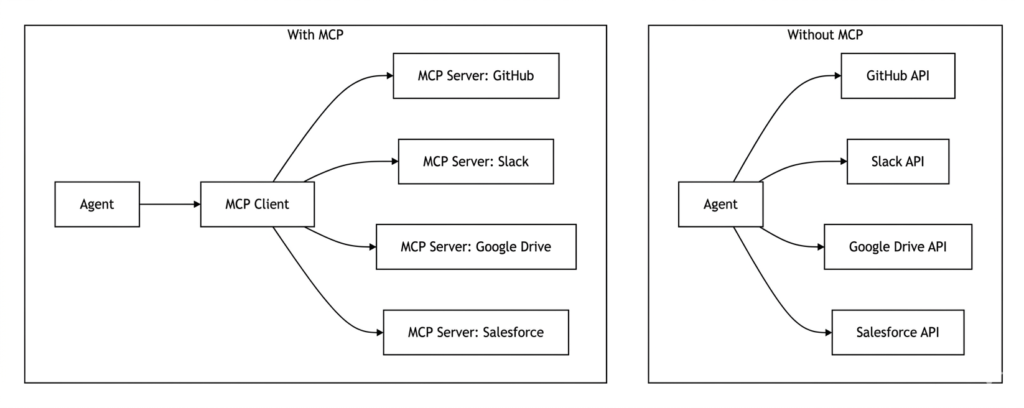
*Figure 3: MCP standardizes integration, reducing N-to-M complexity to N-to-1*
MCP Architecture
MCP divides responsibilities into three distinct roles :
| Role | Description | Example |
|---|---|---|
| Host | AI application initiating connections | Claude Desktop, IDE plugin |
| Client | Maintains 1:1 connection with server | MCP client library |
| Server | Provides tools, resources, and prompts | GitHub MCP server, filesystem MCP server |
What MCP Does and Doesn’t Solve
MCP provides a specification for communication. It excels at standardization but does not provide :
- OAuth 2.0 lifecycle management for 10,000 users
- Rate limit handling when APIs return
429 - SOC 2 compliance logs for every action
- Authentication token storage and refresh
These execution-layer concerns must be handled by the application or a dedicated execution platform.
Real-World MCP Implementation: Microsoft Graph
The @frustrated/ms-graph-mcp package demonstrates a production-ready MCP server for Microsoft Graph :
bash
# Initialize with OAuth 2.0 PKCE flow
bunx @frustrated/ms-graph-mcp init

# Run MCP server
bunx @frustrated/ms-graph-mcp run

# Manage permissions
bunx @frustrated/ms-graph-mcp permissions

# Revoke access
bunx @frustrated/ms-graph-mcp revoke
Security features include:
- Token cache stored with
0600permissions (owner read/write only) - HTTPS-only communication
- Input validation on all requests
- Output sanitization before passing to AI agents
Part 5: Tool Calling Across Major Providers
While tool calling principles are universal, implementation details vary across providers. Here’s a comparison based on 2026 best practices :
| Dimension | OpenAI | Anthropic (Claude) | Google (Gemini) |
|---|---|---|---|
| Tool Definition Format | JSON Schema | JSON Schema with input_schema | JSON Schema in functionDeclarations |
| Tool Discovery | Manual tool loading | Tool Search (dynamic discovery for 30+ tools) | Via Vertex AI Agent Builder |
| Structured Outputs | JSON Schema enforcement at API level | output_config.format (cannot combine with citations) | JSON Schema via config; combinable with tools |
| Grounding / Citations | Tool calling for retrieval | Citations API (structured source linkage) | Google Search grounding with groundingMetadata |
| Prompt Caching | Stable prefix at beginning | Exact prefix match; documented cache breakpoints | Context caching for long-context workloads |
| Reasoning Controls | reasoning_effort parameter | Extended thinking; effort settings | thinkingLevel / thinkingBudget |
OpenAI Tool Calling
OpenAI’s tool calling uses the tools parameter with JSON Schema definitions :
python
from openai import OpenAI

client = OpenAI()

tools = [{
    "type": "function",
    "function": {
        "name": "get_weather",
        "description": "Get current weather for a location",
        "parameters": {
            "type": "object",
            "properties": {
                "location": {"type": "string", "description": "City and state"},
                "unit": {"type": "string", "enum": ["celsius", "fahrenheit"]}
            },
            "required": ["location"]
        }
    }
}]

response = client.chat.completions.create(
    model="gpt-4o",
    messages=[{"role": "user", "content": "What's the weather in San Francisco?"}],
    tools=tools,
    tool_choice="auto"
)
Anthropic Tool Calling
Anthropic’s Claude uses the tools parameter with a similar structure :
python
import anthropic

client = anthropic.Anthropic()

response = client.messages.create(
    model="claude-3-5-sonnet-20241022",
    max_tokens=1024,
    tools=[{
        "name": "get_weather",
        "description": "Get current weather for a location",
        "input_schema": {
            "type": "object",
            "properties": {
                "location": {"type": "string", "description": "City and state"},
                "unit": {"type": "string", "enum": ["celsius", "fahrenheit"]}
            },
            "required": ["location"]
        }
    }],
    messages=[{"role": "user", "content": "What's the weather in San Francisco?"}]
)
Google Gemini Tool Calling
Gemini uses functionDeclarations within the tools parameter :
python
import google.generativeai as genai

model = genai.GenerativeModel('gemini-2.0-flash-exp')

response = model.generate_content(
    "What's the weather in San Francisco?",
    tools=[{
        "function_declarations": [{
            "name": "get_weather",
            "description": "Get current weather for a location",
            "parameters": {
                "type": "object",
                "properties": {
                    "location": {"type": "string", "description": "City and state"},
                    "unit": {"type": "string", "enum": ["celsius", "fahrenheit"]}
                },
                "required": ["location"]
            }
        }]
    }]
)
Part 6: The Execution Gap – From Discovery to Production
Why Tool Discovery Doesn’t Equal Production Readiness
A critical insight from production deployments: “Knowing which tool to call is trivial compared to the infrastructure required to call it successfully” . The execution layer is where most engineering teams encounter challenges.
The Three Hidden Challenges
1. Per-User Authentication at Scale
In a demo, you store an API key in a .env file. In production, you have thousands of users who need to connect their own Salesforce, GitHub, or Gmail accounts .
| Requirement | Implementation |
|---|---|
| OAuth client | Handles redirects, state parameters |
| Token storage | Secure, encrypted storage with user isolation |
| Refresh logic | Automatic refresh before expiry |
| Scope management | Per-user permission scopes |
2. API Heterogeneity and Reliability
APIs are brittle. Each has different:
- Rate limits (429 responses require exponential backoff)
- Pagination (LLMs see first page only; execution layer must aggregate)
- Error formats (success requires parsing varied responses)
- Authentication (OAuth, API keys, JWTs, Basic Auth)
3. Agent Governance
If your agent has access to delete_repo in GitHub, who can call it? MCP provides the capability but doesn’t enforce the policy . Production requires:
- RBAC/ABAC: Role-based and attribute-based access control
- Scope Validation: Read vs. write permissions per tool
- Audit Trails: Log every tool call with risk labels
- Human-in-the-Loop: Approvals for sensitive actions
Production Readiness Checklist
| Component | Requirement | Risk of Neglect |
|---|---|---|
| Auth Management | Per-user OAuth token refresh & storage | Agents fail mid-task from expired tokens |
| Observability | Log every tool call, input, output | Impossible to debug failures |
| Rate Limiting | Exponential backoff & retry logic | Entire IP blocked by API provider |
| Output Normalization | Standardize JSON from varied APIs | LLM confused by unstructured responses |
| Permissions | Scope validation (Read vs. Write) | Agent accidentally deletes data |
| Idempotency | Safe retries with idempotency keys | Duplicate actions on retry |
Part 7: Building Tool-Using Agents with Frameworks
LangChain + Composio Integration
The Composio Tool Router provides a managed execution layer that handles authentication, rate limiting, and tool discovery :
python
import asyncio
from langchain.agents import create_agent
from langchain_mcp_adapters.client import MultiServerMCPClient
from composio_langchain import ComposioToolSet, App

async def main():
    # Initialize Composio client
    composio_toolset = ComposioToolSet()

    # Create Tool Router session for Safetyculture
    session = composio_toolset.create_tool_router_session(
        user_id="user-123",
        apps=[App.SAFETYCULTURE]
    )

    # Create MCP client with Tool Router URL
    mcp_client = MultiServerMCPClient({
        "safetyculture": {
            "transport": "sse",
            "url": session.mcp_url
        }
    })

    # Get tools from MCP server
    tools = await mcp_client.get_tools()

    # Create LangChain agent
    agent = create_agent(
        model="gpt-4o",
        tools=tools,
        system_prompt="You are a safety management assistant..."
    )

    # Run agent with conversation history
    response = await agent.ainvoke({
        "messages": [{"role": "user", "content": "Show inspections updated this week"}]
    })
Google ADK with Interactions API
Google’s Agent Development Kit (ADK) now supports the Interactions API for stateful, multi-turn tool-using workflows :
python
from google.adk.agents.llm_agent import Agent
from google.adk.models.google_llm import Gemini
from google.adk.tools.google_search_tool import GoogleSearchTool

root_agent = Agent(
    model=Gemini(
        model="gemini-2.5-flash",
        use_interactions_api=True,  # Enable Interactions API
    ),
    name="interactions_test_agent",
    tools=[
        GoogleSearchTool(bypass_multi_tools_limit=True),
        get_current_weather,
    ],
)
The Interactions API provides :
- Unified Model & Agent Access: Same endpoint for models or built-in agents
- Simplified State Management: Offload conversation history with
previous_interaction_id - Background Execution: Support for long-running tasks
- Native Thought Handling: Explicit modeling of reasoning chains
Open Responses Specification
OpenAI’s Open Responses specification standardizes agentic workflows across providers . Key concepts include:
| Concept | Description |
|---|---|
| Items | Atomic units: messages, function calls, reasoning traces |
| Reasoning Type | Exposes model thinking in service-controlled format |
| Internal Tools | Executed in service infrastructure (retrieval, summarization) |
| External Tools | Executed in developer code; service pauses for response |
The specification has early support from Hugging Face, OpenRouter, Vercel, LM Studio, Ollama, and vLLM .
Part 8: Security and Governance
Defense in Depth for Tool-Using Agents
Treat all external content as untrusted and defend in layers :
| Layer | Control |
|---|---|
| Input | Delimit and sanitize; use allowlists |
| Tool Permissions | Least-privilege credentials; validate arguments |
| Execution | Isolated sandboxes (containers, gVisor, Firecracker, seccomp) |
| Output | Sanitize before passing back to LLM |
| Audit | Log every call; enable human-in-the-loop for sensitive actions |
Authentication and Credential Management
- Per-User OAuth: Handle redirects, store refresh tokens securely
- Automatic Refresh: Refresh tokens 5 minutes before expiry
- Secrets Vault: Never store credentials in code or environment variables
- Scope Isolation: Different tokens for different permission levels
OWASP AI Agent Security Guidance
Key recommendations from OWASP’s AI Agent Security Cheat Sheet :
- Validate all tool inputs before execution
- Implement rate limiting per tool and per user
- Use allowlists for tool availability
- Log everything for forensic analysis
- Red-team regularly to probe jailbreaks and exfiltration
Part 9: Evaluation and Observability
Metrics That Matter
Instrument agents like production services :
| Metric | Description | Target |
|---|---|---|
| Task Success Rate | End-to-end completion rate | >80% |
| Tool-Call Accuracy | Correct tool selection and parameters | >90% |
| Tool Success Rate | Successful API execution | >95% |
| Retrieval Faithfulness | Grounding in retrieved context | >85% |
| Latency | Time from prompt to response | <5 seconds |
| Cost per Task | Token consumption × model pricing | Depends on use case |
OpenTelemetry for Agent Observability
Create spans for each stage of the tool-calling loop :
python
import opentelemetry.trace as trace

tracer = trace.get_tracer("agent.tool_calling")

with tracer.start_as_current_span("tool_discovery") as span:
    tools = discover_tools(query)
    span.set_attribute("tools_found", len(tools))

with tracer.start_as_current_span("llm_tool_call") as span:
    response = llm.generate(messages, tools)
    span.set_attribute("tool_chosen", response.tool_call.name)

with tracer.start_as_current_span("api_execution") as span:
    result = call_api(response.tool_call)
    span.set_attribute("api_status", result.status)
    span.set_attribute("api_latency_ms", result.latency)
Testing Frameworks
- Scenario Suites: End-to-end traces with explicit pass/fail checks
- LLM-as-Judge: For faithfulness evaluation when ground truth is scarce
- Code-Based Checks: For reproducibility on deterministic tasks
Part 10: MHTECHIN’s Expertise in Tool-Using Agents
At MHTECHIN, we specialize in building production-grade AI agents with robust tool-calling capabilities. Our expertise spans:
- Custom Tool Integration: Connecting agents to enterprise APIs, databases, and legacy systems
- MCP Server Development: Building standardized interfaces for your internal tools
- Authentication & Governance: OAuth flows, token management, and permission systems
- Evaluation & Observability: Instrumentation, metrics, and testing frameworks
MHTECHIN’s solutions leverage state-of-the-art frameworks including LangChain, AutoGen, and custom MCP implementations to deliver agents that don’t just chat—they act.
Conclusion
Tool use is the defining capability that transforms LLMs from conversational interfaces into autonomous agents. By providing structured I/O, real-time data access, and action execution, tool calling bridges the gap between probabilistic reasoning and deterministic action.
Key Takeaways:
- Tool calling is the I/O layer that enables agents to interact with external systems
- The 6-step agentic loop includes discovery, definition, prediction, execution, and response
- Strict schemas with pre- and post-validation ensure reliable tool contracts
- MCP standardizes integration but doesn’t solve authentication or governance
- The execution gap—auth, rate limits, pagination—is where production complexity lives
- Security requires defense in depth: least privilege, sandboxing, audit trails
- Evaluation and observability are essential for production reliability
As the 2026 ecosystem matures, with standards like MCP and Open Responses reducing fragmentation, the barrier to building capable, secure tool-using agents continues to fall. The organizations that succeed will be those that invest not just in model capabilities, but in the execution infrastructure—authentication, observability, governance—that makes tool calling reliable at scale.
Frequently Asked Questions (FAQ)
Q1: What is tool calling in AI agents?
Tool calling (or function calling) is the mechanism that allows LLMs to output structured data—typically JSON—that instructs an external system to perform an action, rather than generating free text .
Q2: How does tool calling differ from prompting?
Prompts ask the model to generate text; tool calling asks the model to output structured instructions that systems can execute. Tool calling enables real-time data access and action execution .
Q3: What is the Model Context Protocol (MCP)?
MCP is an open standard introduced by Anthropic in 2024 that standardizes how AI applications connect to tools and services—the “USB-C for AI” .
Q4: What are the key steps in a tool-calling loop?
The modern 6-step loop includes: Tool Discovery, Tool Definition, User Prompt, LLM Prediction, Execution, and Final Response .
Q5: What security considerations exist for tool-using agents?
Production requirements include per-user OAuth, least-privilege credentials, sandboxed execution, input sanitization, rate limiting, and immutable audit trails .
Q6: How do I choose between OpenAI, Anthropic, and Gemini for tool calling?
OpenAI offers robust JSON Schema enforcement; Anthropic provides Tool Search for large tool catalogs; Gemini integrates tightly with Google Search grounding. Selection depends on your tool catalog size and grounding needs .
Q7: What is the “execution gap”?
The gap between tool discovery (knowing which tool to call) and production execution (handling auth, rate limits, pagination, and governance). This is where most engineering complexity lies .
Q8: How do I evaluate tool-calling performance?
Track task success rate, tool-call accuracy, tool success rate, retrieval faithfulness, latency, and cost. Use OpenTelemetry for distributed tracing .

Leave a Reply