Introduction
Imagine an AI that doesn’t just guess the answer but thinks through problems step by step, searches for information when it doesn’t know something, and adjusts its approach based on what it finds. This is the essence of the ReAct pattern – a revolutionary prompting paradigm that has become the foundation of modern AI agents .
Developed in 2022 by researchers from Google Research and Princeton University, ReAct (Reasoning + Acting) enables large language models to interleave verbal reasoning traces with task-specific actions, creating a powerful synergy that mirrors human problem-solving . Instead of relying solely on internal knowledge, ReAct agents can interact with external tools, verify facts, and adapt their strategies based on real-world feedback.
Since its introduction, ReAct has become a fundamental design pattern in agentic AI, powering everything from web research agents to complex decision-making systems . Major frameworks like LangChain, LangGraph, and AutoGen have built their agent architectures around this pattern .
In this comprehensive guide, you’ll learn:
- What the ReAct pattern is and why it matters
- How the Thought–Action–Observation cycle works
- Step-by-step implementation with code examples
- Real-world applications and performance benchmarks
- Best practices and common pitfalls
Let’s dive in.
Part 1: What Is the ReAct Pattern?
Definition and Origin
ReAct (Reasoning + Acting) is a prompting framework that enables AI agents to solve complex tasks by generating interleaved reasoning traces and actions in an iterative cycle . The name captures the core idea: the agent doesn’t just think or just act—it does both in a tightly integrated loop.
The pattern was introduced in the landmark paper “ReAct: Synergizing Reasoning and Acting in Language Models” by Shunyu Yao, Jeffrey Zhao, and colleagues at Google Research and Princeton University, presented at ICLR 2023 .
Why ReAct Matters
Before ReAct, language model workflows followed two separate approaches:
ReAct combines the best of both worlds:
- Reasoning enables planning, tracking progress, and handling exceptions
- Acting allows interaction with external tools and environments
- Feedback loops ground decisions in real observations
As Google Research noted, “The synergy between reasoning and acting allows the model to perform dynamic reasoning to create, maintain, and adjust high-level plans for acting, while also interacting with external environments to incorporate additional information into reasoning” .
The Core Cycle: Thought → Action → Observation
At the heart of ReAct is a simple, repeating cycle:
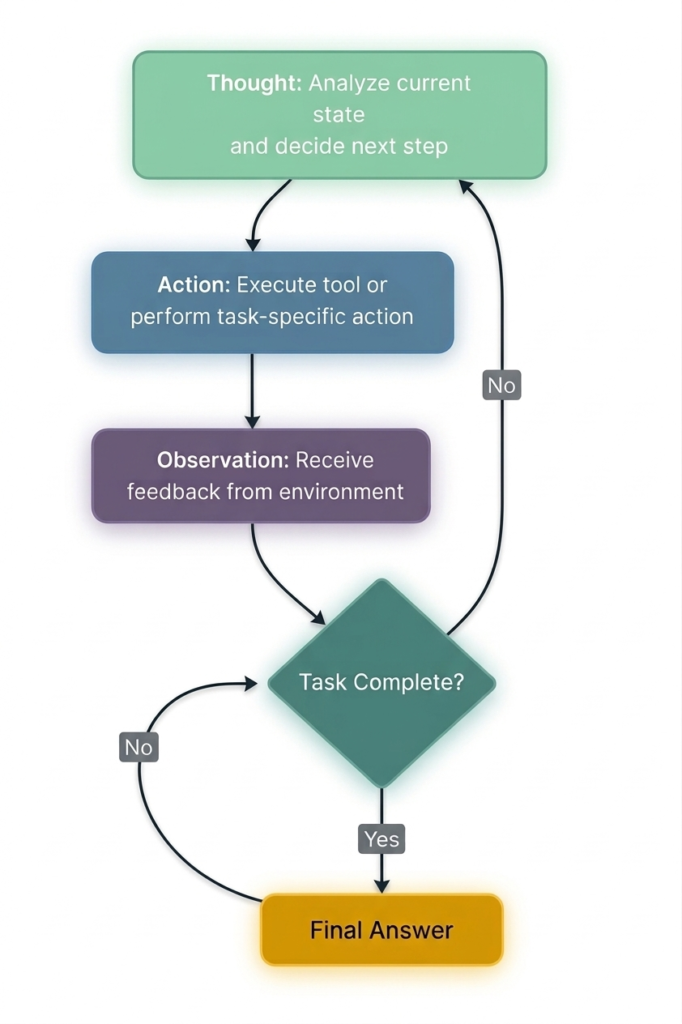
Figure 1: The ReAct cycle – Thought, Action, Observation repeat until the task is complete
Each iteration consists of three components :
1. Thought – The Reasoning Phase
The agent analyzes the current state, identifies what it knows and what it’s missing, and decides what to do next. This is the “thinking out loud” step that makes the agent’s decision-making transparent.
2. Action – The Execution Phase
Based on its reasoning, the agent selects and executes a tool or action. Actions might include:
Search[query]– query a knowledge base or search engineCalculate[expression]– perform mathematical operationsScrape[url]– retrieve content from a webpageFinish[answer]– complete the task with a final answer
3. Observation – The Feedback Phase
The system executes the action and returns a result. The agent observes this feedback and uses it to inform the next thought.
Part 2: How ReAct Works – A Detailed Walkthrough
The Prompt Structure
ReAct agents are typically guided by a prompt that establishes the format:
text
Question: {user question}

Thought: [reason about what to do]
Action: [tool name]
Action Input: [parameters for the tool]
Observation: [result from the tool]

... (repeat Thought/Action/Observation as needed)

Thought: I now know the final answer
Final Answer: [complete answer to the original question]
Real-World Example: Multi-Hop Question Answering
Consider this question from the ReAct paper: “What is the elevation range for the area that the eastern sector of the Colorado orogeny extends into?”
Thought 1: I need to search for information about the Colorado orogeny and its eastern sector.
Action 1: Search[Colorado orogeny]
Observation 1: The Colorado orogeny was an episode of mountain building in Colorado and surrounding areas.
Thought 2: I need more specific information about the eastern sector.
Action 2: Lookup[eastern sector]
Observation 2: The eastern sector extends into the High Plains and is called the Central Plains orogeny.
Thought 3: Now I need to find the elevation range of the High Plains.
Action 3: Search[High Plains elevation range]
Observation 3: The High Plains rise in elevation from around 1,800 to 7,000 ft (550 to 2,130 m).
Thought 4: I have found the answer.
Action 4: Finish[1,800 to 7,000 ft]
This trajectory demonstrates how ReAct combines reasoning and action:
- The agent decomposes the complex question into manageable sub-tasks
- It uses external tools (search, lookup) to fill knowledge gaps
- It adapts its plan based on observations
Visualizing the ReAct Loop
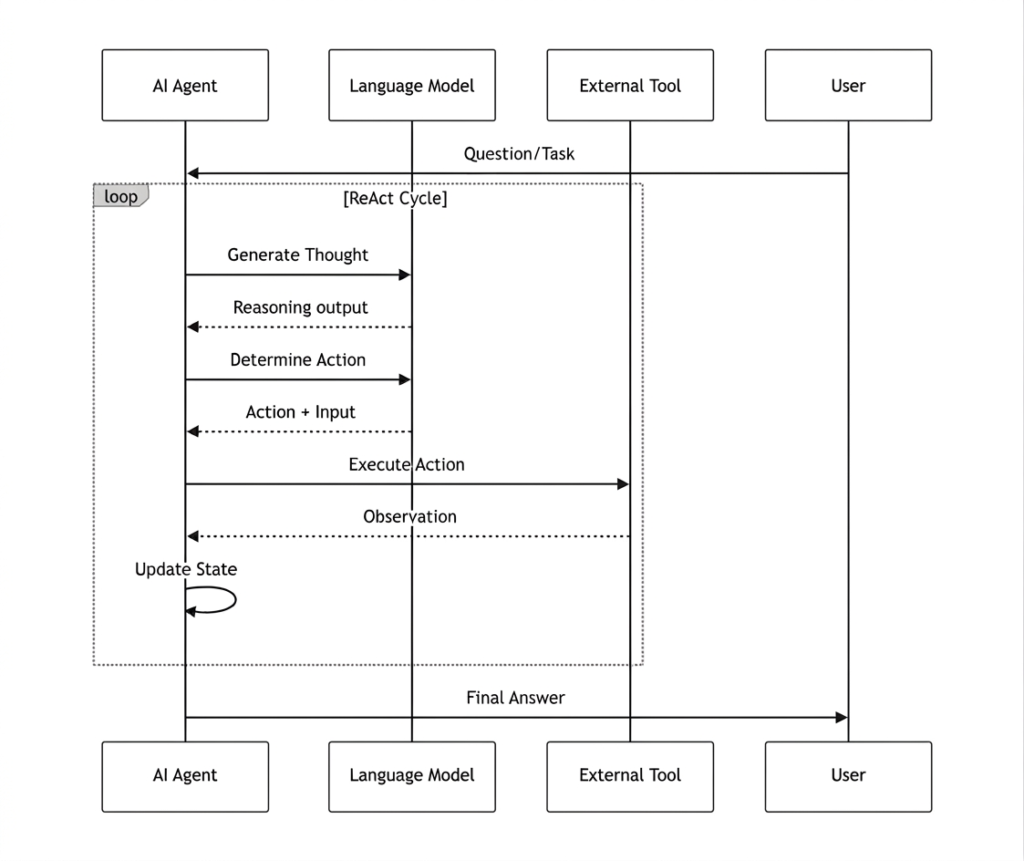
Figure 2: Sequence diagram of the ReAct agent loop
Part 3: Implementing ReAct Agents – Step-by-Step
Option 1: Building from Scratch with LangGraph
LangGraph provides an excellent framework for building ReAct agents with a graph-based workflow .
Step 1: Define the State
python
from langgraph.graph import StateGraph, END
from typing import TypedDict, Annotated
import operator

class AgentState(TypedDict):
    messages: Annotated[list, operator.add]
    next_action: str
    iterations: int
Step 2: Create Tools
python
def search_tool(query: str) -> str:
    """Simulate a search tool. In production, use Serper, Tavily, or Brave Search."""
    responses = {
        "weather tokyo": "Tokyo weather: 18°C, partly cloudy",
        "population japan": "Japan population: approximately 125 million",
    }
    return responses.get(query.lower(), f"No results found for: {query}")
Step 3: Implement the Reasoning Node
python
def reasoning_node(state: AgentState):
    """The 'Thought' phase – decides what to do next."""
    messages = state["messages"]
    iterations = state.get("iterations", 0)

    # Simple logic for demonstration
    if iterations == 0:
        return {
            "messages": ["Thought: I need to check Tokyo weather"],
            "next_action": "action",
            "iterations": iterations + 1
        }
    elif iterations == 1:
        return {
            "messages": ["Thought: Now I need Japan's population"],
            "next_action": "action",
            "iterations": iterations + 1
        }
    else:
        return {
            "messages": ["Thought: I have enough info to answer"],
            "next_action": "end",
            "iterations": iterations + 1
        }
Step 4: Implement the Action Node
python
def action_node(state: AgentState):
    """The 'Action' phase – executes the chosen tool."""
    iterations = state["iterations"]

    # Choose query based on iteration
    query = "weather tokyo" if iterations == 1 else "population japan"
    result = search_tool(query)

    return {
        "messages": [
            f"Action: Searched for '{query}'",
            f"Observation: {result}"
        ],
        "next_action": "reasoning"
    }
Step 5: Build and Run the Graph
python
# Build the graph
workflow = StateGraph(AgentState)
workflow.add_node("reasoning", reasoning_node)
workflow.add_node("action", action_node)

# Define edges
workflow.set_entry_point("reasoning")
workflow.add_conditional_edges("reasoning", route, {
    "action": "action",
    "end": END
})
workflow.add_edge("action", "reasoning")

# Compile and run
app = workflow.compile()
result = app.invoke({
    "messages": ["User: Tell me about Tokyo and Japan"],
    "iterations": 0,
    "next_action": ""
})

# Output the conversation
for msg in result["messages"]:
    print(msg)
Output:
text
User: Tell me about Tokyo and Japan
Thought: I need to check Tokyo weather
Action: search('weather tokyo')
Observation: Tokyo weather: 18°C, partly cloudy
Thought: Now I need Japan's population
Action: search('population japan')
Observation: Japan population: approximately 125 million
Thought: I have enough info to answer
Option 2: LLM-Powered ReAct Agent
For a truly dynamic agent, replace hardcoded logic with an LLM that decides actions .
python
from openai import OpenAI
import os

client = OpenAI(api_key=os.environ.get("OPENAI_API_KEY"))

class ReActAgent:
    def __init__(self, tools):
        self.tools = tools
        self.messages = []

    def think(self, user_input):
        self.messages.append({"role": "user", "content": user_input})

        # Prompt format from ReAct paper
        prompt = self._build_react_prompt(user_input)

        max_iterations = 10
        for _ in range(max_iterations):
            response = client.chat.completions.create(
                model="gpt-4o",
                messages=[{"role": "user", "content": prompt}]
            )

            content = response.choices[0].message.content

            # Check if we have a final answer
            if "Final Answer:" in content:
                return content.split("Final Answer:")[-1].strip()

            # Parse and execute action
            if "Action:" in content and "Action Input:" in content:
                action = self._parse_action(content)
                result = self._execute_tool(action)

                # Add observation to prompt and continue
                prompt += f"\nObservation: {result}\n"

        return "Unable to complete within iteration limit"
Option 3: Using Pre-Built Frameworks
For production applications, consider using established frameworks:
Part 4: Performance Benchmarks and Research Findings
The original ReAct paper demonstrated significant improvements across multiple benchmarks .
Question Answering and Fact Verification
| Benchmark | Standard | CoT (Reason Only) | Act-Only | ReAct | Best ReAct+CoT |
|---|---|---|---|---|---|
| HotpotQA (exact match) | 28.7% | 29.4% | 25.7% | 27.4% | 35.1% |
| FEVER (accuracy) | 57.1% | 56.3% | 58.9% | 60.9% | 64.6% |
*Source: Google Research, PaLM-540B prompting results*
Interactive Decision Making
| Benchmark | Act-Only | ReAct | Imitation Learning Baseline |
|---|---|---|---|
| ALFWorld (success rate) | 45% | 71% | 37% (with ~100k samples) |
| WebShop (success rate) | 30.1% | 40% | 29.1% (with ~90k samples) |
Key Findings
- ReAct reduces hallucinations by grounding decisions in external observations
- Combining ReAct with CoT yields the best performance on reasoning-heavy tasks
- ReAct excels in interactive environments where adaptation is critical
Part 5: Advanced ReAct Patterns and Extensions
1. ReAct + Reflection
The Reflection pattern adds a self-evaluation layer where the agent critiques its own outputs and revises them . This is particularly useful for code generation and content creation.
2. ReAct + Planning
In complex tasks, a planning phase can precede the ReAct loop. The agent first creates a structured roadmap, then executes using ReAct for each step .
3. Multi-Agent ReAct
Multiple ReAct agents can collaborate, each specializing in different domains. A coordinator agent manages task distribution and result synthesis .
4. Sequential Thinking
An extension that adds state tracking and dynamic task decomposition, enabling more efficient tool use and better logical coherence .
Part 6: Best Practices and Design Considerations
When to Use ReAct
When NOT to Use ReAct
- Simple, single-step tasks – overhead outweighs benefits
- Real-time applications – latency may be unacceptable
- Tasks with no tool access – ReAct’s value is in external interaction
Design Guidelines
- Keep actions small and scoped – makes error recovery easier
- Define clear stopping criteria – prevent infinite loops
- Use consistent observation formats – helps the agent interpret results
- Implement guardrails for tool use – permission checks, rate limits
- Monitor iteration counts – set maximum limits to control costs
Common Pitfalls to Avoid
Part 7: Real-World Applications
1. Web Research Agent
A practical implementation using ReAct can:
- Search the web via Google API
- Scrape content from URLs
- Execute code for data analysis
- Synthesize findings into comprehensive reports
2. Text Length Calculator Agent
A simple ReAct agent can reason about text analysis tasks, using tools to calculate statistics and return formatted results .
3. Financial Analysis Agent
ReAct agents can:
- Retrieve market data via APIs
- Calculate financial metrics
- Generate investment recommendations
- Flag anomalies for human review
4. Healthcare Decision Support
ReAct agents can:
- Query electronic health records
- Cross-reference medical literature
- Identify potential diagnoses
- Escalate complex cases to specialists
Part 8: MHTECHIN’s Expertise in ReAct Agents
At MHTECHIN, we specialize in building production-grade AI agents using advanced patterns like ReAct. Our expertise spans:
- Custom Agent Development: Tailored ReAct agents for specific business domains
- Tool Integration: Seamless connections to APIs, databases, and enterprise systems
- Multi-Agent Orchestration: Coordinated ReAct agents working together on complex workflows
- Production Deployment: Scalable, secure agent systems with monitoring and guardrails
MHTECHIN’s solutions leverage state-of-the-art frameworks including LangGraph, AutoGen, and custom ReAct implementations to deliver autonomous systems that drive real business value.
Conclusion
The ReAct pattern represents a fundamental shift in how AI agents approach complex tasks. By interleaving explicit reasoning with concrete actions, ReAct enables agents to:
- Ground decisions in real information – reducing hallucinations
- Adapt dynamically – adjusting plans based on feedback
- Provide transparency – every step is visible and auditable
- Scale to complex tasks – handling multi-step workflows with ease
Since its introduction by Google Research in 2022, ReAct has become the foundation of modern agentic AI, powering frameworks like LangChain, LangGraph, and AutoGen. With performance improvements of up to 71% on interactive tasks and 35% on multi-hop reasoning, ReAct consistently outperforms earlier approaches .
As you build your own ReAct agents, remember:
- Start with simple tools and clear prompts
- Implement guardrails for safety
- Monitor iteration counts and costs
- Evolve to advanced patterns as complexity grows
Frequently Asked Questions (FAQ)
Q1: What is the ReAct pattern in AI?
The ReAct (Reasoning + Acting) pattern is a prompting framework that enables AI agents to solve complex tasks by interleaving explicit reasoning traces with actions that interact with external tools and environments .
Q2: How does ReAct differ from Chain-of-Thought (CoT)?
CoT generates reasoning steps internally but cannot access external information. ReAct combines reasoning with actions that interact with tools, allowing the agent to verify facts and adapt based on real-world feedback .
Q3: What is the Thought–Action–Observation cycle?
It’s the core loop of ReAct where the agent: (1) thinks about what to do next, (2) executes an action using a tool, (3) observes the result, and (4) repeats until the task is complete .
Q4: What types of tools can ReAct agents use?
ReAct agents can use any tool with a clear interface, including web search, calculators, databases, APIs, code executors, file operations, and custom business logic .
Q5: What are the limitations of ReAct?
Key limitations include: increased latency (multiple LLM calls per task), higher costs, potential for infinite loops without proper stopping criteria, and dependence on tool reliability .
Q6: How do I implement a ReAct agent?
You can implement ReAct agents using frameworks like LangGraph, LangChain, or AutoGen, or build from scratch using LLM APIs with a structured prompt format .
Q7: What performance improvements does ReAct provide?
On interactive decision-making tasks like ALFWorld, ReAct achieves 71% success rate vs 45% for Act-only. On HotpotQA, ReAct+CoT achieves 35.1% vs 29.4% for CoT alone .
Q8: Is ReAct suitable for production use?
Yes, ReAct is widely used in production for research agents, customer support automation, data analysis workflows, and software operations agents .

Leave a Reply