Introduction
Imagine an AI agent tasked with a complex research question: “Analyze the impact of quantum computing on financial cryptography and prepare a comprehensive briefing.” A traditional ReAct agent might meander through dozens of reasoning steps, calling tools repeatedly, each step requiring an expensive LLM call. The process is slow, costly, and difficult to audit.
Now imagine a Plan-and-Execute agent. It first creates a structured roadmap: 1) Search for quantum computing advancements, 2) Identify cryptography vulnerabilities, 3) Analyze financial sector exposure, 4) Synthesize findings, 5) Generate briefing format. Only then does it execute—using smaller, faster models for each step, adjusting the plan only when necessary. The result? Faster execution, lower costs, and a clear audit trail .
The Plan-and-Execute (P&E) pattern has emerged as one of the most important architectural approaches for production-grade AI agents in 2025 and 2026. By separating planning from execution, this pattern addresses key limitations of reactive agent architectures like ReAct—particularly for complex, multi-step workflows where efficiency, reliability, and traceability matter most .
In this comprehensive guide, you’ll learn:
- What Plan-and-Execute agents are and how they differ from ReAct
- The three-core-agent architecture (Planner, Executor, Replanner)
- Step-by-step implementation using LangGraph and other frameworks
- Real-world use cases across finance, security, research, and customer service
- Best practices for production deployment
Part 1: What Are Plan-and-Execute Agents?
Definition and Core Concept
A Plan-and-Execute agent is an AI system that separates task completion into two distinct phases: first creating a structured, multi-step plan, then executing that plan—potentially with iterative replanning based on intermediate results .
Unlike reactive agents that decide the next action step-by-step, P&E agents take a strategic, top-down approach. They answer the question “What needs to be done?” before addressing “How do I do it?” .
The Thinkers and Doers Pattern
The Plan-and-Execute pattern reflects how humans naturally approach complex tasks. When making a restaurant reservation, we don’t simultaneously analyze restaurant options, check availability, and conduct the phone call. Instead, we first plan: research restaurants, check reviews, select a shortlist, and decide on a strategy. Then we execute: make the call, armed with all the information we need .
As one developer discovered when building a voice AI for restaurant reservations, splitting the work between a context agent (the “thinker”) that gathers complete information and creates a plan, and an execution agent (the “doer”) optimized for real-time conversation, dramatically improved reliability and made debugging significantly easier .
Plan-and-Execute vs. ReAct: A Comparative Analysis
| Dimension | ReAct | Plan-and-Execute |
|---|---|---|
| Decision Pattern | Iterative (decide next step at each turn) | Strategic (create full plan upfront) |
| LLM Calls | One per step (potentially dozens) | Fewer total calls (plan once, execute many) |
| Model Usage | Large model for all steps | Large model for planning, smaller models for execution |
| Cost Efficiency | Higher (repeated large-model calls) | Lower (smaller models handle execution) |
| Traceability | Step-by-step reasoning visible | Clear plan with audit trail |
| Adaptability | Reacts after each action | Replans only when necessary |
| Best Use Case | Simple, exploratory tasks | Complex, multi-step workflows |
As noted in the Machine Learning Practitioner’s Guide to Agentic AI Systems, Plan-and-Execute is “frequently faster and cheaper than ReAct for complex workflows, making it a go-to choice for production systems in 2025” .
Part 2: The Architecture of Plan-and-Execute Agents
The Three-Core-Agent Framework
The Plan-and-Execute architecture typically consists of three specialized agents working in coordination :
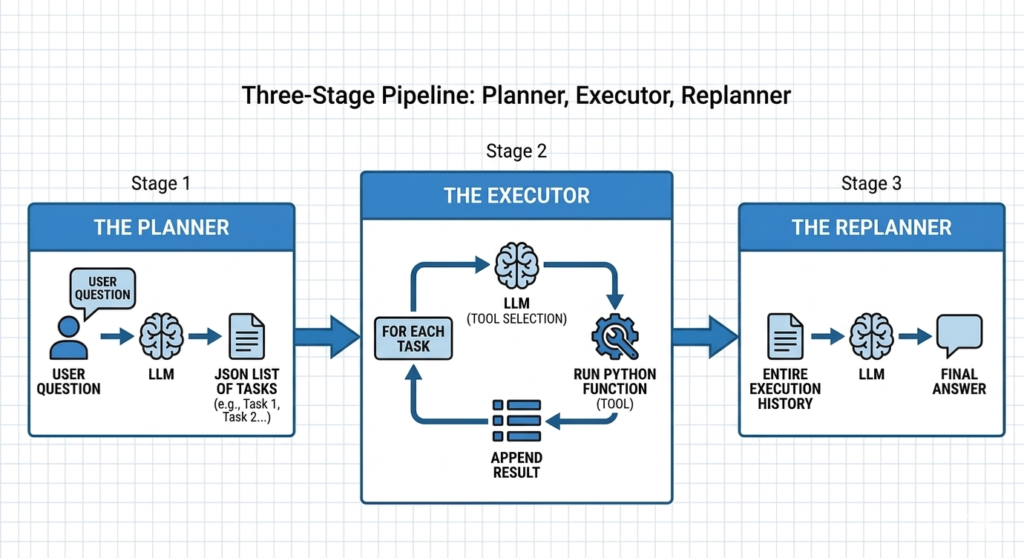
*Figure 2: The three-core-agent architecture of Plan-and-Execute systems *
1. The Planner Agent
The Planner is responsible for decomposing a complex user goal into a structured, ordered list of actionable steps. This agent typically uses a powerful LLM with structured output capabilities to generate a plan that follows a defined schema .
Key Functions:
- Analyze the user’s high-level goal
- Break it into manageable, sequential subtasks
- Output a structured
Planobject (e.g., JSON with steps array) - Store the plan in session memory for subsequent phases
Implementation Approaches:
- Tool-Calling Model: Configure the model with a
PlanToolthat defines the expected schema - Structured Output Model: Use a model pre-configured to output directly in
Planformat
python
# Example: Planner output structure
{
    "goal": "Research quantum computing impact on financial cryptography",
    "steps": [
        {"id": 1, "description": "Search for recent quantum computing advancements", "tool": "web_search"},
        {"id": 2, "description": "Identify cryptography vulnerabilities to quantum attacks", "tool": "research_db"},
        {"id": 3, "description": "Analyze financial sector exposure", "tool": "analysis"},
        {"id": 4, "description": "Synthesize findings into briefing format", "tool": "summary_generator"}
    ]
}
2. The Executor Agent
The Executor is responsible for carrying out the steps in the plan sequentially. Unlike the Planner, the Executor can use smaller, faster, and cheaper models since its task is more straightforward: execute a given step using the appropriate tools and store results .
Key Functions:
- Load the current plan from session
- Identify the first unexecuted step
- Call appropriate tools (search, database, calculator, API)
- Store execution results in session
- Support multi-round tool calling within a single step
python
# Example: Executor processing a step
executor_config = {
    "model": "gpt-4o-mini",  # Smaller, cheaper model
    "tools": ["web_search", "database_query", "calculator"],
    "max_iterations": 5  # Limit tool calls per step
}
3. The Replanner Agent
The Replanner evaluates progress after each execution step and decides whether to continue, adjust the plan, or finish. This agent uses a tool-calling model configured with two specialized tools: PlanTool (for generating updated plans) and RespondTool (for delivering final answers) .
Decision Logic:
- Continue: If the goal is not yet met, generate a new plan with remaining/adjusted steps
- Finish: If the goal is met, call
RespondToolto produce the final user response
python
# Replanner decision flow
def replanner_decision(executed_steps, results, original_goal):
    if goal_achieved(executed_steps, results):
        return {"action": "finish", "response": synthesize_results(results)}
    elif need_replan(executed_steps, results):
        return {"action": "replan", "new_plan": generate_adjusted_plan()}
    else:
        return {"action": "continue"}
The Plan-Execute-Replan Loop
The complete workflow operates as a “plan → execute → replan” loop, often orchestrated by a coordinator agent :
- Initialization: User provides a goal; the Planner generates the initial plan
- Execution Phase: Executor processes steps sequentially, storing results
- Replanning Phase: After each step (or batch), Replanner evaluates progress
- Iteration: If replanning is triggered, the loop continues with the updated plan
- Termination: When the goal is met or max iterations reached, final response is delivered
Part 3: Implementing Plan-and-Execute Agents
Option 1: LangGraph Implementation
LangGraph provides excellent support for building Plan-and-Execute agents with graph-based workflows .
Step 1: Define the State
python
from typing import TypedDict, List, Annotated
import operator

class PlanExecuteState(TypedDict):
    """State for Plan-and-Execute agent."""
    input: str
    plan: List[str]
    past_steps: Annotated[List[tuple], operator.add]
    response: str
    iteration: int
Step 2: Create the Planner Node
python
from langchain_openai import ChatOpenAI
from langchain_core.prompts import ChatPromptTemplate

def create_planner_node():
    planner_prompt = ChatPromptTemplate.from_messages([
        ("system", """You are a planning agent. Break down the user's goal into a
        structured list of steps. Each step should be clear, actionable, and
        specify what tool to use if needed."""),
        ("human", "{input}")
    ])

    model = ChatOpenAI(model="gpt-4o", temperature=0)
    planner = planner_prompt | model

    def planner_node(state: PlanExecuteState):
        response = planner.invoke({"input": state["input"]})
        plan = parse_plan(response.content)  # Convert to step list
        return {"plan": plan, "iteration": 0}

    return planner_node
Step 3: Create the Executor Node
python
def create_executor_node(tools):
    def executor_node(state: PlanExecuteState):
        plan = state["plan"]
        past_steps = state.get("past_steps", [])
        iteration = state.get("iteration", 0)

        # Get current step
        if iteration < len(plan):
            current_step = plan[iteration]

            # Determine tool and execute
            result = execute_step(current_step, tools)

            # Update state
            return {
                "past_steps": [(current_step, result)],
                "iteration": iteration + 1
            }
        return {}

    return executor_node
Step 4: Create the Replanner Node
python
def create_replanner_node():
    replanner_prompt = ChatPromptTemplate.from_messages([
        ("system", """Evaluate progress toward the goal. Based on completed steps
        and their results, decide whether to:
        1. Continue with the current plan
        2. Replan with adjusted steps
        3. Finish and provide final answer"""),
        ("human", "Goal: {input}\nCompleted steps: {past_steps}\nCurrent plan: {plan}")
    ])

    model = ChatOpenAI(model="gpt-4o", temperature=0)
    replanner = replanner_prompt | model

    def replanner_node(state: PlanExecuteState):
        evaluation = replanner.invoke({
            "input": state["input"],
            "past_steps": state.get("past_steps", []),
            "plan": state.get("plan", [])
        })

        # Parse decision and act accordingly
        if "finish" in evaluation.content.lower():
            return {"response": synthesize_response(state)}
        elif "replan" in evaluation.content.lower():
            new_plan = generate_updated_plan(state)
            return {"plan": new_plan}
        return {}

    return replanner_node
Step 5: Build the Graph
python
from langgraph.graph import StateGraph, END

def create_plan_execute_agent(tools, max_iterations=10):
    # Create nodes
    planner = create_planner_node()
    executor = create_executor_node(tools)
    replanner = create_replanner_node()

    # Build graph
    workflow = StateGraph(PlanExecuteState)
    workflow.add_node("planner", planner)
    workflow.add_node("executor", executor)
    workflow.add_node("replanner", replanner)

    # Define edges
    workflow.set_entry_point("planner")
    workflow.add_edge("planner", "executor")
    workflow.add_conditional_edges(
        "executor",
        should_continue,
        {"continue": "replanner", "end": END}
    )
    workflow.add_edge("replanner", "executor")

    # Compile with iteration limit
    return workflow.compile()
Option 2: NVIDIA ACE Agent Implementation
NVIDIA’s ACE Agent platform provides a production-ready Plan-and-Execute implementation using LangGraph with Tavily search integration .
Prerequisites:
bash
# Set up API keys
export OPENAI_API_KEY=your-key
export TAVILY_API_KEY=your-key

# Install dependencies
pip install tavily-python==0.3.3 langgraph==0.0.31 langchain-openai==0.1.2
Key Features:
- Integrates with Tavily search for internet-based research
- Supports Docker-based deployment
- Includes planning, execution, and answer evaluation phases
Option 3: Eino ADK Plan-Execute Agent
The Eino ADK framework (CloudWeGo) provides a comprehensive Go-based implementation :
go
import "github.com/cloudwego/eino/adk/prebuilt/planexecute"

func newPlanExecuteAgent(ctx context.Context) adk.Agent {
    model := newToolCallingModel(ctx)

    // Create three core agents
    planner := newPlanner(ctx, model)
    executor := newExecutor(ctx, model)
    replanner := newReplanner(ctx, model)

    // Compose into PlanExecuteAgent
    planExecuteAgent, err := planexecute.NewPlanExecuteAgent(ctx,
        &planexecute.Config{
            Planner:       planner,
            Executor:      executor,
            Replanner:     replanner,
            MaxIterations: 10,
        })
    return planExecuteAgent
}
Option 4: OPEA Agent Microservice
The OPEA (Open Platform for Enterprise AI) project supports Plan-and-Execute as a built-in agent strategy :
yaml
# Agent configuration
strategy: plan_execute
llm_engine: openai
model: gpt-4o-mini
with_memory: true
tools: /path/to/tools.yaml
Part 4: Real-World Use Cases and Applications
1. Financial Systems and Trading
Plan-and-Execute agents excel in financial environments where precision, auditability, and reliability are paramount .
Use Case: Automated Trading Strategy Execution
- Planning Phase: Analyze market data, identify opportunities, generate trading strategy
- Execution Phase: Execute trades in defined sequence with risk checks
- Replanning: Adjust strategy based on market movements or execution failures
python
# Example: Financial analysis plan
plan = [
    {"step": "fetch_market_data", "params": {"symbols": ["AAPL", "GOOGL"], "period": "1d"}},
    {"step": "calculate_indicators", "params": {"indicators": ["RSI", "MACD", "Moving Average"]}},
    {"step": "identify_opportunities", "params": {"strategy": "momentum"}},
    {"step": "execute_trades", "params": {"max_position": 1000, "risk_limit": 0.02}},
    {"step": "generate_report", "params": {"format": "pdf"}}
]
2. Security and Compliance
Security-sensitive environments benefit from Plan-and-Execute’s explicit task breakdown and audit trails .
Use Case: Vulnerability Assessment and Patch Management
- Planning: Scan infrastructure, identify vulnerabilities, prioritize by severity
- Execution: Apply patches in order of priority, verify fixes
- Replanning: Adjust if patches fail or new vulnerabilities are discovered
Key Advantages:
- Complete audit trail of all actions
- Compliance verification at each step
- Ability to pause and escalate for human approval
3. Research and Knowledge Work
Research agents are ideal candidates for Plan-and-Execute architecture .
Use Case: Research Briefing Generation
python
research_plan = [
    {"step": "search_academic_databases", "query": "quantum computing cryptography 2025"},
    {"step": "extract_key_findings", "limit": 10},
    {"step": "analyze_financial_implications", "sources": "extracted_findings"},
    {"step": "synthesize_briefing", "format": "executive_summary"},
    {"step": "fact_check", "threshold": 0.95}
]
4. Data Management and ETL Pipelines
Plan-and-Execute agents can orchestrate complex data workflows :
- Extract: Plan data sources and extraction logic
- Transform: Define transformation steps sequentially
- Load: Execute loading with validation at each stage
- Quality Checks: Built-in validation and replanning for data quality issues
5. Customer Service Automation
For complex customer queries requiring multiple steps, Plan-and-Execute provides structured handling .
Use Case: Complex Support Request
- Plan: Identify required steps (verify account, check order history, research issue, draft response)
- Execute: Process each step with specialized tools
- Replan: If customer provides new information, adjust plan accordingly
- Respond: Deliver comprehensive, verified resolution
Part 5: Best Practices for Production Deployment
1. Choose the Right Use Case
Plan-and-Execute excels when:
- Tasks require 5+ sequential steps
- Cost optimization is important (using smaller models for execution)
- Audit trails and traceability are required
- Tasks are well-structured with clear success criteria
Consider ReAct when:
- Tasks are exploratory with unpredictable paths
- Step-by-step reasoning transparency is critical
- The agent needs to react immediately to each observation
2. Implement Memory Management
For multi-turn conversations, implement proper memory management :
python
from langchain.memory import ConversationBufferMemory

memory = ConversationBufferMemory(
    memory_key="chat_history",
    return_messages=True
)
Memory Types:
- Short-term: Session state, current plan, executed steps
- Long-term: Vector databases (Pinecone, Chroma) for semantic retrieval
- Persistent: Redis for cross-session memory
3. Set Guardrails and Safety Controls
Production Plan-and-Execute agents require robust safety measures :
| Safety Control | Implementation |
|---|---|
| Max Iterations | Limit replanning cycles (e.g., 10 iterations) |
| Tool Sandboxing | Isolate tool execution from critical systems |
| Human-in-the-Loop | Require approval for high-risk actions |
| Audit Trails | Log all plans, actions, and decisions |
| Policy Checks | Validate inputs and outputs against policies |
4. Optimize for Cost and Performance
- Planner: Powerful model (GPT-4o, Claude 3.5) – few calls
- Executor: Smaller, cheaper model (GPT-4o-mini, Llama 3.1 8B) – many calls
- Replanner: Medium model with tool-calling capabilities
Performance Optimization:
- Use parallel execution for independent steps
- Implement caching for repeated tool calls
- Set timeouts for each execution step
- Monitor token usage with cost tracking
5. Ensure Observability
Production systems require comprehensive observability :
python
# Log structure for audit
{
    "session_id": "abc123",
    "timestamp": "2026-03-27T10:00:00Z",
    "phase": "planning",
    "input": "User query",
    "plan": ["step1", "step2", "step3"],
    "execution": {
        "step_1": {"status": "success", "result": "...", "tokens": 150},
        "step_2": {"status": "failed", "error": "timeout", "retry": 2}
    },
    "replan": {"triggered": true, "new_plan": ["step2_alt", "step3"]},
    "cost_usd": 0.023
}
Part 6: MHTECHIN’s Expertise in Plan-and-Execute Agents
At MHTECHIN, we specialize in building production-grade AI agents using advanced architectural patterns like Plan-and-Execute. Our expertise spans:
- Custom Agent Development: Tailored Plan-and-Execute agents for specific business domains
- Framework Integration: LangGraph, AutoGen, CrewAI, and custom implementations
- Tool Ecosystem: Seamless integration with enterprise APIs, databases, and MCP servers
- Production Deployment: Scalable, secure agent systems with comprehensive monitoring
MHTECHIN’s solutions leverage state-of-the-art frameworks to deliver autonomous systems that balance power with control, enabling organizations to automate complex workflows while maintaining auditability and safety.
Conclusion
The Plan-and-Execute pattern represents a significant evolution in agentic AI architecture. By separating strategic planning from tactical execution, it addresses key limitations of reactive approaches like ReAct—particularly for complex, multi-step workflows where efficiency, reliability, and traceability are paramount .
Key Takeaways:
- Three-core-agent architecture (Planner, Executor, Replanner) enables structured, auditable workflows
- Cost efficiency comes from using smaller models for execution while reserving powerful models for planning
- Real-world applications span finance, security, research, and customer service
- Production readiness requires guardrails, observability, and careful model selection
As the agentic AI landscape evolves, Plan-and-Execute has established itself as a foundational pattern for production systems. Whether you’re building research agents, financial trading systems, or complex customer service automation, the separation of thinking from doing provides the structure needed for reliable, scalable AI solutions.
Frequently Asked Questions (FAQ)
Q1: What is a Plan-and-Execute agent?
A Plan-and-Execute agent is an AI system that separates task completion into two phases: first creating a structured, multi-step plan, then executing that plan—with optional replanning based on intermediate results .
Q2: How does Plan-and-Execute differ from ReAct?
ReAct decides the next action at each step iteratively, requiring an LLM call per action. Plan-and-Execute creates a full plan upfront, then executes steps (often with smaller models), making it faster and cheaper for complex workflows .
Q3: What are the three core agents in a Plan-and-Execute system?
The architecture typically includes: Planner (creates structured task plan), Executor (executes steps with tools), and Replanner (evaluates progress and decides to continue, replan, or finish) .
Q4: When should I use Plan-and-Execute instead of ReAct?
Use Plan-and-Execute for complex, multi-step tasks (5+ steps) where cost optimization matters, audit trails are required, and tasks are well-structured. Use ReAct for exploratory tasks requiring step-by-step transparency .
Q5: What frameworks support Plan-and-Execute agents?
Major frameworks include LangGraph, AutoGen, CrewAI, Eino ADK (Go), and OPEA Agent Microservice .
Q6: How do I implement memory in Plan-and-Execute agents?
Use short-term memory for session state (current plan, executed steps) and long-term memory via vector databases (Pinecone, Chroma) for semantic retrieval. Redis supports persistent memory across sessions .
Q7: What safety controls are needed for production?
Essential controls include max iteration limits, tool sandboxing, human-in-the-loop for high-risk actions, comprehensive audit trails, and policy-based input/output validation .
Q8: How does Plan-and-Execute improve cost efficiency?
By using smaller, cheaper models (e.g., GPT-4o-mini) for execution while reserving powerful models (GPT-4o, Claude) for the planning phase, which requires fewer total LLM calls .

Leave a Reply