Introduction
The explosion of agentic AI in 2026 has been powered not just by proprietary models from tech giants, but by an extraordinary wave of open-source innovation. From lightweight frameworks you can run on a laptop to enterprise-scale orchestration systems, open-source tools have democratized autonomous AI development. Whether you’re a hobbyist building your first agent or an enterprise architect deploying production systems, there’s an open-source framework for you.
The open-source agentic AI ecosystem has grown from a handful of experimental projects to a mature landscape with over 126,000 GitHub stars across major frameworks, thousands of contributors, and production deployments at Fortune 500 companies. According to recent data, 67% of organizations building agentic AI use at least one open-source framework, with adoption accelerating as model quality improves and costs decrease.
In this comprehensive guide, you’ll learn:
- The most powerful open-source agentic AI frameworks available today
- How each framework approaches agent architecture and orchestration
- Step-by-step getting started guides for each framework
- When to choose which framework for your specific needs
- How to combine frameworks for maximum capability
- Real-world examples and community resources
Part 1: The Open-Source Agentic AI Landscape
The Ecosystem at a Glance
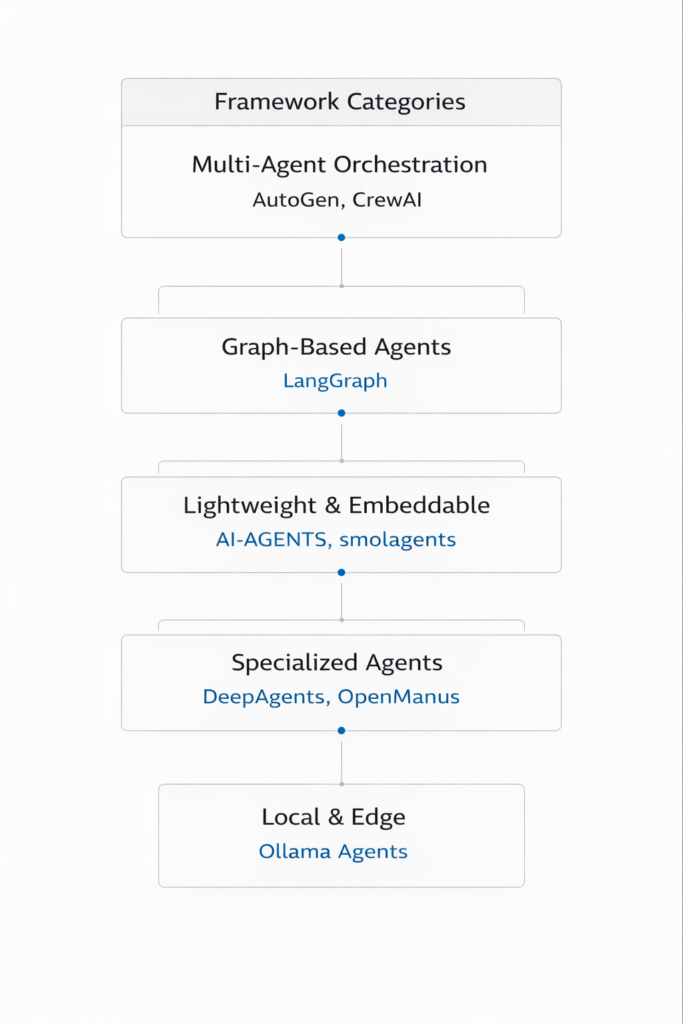
*Figure 1: The open-source agentic AI framework ecosystem*
Framework Popularity and Adoption (2026)
| Framework | GitHub Stars | Release Year | Primary Language | License |
|---|---|---|---|---|
| LangChain/LangGraph | 126,000+ | 2022 | Python/TS | MIT |
| AutoGen | 43,000+ | 2023 | Python | MIT |
| CrewAI | 27,000+ | 2024 | Python | MIT |
| AI-AGENTS | 8,500+ | 2025 | Python | Apache 2.0 |
| smolagents | 6,200+ | 2025 | Python | Apache 2.0 |
| DeepAgents | 5,800+ | 2025 | Python | MIT |
| OpenManus | 4,500+ | 2025 | Python | MIT |
| AG2 | 3,200+ | 2025 | Python | Apache 2.0 |
Part 2: LangGraph – Graph-Based Agent Orchestration
Overview
LangGraph is a framework for building stateful, multi-agent systems using graph-based workflows. Built on LangChain, it offers explicit control over agent flows with features like persistence, human-in-the-loop, and conditional branching.
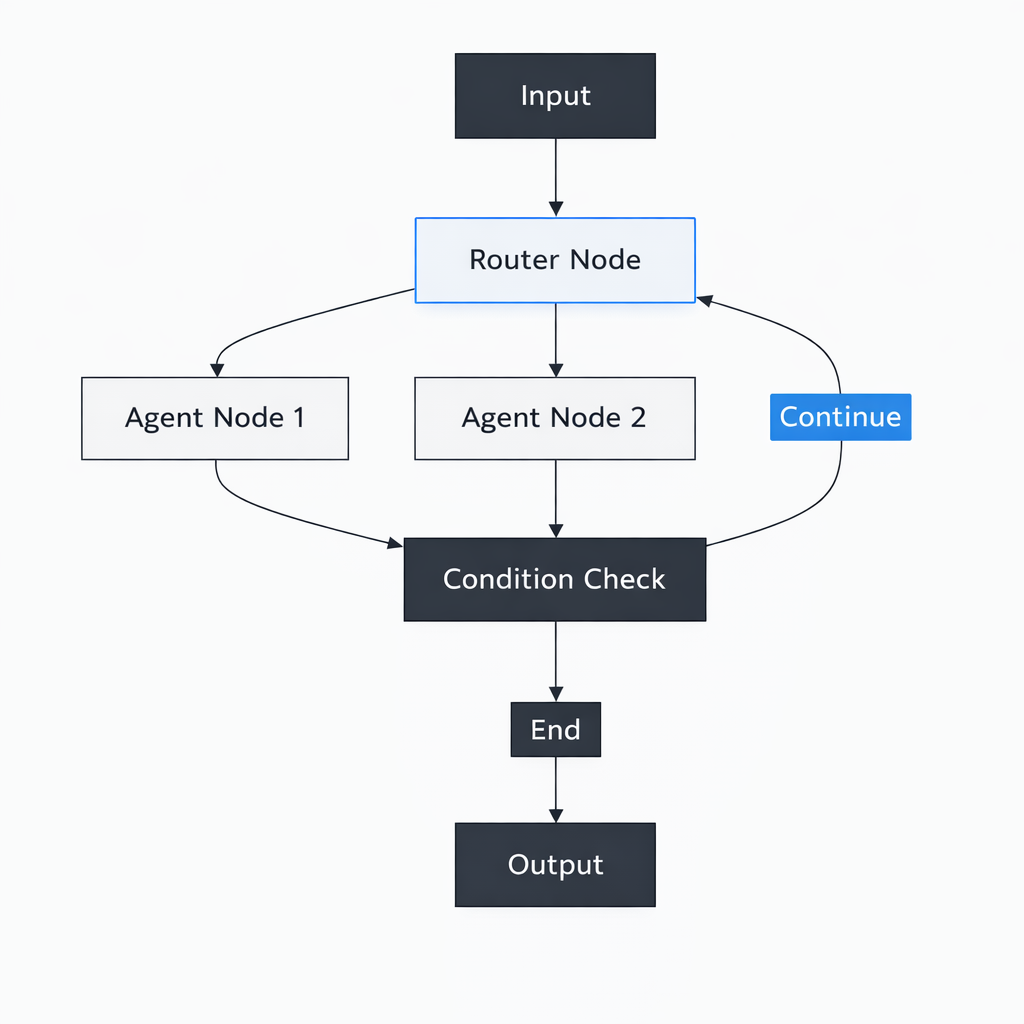
*Figure 2: LangGraph’s graph-based agent architecture*
Key Features
| Feature | Description |
|---|---|
| Stateful Graph | Explicit state management across nodes |
| Persistence | Checkpointing and resumability |
| Human-in-the-Loop | Interrupt execution for human input |
| Conditional Edges | Dynamic routing based on state |
| Multi-Agent | Built-in support for agent teams |
Getting Started
python
# Install
pip install langgraph langchain-openai

# Basic agent with graph
from langgraph.graph import StateGraph, END
from typing import TypedDict, Annotated
import operator

class AgentState(TypedDict):
    messages: Annotated[list, operator.add]
    current_step: str

def node_reason(state: AgentState):
    # Reasoning logic
    return {"messages": ["Thought: I need to analyze this..."]}

def node_act(state: AgentState):
    # Action logic
    return {"messages": ["Action: Searching database..."]}

def node_respond(state: AgentState):
    # Response logic
    return {"messages": ["Final answer"]}

def should_continue(state: AgentState):
    if len(state["messages"]) < 5:
        return "reason"
    return "respond"

# Build graph
graph = StateGraph(AgentState)
graph.add_node("reason", node_reason)
graph.add_node("act", node_act)
graph.add_node("respond", node_respond)

graph.set_entry_point("reason")
graph.add_edge("reason", "act")
graph.add_conditional_edges("act", should_continue, {
    "reason": "reason",
    "respond": "respond"
})
graph.add_edge("respond", END)

app = graph.compile()

# Run
result = app.invoke({"messages": ["User: What's the weather?"]})
Best For
- Complex workflows with multiple decision points
- Applications requiring persistence and resumability
- Multi-agent systems with clear control flow
- Production deployments with explicit state management
Resources
- GitHub:
https://github.com/langchain-ai/langgraph - Documentation:
https://langchain-ai.github.io/langgraph/ - Community: Discord, Twitter (@LangChainAI)
Part 3: AutoGen – Multi-Agent Conversations
Overview
AutoGen (now part of Microsoft Agent Framework) pioneered conversational multi-agent systems where agents communicate like human team members. Its GroupChat pattern has become the standard for agent collaboration.
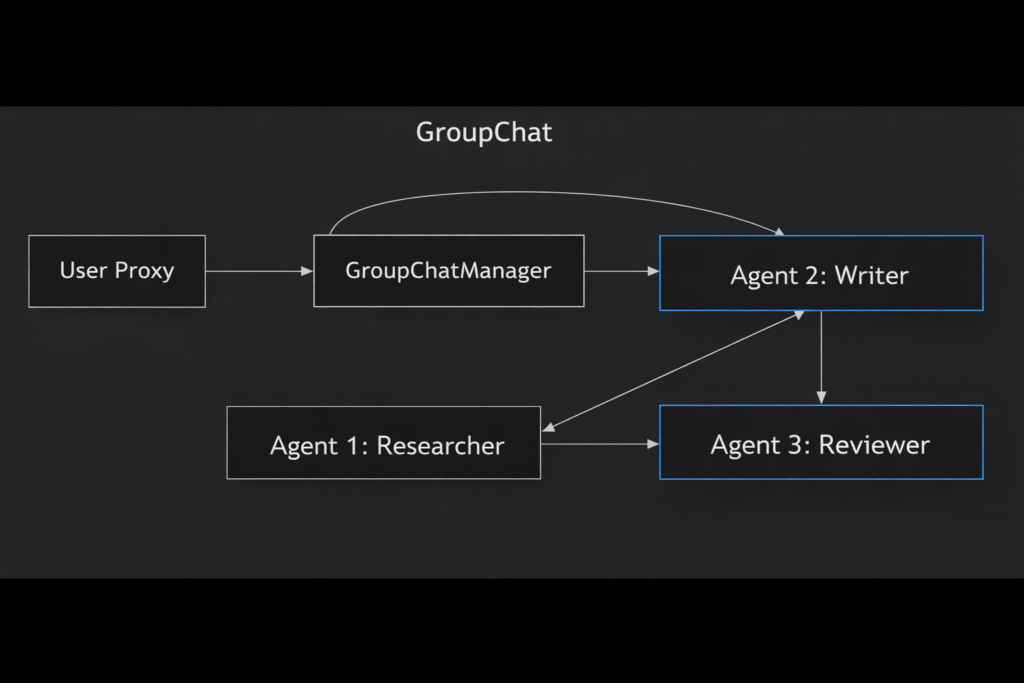
Figure 3: AutoGen’s GroupChat pattern
Key Features
| Feature | Description |
|---|---|
| Conversational Agents | Agents communicate via messages |
| GroupChat | Multi-agent team collaboration |
| Code Execution | Built-in Python code execution |
| Human Proxy | Integrated human-in-the-loop |
| Extensibility | Plugin system, MCP support |
Getting Started
python
# Install
pip install pyautogen

from autogen import AssistantAgent, UserProxyAgent, GroupChat, GroupChatManager

# Configure LLM (local or cloud)
llm_config = {
    "config_list": [{"model": "gpt-4o", "api_key": "your-key"}],
    "temperature": 0.2
}

# Create agents
researcher = AssistantAgent(
    name="Researcher",
    system_message="You research topics and find information.",
    llm_config=llm_config
)

writer = AssistantAgent(
    name="Writer",
    system_message="You synthesize information into clear content.",
    llm_config=llm_config
)

reviewer = AssistantAgent(
    name="Reviewer",
    system_message="You review content for accuracy and clarity.",
    llm_config=llm_config
)

user_proxy = UserProxyAgent(
    name="User",
    human_input_mode="TERMINATE",
    code_execution_config={"work_dir": "coding"}
)

# Create group chat
groupchat = GroupChat(
    agents=[user_proxy, researcher, writer, reviewer],
    messages=[],
    max_round=12
)

manager = GroupChatManager(groupchat=groupchat, llm_config=llm_config)

# Start
user_proxy.initiate_chat(
    manager,
    message="Research and write about quantum computing applications"
)
Best For
- Multi-agent collaboration and brainstorming
- Research and writing workflows
- Code generation and debugging
- Human-in-the-loop applications
Resources
- GitHub:
https://github.com/microsoft/autogen - Documentation:
https://microsoft.github.io/autogen/ - Community: Discord, GitHub Discussions
Part 4: CrewAI – Role-Based Agent Teams
Overview
CrewAI takes a role-based approach to agent collaboration. Instead of free-form conversation, agents have defined roles, goals, and tasks, making it intuitive for business process automation.
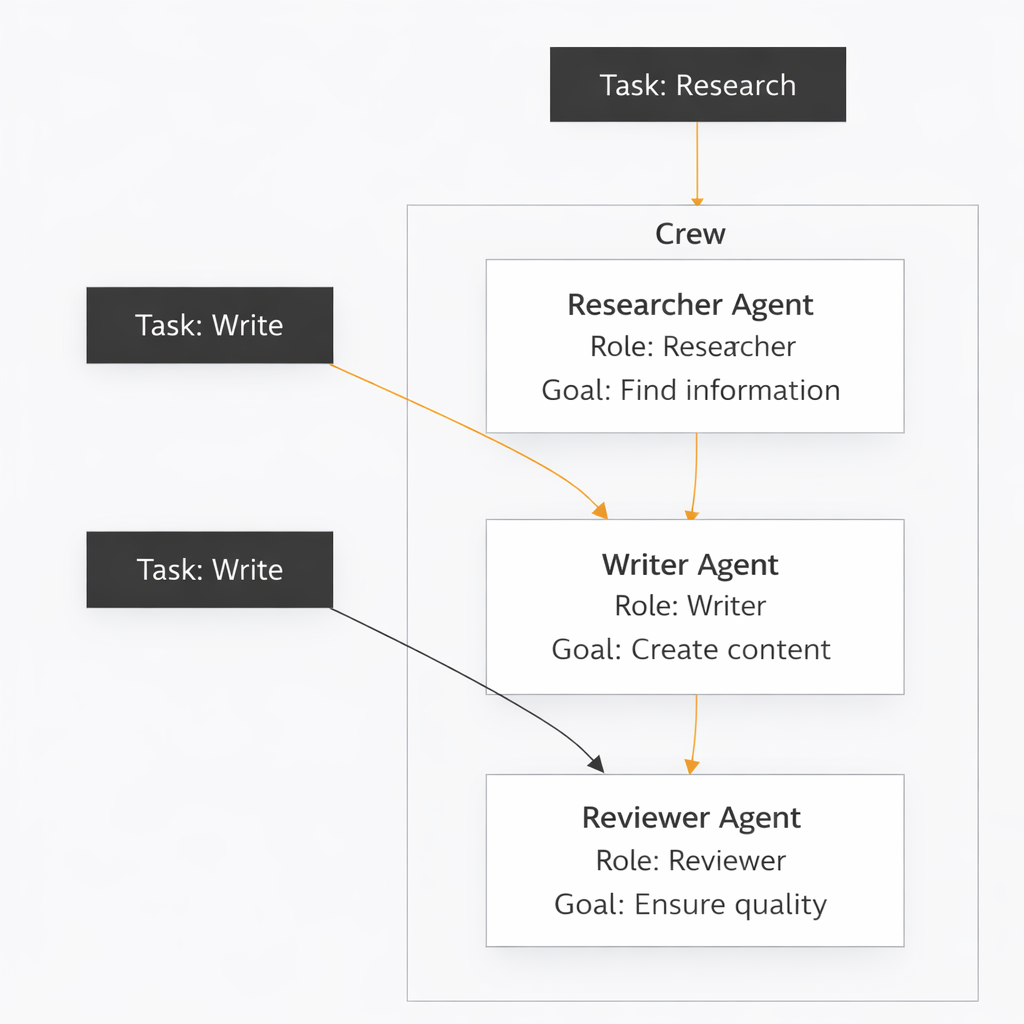
*Figure 4: CrewAI’s role-based agent architecture*
Key Features
| Feature | Description |
|---|---|
| Role-Based Agents | Agents with explicit roles and goals |
| Task Decomposition | Break complex work into tasks |
| Flows | Deterministic process control |
| Memory | Built-in short and long-term memory |
| Tools | Extensive tool integrations |
Getting Started
python
# Install
pip install crewai crewai-tools

from crewai import Agent, Task, Crew
from crewai_tools import SerperDevTool, WebsiteSearchTool

# Create tools
search_tool = SerperDevTool()
web_tool = WebsiteSearchTool()

# Create agents
researcher = Agent(
    role="Senior Research Analyst",
    goal="Find latest information on {topic}",
    backstory="You are an expert researcher with years of experience.",
    tools=[search_tool, web_tool],
    verbose=True
)

writer = Agent(
    role="Content Writer",
    goal="Create engaging content based on research",
    backstory="You are a skilled writer who creates clear, engaging content.",
    verbose=True
)

# Create tasks
research_task = Task(
    description="Research {topic} thoroughly",
    agent=researcher,
    expected_output="Detailed research findings with sources"
)

write_task = Task(
    description="Write report based on research",
    agent=writer,
    expected_output="Well-structured report with key insights"
)

# Create crew
crew = Crew(
    agents=[researcher, writer],
    tasks=[research_task, write_task],
    verbose=True
)

# Run
result = crew.kickoff(inputs={"topic": "AI agents 2026"})
Best For
- Business process automation
- Content creation pipelines
- Research and reporting
- Teams with clear role definitions
Resources
- GitHub:
https://github.com/joaomdmoura/crewAI - Documentation:
https://docs.crewai.com/ - Community: Discord, Twitter (@crewAI)
Part 5: AI-AGENTS – Lightweight and Extensible
Overview
AI-AGENTS is a lightweight framework focused on simplicity and extensibility. It provides a clean abstraction for building agents with tools, memory, and multi-agent coordination.
python
# Install
pip install ai-agents

from ai_agents import Agent, Tool, Memory

# Simple agent
agent = Agent(
    name="Assistant",
    instructions="You are a helpful assistant.",
    tools=[search_tool, calculator],
    memory=Memory()
)

# Run
response = agent.run("What's the weather in Tokyo?")
Key Features
| Feature | Description |
|---|---|
| Lightweight | Minimal dependencies |
| Simple API | Intuitive agent creation |
| Extensible | Easy to add custom tools |
| Memory | Built-in conversation memory |
| Multi-Agent | Support for agent teams |
Resources
- GitHub:
https://github.com/ai-agi/ai-agents - Documentation: Built-in docstrings
Part 6: smolagents – Minimalist Agent Framework
Overview
smolagents (from Hugging Face) is a minimalist framework for building agents with minimal code. It emphasizes simplicity while providing powerful capabilities like code execution and tool use.
python
# Install
pip install smolagents

from smolagents import CodeAgent, tool

@tool
def get_weather(city: str) -> str:
    """Get weather for a city."""
    return f"Weather in {city}: 72°F, sunny"

agent = CodeAgent(tools=[get_weather])
agent.run("What's the weather in Paris?")
Key Features
| Feature | Description |
|---|---|
| Code-First | Agents write and execute code |
| Minimal API | Get started in minutes |
| Local Models | Works with Hugging Face models |
| Lightweight | Small footprint |
Resources
- GitHub:
https://github.com/huggingface/smolagents - Documentation:
https://huggingface.co/docs/smolagents
Part 7: DeepAgents – Planning and Sub-Agents
Overview
DeepAgents (from LangChain) is designed for long-horizon tasks requiring planning, sub-agent orchestration, and context offloading. It’s ideal for complex research and development tasks.
python
# Install
pip install deepagents

from deepagents import DeepAgent
from langchain_openai import ChatOpenAI

agent = DeepAgent(
    model=ChatOpenAI(model="gpt-4o"),
    system_prompt="You are a research assistant with planning capabilities.",
    max_iterations=20
)

result = agent.invoke({
    "messages": ["Research the history of quantum computing and summarize key breakthroughs"]
})
Key Features
| Feature | Description |
|---|---|
| Long-Horizon Planning | Handles complex, multi-step tasks |
| Sub-Agent Orchestration | Spawns sub-agents for subtasks |
| Filesystem Memory | Context offloading to files |
| Model Agnostic | Works with any LLM |
Resources
- GitHub:
https://github.com/langchain-ai/deepagents - Documentation: Part of LangChain docs
Part 8: OpenManus – Autonomous Generalist Agent
Overview
OpenManus is an open-source implementation of the Manus AI concept—a generalist agent that can autonomously perform tasks across domains. It’s designed for high autonomy and broad capability.
python
# Install
git clone https://github.com/OpenManus/OpenManus
cd OpenManus
pip install -r requirements.txt

# Run
python run.py "Research and create a presentation on AI agents"
Key Features
| Feature | Description |
|---|---|
| Generalist | Handles diverse task types |
| High Autonomy | Minimal human intervention |
| Tool-Rich | Extensive tool library |
| Browser Automation | Web interaction capabilities |
Resources
- GitHub:
https://github.com/OpenManus/OpenManus - Community: Discord, GitHub Issues
Part 9: AG2 – Production Multi-Agent Systems
Overview
AG2 (formerly AutoGen v0.4) is the next-generation agent framework with a focus on production readiness, observability, and extensibility. It supports Python, .NET, and JavaScript.
python
# Install
pip install ag2

from ag2 import AssistantAgent, UserProxyAgent

assistant = AssistantAgent(name="assistant", llm_config=llm_config)
user = UserProxyAgent(name="user", code_execution_config={"work_dir": "coding"})

user.initiate_chat(assistant, message="Write a Python function to calculate Fibonacci numbers")
Key Features
| Feature | Description |
|---|---|
| Multi-Language | Python, .NET, JavaScript |
| Production Ready | Observability, checkpointing |
| MCP Support | Model Context Protocol |
| Extensible | Plugin architecture |
Resources
- GitHub:
https://github.com/ag2ai/ag2 - Documentation:
https://ag2.ai/docs/
Part 10: Framework Comparison and Selection Guide
Quick Comparison Table
| Framework | Best For | Complexity | Learning Curve | Production Ready |
|---|---|---|---|---|
| LangGraph | Complex workflows | High | Medium | ✅ |
| AutoGen | Multi-agent conversations | Medium | Low | ✅ |
| CrewAI | Role-based teams | Low | Very Low | ✅ |
| AI-AGENTS | Simple agents | Low | Low | 🟡 |
| smolagents | Quick prototypes | Very Low | Very Low | 🟡 |
| DeepAgents | Long-horizon tasks | High | Medium | 🟡 |
| OpenManus | Generalist autonomy | Medium | Medium | 🟡 |
| AG2 | Production multi-agent | Medium | Medium | ✅ |
Selection Guide
| If You Need… | Choose |
|---|---|
| Complex, stateful workflows | LangGraph |
| Multi-agent collaboration | AutoGen or AG2 |
| Role-based business processes | CrewAI |
| Quick prototyping | smolagents or AI-AGENTS |
| Long, complex research tasks | DeepAgents |
| Generalist autonomous agent | OpenManus |
| Production enterprise deployment | LangGraph, AG2, CrewAI |
Part 11: MHTECHIN’s Expertise in Open-Source Agentic AI
At MHTECHIN, we specialize in building and deploying autonomous AI agents using open-source frameworks. Our expertise includes:
- Framework Selection: Helping you choose the right framework for your use case
- Custom Agent Development: Tailored agents built with LangGraph, AutoGen, CrewAI
- Production Deployment: Scalable, observable agent systems
- Framework Integration: Combining multiple frameworks for maximum capability
- Training & Support: Empowering your team to build agents
MHTECHIN helps organizations leverage the power of open-source agentic AI to build autonomous systems that drive real business value.
Conclusion
The open-source agentic AI ecosystem has matured into a rich landscape of frameworks, each with unique strengths. Whether you need complex state management, multi-agent collaboration, role-based teams, or quick prototyping, there’s an open-source framework ready to power your autonomous agents.
Key Takeaways:
- LangGraph for complex, stateful workflows
- AutoGen/AG2 for multi-agent conversations
- CrewAI for role-based team collaboration
- smolagents for quick prototyping
- DeepAgents for long-horizon tasks
- OpenManus for generalist autonomy
The best framework for you depends on your specific needs, team skills, and deployment requirements. Start with the framework that matches your mental model, experiment, and evolve as your needs grow.
Frequently Asked Questions (FAQ)
Q1: Which open-source agent framework is easiest to start with?
smolagents and CrewAI have the gentlest learning curves. You can build a working agent in minutes with minimal code .
Q2: What’s the difference between AutoGen and LangGraph?
AutoGen focuses on conversational multi-agent systems where agents communicate like a team. LangGraph focuses on graph-based state management with explicit control flows .
Q3: Can I run these frameworks with local models?
Yes! All frameworks support local models through Ollama, vLLM, or llama.cpp integrations .
Q4: Which framework is best for production?
LangGraph, AG2, and CrewAI have the strongest production features including persistence, observability, and enterprise support .
Q5: Do these frameworks work with OpenAI/Anthropic APIs?
Yes, all frameworks support cloud model APIs. Most also support local models .
Q6: Which framework is best for multi-agent systems?
AutoGen/AG2 pioneered multi-agent systems, and CrewAI offers excellent role-based collaboration. LangGraph also supports multi-agent workflows .
Q7: Are these frameworks free to use?
Yes, all listed frameworks are open-source under MIT or Apache 2.0 licenses .
Q8: How do I choose between frameworks?
Match your use case to the framework’s strength: complex workflows → LangGraph, multi-agent → AutoGen, role-based → CrewAI, quick prototypes → smolagents .

Leave a Reply