1) Start with the Problem: Why Do AI Agents Need Memory?
Most AI agents fail not because of poor models—but because they forget.
Imagine a customer support agent that helps you troubleshoot a problem, then completely forgets the conversation when you return an hour later. Or a personal assistant that asks for your preferences repeatedly because it has no recollection of previous interactions. These aren’t hypothetical scenarios—they’re the reality of agents built without proper memory systems.
An agent without memory cannot:
- Recall past conversations or context
- Learn from previous actions or mistakes
- Personalize responses based on user history
- Handle long, multi-step workflows spanning days or weeks
- Build trust through consistency and familiarity
This is where vector databases enter the picture. They act as the long-term memory layer for AI agents—a persistent, searchable repository of past interactions, learned facts, and contextual knowledge that agents can query in real time.
At MHTECHIN , we design memory architectures that transform stateless AI agents into intelligent systems that remember, learn, and improve over time. This guide explores the landscape of vector databases and the patterns that make agent memory work.
2) Core Idea: What Vector Databases Do (In Simple Terms)
To understand vector databases, you first need to understand embeddings.
Think of embeddings as a translator that converts words into numbers—but not just any numbers. These numbers capture meaning. Words with similar meanings end up with similar numerical representations, or vectors. “Happy” and “joyful” would be close together in this numerical space; “happy” and “sad” would be far apart.
A vector database stores these numerical representations and enables AI agents to:
- Search semantically (by meaning, not by matching exact keywords)
- Retrieve relevant past information even when the wording differs
- Use that retrieved context to generate better, more informed responses
Traditional databases excel at exact matches. If you search for “order #12345,” they’ll find it. But if you ask “What was that thing I bought last month that cost about fifty dollars?” a traditional database struggles. A vector database understands that you’re asking about a specific order based on semantic meaning, not exact identifiers.
3) Visual Understanding: How Agent Memory Works
The memory flow in an AI agent follows a consistent pattern, whether you’re building a chatbot, a research assistant, or an enterprise knowledge system:
Step 1: User Input Arrives
The user types or speaks a query. This could be a question (“What did we discuss about the project timeline?”), a command (“Remember that I prefer early morning meetings”), or a piece of information to store.
Step 2: Input Converted to Embedding
The system passes the user input through an embedding model—a neural network trained to convert text into numerical vectors that capture meaning. The output is a list of numbers (typically 384 to 1536 dimensions) that represent the semantic content.
Step 3: Stored in Vector Database (When Appropriate)
If the input contains information worth remembering, it’s stored as a vector alongside its original text, metadata (timestamp, user ID, conversation ID), and any relevant context.
Step 4: New Query Creates Another Embedding
When the user returns with a new query, the same embedding model converts this new query into a vector.
Step 5: Similarity Search
The vector database finds the most similar stored vectors to the query vector. “Similar” means close in the numerical space—representing semantic relatedness.
Step 6: Retrieval of Relevant Context
The system retrieves the original text and metadata associated with those similar vectors. This becomes the memory context.
Step 7: Context Passed to LLM
The retrieved memory is added to the prompt sent to the language model, along with the current user query.
Step 8: Informed Response Generated
The LLM generates a response that incorporates both its general knowledge and the specific, retrieved memories. The agent remembers.
This flow happens in milliseconds, enabling real-time memory retrieval for interactive applications.
4) Types of Memory in AI Agents
Not all memory is the same. In human cognition, we distinguish between different memory systems—short-term, long-term, episodic, semantic. AI agents benefit from similar distinctions.
| Memory Type | Description | How It’s Stored | Example |
|---|---|---|---|
| Short-Term | Current session context—what’s been said in this conversation | In-memory or session cache | The last three exchanges in a customer support chat |
| Long-Term | Persistent knowledge that spans sessions | Vector database | Facts learned about a user over weeks of interaction |
| Episodic | Specific past interactions and events | Vector database with timestamps | “Last week you asked about refund policies” |
| Semantic | Facts and general knowledge extracted from documents | Vector database with source attribution | “According to company policy, refunds require manager approval” |
Most agents need a combination. Short-term memory lives in the conversation buffer. Long-term, episodic, and semantic memories live in vector databases, each with different metadata and retrieval strategies.
5) What Is a Vector Database?
A vector database is purpose-built for one job: storing high-dimensional vectors and performing similarity search at scale.
Unlike traditional databases (relational, document, graph) that are optimized for exact matches, joins, and transactions, vector databases are optimized for:
- Storing embeddings: Numerical representations with hundreds or thousands of dimensions
- Similarity search: Finding the nearest neighbors to a query vector
- Scaling efficiently: Handling millions or billions of vectors with acceptable latency
Think of it as the difference between a library organized by title (traditional database) and a library organized by meaning (vector database). In a traditional library, you find books by their exact titles or authors. In a vector library, you describe what you’re looking for, and it brings back the books that are about that topic, even if they use different words.
6) Key Concepts You Must Understand
Embeddings: The Foundation
Embeddings are the bridge between human language and vector search. An embedding model (like OpenAI’s text-embedding-ada-002 or open-source alternatives like all-MiniLM-L6-v2) converts text into a list of numbers.
What makes embeddings powerful:
- Semantic capture: Words with similar meanings produce similar vectors
- Context awareness: The same word in different contexts produces different vectors (“bank” as in river vs. “bank” as in money)
- Fixed dimensionality: Every input produces a vector of the same length, enabling mathematical comparison
Similarity Search: Finding What Matters
Similarity search is the heart of vector database retrieval. Given a query vector, the database returns the stored vectors closest to it in the numerical space.
Common similarity metrics:
| Metric | What It Measures | When to Use |
|---|---|---|
| Cosine Similarity | Angle between vectors (direction, not magnitude) | Text embeddings—most common |
| Euclidean Distance | Straight-line distance between points | When magnitude matters |
| Dot Product | Product of vector components | Optimized for normalized vectors |
Indexing: Making Search Fast
Without indexing, similarity search would require comparing the query vector to every stored vector—an O(n) operation that becomes impossible at scale. Indexing structures (like HNSW, IVF, or Product Quantization) create efficient pathways to the most relevant vectors, reducing search time from seconds to milliseconds.
7) Chart: How Similarity Search Works
| Query | Stored Data | Similarity Score | Result |
|---|---|---|---|
| “AI basics” | “Introduction to artificial intelligence” | 0.92 | Match (semantically related) |
| “AI basics” | “Machine learning fundamentals” | 0.87 | Match (related concept) |
| “AI basics” | “Cooking recipes for beginners” | 0.12 | Ignore (unrelated) |
The similarity score (often between 0 and 1) indicates semantic closeness. A score above a certain threshold (typically 0.7-0.8) indicates a relevant memory worth retrieving.
8) Popular Vector Databases: Deep Dive
8.1 Pinecone: The Production-Ready Managed Service
Overview:
Pinecone is a fully managed vector database designed for production AI applications. It abstracts away infrastructure management, scaling, and operations—you simply upload vectors and query them.
Strengths:
- Zero infrastructure management: No servers to provision, tune, or maintain
- Automatic scaling: Handles from thousands to billions of vectors seamlessly
- Enterprise-grade reliability: 99.9% uptime SLA, SOC2 compliance
- Fast similarity search: Milliseconds even at billion-scale
- Metadata filtering: Combine vector search with traditional filters (time range, user ID, etc.)
Weaknesses:
- Vendor lock-in: Proprietary service, not open-source
- Cost at scale: Managed service pricing adds up at very large scales
- Less control: Can’t customize indexing or storage behavior
Best For:
- Production applications where reliability is paramount
- Teams without dedicated infrastructure engineers
- Applications expecting to scale rapidly
8.2 Weaviate: The Flexible Open-Source Alternative
Overview:
Weaviate is an open-source vector database that can be self-hosted or used as a managed cloud service. It’s known for its flexibility and built-in ML capabilities.
Strengths:
- Open-source: Full control over deployment and code
- Hybrid search: Combines vector similarity with keyword (BM25) search
- GraphQL API: Intuitive query language for complex retrievals
- Built-in modules: Can integrate with OpenAI, Cohere, Hugging Face models directly
- Flexible schema: Define classes and properties like an object database
Weaknesses:
- Operations overhead: Self-hosted requires infrastructure management
- Learning curve: More complex than simpler alternatives
- Resource requirements: Can be memory-intensive for large-scale deployments
Best For:
- Organizations requiring data sovereignty (self-hosted)
- Custom applications needing hybrid search (keyword + semantic)
- Teams comfortable with infrastructure management
8.3 Chroma: The Developer-Friendly Lightweight Option
Overview:
Chroma is an open-source vector database designed for simplicity and developer productivity. It’s the go-to choice for prototyping and smaller-scale applications.
Strengths:
- Extremely simple setup:
pip install chromadband you’re running - Developer-friendly API: Intuitive Python interface
- Embedded mode: Runs in-process for zero-latency access
- Fast prototyping: Get a working memory system in minutes
- Lightweight: Minimal resource requirements
Weaknesses:
- Limited scalability: Not designed for billion-scale use cases
- Fewer features: Lacks advanced indexing and distributed capabilities
- No managed option: Must self-host for production
Best For:
- Prototyping and proof-of-concept work
- Small to medium applications (thousands to millions of vectors)
- Development environments and local testing
9) Comparison Chart: Choosing the Right Vector Database
| Feature | Pinecone | Weaviate | Chroma |
|---|---|---|---|
| Deployment Model | Fully managed (cloud) | Self-hosted or managed | Self-hosted (embedded) |
| Setup Complexity | Minimal (API keys) | Moderate | Very simple |
| Scaling Capability | Billion-scale | Billion-scale | Million-scale |
| Cost Structure | Usage-based (per vector) | Infrastructure cost (self-hosted) | Free (self-hosted) |
| Search Types | Vector + metadata | Vector + keyword (hybrid) | Vector only |
| API Style | REST | GraphQL + REST | Python native |
| Built-in Embeddings | No (bring your own) | Yes (multiple providers) | No (bring your own) |
| Best Use Case | Production at scale | Custom, complex search | Prototyping, small apps |
Decision Guide
| If you need… | Choose… |
|---|---|
| Fastest time-to-production with no ops | Pinecone |
| Full control and hybrid search | Weaviate (self-hosted) |
| Simple local development | Chroma |
| Enterprise compliance and managed service | Pinecone |
| Data sovereignty (keep data on-prem) | Weaviate or Chroma |
| Billions of vectors | Pinecone or Weaviate |
10) Memory Design Patterns for AI Agents
Pattern 1: Chat Memory (Conversation History)
What it does: Stores conversation exchanges as vectors, enabling retrieval of relevant past discussions.
How it works:
- Each turn in a conversation (user message + agent response) is stored as a vector
- When a new message arrives, the system retrieves the most semantically similar past exchanges
- Retrieved exchanges are added to the context window
- The agent generates responses informed by relevant history
When to use: Customer support agents, personal assistants, any application where users return to ongoing conversations
Key design decisions:
- Store each message individually or group into episodes?
- How far back to retrieve? (last 5 exchanges? last 20?)
- Include timestamps to prioritize recent conversations?
Pattern 2: Knowledge Base (Document Retrieval)
What it does: Stores documents, articles, or knowledge chunks as vectors for semantic search.
How it works:
- Documents are split into chunks (typically 500-1000 tokens)
- Each chunk is embedded and stored with metadata (source, title, date)
- User queries retrieve relevant chunks
- Retrieved chunks serve as grounding context for the LLM
When to use: Enterprise knowledge management, research assistants, technical support documentation
Key design decisions:
- Optimal chunk size (smaller = more precise, larger = more context)
- Metadata strategy (what to store with each chunk)
- Update strategy (how to handle document versioning)
Pattern 3: Personalization Memory (User Preferences)
What it does: Stores user preferences, habits, and history to personalize responses.
How it works:
- User interactions that reveal preferences are stored as vectors
- Each stored item includes the user ID as metadata
- When a user interacts, the system retrieves their past preferences
- The LLM uses this to tailor responses
When to use: Recommendation systems, personalized assistants, adaptive learning applications
Key design decisions:
- How to structure preference data (explicit statements vs. inferred patterns)
- Privacy considerations (what to store, retention policies)
- Weighting (more recent preferences matter more)
Pattern 4: Episodic Memory (Past Interactions)
What it does: Stores specific past interactions as retrievable episodes, enabling context across sessions.
How it works:
- Each interaction session is stored as a vector
- Metadata includes session ID, timestamp, user ID
- Retrieval can find past sessions by content or by time
- Enables continuity like “we discussed this last week”
When to use: Long-running projects, healthcare applications, legal case management
Key design decisions:
- How to summarize sessions for efficient storage
- When to create new episodes vs. append to existing
- Retention and archival policies
11) RAG + Memory: The Complete Architecture
Retrieval-Augmented Generation (RAG) and vector memory combine to create the complete agent intelligence system:
The Architecture Flow:
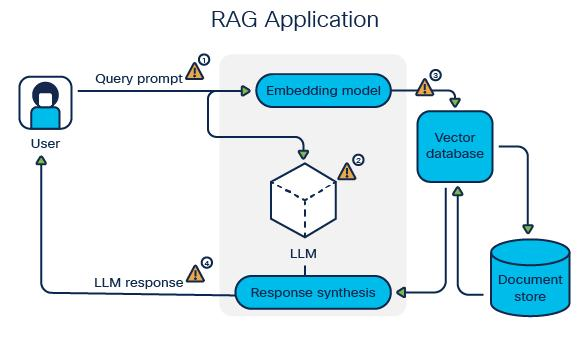
Key Insight: Multiple memory sources (short-term, long-term, knowledge) can be queried in parallel and combined, giving the agent a comprehensive view of what’s relevant.
12) Integrating with AI Agent Frameworks
Vector databases don’t operate in isolation—they’re part of a larger ecosystem:
| Component | Role in Memory System |
|---|---|
| LLM | Uses retrieved memories to generate informed responses |
| Vector Database | Stores and retrieves embeddings of memories |
| Embedding Model | Converts text to vectors for storage and queries |
| Agent Framework | Orchestrates memory retrieval and LLM calls |
| Data Pipeline | Ingests and processes data for storage |
Integration Patterns
Semantic Kernel Integration:
Vector databases serve as the memory connector, providing long-term storage that Semantic Kernel agents can query and update.
LangChain Integration:
LangChain provides vector store wrappers for Pinecone, Weaviate, Chroma, and dozens of others, enabling memory with minimal code.
LlamaIndex Integration:
LlamaIndex treats vector databases as “indexes” that can be combined with retrieval strategies for sophisticated RAG pipelines.
13) Common Challenges and Solutions
| Challenge | Cause | Solution |
|---|---|---|
| Irrelevant Retrieved Results | Poor embedding model or inappropriate chunk size | Use higher-quality embedding models. Experiment with chunk sizes. Implement re-ranking after initial retrieval. |
| Slow Search Performance | Large dataset without proper indexing | Enable HNSW or IVF indexing. Reduce dimensions if possible. Use metadata filters to narrow search space. |
| High Storage Costs | Storing too many vectors or high dimensions | Prune stale data. Use product quantization for compression. Reduce vector dimensions with PCA. |
| Redundant Memory Entries | Duplicate or near-duplicate storage | Implement deduplication. Use similarity thresholds to avoid storing near-identical entries. |
| Outdated Information | No mechanism for updating or removing stale memories | Implement timestamps and decay. Provide manual override for critical updates. Use versioning for knowledge. |
| Context Window Overflow | Retrieved memories exceed LLM token limits | Implement dynamic truncation. Summarize retrieved content. Use sliding window approaches. |
14) Best Practices for Agent Memory Systems
Embedding Strategy
- Use embedding models tuned for your domain (general-purpose for most, specialized for technical or multilingual applications)
- Cache embeddings to avoid recomputing
- Consider dimensionality—higher is not always better
Data Chunking
- For knowledge bases: 500-1000 tokens per chunk works well for most applications
- For conversation memory: Store full exchanges or individual turns depending on retrieval needs
- Include overlapping chunks to ensure no information falls between boundaries
Metadata Design
- Always store: timestamp, source, user ID, conversation ID
- Consider storing: importance score, access controls, retention policy
- Use metadata filters to narrow search before vector similarity
Retrieval Strategy
- Combine vector similarity with metadata filtering (e.g., “only last 30 days”)
- Use hybrid search (vector + keyword) when exact matches matter
- Implement multi-stage retrieval: broad vector search → re-ranking → final selection
Monitoring
- Track retrieval relevance (human feedback or automated metrics)
- Monitor latency and adjust indexing strategies
- Log what was retrieved to enable debugging
15) MHTECHIN Memory Architecture Framework
At MHTECHIN , we design memory systems that balance performance, scalability, and cost:
Our Layered Memory Stack
| Layer | MHTECHIN Recommendation | Rationale |
|---|---|---|
| Embedding Model | OpenAI text-embedding-3-small (balanced) or custom fine-tuned | Quality embeddings at reasonable cost |
| Short-Term Memory | Redis or in-memory cache | Ultra-low latency for active sessions |
| Long-Term Memory | Pinecone (production) or Weaviate (self-hosted) | Scalable, reliable vector storage |
| Knowledge Base | Hybrid: vector database + metadata filtering | Combines semantic and structured retrieval |
| Retrieval Orchestration | LlamaIndex or LangChain | Sophisticated retrieval strategies |
| Agent Framework | Semantic Kernel or CrewAI | Orchestration of memory + reasoning |
Our Design Methodology
- Requirements Analysis: Understand what needs to be remembered, retrieval patterns, scale
- Data Modeling: Design chunking strategy, metadata schema, embedding approach
- Vector Database Selection: Choose based on operational requirements, scale, and team expertise
- Retrieval Strategy Design: Define similarity thresholds, hybrid approaches, fallback patterns
- Integration: Connect with agent framework and LLM
- Testing & Optimization: Validate retrieval relevance, tune parameters
- Production Deployment: Monitor, iterate, improve
16) Real-World Use Cases
Use Case 1: Enterprise Customer Support Agent
Challenge: A global software company needed a support agent that remembered past customer interactions across channels (email, chat, phone) to provide consistent service.
Solution:
- Pinecone for long-term memory across millions of past interactions
- Each support ticket stored as a vector with metadata (customer ID, product, resolution)
- Retrieval combines vector similarity with metadata filters (customer ID, time range)
- Agent retrieves relevant past issues before answering new queries
Results:
- 40% reduction in repeat inquiries
- Consistent support across channels
- Agents can reference past conversations accurately
Use Case 2: Research Assistant with Knowledge Memory
Challenge: A pharmaceutical research team needed an AI that could remember findings across thousands of research papers and experimental notes.
Solution:
- Weaviate with hybrid search (vector + keyword)
- Papers chunked into 500-token segments with metadata (title, authors, date)
- Retrieval combines semantic similarity with keyword search for exact terms
- Assistant builds cumulative understanding across research sessions
Results:
- Researchers find relevant papers 3× faster
- Connections between related research surfaced automatically
- Cumulative memory builds comprehensive research context
Use Case 3: Personalized AI Fitness Coach
Challenge: A fitness app wanted a coach that remembered user preferences, progress, and past conversations to provide personalized guidance.
Solution:
- Chroma for lightweight, user-specific memory
- Each user has a dedicated collection storing preferences, workout history, past conversations
- Retrieval finds relevant history for each interaction
- Coach personalizes based on retrieved context
Results:
- 60% higher user engagement
- Personalized plans based on remembered preferences
- Users feel understood across sessions
17) Future of Agent Memory
Vector databases and agent memory systems are evolving rapidly:
Emerging Trends
1. Real-Time Memory Updates
Current systems retrieve memories at query time. Future systems will update memories continuously, learning from each interaction in real time.
2. Multi-Modal Memory
Memory will expand beyond text to include images, audio, and video. Agents will retrieve not just what was said, but what was seen and heard.
3. Self-Managing Memory
Agents will decide what to remember, what to forget, and when to consolidate memories—moving beyond simple retrieval to intelligent memory management.
4. Distributed Memory Networks
Multiple agents will share a common memory layer, enabling collaboration and knowledge sharing across specialized agents.
5. Causal Memory
Beyond retrieving related content, agents will retrieve causal chains—understanding not just what happened, but why.
18) Conclusion
Vector databases are not optional infrastructure for sophisticated AI agents—they are essential. They transform stateless, forgetful systems into intelligent agents that remember, learn, and personalize.
Key Takeaways
| Dimension | What Vector Databases Enable |
|---|---|
| Memory | Long-term storage of conversations, facts, and preferences |
| Context | Retrieval of relevant past information for current queries |
| Personalization | User-specific memories that adapt over time |
| Knowledge | Semantic search across documents and knowledge bases |
| Continuity | Seamless experiences across sessions |
The choice of vector database—Pinecone for production scale, Weaviate for hybrid search and control, Chroma for simplicity—depends on your requirements. But the pattern is consistent: embeddings + similarity search = memory that works.
By combining vector databases with LLMs and orchestration frameworks, you can build AI agents that don’t just respond—they remember, learn, and grow more valuable with every interaction.
19) FAQ (SEO Optimized)
Q1: What is a vector database?
A: A vector database is a specialized database designed to store high-dimensional vectors (numerical representations of data) and perform similarity search. Unlike traditional databases that find exact matches, vector databases find semantically similar content—enabling AI agents to retrieve relevant memories based on meaning.
Q2: Why do AI agents need vector databases?
A: AI agents need vector databases for long-term memory. Without them, agents forget past conversations, cannot learn from history, and cannot personalize responses. Vector databases enable agents to store and retrieve relevant context across sessions.
Q3: Which vector database is best: Pinecone, Weaviate, or Chroma?
A: The choice depends on your needs:
- Pinecone: Best for production applications that need managed infrastructure and automatic scaling
- Weaviate: Best for organizations needing hybrid search (vector + keyword) or self-hosted control
- Chroma: Best for prototyping, small applications, and teams wanting the simplest possible setup
Q4: What are embeddings and why are they important?
A: Embeddings are numerical representations of text that capture semantic meaning. They’re the foundation of vector databases because they enable similarity search—finding content that’s related by meaning, not just by keywords. Good embeddings are essential for effective memory retrieval.
Q5: How does an agent use vector databases for memory?
A: The process follows a pattern: user input → convert to embedding → store (if worth remembering) → new query → convert to embedding → search for similar vectors → retrieve original content → pass to LLM as context → generate informed response.
Q6: Can I use multiple vector databases together?
A: Yes. Many architectures use different databases for different memory types:
- Short-term memory in Redis or in-memory cache
- Long-term memory in Pinecone for scale
- Knowledge base in Weaviate for hybrid search
- User preferences in Chroma for lightweight storage
Q7: How do I choose an embedding model?
A: Consider:
- General purpose: OpenAI’s text-embedding-3-small or text-embedding-ada-002
- Open source: all-MiniLM-L6-v2 (lightweight) or e5-large (higher quality)
- Domain-specific: Fine-tune embeddings on your domain data for best results
Q8: What are the costs of vector databases?
A: Costs vary:
- Pinecone: Pay per vector stored and operations—starts at ~$70/month for starter tier
- Weaviate (self-hosted) : Infrastructure costs only (EC2, etc.)—can be lower at scale
- Chroma: Free, plus your infrastructure costs
- Embeddings: API costs per million tokens (OpenAI: ~$0.10-0.60 per million tokens)
Q9: How can MHTECHIN help with vector memory architecture?
A: MHTECHIN provides end-to-end memory system design:
- Requirements analysis and data modeling
- Vector database selection and deployment
- Embedding strategy and optimization
- Retrieval pipeline integration with agent frameworks
- Monitoring and ongoing optimization
External Resources
| Resource | Description | Link |
|---|---|---|
| Pinecone Documentation | Official Pinecone docs and tutorials | pinecone.io/docs |
| Weaviate Documentation | Weaviate open-source docs | weaviate.io/developers/weaviate |
| Chroma Documentation | Chroma getting started | docs.trychroma.com |
| Hugging Face Embeddings | Open-source embedding models | huggingface.co/models?pipeline_tag=sentence-similarity |
| OpenAI Embeddings | OpenAI’s embedding models | platform.openai.com/docs/guides/embeddings |

Leave a Reply