Introduction
Large language models like ChatGPT are impressive. They can write essays, answer questions, and generate code. But they have a fundamental limitation: they only know what they were trained on. Ask a question about your company’s internal documents, your customer data, or the latest news from yesterday, and they will either admit ignorance or—worse—hallucinate an answer.
This is where vector databases come in. Vector databases are the missing piece that connects powerful AI models with your private, up-to-date, and domain-specific knowledge. They are the technology behind retrieval-augmented generation (RAG), semantic search, and personalized recommendations. Without them, many of today’s most powerful AI applications would not be possible.
This article explains what vector databases are, how they work, why they are essential for modern AI systems, and how to choose and use them. Whether you are a developer building AI applications, a data scientist working with embeddings, or a business leader evaluating AI investments, this guide will help you understand this critical piece of the AI infrastructure stack.
For a foundational understanding of the infrastructure that powers modern AI, you may find our guide on AI Infrastructure: GPUs, TPUs, and Cloud Platforms helpful as a starting point.
Throughout, we will highlight how MHTECHIN helps organizations design and deploy vector database solutions that power intelligent, context-aware AI applications.
Section 1: What Is a Vector Database?
1.1 A Simple Definition
A vector database is a database designed to store, index, and query high-dimensional vectors—mathematical representations of data that capture semantic meaning. Unlike traditional databases that search for exact matches, vector databases search for similarity.
Think of it this way: a traditional database is like a library where you find a book by its exact title. A vector database is like a librarian who understands concepts—you can ask “books about machine learning” and get results even if none of the titles contain those exact words.
1.2 Why Traditional Databases Fall Short
Traditional databases (SQL, NoSQL) excel at exact matches, structured queries, and relationships. But they struggle with:
- Semantic search. Finding documents about “artificial intelligence” when the query uses different terms
- Similarity search. Finding images that look like a reference image
- Recommendations. Finding products similar to what a user liked
- Context retrieval. Finding relevant information to augment an AI model
Vector databases solve these problems by representing data as vectors and searching by meaning rather than exact terms.
1.3 Vectors: The Language of AI
At the heart of vector databases are embeddings—numerical representations of data created by AI models.
An embedding model (like OpenAI’s text-embedding-3, or open source models like sentence-transformers) takes input—text, images, audio—and converts it to a vector: a list of numbers, typically hundreds to thousands of dimensions long.
Crucially, vectors capture semantic meaning. The vector for “king” is mathematically close to the vector for “queen.” The vector for “car” is close to “automobile.” The vector for a picture of a cat is close to the vector for the word “cat.”
Vector databases store these embeddings and enable fast search for similar vectors.
Section 2: How Vector Databases Work
2.1 The Three Core Functions
Vector databases perform three main functions:
Ingestion. Take raw data (documents, images, audio), pass it through an embedding model to generate vectors, and store the vectors alongside metadata.
Indexing. Build efficient data structures (indices) that enable fast similarity search. Without indexing, searching billions of vectors would be impossibly slow.
Search. Given a query vector (created from a user’s question or reference data), find the most similar vectors in the database and return the associated data.
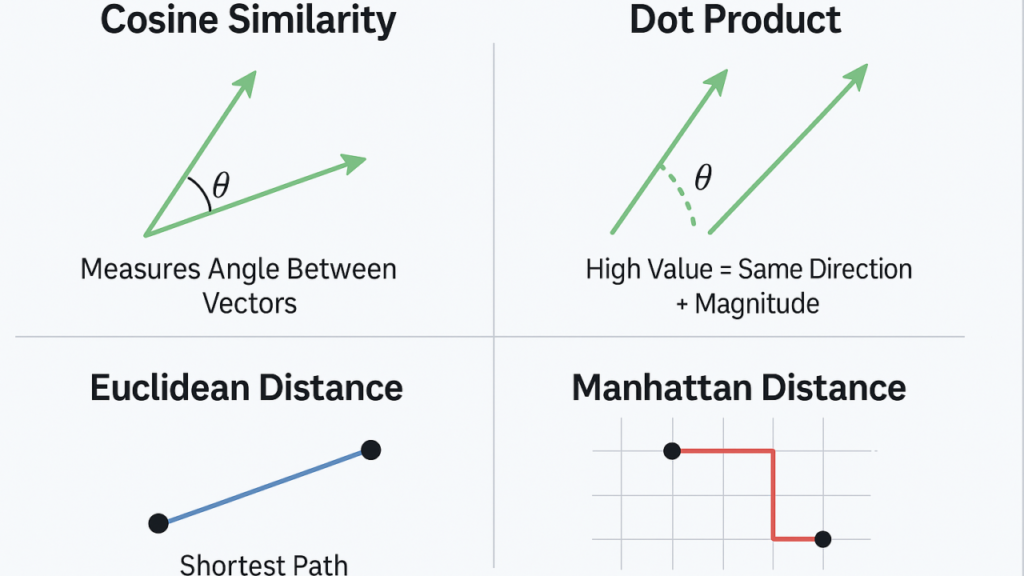
2.2 Similarity Metrics
Vector databases use mathematical measures to determine how similar two vectors are:
| Metric | How It Works | Best For |
|---|---|---|
| Cosine Similarity | Measures the angle between vectors | Text embeddings; semantic similarity |
| Euclidean Distance | Measures straight-line distance | General purpose; works well for many embeddings |
| Dot Product | Measures magnitude and direction | Optimized for certain embedding models |
The choice of metric depends on the embedding model and the use case.
2.3 Indexing Algorithms
To search billions of vectors quickly, vector databases use specialized indexing algorithms:
- HNSW (Hierarchical Navigable Small World). Graph-based indexing; excellent search speed; widely used
- IVF (Inverted File Index). Clustering-based; good balance of speed and accuracy
- PQ (Product Quantization). Compression; reduces memory usage
- DiskANN. Disk-based; for very large datasets
Different algorithms trade off between search speed, memory usage, and accuracy.
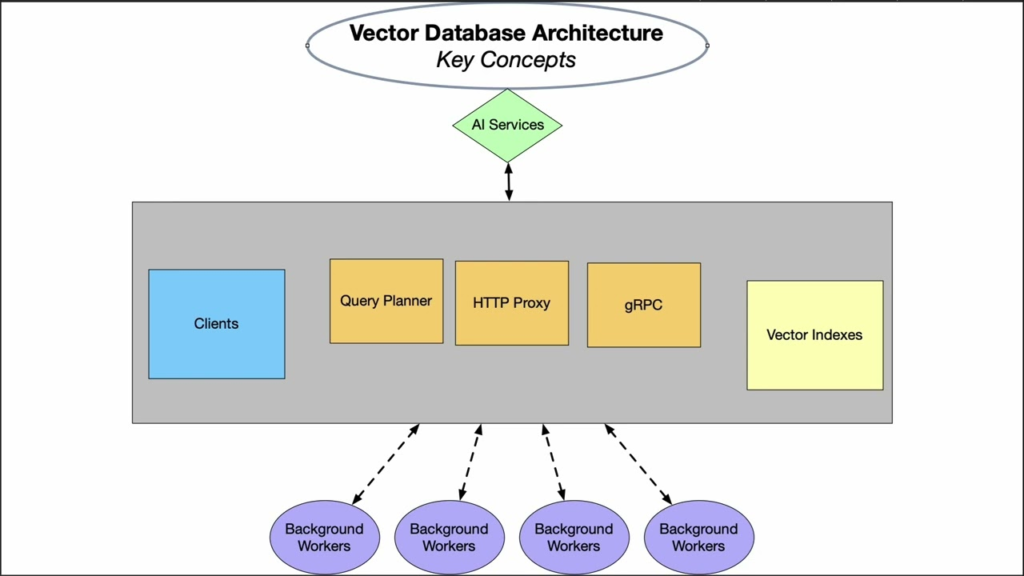
2.4 The Retrieval Process
When a user asks a question, the vector database workflow is:
- Embed the query. Convert the user’s question into a vector using the same embedding model used for documents.
- Search. Find the most similar vectors in the database (nearest neighbor search).
- Retrieve metadata. Return the original text, images, or data associated with those vectors.
- Feed to AI. The retrieved information is passed to a language model (like GPT) to generate a context-aware answer.
This is the foundation of retrieval-augmented generation (RAG) .
Section 3: Why Vector Databases Are Essential for Modern AI
3.1 Retrieval-Augmented Generation (RAG)
RAG is one of the most important patterns in modern AI. Instead of relying solely on a language model’s internal knowledge, RAG:
- Takes the user’s query
- Searches a vector database for relevant information
- Combines the retrieved information with the query
- Asks the language model to generate a response based on that information
Why this matters:
- Up-to-date information. The language model only knows its training data (months or years old). The vector database can contain current information.
- Private data. Sensitive documents never enter the language model’s training; they stay in your vector database.
- Reduced hallucinations. When the AI has relevant information to reference, it is much less likely to make up facts.
- Specificity. The AI can answer questions about your specific products, customers, or documents.
3.2 Semantic Search
Vector databases power semantic search—search that understands meaning, not just keywords.
A traditional keyword search for “machine learning book” might miss “AI textbook” because it does not match the exact words. A vector search understands that “machine learning,” “AI,” and “deep learning” are semantically related and returns relevant results even when exact terms do not match.
3.3 Recommendation Systems
Vector databases enable recommendation engines that understand user preferences semantically. Instead of simple collaborative filtering (“users who liked X also liked Y”), vector-based recommendations:
- Represent user preferences as vectors
- Represent item features (product descriptions, movie plots, song lyrics) as vectors
- Find items whose vectors are close to the user’s preference vector
This captures deeper meaning: recommending a “thriller with a twist ending” rather than just “movies like the one you watched.”
3.4 Multimodal Search
Vector databases can handle multiple data types. The same vector space can contain:
- Text embeddings (from documents, questions)
- Image embeddings (from product photos, medical images)
- Audio embeddings (from voice recordings, music)
This enables multimodal search: a user can search for images using text, or text using images.
3.5 Real-Time Personalization
Vector databases enable real-time personalization. As users interact with an application, their behavior can be embedded and stored. The system can then retrieve content tailored to that user’s current interests—not just broad segments.
Section 4: Popular Vector Databases
4.1 Open Source Vector Databases
| Database | Key Features | Best For |
|---|---|---|
| Chroma | Lightweight, Python-native, easy to use | Prototyping, small to medium applications |
| Weaviate | Built-in modules, GraphQL API, hybrid search | Production applications; multi-modal |
| Qdrant | High performance, written in Rust, filtering | High-scale production; advanced filtering |
| Milvus | Cloud-native, distributed, battle-tested | Large-scale enterprise deployments |
| LanceDB | Embedded, serverless, columnar format | Edge deployments; low overhead |
4.2 Cloud Vector Databases
| Service | Platform | Key Features |
|---|---|---|
| Pinecone | Managed | Fully managed; easy to start; scales automatically |
| Azure AI Search | Microsoft | Integrated with Azure; hybrid search; cognitive skills |
| Amazon OpenSearch | AWS | Vector support in existing OpenSearch; integrated with AWS |
| Google Vertex AI Matching Engine | Google Cloud | Integrated with Vertex AI; large-scale |
| Databricks Vector Search | Databricks | Integrated with Databricks lakehouse |
4.3 Embedded Vector Databases
For edge or embedded applications, lightweight vector databases run within applications:
- SQLite with vector extensions. Add vector search to existing SQLite databases
- LanceDB. Embedded, serverless, optimized for ML data
- Chroma (embedded mode). Run entirely in memory
4.4 PostgreSQL Extensions
For teams already using PostgreSQL, extensions add vector search:
- pgvector. Adds vector data type and similarity search; open source; simple
- pg_embedding. Alternative vector extension
pgvector has become the default choice for teams wanting vector search without adding a new database.
Section 5: Choosing a Vector Database
5.1 Key Selection Criteria
| Criteria | What to Consider |
|---|---|
| Scale | How many vectors? Millions? Billions? |
| Performance | Latency requirements? Throughput needs? |
| Filtering | Need to filter by metadata (e.g., date, category)? |
| Deployment | Managed service, self-hosted, or embedded? |
| Ecosystem | Integration with existing stack? Language support? |
| Cost | Operational vs capital expense; cloud vs self-managed |
5.2 Decision Framework
| Use Case | Recommended |
|---|---|
| Prototyping / small scale | Chroma, pgvector, or Pinecone (free tier) |
| Production with existing PostgreSQL | pgvector (easiest path) |
| High-scale enterprise | Milvus, Weaviate, Qdrant; consider managed options |
| Fully managed, minimal ops | Pinecone, Azure AI Search, AWS OpenSearch |
| Multi-modal (text + images + audio) | Weaviate (built-in modules) |
| Edge / embedded | LanceDB, embedded Chroma |
5.3 The pgvector Advantage
For many organizations, pgvector is the simplest path to vector search. It adds vector capabilities to PostgreSQL, meaning:
- No new database to manage
- Existing PostgreSQL skills apply
- ACID compliance
- Backup, replication, and tooling already in place
For teams already on PostgreSQL, pgvector is often the right starting point.
Section 6: Real-World Vector Database Applications
6.1 Retrieval-Augmented Generation (RAG)
The most common application. A customer support chatbot:
- Takes user questions
- Searches a vector database of support documents
- Retrieves relevant documentation
- Generates a response citing specific sources
Result: accurate, up-to-date answers without hallucinations.
6.2 Semantic Code Search
For developers working in large codebases, vector search enables:
- Finding functions by what they do, not just function names
- Discovering similar code patterns
- Retrieving relevant examples
6.3 Image and Video Search
E-commerce and media platforms use vector databases to:
- Search product catalogs by image (“find shoes like this”)
- Recommend visually similar items
- Detect duplicate or near-duplicate images
6.4 E-commerce Recommendations
Vector databases power modern recommendation engines:
- Embed product descriptions and customer behavior
- Find products semantically similar to what a user viewed
- Personalize in real time
6.5 Research and Knowledge Management
Organizations use vector databases to:
- Search internal documents, research papers, and wikis
- Enable conversational Q&A over private knowledge bases
- Connect disparate information sources
6.6 Healthcare
Healthcare applications include:
- Finding similar patient cases for diagnosis support
- Searching medical literature for relevant studies
- Matching clinical trial criteria to patient records
Section 7: Challenges and Best Practices
7.1 Embedding Model Selection
The quality of vector search depends entirely on the embedding model. Different models work better for different data:
- Text. OpenAI text-embedding-3, Cohere, sentence-transformers
- Images. CLIP, ResNet
- Code. CodeBERT, OpenAI text-embedding-3 (trained on code)
Best practice. Test multiple embedding models on your use case. The “best” general model may not be best for your domain.
7.2 Cost Considerations
Vector databases introduce additional costs:
- Embedding generation. API costs or compute for generating vectors
- Storage. Vectors require significant space; compression helps
- Compute. Index building and search consume resources
Best practice. Optimize embedding costs by caching, using efficient models, and compressing vectors with quantization.
7.3 Index Tuning
Vector database performance depends on index parameters. The wrong parameters lead to slow queries or poor recall.
Best practice. Understand the trade-offs: faster search often means lower recall or more memory. Test with your data.
7.4 Hybrid Search
Vector search alone is not always enough. Many applications need hybrid search—combining vector similarity with keyword matching, metadata filtering, and business rules.
Best practice. Use databases that support hybrid search or combine results from multiple sources.
7.5 Update Strategy
Unlike static indexes, vector databases must handle updates. How do you add new documents? Remove outdated ones? Handle real-time updates?
Best practice. Design your update pipeline. Some databases handle real-time updates; others require periodic reindexing.
Section 8: How MHTECHIN Helps with Vector Databases
Vector databases are a critical component of modern AI systems, but choosing and operating them requires expertise. MHTECHIN helps organizations design and deploy vector database solutions that power intelligent applications.
8.1 For Strategy and Selection
MHTECHIN helps organizations:
- Assess use cases. RAG? Semantic search? Recommendations?
- Evaluate scale. How many vectors? What growth?
- Select the right database. Open source? Managed? Embedded?
- Choose embedding models. Which model for your domain?
8.2 For Implementation
MHTECHIN implements vector database solutions:
- Deployment. Self-hosted or cloud; Kubernetes or serverless
- Integration. Connect to embedding models, language models, and application logic
- Index optimization. Tune for performance and recall
- Hybrid search. Combine vector search with keyword and metadata filtering
8.3 For RAG Systems
MHTECHIN builds complete RAG pipelines:
- Data ingestion. Chunking, embedding, loading into vector databases
- Query processing. Embedding, retrieval, context assembly
- LLM integration. Prompt engineering, response generation
- Feedback loops. Capture user feedback to improve retrieval
8.4 For Production Readiness
MHTECHIN ensures vector databases are production-ready:
- Performance testing. Latency, throughput, concurrency
- Monitoring. Track search latency, recall, drift
- Disaster recovery. Backup, replication, failover
- Security. Encryption, access controls, compliance
8.5 The MHTECHIN Approach
MHTECHIN’s vector database practice combines deep expertise in both databases and AI. The team helps organizations build systems that are fast, accurate, and scalable—powering the next generation of intelligent applications.
Section 9: Frequently Asked Questions
9.1 Q: What is a vector database in simple terms?
A: A vector database stores data as mathematical representations (vectors) that capture meaning. Instead of searching for exact words or values, it searches for similar meanings. It is what powers “search by meaning” in modern AI applications.
9.2 Q: Why do I need a vector database for AI?
A: Large language models only know what they were trained on. A vector database gives them access to your private, up-to-date information. This enables retrieval-augmented generation (RAG), semantic search, and personalized recommendations.
9.3 Q: What is the difference between a vector database and a traditional database?
A: Traditional databases (SQL, NoSQL) search for exact matches or structured queries. Vector databases search for similarity—finding vectors that are mathematically close. They are designed for semantic search, not exact lookups.
9.4 Q: What is retrieval-augmented generation (RAG)?
A: RAG is a pattern where a language model retrieves relevant information from a vector database before generating a response. This grounds the model in current, specific information and reduces hallucinations.
9.5 Q: Do I need a separate vector database or can I use my existing database?
A: If you are already using PostgreSQL, pgvector adds vector search capabilities to your existing database. For other databases, you may need a dedicated vector database. The choice depends on scale, performance needs, and operational preferences.
9.6 Q: How do I choose an embedding model?
A: The right embedding model depends on your data (text, images, code) and your use case. Test multiple models—the best general-purpose model may not be best for your domain. Common options: OpenAI embeddings, Cohere, sentence-transformers.
9.7 Q: How many vectors can a vector database handle?
A: It depends on the database and infrastructure. Lightweight solutions like Chroma handle millions; distributed systems like Milvus handle billions. Scale influences database choice.
9.8 Q: What is hybrid search?
A: Hybrid search combines vector similarity with traditional keyword matching and metadata filtering. Many applications need both semantic understanding and exact filtering (e.g., “documents about AI from 2024”).
9.9 Q: How much does a vector database cost?
A: Costs vary widely. Open source databases are free but require operational expertise. Managed services like Pinecone charge based on vector count and queries. Cloud providers charge for compute and storage. MHTECHIN can help estimate costs for your use case.
9.10 Q: How does MHTECHIN help with vector databases?
A: MHTECHIN helps organizations select, deploy, and optimize vector databases for RAG, semantic search, and recommendations. We provide end-to-end support from strategy through production.
Section 10: Conclusion—The Memory Layer for AI
Large language models are powerful, but they have a fundamental limitation: they only know what they were trained on. Vector databases solve this by providing a memory layer—a repository of current, specific, and private information that AI models can access when needed.
Without vector databases, AI applications are limited to the model’s training data—stale, public, and unable to access your unique knowledge. With vector databases, AI becomes truly useful: it can answer questions about your documents, recommend products based on user preferences, and ground its responses in verified information.
As AI adoption grows, vector databases are becoming as essential as the models themselves. They are the infrastructure that turns general-purpose AI into domain-specific, context-aware, trustworthy systems.
Ready to give your AI a memory? Explore MHTECHIN’s vector database and RAG services at www.mhtechin.com. From strategy through implementation, our team helps you build intelligent applications that understand your world.
This guide is brought to you by MHTECHIN—helping organizations design and deploy vector database solutions for modern AI systems. For personalized guidance on vector database strategy or implementation, reach out to the MHTECHIN team today.

Leave a Reply