1) Product Lens: What You’re Building
Instead of thinking “framework,” think product. With Google Vertex AI, you’re building an AI-powered application that includes:
| Component | Description |
|---|---|
| Agent | Reasoning engine + action execution |
| Data Connections | RAG (Retrieval-Augmented Generation) for grounded responses |
| Tools | APIs, functions, and external services |
| Deployment Endpoints | REST APIs, chat UIs, and app integrations |
Backed by Google’s global infrastructure, Vertex AI provides a unified platform to design, test, and scale agents without managing infrastructure. It’s the same technology powering Google’s own AI products, now available for enterprise builders.
2) When to Choose Vertex AI Agent Builder
Use Vertex AI when you need enterprise-grade AI capabilities with minimal infrastructure overhead:
| Requirement | Why Vertex AI Fits |
|---|---|
| Enterprise Deployment | Fully managed infrastructure with 99.9% SLA |
| RAG-Based Applications | Built-in data grounding with Vertex AI Search |
| Scalable APIs | Native endpoints with auto-scaling |
| Google Ecosystem | Seamless BigQuery, Cloud Storage, and Workspace integration |
| Low-Ops Setup | Minimal DevOps—focus on agent logic, not infrastructure |
| Multi-Modal Support | Text, images, documents, and soon video |
For organizations already invested in Google Cloud, Vertex AI represents the natural choice for AI agent deployment.
3) System View: End-to-End Architecture
Complete Agent Architecture on Vertex AI
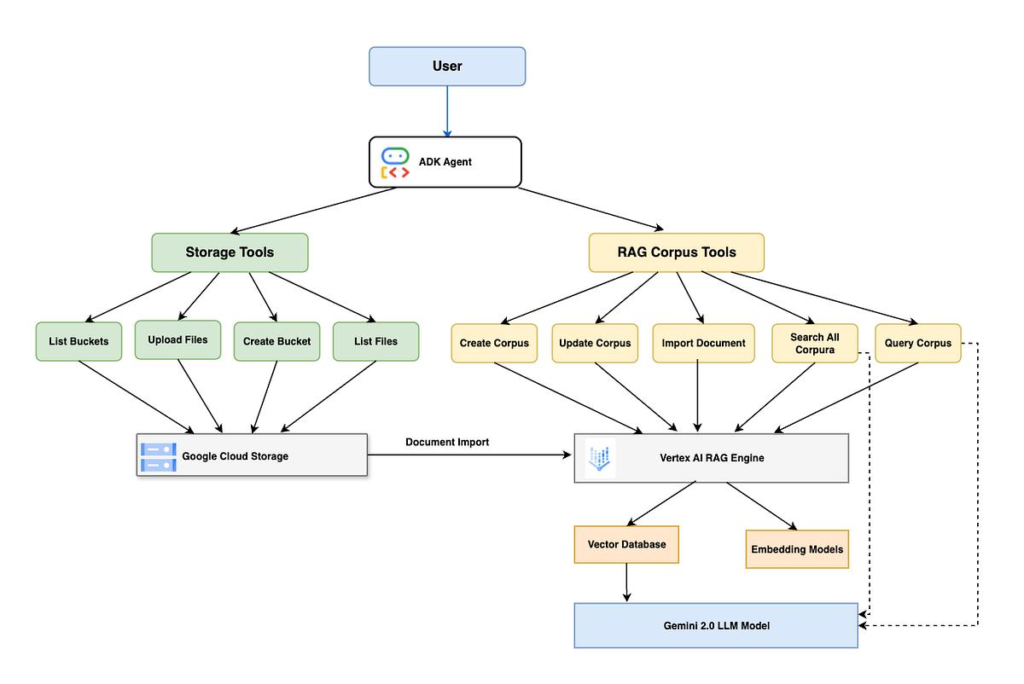
Flow Breakdown
- User Interaction: User submits query via web, mobile, or API
- Agent Processing: Agent interprets intent and determines required actions
- Data Retrieval (RAG): Retrieves relevant context from knowledge bases
- Tool Execution: Calls external APIs or functions as needed
- Response Generation: LLM generates final response with grounded context
- Output Delivery: Returns via API or UI with usage metrics
4) Core Building Blocks (Vertex AI Style)
4.1 Agent – The Cognitive Core
The agent is the brain of your AI application. In Vertex AI Agent Builder, agents are defined through:
- System Instructions: High-level behavior guidelines—what the agent should do, what it should avoid, how it should interact. For example: “You are MHTECHIN’s technical support agent. Help customers with AI framework questions. Be professional, concise, and always cite sources when available.”
- Goals: What the agent aims to accomplish. Clear goals help the agent prioritize actions. Examples include: “Resolve technical inquiries accurately” or “Guide users to appropriate documentation.”
- Response Style: The tone and format of responses. You can specify things like: “Use bullet points for clarity,” “Include code examples when relevant,” or “Keep responses under 500 words.”
4.2 Data Stores (RAG)
Vertex AI provides built-in RAG capabilities through multiple data sources:
| Data Source | Use Case | Example |
|---|---|---|
| Cloud Storage Buckets | Documents, PDFs, images | Product manuals, technical documentation |
| BigQuery Tables | Structured business data | Customer records, sales data |
| Website URLs | Public or internal web content | Company blogs, help centers |
| Vertex AI Search | Enterprise search integration | Unified search across multiple sources |
When you upload data, Vertex AI automatically chunks documents, generates embeddings, and creates a searchable index—no manual vector database management required.
4.3 Tools – Extending Agent Capabilities
Tools allow your agent to take actions beyond generating text. In Vertex AI, tools are defined as functions the agent can call when needed:
- API Calls: Connect to external services like Salesforce, Jira, or custom APIs
- Cloud Functions: Serverless business logic written in Python, Node.js, or Go
- Workflows: Multi-step automation with conditionals and error handling
- Custom Code: Python functions executed securely in Vertex AI’s sandbox
When a user asks something like “Create a support ticket for this issue,” the agent recognizes this as a tool-requiring query, calls the appropriate function, and reports the result.
4.4 Deployment Layer – Making Your Agent Available
Deploy agents through multiple channels:
- REST APIs: Programmatic access for backend systems and microservices
- Chat Interfaces: Web-based conversational UI with customizable branding
- App Integrations: Embed in existing applications via iframes or SDKs
Each deployment option includes built-in authentication, rate limiting, and monitoring.
5) Build Workflow: Step-by-Step Guide
Step 1: Set Up Google Cloud Project
Before building your agent, you need a Google Cloud project with the right permissions:
What happens here: You create a project, enable the Vertex AI API, and set up authentication. This establishes the foundation for all subsequent work.
Key actions:
- Install Google Cloud CLI and authenticate
- Create a new project (or use existing)
- Enable Vertex AI API
- Configure IAM roles for your team members
Required IAM Roles:
roles/aiplatform.user– Vertex AI accessroles/storage.objectAdmin– Cloud Storage for dataroles/bigquery.dataEditor– BigQuery access (if used)
Step 2: Open Vertex AI Agent Builder
Navigate to Vertex AI Agent Builder in Google Cloud Console:
What happens here: You access the visual interface for creating and managing agents. This is where the agent-building experience shifts from code-first to product-first.
Agent Types:
- Conversational Agent: For chat interfaces and customer support
- Task Agent: For workflow automation and business processes
- Search Agent: For RAG applications and document Q&A
Step 3: Define Agent Behavior
This is where you give your agent its personality and purpose. The quality of your agent definition directly impacts response quality.
What to include in agent instructions:
Instructions: |
  You are MHTECHIN's technical support agent. Your role is to help customers with:
  - Technical questions about AI frameworks (Semantic Kernel, Haystack, LangChain)
  - Cloud deployment guidance (AWS, Google Cloud, Azure)
  - Troubleshooting implementation issues

  Guidelines:
  1. Be helpful, concise, and professional
  2. If unsure, suggest consulting MHTECHIN's documentation
  3. Always verify information against the knowledge base
  4. Escalate to human support for complex architectural decisions

Goals:
  - Resolve technical inquiries accurately
  - Guide users to appropriate resources
  - Collect feedback for continuous improvement

Response Style:
  - Professional but approachable
  - Include code examples when relevant
  - Use bullet points for clarity
Why this matters: The instructions act as the agent’s “constitution.” Well-written instructions reduce hallucinations, improve consistency, and ensure the agent behaves appropriately for your use case.
Step 4: Add Data (RAG Setup)
Connect your knowledge sources to ground the agent’s responses in real information.
What happens here: You upload documents, connect databases, or crawl websites. Vertex AI automatically:
- Chunks documents into optimal sizes
- Generates embeddings for semantic search
- Creates a searchable index
- Updates automatically when sources change
Data Source Options:
| Method | Description | Best For |
|---|---|---|
| Cloud Storage Upload | Drag-and-drop PDFs, Word docs, markdown | Document-heavy knowledge bases |
| BigQuery Connection | Query structured data tables | Customer data, transaction histories |
| Website Crawling | Automatic crawling of URLs | Public documentation, help centers |
| Manual Entry | Direct text input | Quick prototypes, FAQs |
Best Practices for RAG Data:
- Clean documents before upload (remove headers, footers, noise)
- Chunk documents thoughtfully (500-1000 tokens per chunk works well)
- Include metadata (source, date, author) for citation
- Update regularly as documentation evolves
Step 5: Add Tools
Extend your agent with custom capabilities that go beyond text generation.
What happens here: You define functions the agent can call when it needs to take action. For each tool, you specify:
- Name: Clear identifier (e.g., “create_ticket”)
- Description: When the tool should be used
- Parameters: What inputs the tool requires
- Implementation: Where the tool runs (Cloud Function, external API)
Tool Types and Examples:
| Tool Type | Example | When Used |
|---|---|---|
| API Integration | Get weather from external service | User asks about conditions |
| Cloud Function | Calculate complex metrics | User needs data analysis |
| Database Query | Look up customer information | Support ticket creation |
| External Service | Create Jira ticket | User requests action |
Tool Definition Example (Conceptual):
Tool Name: search_documentation
Description: Search MHTECHIN's technical documentation for relevant articles
Parameters:
  - query: the search term (required)
  - category: documentation category (optional)
Implementation: Cloud Function that queries a search index
Step 6: Test Agent
Use Vertex AI’s built-in testing interface to validate your agent before deployment.
What happens here: You simulate conversations to see how the agent responds. The testing environment shows:
- The agent’s reasoning trace
- Which tools were invoked
- Retrieved documents (for RAG)
- Token usage and latency
Test Scenarios to Validate:
| Scenario | Test Query | What to Check |
|---|---|---|
| Basic Q&A | “What is MHTECHIN?” | Correctness, tone, source citation |
| RAG Response | “Explain Haystack pipelines” | Retrieved relevant docs, grounded response |
| Tool Invocation | “Create a support ticket” | Tool called correctly, result handled |
| Edge Cases | “I need help with something not in docs” | Graceful fallback, escalation suggestion |
| Complex Reasoning | “Compare Semantic Kernel and LangGraph” | Multi-step reasoning, structured output |
Iterate: Testing isn’t a one-time step. Run tests, identify gaps, refine instructions or data, and test again. The quality of your agent improves with each iteration.
Step 7: Deploy Agent
Make your agent available to users through one or more deployment channels.
What happens here: Your configured agent is packaged as a production service with endpoints, authentication, and monitoring.
Deployment Options:
| Option | Description | Use Case |
|---|---|---|
| REST API Endpoint | Programmatic access via HTTPS | Backend integration, microservices |
| Chat UI Widget | Embeddable iframe | Website chatbot, customer support |
| Web App Integration | Custom frontend with SDK | Full-featured application |
| Google Workspace Add-on | Integration with Gmail, Docs | Internal productivity tools |
What You Get Automatically:
- Authentication: OAuth 2.0 or API key support
- Rate Limiting: Configurable limits per user or API key
- Monitoring: CloudWatch-style metrics for invocations, latency, errors
- Versioning: Deploy multiple versions, roll back if needed
6) Chart: Vertex AI Agent Lifecycle
| Stage | Action | Output |
|---|---|---|
| Design | Define agent behavior, goals, instructions | Agent configuration |
| Data | Upload documents, connect BigQuery, index content | Indexed knowledge base |
| Tools | Integrate APIs, write Cloud Functions | Custom capabilities |
| Testing | Simulate conversations, validate responses | Improved agent performance |
| Deployment | Launch API endpoint or chat interface | Production system |
7) Hands-On Example: Building a Support Agent
Let’s walk through building a practical example: a technical support agent for MHTECHIN’s AI framework documentation.
Agent Definition
Purpose: Help users with questions about Semantic Kernel, Haystack, and cloud deployment
Instructions (Simplified):
You are MHTECHIN's AI framework support agent. You help developers and architects with:

- Semantic Kernel agent orchestration
- Haystack RAG pipelines
- AWS Bedrock deployment
- Vertex AI integration

Rules:
1. Always check the knowledge base before answering
2. Cite specific documentation when possible
3. If you can't find an answer, suggest contacting support
Data Connection
Connect to MHTECHIN’s documentation stored in Cloud Storage:
- Semantic Kernel documentation (PDFs, markdown)
- Haystack implementation guides
- AWS Bedrock deployment guides
- Vertex AI tutorials
When a user asks “How do I deploy Haystack on AWS?” the agent retrieves relevant deployment guides before generating a response.
Tool Integration
Add a tool for creating support tickets:
Tool Definition:
- Name: create_support_ticket
- Description: Create a support ticket when users need human assistance
- Parameters: issue_description, priority, contact_email
- Implementation: Cloud Function that writes to Firestore
When the agent determines a question requires human expertise, it can invoke this tool and provide the user with a ticket number.
Testing Example
Test Query: “How do I implement Chain-of-Thought reasoning with Semantic Kernel?”
Expected Behavior:
- Retrieve relevant documentation from knowledge base
- Identify that no tool is needed
- Generate step-by-step explanation with code pattern
- Cite source documentation
What to Validate:
- Retrieved documents are relevant
- Explanation includes reasoning pattern
- Source citations are accurate
Deployment
After testing, deploy as:
- REST API for integration with developer portals
- Chat widget for MHTECHIN’s website
- Internal tool for engineering team
8) Design Patterns for Vertex AI Agents
Pattern 1: RAG-Powered Assistant
What it is: An agent that answers questions by retrieving relevant information from a knowledge base before generating responses.
Architecture Flow:
User Query → Agent → Vertex AI Search → Retrieved Docs → LLM → Grounded Response
Best For: Customer support bots, knowledge assistants, document Q&A
Key Benefits: Reduces hallucinations, ensures responses are accurate and up-to-date, provides source citations
Implementation Notes: Connect Vertex AI Search with your documentation. Define clear system instructions that emphasize using retrieved context. The agent automatically grounds responses in the retrieved documents.
Pattern 2: API-Orchestrated Agent
What it is: An agent that calls external APIs to perform actions or fetch real-time data.
Architecture Flow:
User Query → Agent → Determine Tool Need → Call Cloud Function → External API → Combine Results → Response
Best For: Workflow automation, data integration, business process execution
Key Benefits: Extends beyond text generation to take real actions, integrates with existing systems
Implementation Notes: Define tools with clear descriptions so the agent knows when to use them. Handle API errors gracefully. Provide clear feedback to users about what actions were taken.
Pattern 3: Enterprise Copilot
What it is: An agent integrated with business tools like BigQuery and Google Workspace.
Architecture Flow:
User → Agent → BigQuery (data) → Google Workspace (actions) → Cloud Tasks (scheduling) → Response
Best For: Internal productivity, executive assistants, data analysis
Key Benefits: Works with existing business data, automates routine tasks, provides insights from company data
Implementation Notes: Use BigQuery for structured data access. Integrate with Google Workspace APIs for actions like scheduling meetings or drafting emails. Maintain user context across sessions.
Pattern 4: Multi-Agent Orchestration
What it is: A supervisor agent that coordinates multiple specialized agents for complex tasks.
Architecture Flow:
Supervisor Agent → Research Agent → Planning Agent → Execution Agent → Validation Agent → Consolidated Output
Best For: Complex analysis, research synthesis, multi-step workflows
Key Benefits: Each agent specializes in one area, improving overall quality. Supervisor manages handoffs and synthesizes results.
Implementation Notes: Define clear roles for each specialized agent. The supervisor needs strong instructions for when to delegate to each specialist. Maintain a shared context across agents.
9) Comparison Chart: Vertex AI vs. Competitors
| Feature | Vertex AI Agent Builder | AWS Bedrock AgentCore | Microsoft Semantic Kernel |
|---|---|---|---|
| Type | Full platform (SaaS) | Model service + runtime | Framework (SDK) |
| Deployment | Fully managed | Fully managed | Self-managed or managed |
| RAG | Built-in (Vertex AI Search) | External | External (vector DBs) |
| UI Tools | Visual Agent Builder, testing console | AgentCore console | None (code only) |
| Multi-Modal | Native (Gemini) | Limited | Via external models |
| Google Ecosystem | Native BigQuery, Workspace | Limited | Limited |
| Open Source | No | No | Yes (Apache 2.0) |
| Best For | End-to-end applications, RAG | Model hosting, AWS shops | .NET shops, framework flexibility |
Strategic Decision Guide
| If you need… | Choose… |
|---|---|
| Fast time-to-market with minimal ops | Vertex AI Agent Builder |
| Deep Google Cloud integration | Vertex AI Agent Builder |
| Multi-model access + AWS ecosystem | AWS Bedrock |
| Framework flexibility + .NET support | Semantic Kernel |
| Open source + custom deployment | LangChain / Semantic Kernel |
10) Advanced Capabilities
10.1 Grounding (RAG)
Grounding is Vertex AI’s built-in mechanism for ensuring responses are based on real data rather than the model’s training knowledge. When enabled, the agent:
- Takes the user query
- Searches your connected knowledge base
- Retrieves the most relevant documents
- Provides those documents as context to the model
- Generates a response that cites the sources
Why this matters: Without grounding, models can hallucinate. With grounding, responses are verifiable, accurate, and traceable to source materials.
10.2 Multi-Modal AI
Gemini models (available in Vertex AI) can process text, images, and documents together. This enables agents that can:
- Analyze screenshots of error messages
- Extract information from scanned documents
- Understand architectural diagrams
- Process video content (coming soon)
Example: A support agent could analyze a user’s screenshot of a failed deployment, identify the error, and suggest a fix.
10.3 Tool Calling with Function Declaration
Tool calling allows agents to take actions. The agent decides when a tool is needed, what parameters to pass, and how to incorporate the result into its response.
How it works:
- You define functions with names, descriptions, and parameter schemas
- The agent analyzes user queries to determine if a function should be called
- If needed, the agent constructs the function call with appropriate parameters
- Vertex AI executes the function or sends the request for external execution
- The agent incorporates the result into its final response
10.4 Monitoring and Analytics
Vertex AI provides comprehensive monitoring out of the box:
| Metric | What It Tells You |
|---|---|
| Invocations | How often your agent is used |
| Average Latency | Response time performance |
| Token Usage | Input/output token counts (cost tracking) |
| Error Rate | Failure percentage |
| User Feedback | Thumbs up/down on responses |
You can set up alerts for unusual patterns (e.g., sudden error spikes) and use analytics to continuously improve your agent
11) Common Challenges and Solutions
| Challenge | Cause | Solution |
|---|---|---|
| Poor Responses | Weak or vague instructions | Refine system prompts. Add examples of good responses. Use structured instructions with clear sections. |
| Irrelevant Data | Bad indexing, noisy documents | Clean documents before upload. Remove headers, footers, ads. Use metadata to filter irrelevant content. |
| High Cost | Overuse, long contexts | Optimize queries. Use smaller models for simple tasks. Implement caching for frequent questions. |
| Latency | Heavy models, complex tool chains | Use faster models (Gemini Flash) for time-sensitive tasks. Parallelize independent tool calls. Implement streaming responses. |
| Tool Misuse | Agent calls wrong tool | Improve tool descriptions. Add examples of when to use each tool. Validate parameters before execution. |
| Hallucination | Insufficient grounding | Increase retrieved documents. Strengthen instructions to only use provided context. Add source citations. |
12) Best Practices Checklist
Design Phase
- Define clear agent goals and constraints
- Write specific, example-rich system instructions
- Set appropriate temperature (0.2 for factual, 0.7 for creative)
Data Phase
- Clean and chunk documents before upload
- Include metadata (source, date, author)
- Update knowledge base regularly
Tools Phase
- Write clear tool descriptions with usage examples
- Validate inputs before execution
- Handle errors gracefully with user-friendly messages
Testing Phase
- Test edge cases and unexpected inputs
- Validate tool invocation accuracy
- Collect and review user feedback
Deployment Phase
- Set appropriate rate limits
- Configure monitoring alerts
- Plan for version updates and rollbacks
13) MHTECHIN Implementation Framework
At MHTECHIN , we follow a structured, proven methodology for Vertex AI agent implementation:
Our Four-Phase Approach
PHASE 1: DISCOVERY & DESIGN
• Understand business objectives and use cases
• Define agent goals, personas, and success metrics
• Map data sources and tool requirements
• Design conversation flows and response patterns

PHASE 2: DATA PREPARATION
• Clean and structure documentation
• Set up Cloud Storage and BigQuery connections
• Configure Vertex AI Search indexes
• Implement update workflows for fresh data

PHASE 3: AGENT CONSTRUCTION
• Configure agent instructions and goals
• Build and test RAG pipelines
• Develop custom tools and Cloud Functions
• Iterate based on testing feedback

PHASE 4: DEPLOYMENT & OPTIMIZATION
• Deploy to production API endpoints
• Set up monitoring and alerts
• Implement continuous improvement processes
• Train internal teams on agent management
Technology Stack Integration
| Layer | MHTECHIN Recommended Stack |
|---|---|
| Agent Core | Vertex AI Agent Builder |
| Models | Gemini 2.0 Flash (fast) / Gemini Pro (complex) |
| Data | Cloud Storage + BigQuery + Vertex AI Search |
| Tools | Cloud Functions + API Gateway |
| Frontend | React with Vertex AI SDK |
| Monitoring | Cloud Monitoring + Logging |
| CI/CD | Cloud Build + Cloud Run |
Why Partner with MHTECHIN?
- Google Cloud Expertise: Deep relationships with Google engineering teams
- Proven Methodology: Dozens of successful Vertex AI implementations
- End-to-End Capability: From data preparation to production monitoring
- Industry Focus: Experience in financial services, healthcare, manufacturing
- Training & Enablement: Upskill your team for ongoing success
14) Real-World Use Cases
Use Case 1: Customer Support Bot
Challenge: Enterprise needed 24/7 support with consistent, accurate answers across global teams.
Solution:
- Vertex AI Agent with RAG from product documentation
- Multi-language support via Gemini
- Integration with ticketing system via tools
- Deployed as website chat widget
Results:
- 60% reduction in human support tickets
- 24/7 availability across time zones
- Consistent responses aligned with latest documentation
Use Case 2: Enterprise Knowledge Assistant
Challenge: Organization struggled with knowledge silos across departments.
Solution:
- Vertex AI Agent connected to BigQuery and Cloud Storage
- Multi-source RAG across engineering, sales, and HR documents
- Deployed as internal chat interface with SSO
- Citation system for source verification
Results:
- 40% faster information retrieval
- Reduced cross-departmental friction
- Verifiable answers with source links
Use Case 3: AI-Powered SaaS Product
Challenge: Startup wanted to embed AI capabilities without building infrastructure.
Solution:
- Vertex AI Agent Builder for core agent logic
- REST API deployment for product integration
- Usage-based pricing aligned with Vertex AI costs
- Multi-tenant isolation via session management
Results:
- 3-month development vs. 12-month estimated build
- Auto-scaling without infrastructure management
- Pay-per-use cost model
Use Case 4: Internal Developer Copilot
Challenge: Engineering team needed faster access to internal documentation and best practices.
Solution:
- Vertex AI Agent connected to internal wikis and code repositories
- Tools for creating Jira tickets and searching logs
- Integration with Slack for team accessibility
- Code example generation from internal patterns
Results:
- 30% reduction in developer onboarding time
- Faster debugging with context-aware suggestions
- Consistent adherence to internal best practices
15) Future of Vertex AI Agents
Google is continuously evolving Vertex AI Agent Builder. Key trends to watch:
1. Fully Autonomous Agents
Agents that not only answer questions but complete entire workflows independently—from gathering requirements to executing multi-step tasks.
2. Deeper Enterprise Integration
Tighter integration with Google Workspace (Gmail, Docs, Sheets, Calendar) for agents that act as true copilots within business workflows.
3. Multi-Modal Expansion
Enhanced support for video, audio, and real-time data streams, enabling agents that can see, hear, and respond to rich media.
4. Agent Marketplaces
Pre-built, industry-specific agents available through Google Cloud Marketplace, accelerating time-to-value for common use cases.
5. Advanced Orchestration
Native support for multi-agent systems where specialized agents collaborate under supervisor coordination—all within Vertex AI.
16) Conclusion
Google Vertex AI Agent Builder represents a significant advancement in enterprise AI development. It transforms agent building from complex infrastructure management to product-focused development.
Key Takeaways
- Product-First Approach: Build agents as products with clear goals, personas, and interfaces
- Built-In RAG: Vertex AI Search provides native grounding without external vector databases
- No Infrastructure Management: Fully managed deployment with automatic scaling
- Google Ecosystem Integration: Native connectivity to BigQuery, Cloud Storage, and Workspace
- Visual and Code Options: Choose between low-code console or programmatic SDKs
- Production Ready: Built-in authentication, monitoring, and versioning
The Path Forward
By combining:
- Vertex AI Agent Builder for core agent logic
- Google Cloud data services for knowledge and context
- MHTECHIN expertise for implementation and optimization
Organizations can build production-ready AI agents in weeks, not months. The focus shifts from infrastructure to intelligence—from managing servers to solving business problems.
17) FAQ (SEO Optimized)
Q1: What is Vertex AI Agent Builder?
A: Vertex AI Agent Builder is a tool within Google Cloud’s Vertex AI platform that enables developers to create, test, and deploy AI agents with built-in RAG, tool integration, and managed infrastructure. It combines the power of Gemini models with enterprise data and services.
Q2: Can I build AI agents without coding on Vertex AI?
A: Yes. Vertex AI Agent Builder provides a visual interface for configuring agent instructions, connecting data sources, and defining tools. For custom integrations, you can also use the Python SDK or REST API.
Q3: Does Vertex AI support RAG (Retrieval-Augmented Generation)?
A: Yes. Vertex AI Search integrates directly with Agent Builder, providing built-in RAG capabilities. You connect your documents (Cloud Storage, BigQuery, websites), and the agent automatically retrieves relevant context to ground responses.
Q4: What models does Vertex AI Agent Builder use?
A: Vertex AI provides access to Google’s Gemini models (Gemini 2.0 Flash, Gemini Pro, Gemini Ultra) as well as third-party models through Model Garden. Agent Builder abstracts model selection, allowing you to focus on agent logic.
Q5: How do I deploy a Vertex AI agent?
A: You can deploy agents as REST API endpoints for programmatic access, embed chat widgets on websites, or integrate with applications via SDKs. Deployment is managed—no infrastructure configuration required.
Q6: How is Vertex AI different from AWS Bedrock?
A: Vertex AI is a full platform for building AI applications with built-in RAG, visual tools, and deep Google Cloud integration. AWS Bedrock focuses primarily on model access and basic agent runtime. Vertex AI is ideal for end-to-end applications, while Bedrock suits model-centric AWS workloads.
Q7: What are the costs for Vertex AI Agent Builder?
A: Costs include:
- Model invocation (per token, varies by model)
- Vertex AI Search usage (for RAG)
- Cloud Storage and BigQuery (data storage)
- API Gateway and Cloud Functions (if used)
All services follow pay-per-use pricing.
Q8: Can Vertex AI agents use custom tools?
A: Yes. You can define custom tools that call Cloud Functions, external APIs, or execute code. The agent decides when to invoke tools based on user queries and tool descriptions.
Q9: How does Vertex AI handle multi-modal inputs?
A: Gemini models support text, images, and documents. You can build agents that analyze screenshots, extract information from scanned PDFs, or understand diagrams. Multi-modal support is built into the platform.
Q10: How can MHTECHIN help with Vertex AI Agent Builder?
A: MHTECHIN provides end-to-end services including:
- Agent design and strategy
- Data preparation and RAG configuration
- Custom tool development
- Deployment and monitoring setup
- Team training and enablement
External Links
| Resource | Link |
|---|---|
| Google Vertex AI Official Documentation | cloud.google.com/vertex-ai |
| Vertex AI Agent Builder Overview | cloud.google.com/vertex-ai/generative-ai/docs/agent-builder |
| Gemini API Documentation | ai.google.dev/gemini-api |
| Google Cloud Free Tier | cloud.google.com/free |
| Vertex AI Pricing | cloud.google.com/vertex-ai/pricing |

Leave a Reply