1) Executive Summary
Building AI agents is only half the journey—the real value comes from deploying them reliably at scale. In today’s enterprise landscape, organizations need:
- Secure infrastructure that protects sensitive data and complies with regulations
- Scalable AI execution that handles traffic spikes without manual intervention
- Managed model access to leading foundation models without infrastructure overhead
- Seamless integration with existing cloud services and enterprise systems
This is where Amazon Bedrock—Amazon Web Services’ fully managed generative AI platform—becomes critical. With the introduction of AgentCore, AWS has fundamentally simplified how developers build, deploy, and operate AI agents in production environments .
At MHTECHIN, we specialize in helping enterprises navigate this transition. As an AWS partner with deep expertise in agentic AI architectures, we’ve developed a proven methodology for deploying production-grade AI agents on Bedrock that balances performance, security, and cost efficiency.
This guide follows a cloud architecture + deployment playbook format, providing actionable insights for moving from local AI prototypes to production-grade systems on AWS. Whether you’re building customer support chatbots, research assistants, or complex multi-agent orchestration systems, this blueprint will accelerate your journey to production.
2) What Is Amazon Bedrock?
Amazon Bedrock is a fully managed service that enables developers to build and deploy generative AI applications using foundation models (FMs) without managing infrastructure. It provides a unified API to access leading models from Anthropic, Amazon, Meta, and other providers, along with enterprise-grade security, monitoring, and governance capabilities .
Evolution: The AgentCore Platform
In 2025, AWS launched Amazon Bedrock AgentCore—a significant evolution that transforms Bedrock from a model-hosting service into a comprehensive agentic AI platform. AgentCore provides the modular services needed to build, deploy, and operate AI agents at scale, including :
| Service | Purpose |
|---|---|
| AgentCore Runtime | Serverless execution environment for hosting AI agents |
| AgentCore Memory | Long-term and short-term conversation memory |
| AgentCore Gateway | MCP-based tool integration with SigV4 authentication |
| AgentCore Identity | Agent identity and credential management |
| AgentCore Browser | Headless browser automation |
| AgentCore Code Interpreter | Secure Python code execution |
| AgentCore Observability | Trace collection and performance monitoring |
AgentCore eliminates the undifferentiated heavy lifting of agent hosting. You focus on your agent’s logic—how it reasons, what tools it uses, how it collaborates—while AgentCore handles scaling, isolation, networking, and security .
Key Capabilities
3) Why Use Bedrock for AI Agents?
The decision to deploy AI agents on AWS Bedrock isn’t just about technology—it’s about accelerating time-to-value while reducing operational risk. Here’s how Bedrock compares to traditional deployment approaches:
The Production-Ready Advantage
One of the most significant benefits of AgentCore is its serverless cost model. Unlike EC2 or ECS, where you pay for pre-allocated resources regardless of utilization, AgentCore charges only for active compute time. Idle periods spent waiting for LLM responses or external context retrieval are not counted toward costs . This can dramatically reduce infrastructure expenses for agent-based applications.
4) Cloud Architecture Overview
Reference Architecture: AI Agent on AWS Bedrock
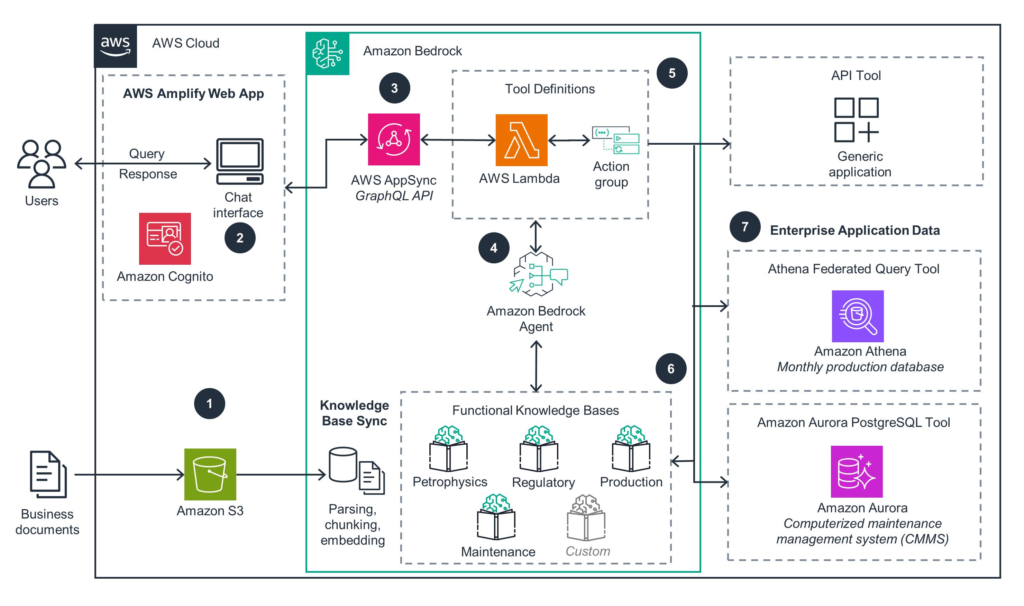
This architecture follows a layered approach that separates concerns, enabling independent scaling, security, and maintenance of each component .
5) Deployment Layers: System Thinking Approach
Instead of focusing solely on code, think in layers. Each layer has distinct responsibilities and AWS services that implement them:
This layered perspective enables modular development, where you can swap components (e.g., changing the frontend from React to Streamlit) without affecting the underlying agent logic .
6) Step-by-Step Deployment Guide
Prerequisites
Before deploying, ensure you have:
- An AWS account with appropriate permissions
- AWS CLI v2.31.13 or later installed and configured (AgentCore support added in January 2025)
- Python 3.10+ installed
- Model access enabled in Bedrock console (e.g., Anthropic Claude Sonnet 4.0 or Claude Haiku 4.5)
- Docker installed (for containerized deployments)
Region Note: Amazon Bedrock AgentCore is available in select AWS regions. Verify availability in your target region before deployment .
Step 1: Set Up AWS CLI with SSO
bash
# Configure a profile with AWS SSO
aws configure sso --profile my-profile

# You'll be prompted for:
# - SSO start URL (your organization's IAM Identity Center portal)
# - SSO region
# - Account ID
# - Role name
# - Default region (e.g., us-east-1)

# Verify your identity
aws sts get-caller-identity --profile my-profile
This command returns your account ID, user ID, and ARN, confirming successful authentication .
Step 2: Create a Python Virtual Environment
bash
# Create virtual environment
python3 -m venv .venv

# Activate it
source .venv/bin/activate  # macOS/Linux
# OR
.venv\Scripts\activate      # Windows

# Deactivate when done
deactivate
Step 3: Install Required Packages
Create a requirements.txt file:
bedrock-agentcore
strands-agents          # For simple agent development
# OR for LangGraph
langchain-aws
langgraph
# OR for CrewAI
crewai
crewai-tools
Install dependencies:
bash
pip install -r requirements.txt
Step 4: Build Your Agent
Create my_agent.py with a basic Strands agent:
python
from bedrock_agentcore import BedrockAgentCoreApp
from strands import Agent

app = BedrockAgentCoreApp()
agent = Agent()

@app.entrypoint
def invoke(payload):
    """Your AI agent function"""
    user_message = payload.get("prompt", "Hello! How can I help you today?")
    result = agent(user_message)
    return {"result": result.message}

if __name__ == "__main__":
    app.run()
For a LangGraph agent with state management :
python
from bedrock_agentcore import BedrockAgentCoreApp
from langchain_aws import ChatBedrock
from langgraph.graph import StateGraph, START, END
from langgraph.graph.message import add_messages
from typing import Annotated, TypedDict

app = BedrockAgentCoreApp()

class State(TypedDict):
    messages: Annotated[list, add_messages]

llm = ChatBedrock(
    model_id="us.anthropic.claude-3-7-sonnet-20250219-v1:0",
    model_kwargs={"temperature": 0.7}
)

def chat_node(state: State):
    response = llm.invoke(state["messages"])
    return {"messages": [response]}

workflow = StateGraph(State)
workflow.add_node("chat", chat_node)
workflow.add_edge(START, "chat")
workflow.add_edge("chat", END)
graph = workflow.compile()

@app.entrypoint
def invoke(payload):
    user_message = payload.get("prompt", "Hello!")
    result = graph.invoke({
        "messages": [{"role": "user", "content": user_message}]
    })
    last_message = result["messages"][-1]
    return {"result": last_message.content}
For a CrewAI multi-agent system :
python
from bedrock_agentcore import BedrockAgentCoreApp
from crewai import Agent, Task, Crew, Process
import os

app = BedrockAgentCoreApp()

os.environ["AWS_DEFAULT_REGION"] = os.environ.get("AWS_REGION", "us-west-2")

researcher = Agent(
    role="Research Assistant",
    goal="Provide helpful and accurate information",
    backstory="You are a knowledgeable research assistant",
    verbose=False,
    llm="bedrock/us.anthropic.claude-3-7-sonnet-20250219-v1:0",
    max_iter=2
)

@app.entrypoint
def invoke(payload):
    user_message = payload.get("prompt", "Hello!")
    task = Task(
        description=user_message,
        agent=researcher,
        expected_output="A helpful and informative response"
    )
    crew = Crew(
        agents=[researcher],
        tasks=[task],
        process=Process.sequential,
        verbose=False
    )
    result = crew.kickoff()
    return {"result": result.raw}
Step 5: Test Locally
bash
# Run the agent
python3 my_agent.py

# In another terminal, send a test request
curl -X POST http://localhost:8080/invocations \
  -H "Content-Type: application/json" \
  -d '{"prompt": "What is the capital of France?"}'
Expected response: {"result": "The capital of France is Paris."}
Step 6: Configure and Deploy with AgentCore
bash
# Configure the agent
agentcore configure --entrypoint my_agent.py

# This creates a configuration file: bedrock_agentcore.yaml

# Deploy to AWS
agentcore deploy

# Test the deployed agent
agentcore invoke '{"prompt": "Tell me a joke"}'
If you get a joke back, your agent is successfully deployed .
Step 7: Invoke Programmatically with Boto3
Create invoke_agent.py:
python
import json
import boto3

agent_arn = "YOUR_AGENT_ARN"  # From deployment output
prompt = "Tell me a joke"

agent_core_client = boto3.client("bedrock-agentcore")

payload = json.dumps({"prompt": prompt}).encode()

response = agent_core_client.invoke_agent_runtime(
    agentRuntimeArn=agent_arn,
    payload=payload
)

content = []
for chunk in response.get("response", []):
    content.append(chunk.decode("utf-8"))
print(json.loads("".join(content)))
Run with:
bash
python invoke_agent.py
Step 8: Clean Up
bash
# Delete the agent runtime when no longer needed
aws bedrock-agentcore delete-agent-runtime --agent-runtime-arn <your_arn>
7) Chart: Complete Deployment Flow
| Step | Component | Action | Output |
|---|---|---|---|
| 1 | User | Sends request via frontend | Input text |
| 2 | Cognito | Validates JWT token | Authentication |
| 3 | API Gateway | Routes to AgentCore | Request payload |
| 4 | AgentCore Runtime | Executes agent logic | Processed request |
| 5 | Bedrock | Invokes LLM (Claude/Nova) | Generated response |
| 6 | Tool Gateway | Executes MCP tools (if needed) | Tool results |
| 7 | Memory | Stores conversation | Context preservation |
| 8 | Response | Returns to user | Final output |
8) Advanced Deployment Patterns
Pattern 1: Serverless AI Agent (Basic)
User → API Gateway → Lambda (Agent Logic) → Bedrock → Response
Best for lightweight applications with simple orchestration needs.
Pattern 2: Full-Stack Production System
Browser → CloudFront → S3 (React App) → Cognito (Auth) → AgentCore Runtime → Bedrock → Response
This architecture, demonstrated in AWS’s full-stack webapp sample, includes:
- React frontend with Cognito authentication
- Direct frontend-to-AgentCore calls with JWT Bearer tokens
- Fully automated CDK deployment
Pattern 3: Multi-Agent Collaboration
User → Supervisor Agent
         ├── Maintenance Agent → S3 (Schedules)
         ├── Alarm Agent → DynamoDB (Alerts)
         └── KPI Agent → S3 (Metrics)
Used in telecom network operations, this pattern enables specialized agents with distinct roles orchestrated by a supervisor .
Pattern 4: Enterprise RAG System with Terraform
User → AgentCore Runtime (LangGraph Agent)
         ├── Knowledge Base Retriever → Bedrock Knowledge Base → S3 Vectors
         └── LLM → Claude Haiku 4.5
This pattern, detailed in Caylent’s RAG tutorial, uses Terraform for infrastructure-as-code deployment .
9) Scaling AI Agents on AWS
Auto-Scaling Strategy
AgentCore Runtime’s serverless architecture provides automatic scaling based on load . Key considerations:
| Component | Scaling Behavior | Configuration |
|---|---|---|
| AgentCore Runtime | Automatically scales with request volume | No configuration needed |
| Bedrock Models | Managed service, scales transparently | Model access required |
| Lambda Functions | Concurrent execution limit | Configure reserved concurrency |
| API Gateway | Automatic scaling | Set throttling limits |
Load Handling Techniques
- Rate Limiting: Configure API Gateway usage plans to prevent abuse
- Queue Systems: Use Amazon SQS for asynchronous processing of long-running tasks
- Request Throttling: Set API Gateway throttling limits per stage
- Caching: Leverage Amazon ElastiCache or AgentCore Memory for frequent queries
Prompt Caching for Cost Optimization
Prompt caching dramatically reduces input token usage by reusing system prompts and stable instruction blocks. Implement with Claude models :
python
from strands.models import BedrockModel, CacheConfig

model = BedrockModel(
    model_id="us.anthropic.claude-sonnet-4-6-v1",
    cache_config=CacheConfig(strategy="auto")
)
10) Security Best Practices
JWT Authentication Pattern
AgentCore Runtime supports built-in Cognito JWT validation :
python
# AgentCore automatically validates JWT tokens
# Configured during deployment with cognito-user-pool-arn
# Frontend includes JWT in Authorization: Bearer <token> header
11) Integration with AI Frameworks
Amazon Bedrock AgentCore integrates seamlessly with popular open-source frameworks :
Framework-Specific Deployment Examples
python
from strands import Agent, tool

@tool
def get_weather(location: str) -> str:
    """Get weather for a location."""
    return f"Weather in {location}: Sunny, 72°F"

agent = Agent(tools=[get_weather])
LangGraph with Conditional Routing :
python
from langgraph.graph import StateGraph, START, END
from langgraph.prebuilt import ToolNode

workflow = StateGraph(AgentState)
workflow.add_node("generate_query", generate_query)
workflow.add_node("retrieve", ToolNode([knowledge_base_retriever]))
workflow.add_node("generate_answer", generate_answer)

workflow.add_edge(START, "generate_query")
workflow.add_conditional_edges(
    "generate_query",
    tools_condition,
    {"tools": "retrieve", END: "generate_answer"}
)
workflow.add_edge("retrieve", "generate_answer")
workflow.add_edge("generate_answer", END)
12) Monitoring and Optimization
Tools
Optimization Tips
- Cache Frequent Responses: Use AgentCore Memory for recurring queries
- Reduce Token Usage: Implement prompt caching, compress conversation history
- Model Selection: Use Claude Haiku 4.5 for simpler tasks, Sonnet for complex reasoning
- Batch Processing: Group multiple requests when possible
- Monitor Costs: Use AWS Cost Explorer with Bedrock-specific filters
13) Cost Optimization Strategy
Bedrock Pricing (as of 2026)
| Model | Input (per 1M tokens) | Output (per 1M tokens) |
|---|---|---|
| Claude Haiku 4.5 | $1.00 | $5.00 |
| Claude Sonnet 4.5 | $3.00 | $15.00 |
| Amazon Nova Lite | $0.80 | $3.20 |
| Amazon Nova Pro | $2.40 | $9.60 |
14) Real-World Use Cases
Use Case 1: AI Customer Support
Challenge: Enterprise needed scalable chatbot with 24/7 availability across multiple regions.
Solution:
- AgentCore Runtime for serverless agent hosting
- Cognito for user authentication
- Claude Haiku 4.5 for cost-efficient responses
- Bedrock Knowledge Base for product documentation
Results:
- Automatic scaling during traffic spikes
- 99.9% uptime with no infrastructure management
- 40% lower cost vs. EC2-based deployment
Use Case 2: Enterprise Automation (Supply Chain)
Challenge: Manual procurement process requiring cross-system coordination.
Solution (from AWS sample architecture) :
- Multi-agent system with Supervisor Agent
- Gateway tools for ERP, inventory, and supplier APIs
- AgentCore Memory for contextual awareness
- Code Interpreter for automated report generation
Results:
- 75% reduction in processing time
- End-to-end auditability with execution traces
- Seamless integration with existing systems
Use Case 3: Telecom Network Operations
Challenge: High MTTR due to fragmented monitoring tools and manual correlation.
Solution (AWS blog implementation) :
- Supervisor Agent orchestrating specialized agents
- Alarm Agent for real-time alerts
- Maintenance Agent for schedule awareness
- KPI Agent for performance anomaly detection
Results:
- 50% reduction in MTTR
- 80% fewer manual escalations
- Single unified interface for operations teams
Use Case 4: AI SaaS Product
Challenge: Launch AI-powered analytics platform with subscription model.
- Full-stack deployment with React frontend
- Cognito for user management and SSO
- AgentCore for isolated, multi-tenant agent execution
- CloudFront for global content delivery
Results:
- Rapid go-to-market (2 weeks from prototype)
- Secure multi-tenancy with JWT isolation
- Pay-per-use cost model matching subscription revenue
15) MHTECHIN Deployment Strategy
At MHTECHIN, we follow a structured, proven methodology for deploying AI agents on AWS Bedrock. Our approach ensures that your AI systems are not just functional, but production-ready from day one.
Our Four-Phase Methodology
┌─────────────────────────────────────────────────────────────────┐
│                       PHASE 1: DESIGN                           │
│  • Assess use cases and requirements                            │
│  • Define multi-agent architecture                              │
│  • Select optimal models and tools                              │
│  • Create infrastructure-as-code templates                      │
└───────────────────────────────┬─────────────────────────────────┘
                                ▼
┌─────────────────────────────────────────────────────────────────┐
│                     PHASE 2: DEVELOPMENT                        │
│  • Build agent logic with Strands/LangGraph/CrewAI              │
│  • Integrate custom tools and APIs                              │
│  • Implement memory and state management                        │
│  • Add validation and error handling                            │
└───────────────────────────────┬─────────────────────────────────┘
                                ▼
┌─────────────────────────────────────────────────────────────────┐
│                     PHASE 3: DEPLOYMENT                         │
│  • Deploy with AgentCore Runtime                                │
│  • Configure Cognito authentication                             │
│  • Set up CloudFront + S3 for frontend                          │
│  • Implement CI/CD pipelines                                    │
└───────────────────────────────┬─────────────────────────────────┘
                                ▼
┌─────────────────────────────────────────────────────────────────┐
│                   PHASE 4: OPTIMIZATION                         │
│  • Monitor with CloudWatch and X-Ray                            │
│  • Analyze token usage and costs                                │
│  • Implement prompt caching                                     │
│  • Continuous improvement cycles                                │
└─────────────────────────────────────────────────────────────────┘
Technology Stack Integration
| Layer | MHTECHIN Recommended Stack |
|---|---|
| Orchestration | Strands Agents (simplicity) / LangGraph (complex workflows) |
| Multi-Agent | CrewAI for role-based teams, AutoGen for conversations |
| Models | Claude Sonnet (reasoning), Claude Haiku (cost-efficiency) |
| Frontend | React with Vite, Cognito integration |
| IaC | Terraform / AWS CDK |
| CI/CD | GitHub Actions + CodeBuild |
| Observability | CloudWatch + X-Ray + AgentCore Observability |
Why Partner with MHTECHIN?
- AWS Partnership: Deep relationships with AWS engineering teams
- Proven Methodology: Dozens of successful Bedrock deployments
- End-to-End Expertise: From agent design to production monitoring
- Cost Optimization: Proven strategies to reduce Bedrock spend
- Security First: Built-in compliance and governance
[Ready to deploy your AI agents on AWS Bedrock? Contact MHTECHIN today for a free architecture consultation.]
16) Future of AI Deployment on Cloud
The trajectory of AI deployment on cloud platforms is accelerating toward:
Fully Autonomous AI Systems
AgentCore’s modular architecture enables agents that can:
- Self-orchestrate across multiple tools and services
- Maintain persistent memory across sessions
- Learn and adapt from feedback
Global Scalability
With AWS’s global infrastructure, AI agents can:
- Deploy in multiple regions for latency optimization
- Scale to millions of concurrent users
- Maintain consistent performance worldwide
Multi-Model Orchestration
Bedrock’s unified API enables:
- Dynamic model selection based on task complexity
- Cost-performance optimization across models
- Fallback strategies for model availability
Enterprise AI Adoption
AWS Bedrock is positioned to lead enterprise AI adoption through:
- Built-in security and compliance
- Integration with existing enterprise systems
- Predictable, usage-based pricing
17) Conclusion
Amazon Bedrock provides a powerful, production-ready platform for deploying AI agents at scale. With the introduction of AgentCore, AWS has eliminated the infrastructure complexity that has historically slowed enterprise AI adoption, enabling developers to focus on what matters: building intelligent agents that solve real business problems.
Key Takeaways
- AgentCore Runtime provides serverless, auto-scaling agent execution with a pay-per-use cost model
- Built-in authentication with Cognito JWT validation simplifies security
- Framework flexibility supports Strands, LangGraph, CrewAI, and custom implementations
- Multi-agent collaboration enables specialized agents with supervisor orchestration
- Production observability comes built-in with CloudWatch and X-Ray
The Path Forward
By combining:
- AI frameworks (Strands, LangGraph, CrewAI, AutoGen)
- Cloud services (Lambda, API Gateway, Cognito, S3)
- Managed models (Bedrock with Claude, Nova, Llama)
Organizations can build scalable, secure, and production-ready AI applications that deliver measurable business value.
MHTECHIN brings the expertise to navigate this complex landscape, helping enterprises deploy AI agents on AWS Bedrock with confidence. Whether you’re starting your first pilot or scaling to enterprise-wide deployment, our proven methodology and deep AWS partnership ensure your success.
[Start your AI agent deployment journey with MHTECHIN today. Contact us to discuss your requirements and receive a customized deployment blueprint.]
18) FAQ (SEO Optimized)
Q1: What is AWS Bedrock?
A: Amazon Bedrock is a fully managed service that provides access to leading foundation models (Anthropic Claude, Amazon Nova, Meta Llama) through a unified API, along with enterprise-grade security, monitoring, and governance capabilities. Bedrock AgentCore adds modular services for building and deploying AI agents at scale .
Q2: Can I deploy AI agents on AWS?
A: Yes. Amazon Bedrock AgentCore provides serverless runtime environments specifically designed for hosting AI agents. You can deploy agents built with Strands, LangGraph, CrewAI, or custom frameworks with a single command .
Q3: Is AWS Bedrock serverless?
A: Yes. Bedrock and AgentCore are fully managed, serverless services. You don’t need to provision or manage any infrastructure. Resources scale automatically based on demand, and you pay only for active compute time .
Q4: Which models are available in Bedrock?
A: Amazon Bedrock provides access to models from multiple providers:
- Anthropic: Claude Haiku 4.5, Claude Sonnet 4.5, Claude Opus
- Amazon: Nova Lite, Nova Pro, Titan Text, Titan Multimodal
- Meta: Llama 3.2, Llama 3.3
- Others: Cohere, Stability AI
Q5: How do I secure AI agents on AWS?
A: Bedrock provides multiple security layers:
- Authentication: Cognito JWT validation with AgentCore built-in support
- Authorization: IAM roles with least privilege principles
- Encryption: KMS for data at rest, TLS for data in transit
- Monitoring: CloudTrail, CloudWatch, and X-Ray for auditability
Q6: How do I deploy a LangGraph agent on AWS?
A: Use the AgentCore CLI:
bash
pip install langchain-aws langgraph
# Create your langgraph_agent.py with @app.entrypoint
agentcore configure --entrypoint langgraph_agent.py
agentcore deploy
agentcore invoke '{"prompt": "Your question"}' [citation:3]
Q7: Can Bedrock agents use custom tools?
A: Yes. Agents can invoke tools through:
- AgentCore Gateway: MCP-based tool integration with SigV4 authentication
- Lambda functions: Custom business logic
- Third-party APIs: Via HTTP calls with proper authentication
Q8: How does Bedrock handle long-term memory?
A: AgentCore Memory provides both short-term session memory and long-term summarized memory. Long conversations are compacted using context summarization strategies to retain key information while controlling token growth .
Q9: What are the costs for deploying AI agents on Bedrock?
A: Costs include:
- Model invocation: Per-token pricing (varies by model)
- AgentCore Runtime: Pay for active compute time only (idle time not billed)
- Supporting services: Cognito, API Gateway, S3 (standard AWS pricing)
- No minimum commitments: Pay-as-you-go model
Q10: How can MHTECHIN help with AWS Bedrock deployment?
A: MHTECHIN provides end-to-end services including:
- Architecture design and model selection
- Agent development with your preferred frameworks
- Infrastructure-as-code (Terraform/CDK) deployment
- Security and compliance implementation
- Cost optimization and monitoring setup
- Ongoing support and optimization
[Contact MHTECHIN to accelerate your AWS Bedrock deployment.]

Leave a Reply