Introduction
Your phone unlocks when it sees your face. Your car warns you when you drift out of your lane. Your photos are automatically organized by who is in them. Your doctor’s office uses AI to analyze medical scans for early signs of disease. All of these are powered by computer vision—the field of artificial intelligence that enables machines to see, interpret, and understand visual information.
Computer vision is one of the most visible and transformative AI technologies. Unlike language models that process text, computer vision systems work with images and video—the world as we experience it. In 2026, computer vision is embedded in smartphones, cars, hospitals, factories, farms, and security systems. It is often invisible, working in the background to make technology more capable and responsive.
This article explains what computer vision is, how it works in simple terms, and—most importantly—how it shows up in applications you encounter every day. Whether you are a business leader evaluating visual AI, a professional curious about how systems “see,” or someone building foundational AI literacy, this guide will help you understand the technology behind the images.
For a foundational understanding of how AI systems learn and process information, you may find our guide on Neural Networks Explained for Non-Technical Professionals helpful as a starting point.
Throughout, we will highlight how MHTECHIN helps organizations leverage computer vision—from quality inspection to medical imaging—to deliver measurable business value.
Section 1: What Is Computer Vision?
1.1 A Simple Definition
Computer vision is the field of artificial intelligence that enables machines to interpret and understand visual information from the world—images, videos, and real-time camera feeds.
The goal is to give machines the ability to “see” in a way that approximates human vision, but with the capacity to operate at superhuman scale and speed. A computer vision system can analyze millions of images in seconds, detect patterns invisible to the human eye, and operate continuously without fatigue.
1.2 The Challenge: What Makes Vision Hard for Computers
To a computer, an image is just a grid of numbers representing pixel colors. A standard photo might be 12 million pixels, each with three numbers (red, green, blue values). There is no inherent understanding of objects, faces, or scenes.
For humans, recognizing a cat is effortless. We do it in milliseconds, without conscious thought. For a computer, this is extraordinarily difficult. How do you write rules for “cat-ness”? What are the rules for distinguishing a cat from a dog in all lighting conditions, angles, and backgrounds?
Computer vision solves this by learning from examples. Instead of writing rules, systems are trained on millions of labeled images, learning to recognize patterns that distinguish objects, faces, and scenes.
1.3 What Computer Vision Does: The Core Capabilities
| Capability | What It Means | Everyday Example |
|---|---|---|
| Image Classification | Identifies what is in an image | Google Photos recognizing “dog” or “beach” |
| Object Detection | Finds and locates multiple objects | Self-driving cars detecting pedestrians, vehicles, signs |
| Facial Recognition | Identifies or verifies a person’s identity | Unlocking your phone with your face |
| Image Segmentation | Classifies every pixel in an image | Medical imaging outlining a tumor |
| Optical Character Recognition (OCR) | Extracts text from images | Scanning a receipt to capture total amount |
| Pose Estimation | Detects human body positions | Fitness apps tracking exercise form |
| Activity Recognition | Understands actions in video | Security cameras detecting suspicious behavior |
Section 2: How Computer Vision Works—The Simple Version
2.1 From Pixels to Understanding
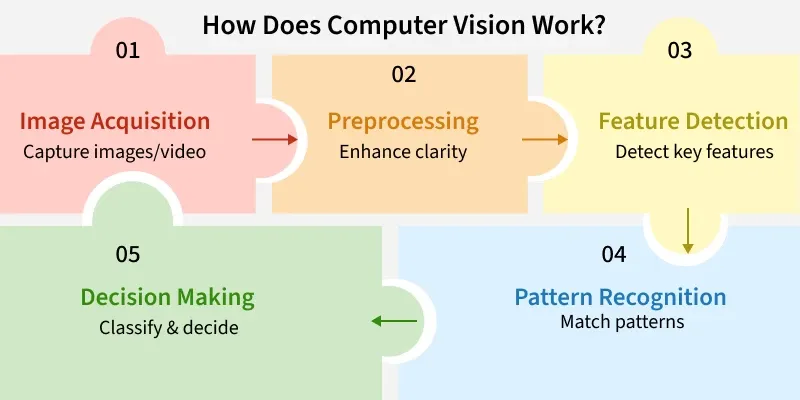
Computer vision systems transform raw pixels into meaningful understanding through a series of steps:
Step 1: Input. The system receives an image—from a camera, a medical scanner, a video feed.
Step 2: Preprocessing. The image may be resized, normalized, or enhanced to improve processing.
Step 3: Feature Extraction. The system identifies patterns—edges, corners, textures, colors. In traditional computer vision, these features were hand-coded by engineers. In modern deep learning, the system learns which features matter.
Step 4: Interpretation. The features are analyzed to make a decision—this is a cat, that is a face, this is a stop sign.
Step 5: Output. The system produces a result: a label, a bounding box, a segmentation mask, or an action.
2.2 Convolutional Neural Networks (CNNs)
The breakthrough that made modern computer vision possible is the Convolutional Neural Network (CNN) . CNNs are designed specifically for grid-like data—images and video.
Instead of connecting every neuron to every pixel (which would be impossibly large), CNNs slide small filters across the image, detecting local patterns. Early layers detect simple features—edges, corners, blobs of color. Deeper layers combine these into more complex patterns—eyes, wheels, letters. Even deeper layers assemble these into complete objects—faces, cars, words.
This hierarchical learning is why CNNs are so effective. They learn to see the world the way humans do: from simple patterns to complex concepts.
2.3 How CNNs Learn
Like all neural networks, CNNs learn through training. The system is shown millions of labeled images. For each image, it makes a prediction, calculates the error, and adjusts its internal parameters (weights) to reduce the error. This process repeats until the network can accurately classify images it has never seen before.
The learning is automatic. The network figures out which features matter—not a human engineer. This is why deep learning has transformed computer vision: it works for problems where human engineers could never write explicit rules.
Section 3: Everyday Computer Vision Applications
3.1 Facial Recognition on Smartphones
When you unlock your phone with your face, a CNN processes the camera image. The network has been trained on millions of face images, learning to extract unique features—distances between eyes, shape of the jawline, contours of the nose.
The system creates a mathematical representation (an embedding) of your face and compares it to the stored embedding. If they match within a threshold, the phone unlocks. All of this happens in milliseconds, multiple times per day, on a device in your pocket.
3.2 Self-Driving Cars
A self-driving car uses multiple computer vision systems to understand its environment. Cameras capture the world around the vehicle. CNNs detect:
- Other vehicles—cars, trucks, motorcycles
- Pedestrians—their position, direction, and movement
- Lane markings—where the road boundaries are
- Traffic signs and signals—stop signs, speed limits, traffic lights
- Obstacles—construction cones, debris, parked cars
These detections happen dozens of times per second. The car’s planning system uses this information to decide when to accelerate, brake, or change lanes.
3.3 Medical Imaging
Hospitals use computer vision to analyze X-rays, CT scans, MRIs, and pathology slides. Systems are trained on thousands of images labeled by expert radiologists, learning to spot subtle anomalies that might indicate cancer, fractures, or other conditions.
In many studies, these systems match or exceed human radiologists for specific screening tasks. They do not replace doctors but serve as a second pair of eyes—flagging areas that deserve closer attention and prioritizing urgent cases.
3.4 Smartphone Cameras
When you take a photo with a modern smartphone, computer vision is working in the background. The camera detects faces to set focus and exposure. It recognizes scenes—sunset, portrait, food—to adjust color and lighting. It may even identify the subject—dog, cat, mountain—to suggest tags for organization.
3.5 Photo Organization
Google Photos, Apple Photos, and similar services use computer vision to automatically organize your images. They recognize faces, grouping photos of the same person. They identify objects and scenes—beach, birthday, wedding—allowing you to search by content. They can even create automatic albums and videos based on detected events.
3.6 Retail Checkout
Amazon Go stores use computer vision to enable checkout-free shopping. Cameras track what items customers pick up and add them to a virtual cart. When customers leave, they are charged automatically—no checkout line, no scanning. The system uses CNNs to identify products and track their movement.
3.7 Quality Inspection in Manufacturing
Factories use computer vision to inspect products on assembly lines. Cameras capture images of each item, and CNNs detect defects—scratches, misalignments, missing components—with superhuman speed and consistency. This reduces waste, improves quality, and catches issues that human inspectors might miss.
3.8 Agriculture
Farmers use drones and cameras to monitor crops. Computer vision systems analyze images to detect:
- Plant health—identifying disease or nutrient deficiencies before they are visible to the naked eye
- Pest infestations—spotting early signs of insect damage
- Weed pressure—enabling targeted herbicide application
- Yield prediction—estimating harvest volume from aerial images
These systems help farmers reduce chemical use, improve yields, and make more informed decisions.
3.9 Security and Surveillance
Security cameras increasingly use computer vision to detect unusual activity. Systems can:
- Recognize faces against watchlists
- Detect unattended bags in airports
- Identify unauthorized entry to restricted areas
- Alert operators to suspicious behavior
These systems raise important privacy and ethical questions, but they are widely deployed in commercial and public spaces.
3.10 Augmented Reality (AR)
When you use Snapchat filters that place virtual objects on your face, computer vision is at work. The system detects your face, identifies key points (eyes, nose, mouth), and maps virtual content to your movements in real time. The same technology powers AR navigation in cars, furniture placement apps (like IKEA Place), and gaming (Pokémon Go).
3.11 Optical Character Recognition (OCR)
When you scan a receipt and your expense app automatically extracts the total amount, that is OCR—a form of computer vision that recognizes text in images. OCR systems detect characters, group them into words, and convert images to machine-readable text. They are used for:
- Digitizing printed documents
- Automating form processing
- Reading license plates
- Extracting information from business cards
3.12 Accessibility Tools
Computer vision powers accessibility tools that help people with visual impairments. Apps can:
- Read text aloud from signs, menus, and documents
- Describe scenes and objects
- Identify currency denominations
- Detect obstacles in navigation
Section 4: How Computer Vision Is Used Across Industries
4.1 Healthcare
| Application | How It Helps | Example |
|---|---|---|
| Radiology | Detects abnormalities in X-rays, CT, MRI | Cancer screening, fracture detection |
| Pathology | Analyzes tissue samples for disease | Cancer diagnosis from biopsy slides |
| Surgery | Guides surgical instruments | Robotic surgery systems |
| Dermatology | Analyzes skin lesions | Melanoma detection from smartphone photos |
4.2 Automotive
| Application | How It Helps | Example |
|---|---|---|
| Autonomous driving | Detects vehicles, pedestrians, signs | Waymo, Tesla Autopilot |
| Driver monitoring | Detects drowsiness and distraction | In-cabin cameras alerting drivers |
| Parking assistance | Identifies parking spaces | Rearview cameras with guidelines |
| Quality control | Inspects paint, assembly, components | Factory inspection systems |
4.3 Retail
| Application | How It Helps | Example |
|---|---|---|
| Cashierless checkout | Tracks items customers take | Amazon Go |
| Inventory management | Detects out-of-stock shelves | Retail robots scanning aisles |
| Loss prevention | Detects suspicious behavior | Security cameras with AI |
| Virtual try-on | Maps products to customer images | Virtual eyewear, makeup try-on |
4.4 Manufacturing
| Application | How It Helps | Example |
|---|---|---|
| Defect detection | Identifies product flaws | Assembly line inspection |
| Robotics guidance | Guides robotic arms | Pick-and-place operations |
| Predictive maintenance | Detects equipment anomalies | Thermal camera monitoring |
| Safety monitoring | Detects unsafe worker behavior | Hard hat, vest compliance |
4.5 Agriculture
| Application | How It Helps | Example |
|---|---|---|
| Crop health monitoring | Detects disease, nutrient deficiencies | Drone-based imaging |
| Weed detection | Enables targeted herbicide application | Precision spraying systems |
| Yield estimation | Predicts harvest volume | Aerial imaging analysis |
| Livestock monitoring | Tracks animal health, behavior | Camera systems in barns |
4.6 Security
| Application | How It Helps | Example |
|---|---|---|
| Facial recognition | Identifies individuals | Access control systems |
| Anomaly detection | Flags unusual behavior | Airport surveillance |
| Perimeter monitoring | Detects intrusions | Fence-line cameras |
| License plate recognition | Tracks vehicles | Tolling, parking enforcement |
Section 5: The Technology Behind Computer Vision
5.1 Key Computer Vision Tasks
| Task | What It Does | Example |
|---|---|---|
| Image Classification | Assigns a single label to an image | “This is a cat” |
| Object Detection | Finds and labels multiple objects | “Dog at [x,y], ball at [x,y]” |
| Semantic Segmentation | Labels every pixel by class | Every pixel marked “road,” “car,” “sky” |
| Instance Segmentation | Distinguishes individual objects | Each car separately outlined |
| Keypoint Detection | Identifies specific points | Face landmarks: eyes, nose, mouth corners |
| Optical Flow | Tracks movement between frames | How objects move across video |
5.2 The Role of Training Data
Computer vision systems are only as good as their training data. To recognize cats, a system needs millions of cat images—in different breeds, poses, lighting conditions, and backgrounds. To detect cancer, it needs thousands of medical images labeled by expert radiologists.
The quality and diversity of training data directly impact performance. Biased data leads to biased systems. A facial recognition system trained primarily on light-skinned faces will perform poorly on darker skin tones. Responsible computer vision requires diverse, representative datasets.
5.3 Real-Time vs. Batch Processing
Computer vision can be deployed in two modes:
Real-time processing. The system analyzes video frames as they arrive, making decisions in milliseconds. This is required for self-driving cars, security surveillance, and interactive applications.
Batch processing. The system analyzes images or videos after they are captured, without time constraints. This is used for photo organization, medical imaging, and quality inspection.
Section 6: How MHTECHIN Helps Organizations Deploy Computer Vision
Computer vision is powerful, but successful deployment requires expertise in data, models, infrastructure, and integration. MHTECHIN helps organizations across industries harness visual AI.
6.1 For Manufacturing and Quality Inspection
MHTECHIN helps manufacturers deploy computer vision for:
- Defect detection. Identify scratches, misalignments, missing components with superhuman consistency
- Assembly verification. Confirm that each product is correctly assembled
- Safety monitoring. Detect workers without required safety gear
- Predictive maintenance. Identify equipment anomalies before failure
6.2 For Healthcare
MHTECHIN works with healthcare organizations to deploy:
- Medical image analysis. Assist radiologists in detecting abnormalities
- Surgical guidance. Support robotic and minimally invasive procedures
- Patient monitoring. Detect falls or distress in hospital settings
- Compliance verification. Confirm proper equipment sterilization, room readiness
6.3 For Retail
MHTECHIN helps retailers implement:
- Inventory management. Detect out-of-stock shelves automatically
- Loss prevention. Identify suspicious behavior patterns
- Customer analytics. Understand traffic patterns, dwell times, demographics
- Checkout automation. Enable frictionless payment experiences
6.4 The MHTECHIN Approach
MHTECHIN’s computer vision practice combines:
- Use case identification. What problem are you solving? What outcome matters?
- Data readiness. Do you have labeled data? What quality? What diversity?
- Model selection. Pre-trained models vs. custom training? Which architecture?
- Infrastructure. Edge deployment (cameras on-site) or cloud processing?
- Integration. How does vision output integrate with existing systems?
- Monitoring. How do you track performance and detect drift?
For organizations exploring computer vision, MHTECHIN provides the expertise to move from concept to production—delivering measurable value without unnecessary complexity.
Section 7: Frequently Asked Questions About Computer Vision
7.1 Q: What is computer vision in simple terms?
A: Computer vision is the technology that enables machines to see, interpret, and understand images and video. It powers everything from facial recognition on your phone to self-driving cars to medical imaging AI that helps doctors detect diseases.
7.2 Q: How does computer vision differ from human vision?
A: Human vision is incredibly sophisticated—we understand context, recognize objects instantly, and interpret meaning effortlessly. Computer vision, by contrast, is pattern matching at massive scale. It does not “understand” what it sees in the human sense. However, computer vision can operate at superhuman speed and scale, analyzing millions of images in seconds.
7.3 Q: What are everyday examples of computer vision?
A: Common examples include: unlocking your phone with facial recognition, self-driving cars detecting pedestrians, Google Photos organizing images by person or scene, medical AI analyzing X-rays, quality inspection in factories, and Snapchat filters tracking your face.
7.4 Q: How does facial recognition work?
A: A convolutional neural network (CNN) is trained on millions of face images. It learns to extract unique features—distances between eyes, shape of the jawline, contours of the nose. When a new face appears, the system creates a mathematical representation (embedding) and compares it to stored embeddings to find a match.
7.5 Q: Can computer vision be fooled?
A: Yes. Small, carefully designed modifications to an image—invisible to humans—can cause computer vision systems to misclassify. These are called adversarial examples. Additionally, systems can be biased by training data—a face recognition system trained primarily on light-skinned faces will perform poorly on darker skin tones.
7.6 Q: How accurate is computer vision?
A: For specific, well-defined tasks with good training data, computer vision can exceed human accuracy—for example, detecting certain cancers in medical images. For general, open-ended tasks, it still lags behind humans. Accuracy depends heavily on the quality of training data and the similarity between training and real-world conditions.
7.7 Q: What hardware does computer vision need?
A: Training computer vision models requires specialized hardware—GPUs or TPUs—for the massive computations involved. Running a trained model (inference) can be done on specialized chips, on cloud servers, or increasingly on edge devices (like smartphones and cameras) with dedicated AI processors.
7.8 Q: How much data is needed to train computer vision?
A: It depends on the task. A simple classifier might need thousands of examples per category. A robust facial recognition system may need millions of face images. Medical imaging AI requires thousands of images labeled by experts. More complex tasks and more variability require more data.
7.9 Q: What is the difference between object detection and image segmentation?
A: Object detection draws bounding boxes around objects—telling you where a car is in an image. Image segmentation labels every pixel—telling you exactly which pixels belong to the car, which to the road, which to the sky. Segmentation provides more detail but requires more computation.
7.10 Q: How can my business start using computer vision?
A: Start by identifying a specific use case—quality inspection, inventory tracking, safety monitoring. Assess your data: do you have labeled images? Consider whether pre-trained models (available from cloud providers) meet your needs, or whether you need custom training. MHTECHIN can help you navigate these decisions and deploy computer vision solutions that deliver measurable ROI.
Section 8: Conclusion—Seeing Like a Machine
Computer vision has transformed how machines interact with the visual world. In 2026, it is no longer a research curiosity—it is a production technology embedded in smartphones, cars, hospitals, factories, and farms. It unlocks faces, diagnoses diseases, inspects products, and guides autonomous vehicles.
But computer vision is not human vision. It does not “understand” what it sees. It excels at pattern recognition at scale—detecting subtle anomalies in medical images, inspecting millions of products, tracking objects across video feeds. It is a tool, not a mind.
For organizations, computer vision represents a massive opportunity. It automates tasks that were previously impossible to automate, improves quality and consistency, and unlocks insights from visual data. The barrier to entry has fallen dramatically, with pre-trained models and cloud APIs making sophisticated vision accessible.
The key is to start with a clear use case, understand your data, and match the technology to the problem. Whether you are inspecting products, monitoring crops, or analyzing medical images, computer vision can deliver real business value.
Ready to help your organization see what’s possible? Explore MHTECHIN’s computer vision solutions and advisory services at www.mhtechin.com. From strategy through deployment, our team helps you turn visual data into business advantage.
This guide is brought to you by MHTECHIN—helping organizations understand and deploy computer vision for real-world impact. For personalized guidance on vision AI strategy or implementation, reach out to the MHTECHIN team today.

Leave a Reply