1) Opening Scenario: From Idea to Agent
Imagine you’re tasked with building an internal AI assistant for a mid-sized enterprise. The requirements are clear but demanding:
- Answer employee questions about HR policies, IT procedures, and project documentation
- Retrieve company documents from SharePoint, internal wikis, and knowledge bases
- Automate workflows like expense approvals, meeting scheduling, and ticket creation
- Integrate with enterprise tools including Microsoft 365, Teams, and existing business applications
Traditionally, this would require stitching together multiple services: a vector database for retrieval, an LLM for reasoning, API integrations for tools, and a deployment infrastructure. Months of work, complex maintenance, and ongoing operational overhead.
Instead of this fragmented approach, you turn to Azure AI Studio, Microsoft’s unified platform for building production AI applications. Within weeks, you have a working agent—deployed, monitored, and delivering value to employees across the organization.
At MHTECHIN , we specialize in exactly this transformation. This guide follows a scenario-based format, showing how Azure AI Studio enables you to build agentic applications—systems that can reason, act, and integrate deeply within enterprise environments.
2) What Are Agentic Applications?
Before diving into Azure AI Studio, let’s clarify what makes an application “agentic.”
Agentic applications are AI systems that go beyond simple question-answering. They:
| Characteristic | Description | Example |
|---|---|---|
| Make Decisions | Choose between multiple paths based on context | “Should I escalate this ticket or resolve it automatically?” |
| Use Tools | Call external APIs, execute code, or trigger workflows | Retrieve customer data from CRM, create calendar event |
| Maintain Context | Remember conversation history and user preferences | “You asked about this yesterday—here’s the update” |
| Execute Autonomously | Complete multi-step tasks without human intervention | Process an expense claim end-to-end |
| Learn and Adapt | Improve based on feedback and usage patterns | Get better at routing questions over time |
Unlike simple chatbots that produce one-off responses, agentic applications behave like digital workers—they have goals, take actions, and deliver outcomes.
3) Azure AI Studio: Product Perspective
Azure AI Studio is not just a tool—it’s a complete development environment for AI systems, designed specifically for enterprise needs. Think of it as the bridge between powerful AI models and your business operations.
What Azure AI Studio Provides
| Capability | What It Means for Your Agent |
|---|---|
| Model Access | One interface to OpenAI GPT-4, GPT-4o, Microsoft’s Phi models, and open-source options |
| Prompt Flow | Visual workflow designer for building multi-step agent logic—no complex code required |
| Data Integration (RAG) | Connect to SharePoint, Azure Blob Storage, SQL databases, and more for grounded responses |
| Tool Integration | Agents can call APIs, Azure Functions, Logic Apps, and business systems |
| Deployment Pipelines | One-click deployment to APIs, web apps, or Teams integration |
| Monitoring & Governance | Built-in logging, content safety, compliance tools, and cost tracking |
The Azure Advantage
What makes Azure AI Studio particularly powerful for enterprises is its native integration with the Microsoft ecosystem:
- Microsoft 365: Your agent can read emails, schedule Teams meetings, update SharePoint
- Azure Services: Seamless connections to Azure Functions, Logic Apps, SQL Database, and Blob Storage
- Security: Enterprise-grade identity management via Entra ID (formerly Azure AD)
- Compliance: Built-in tools for responsible AI, content filtering, and regulatory compliance
For organizations already invested in Microsoft, Azure AI Studio represents the natural, frictionless path to AI agent development.
4) Visualizing the System: End-to-End Architecture
Complete Agentic Application Flow
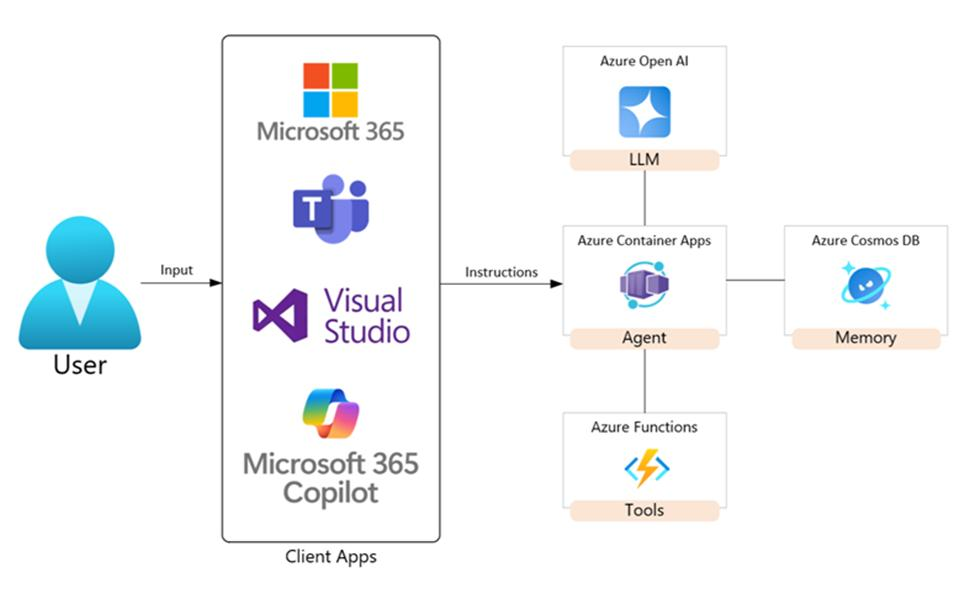
Flow Breakdown
| Step | What Happens | Azure Component |
|---|---|---|
| 1. User Interaction | Employee asks a question in Teams or web app | Teams SDK / React App |
| 2. Authentication | Identity verified via Entra ID | Entra ID (Azure AD) |
| 3. Intent Processing | Agent analyzes the request | Prompt Flow (LLM) |
| 4. Data Retrieval (RAG) | If needed, agent searches company knowledge | Azure AI Search + Index |
| 5. Tool Execution | Agent calls APIs for actions (create ticket, etc.) | Azure Functions / Logic Apps |
| 6. Response Generation | Agent synthesizes results into final answer | Azure OpenAI (GPT-4) |
| 7. Monitoring | All activity logged for audit and improvement | Azure Monitor / Application Insights |
5) Core Modules: An Azure View
5.1 Model Layer – Your AI Engine
Azure AI Studio provides access to a wide range of models through a unified interface:
| Model Family | Models Available | Best For |
|---|---|---|
| Azure OpenAI | GPT-4o, GPT-4, GPT-3.5-Turbo | General reasoning, conversation, code |
| Microsoft Models | Phi-3 (small, efficient), Florence (vision) | Cost-sensitive applications, multi-modal |
| Embedding Models | text-embedding-ada-002, custom embeddings | RAG, semantic search |
| Fine-Tuned Models | Your custom-trained models | Specialized domains, proprietary data |
How It Works: You select models via Azure AI Studio’s interface. The platform handles API keys, scaling, and versioning. Your agent can even use different models for different tasks—a fast, cheap model for simple routing, and a powerful model for complex reasoning.
5.2 Prompt Flow – Visual Agent Orchestration
Prompt Flow is Azure AI Studio’s signature feature—a visual workflow designer that lets you build multi-step agent logic without writing complex orchestration code.
What Prompt Flow Lets You Do:
- Chain prompts together: One step generates a search query, the next retrieves documents, the next synthesizes an answer
- Add conditional logic: “If the user is asking about HR, use HR knowledge base; if IT, use IT docs”
- Incorporate tools: Add nodes that call Azure Functions or external APIs
- Test interactively: Run sample inputs and see exactly how data flows through each step
- Version control: Track changes to your agent logic over time
Why This Matters: Traditional agent development requires writing complex orchestration code. With Prompt Flow, you can see your agent’s logic visually, test each component separately, and iterate rapidly.
5.3 Data Integration (RAG) – Grounding Your Agent
Retrieval-Augmented Generation (RAG) is built directly into Azure AI Studio. Your agent can retrieve information from:
| Data Source | How to Connect | Use Case |
|---|---|---|
| SharePoint | Azure AI Search index | Company policies, team documentation |
| Azure Blob Storage | Direct connection | PDFs, images, archived documents |
| Azure SQL / Cosmos DB | Structured data connector | Customer records, transaction data |
| Public Websites | Crawler-based indexing | Industry standards, public documentation |
| Microsoft 365 | Graph API | Emails, calendar events, Teams messages |
How RAG Works in Azure AI Studio:
- You connect your data sources to Azure AI Search
- Azure AI Search automatically chunks documents and creates embeddings
- When a user asks a question, the agent sends a query to Azure AI Search
- Relevant documents are retrieved and added to the LLM prompt as context
- The LLM generates a response grounded in your actual data
5.4 Tool Integration – Making Your Agent Act
An agent isn’t just a knowledge base—it should be able to do things. Azure AI Studio agents can invoke tools:
| Tool Type | How It Works | Example |
|---|---|---|
| Azure Functions | Serverless code executed on demand | Calculate complex metrics, transform data |
| Logic Apps | Low-code workflow automation | Process expense claims, approval chains |
| APIs | HTTP calls to external services | Check inventory, create Jira ticket |
| Microsoft Graph | Native Microsoft 365 integration | Schedule Teams meeting, send email |
Tool Definition Pattern: You define each tool with:
- Name: What the tool is called
- Description: When the agent should use it
- Parameters: What inputs the tool needs
- Endpoint: Where to call (Azure Function URL, etc.)
The agent decides when to invoke a tool based on the user’s request and the tool descriptions.
5.5 Deployment – Taking Your Agent Live
Once your agent is built and tested, Azure AI Studio makes deployment straightforward:
| Deployment Target | How to Deploy | When to Use |
|---|---|---|
| REST API | One-click deployment to Azure Container Apps | Programmatic access, backend integration |
| Azure Web App | Deploy as a web application | Full-featured web interface |
| Teams App | Package as Teams app | Internal employee assistants |
| Copilot Integration | Connect to Microsoft 365 Copilot | Enterprise-wide AI assistant |
All deployments include built-in:
- Authentication via Entra ID
- Rate limiting to control costs
- Monitoring via Application Insights
- Auto-scaling based on traffic
6) Lifecycle of an Agentic Application
Building an agent is not a one-time event—it’s an ongoing lifecycle. Azure AI Studio supports every phase:
| Phase | Activities | Azure Tools | What You Get |
|---|---|---|---|
| Design | Define agent persona, goals, success metrics | Prompt Flow, Model Catalog | Clear agent specifications |
| Build | Create prompt flows, connect data, add tools | Prompt Flow, Azure AI Search, Functions | Functional agent prototype |
| Test | Run test queries, validate responses, iterate | Prompt Flow playground, evaluation tools | Reliable agent behavior |
| Deploy | Package and publish to target channels | Deployment endpoints, Container Apps | Production-ready service |
| Monitor | Track usage, latency, costs, user feedback | Application Insights, Azure Monitor | Optimization insights |
| Improve | Update prompts, refresh data, add capabilities | Continuous deployment pipeline | Evolving agent value |
7) Hands-On Workflow: Building Your First Agent
Let’s walk through building a practical example: an employee support agent for a company using Microsoft 365.
Step 1: Set Up Azure AI Studio
What You Need:
- Azure subscription (free trial available)
- Access to Azure OpenAI (request approval if needed)
- Azure AI Search service (for RAG)
Key Actions:
- Navigate to Azure AI Studio
- Create a new hub (organizes your projects)
- Set up connections to Azure OpenAI and AI Search
- Configure Entra ID for authentication
Why This Matters: Proper setup ensures your agent has the right permissions and connects to the right services from day one.
Step 2: Create a Project
Inside Azure AI Studio:
- Click “New Project”
- Give it a name (e.g., “MHTECHIN-Employee-Support”)
- Select your hub
- Choose a primary model (GPT-4o for complex reasoning, or GPT-3.5-Turbo for cost efficiency)
Define Your Agent:
| Field | Example Value |
|---|---|
| Name | Employee Support Assistant |
| Description | Helps employees with HR policies, IT issues, and company information |
| Instructions | You are a helpful assistant for employees. Answer questions about HR policies, IT procedures, and company documents. If unsure, suggest contacting the appropriate department. Be concise and professional. |
| Goals | Answer employee questions accurately, reduce support tickets, provide consistent information |
Step 3: Build a Prompt Flow
This is where you design your agent’s logic visually.
A Simple Prompt Flow Structure:
[Input] User Question
    ↓
[LLM Node] Intent Classification
    ↓
[Condition] Is this HR-related?
    ├─ YES → [Search Node] Search HR Knowledge Base → [LLM Node] Generate HR Response
    └─ NO  → [Search Node] Search General Knowledge → [LLM Node] Generate General Response
    ↓
[Output] Final Answer
What Each Node Does:
| Node Type | Purpose | Example Configuration |
|---|---|---|
| Input | Receives user query | Variable: {user_query} |
| LLM Node | Uses language model for reasoning | Prompt: “Classify this question as HR, IT, or General: {user_query}” |
| Condition | Branches based on logic | If classification = “HR”, go to HR path |
| Search Node | Queries knowledge base | Query Azure AI Search with {search_term} |
| Output | Returns final response | Variable: {final_answer} |
Testing in Prompt Flow:
You can test each node individually or run end-to-end:
- Enter a test query like “What’s our parental leave policy?”
- Watch the flow execute step by step
- See what documents were retrieved
- Inspect the final response
Step 4: Add Data (RAG)
Connect your company knowledge:
Data Sources to Connect:
- SharePoint: HR policies, IT documentation, project wikis
- Azure Blob Storage: Archived documents, PDF manuals
- Public URLs: Company public website
Process:
- Create an Azure AI Search index
- Point it to your data sources
- Configure chunking (how documents are split)
- Select embedding model (text-embedding-ada-002 works well)
- Index runs automatically
What Azure AI Search Does:
- Chunks documents into searchable segments
- Creates vector embeddings for semantic search
- Stores metadata (source, date, author)
- Provides search API for your agent
Step 5: Add Tools
Extend your agent with capabilities beyond answering questions:
Example Tools for Employee Support:
| Tool | Purpose | Implementation |
|---|---|---|
| Create IT Ticket | Submit IT support requests | Azure Function that calls ServiceNow API |
| Check PTO Balance | Retrieve vacation days | Azure Function that queries HR database |
| Schedule Meeting | Book Teams meeting | Microsoft Graph API via Logic App |
| Find Available Desk | Locate workspace | Azure Function that checks office system |
Tool Definition (Conceptual):
Tool Name: create_it_ticket
Description: Create an IT support ticket when users report technical issues
Parameters:
  - issue_description: Description of the technical problem
  - priority: Low, Medium, High, or Critical
  - contact_email: User's email for follow-up
Endpoint: Azure Function URL with authentication
The agent will call this tool when it detects a user needs IT support.
Step 6: Test Your Agent
Azure AI Studio provides a playground for testing:
Testing Approach:
- Try a variety of question types
- Verify the agent uses RAG when needed
- Test tool invocation scenarios
- Check edge cases (ambiguous questions, missing data)
- Collect responses and review quality
Sample Test Queries:
| Test Query | What to Check |
|---|---|
| “What’s the vacation policy?” | Retrieved from HR knowledge base |
| “My laptop won’t start” | Should create IT ticket (tool) |
| “When’s the next company holiday?” | Retrieved from company calendar |
| “How do I submit an expense report?” | Step-by-step instructions from documentation |
| “Something random not in our docs” | Graceful fallback, suggests human support |
Step 7: Deploy
Once testing is complete, deploy your agent:
Deployment Options:
- REST API: For integration with existing portals
- Teams App: Package as custom Teams app for internal use
- Web Chat Widget: Embed in company intranet
- Copilot Extension: Add to Microsoft 365 Copilot
One-Click Deployment:
- Click “Deploy” in Azure AI Studio
- Choose deployment type (API, Teams app, etc.)
- Configure authentication (Entra ID, API keys)
- Set scaling limits (min/max replicas)
- Click deploy—infrastructure is provisioned automatically
What You Get After Deployment:
- Production endpoint with autoscaling
- Built-in monitoring (Application Insights)
- Authentication and rate limiting
- Version history for rollback
8) Chart: Azure AI Studio vs. Other Platforms
| Feature | Azure AI Studio | Google Vertex AI | AWS Bedrock |
|---|---|---|---|
| Ecosystem | Microsoft (Teams, 365, Windows) | Google (Workspace, BigQuery) | AWS (EC2, S3, Lambda) |
| Workflow Design | Prompt Flow (visual) | Agent Builder (UI) | AgentCore (code-focused) |
| RAG Support | Azure AI Search (built-in) | Vertex AI Search (built-in) | External (OpenSearch, etc.) |
| Enterprise Integration | Excellent (Microsoft 365 native) | Strong (Google Workspace) | Strong (AWS services) |
| Governance | Advanced (Entra ID, Purview) | Moderate | Strong (IAM, KMS) |
| Development Approach | Visual + Code | Visual + Code | Code-first |
| Best For | Microsoft shops, enterprise agents | Google shops, RAG apps | AWS shops, model hosting |
Strategic Decision Guide
| If your organization… | Choose… |
|---|---|
| Uses Microsoft 365, Teams, Windows | Azure AI Studio |
| Runs primarily on Google Cloud, uses Workspace | Vertex AI |
| Has deep AWS investment | AWS Bedrock |
| Needs maximum code flexibility | Framework (Semantic Kernel, LangChain) |
9) Design Patterns for Agentic Applications
Pattern 1: Enterprise Knowledge Assistant
Scenario: Employees need answers from scattered documentation across SharePoint, wikis, and email.
How It Works:
- Connect all data sources to Azure AI Search
- Agent retrieves relevant documents based on user question
- LLM generates grounded answer with source citations
- Maintains conversation context for follow-up questions
Best For: HR support, IT help desk, policy Q&A, project documentation
Example: “What’s our travel reimbursement policy?” → Retrieves HR policy → Provides exact limit, process, and link to form.
Pattern 2: Workflow Automation Agent
Scenario: Routine tasks require human time and manual steps.
How It Works:
- Agent detects task-type intent
- Invokes appropriate tools (Azure Functions, Logic Apps)
- Executes workflow steps automatically
- Reports completion with details
Best For: Expense processing, vacation requests, IT ticket creation, meeting scheduling
Example: “I need to submit my Q3 travel expenses” → Agent collects details → Creates expense report → Submits for approval → Notifies user of confirmation number.
Pattern 3: AI Copilot (Real-Time Assistance)
Scenario: Users need help within their existing workflow applications.
How It Works:
- Integrated into Teams, Outlook, or custom app
- Listens to user activity or explicit queries
- Provides contextual suggestions and actions
- Learns user preferences over time
Best For: Sales assistance, developer support, executive assistants, project management
Example: In Teams: “Help me prepare for my 2pm meeting” → Agent reviews calendar, pulls meeting documents, summarizes key points, suggests agenda.
Pattern 4: Multi-Agent Orchestration
Scenario: Complex tasks require multiple specialized capabilities.
How It Works:
- Supervisor agent decomposes complex request
- Routes subtasks to specialized agents
- Coordinates responses and synthesizes final answer
- Maintains overall context across sub-agents
Best For: Research synthesis, multi-step analysis, complex business processes
Example: “Analyze our customer feedback from last quarter and recommend product improvements” → Research agent analyzes surveys → Analytics agent processes data → Planner agent develops recommendations → All synthesized into final report.
10) Advanced Capabilities
10.1 Prompt Flow Orchestration
Prompt Flow is Azure AI Studio’s signature capability—a visual workflow builder that lets you design, test, and deploy multi-step agent logic. You can:
- Chain multiple LLM calls
- Add conditional branching
- Integrate search and tools
- Debug step-by-step with run traces
- Version control your flows
Why It Matters: Prompt Flow transforms agent development from complex coding to visual design, dramatically reducing development time.
10.2 Responsible AI and Safety
Azure AI Studio includes built-in responsible AI tools:
| Tool | Purpose |
|---|---|
| Content Filtering | Block harmful content (hate speech, violence, self-harm) |
| Prompt Shields | Detect and block prompt injection attacks |
| Groundedness Detection | Flag when responses aren’t supported by retrieved data |
| Protected Material Detection | Identify copyrighted content in outputs |
| Safety Evaluations | Automated testing for safety risks |
10.3 Monitoring and Observability
Application Insights provides deep visibility into your agent’s performance:
- Invocation metrics: Volume, success rate, latency
- Token usage: Cost tracking per query
- Tool usage: Which tools are called most often
- User feedback: Collect and analyze ratings
- Custom traces: Debug complex flows
10.4 Multi-Agent Systems
Azure AI Studio supports multi-agent orchestration through:
- Prompt Flow branching: Route requests to different flows
- Semantic Kernel integration: Multi-agent patterns
- Custom orchestration: Via Azure Functions or Logic Apps
You can build supervisor agents that coordinate specialized sub-agents for complex workflows.
11) Common Challenges and Solutions
| Challenge | Cause | Solution |
|---|---|---|
| Poor Responses | Weak prompts, insufficient context | Improve prompt flow instructions. Add examples. Ensure RAG retrieves enough context. |
| Data Mismatch | Incorrect indexing, noisy documents | Clean data before indexing. Use metadata to filter. Test retrieval quality. |
| High Cost | Excessive token usage, inefficient flows | Cache common responses. Use smaller models for simple tasks. Optimize prompt lengths. |
| Latency | Complex prompt flows, slow model | Use GPT-3.5-Turbo for simple routing. Parallelize independent operations. Enable streaming. |
| Tool Misuse | Agent calls wrong tool | Improve tool descriptions. Add usage examples. Validate parameters before execution. |
| Hallucination | Not enough grounding | Increase retrieved documents. Strengthen grounding instructions. Add source citations. |
12) Best Practices Checklist
Design Phase
- Define clear agent persona and goals
- Write detailed system instructions with examples
- Plan conversation flows for common scenarios
- Design fallback paths for ambiguous queries
Data Phase
- Clean and normalize documents before indexing
- Include metadata (source, date, author, department)
- Set appropriate chunk sizes (500-1000 tokens)
- Test retrieval quality with sample queries
Tools Phase
- Write clear tool descriptions with when-to-use guidance
- Validate all inputs before execution
- Implement error handling with user-friendly messages
- Log tool usage for monitoring
Testing Phase
- Test all common scenarios before deployment
- Verify tool invocation accuracy
- Validate RAG retrieval quality
- Collect feedback from pilot users
Deployment Phase
- Configure rate limits to control costs
- Set up monitoring alerts for errors
- Plan for version updates and rollbacks
- Document agent capabilities for users
13) MHTECHIN Implementation Strategy
At MHTECHIN , we bring deep Azure expertise to every agentic application project. Our approach combines technical excellence with business understanding.
Our Step-by-Step Methodology
Phase 1: Discovery & Design
- Understand business objectives and user needs
- Identify data sources and integration points
- Define agent personas, goals, and success metrics
- Design conversation flows and tool requirements
Phase 2: Environment Setup
- Configure Azure AI Studio hub and projects
- Set up Azure OpenAI access and models
- Establish connections to data sources
- Configure authentication and security
Phase 3: Agent Construction
- Build prompt flows for core logic
- Connect knowledge bases (RAG)
- Develop and integrate tools (Azure Functions, Logic Apps)
- Implement error handling and fallbacks
Phase 4: Testing & Validation
- Run comprehensive test scenarios
- Validate RAG accuracy and response quality
- Test tool invocation edge cases
- Collect and incorporate feedback
Phase 5: Deployment & Monitoring
- Deploy to production endpoints
- Configure Application Insights monitoring
- Set up alerts and dashboards
- Establish continuous improvement process
Technology Stack Integration
| Layer | MHTECHIN Recommended Stack |
|---|---|
| Agent Orchestration | Azure AI Studio Prompt Flow |
| Reasoning Models | Azure OpenAI GPT-4o / GPT-4 |
| Efficient Models | Microsoft Phi-3 for simple tasks |
| RAG | Azure AI Search + embeddings |
| Tools | Azure Functions + Logic Apps |
| Data | Azure SQL, Cosmos DB, Blob Storage |
| Frontend | React + Teams SDK |
| Identity | Entra ID (Azure AD) |
| Monitoring | Application Insights |
Why Partner with MHTECHIN?
- Deep Microsoft Partnership: Direct relationships with Microsoft engineering teams
- Proven Methodology: Dozens of successful Azure AI deployments
- End-to-End Capability: From strategy to deployment to ongoing optimization
- Industry Expertise: Financial services, healthcare, manufacturing, retail
- Training & Enablement: Upskill your team for sustainable success
14) Real-World Use Cases
Use Case 1: Global HR Support Assistant
Challenge: Multinational company with 50,000+ employees had HR questions scattered across regional policies, making consistent answers difficult.
Solution:
- Azure AI Studio agent with RAG from SharePoint and regional HR databases
- Multi-language support via Azure OpenAI
- Integrated with Teams for employee access
- Tools for submitting HR requests and tracking status
Results:
- 65% reduction in HR ticket volume
- Consistent answers across regions
- 24/7 availability for employees
- Improved employee satisfaction scores
Use Case 2: IT Operations Copilot
Challenge: IT team overwhelmed with routine requests and incident triage.
Solution:
- Agent integrated with ServiceNow ticketing system
- RAG from IT documentation and runbooks
- Tools for creating tickets, checking status, and executing scripts
- Deployed as Teams app for easy access
Results:
- 50% faster incident resolution
- 40% reduction in L1 support tickets
- Automated routine password resets and access requests
- Engineers focused on complex issues
Use Case 3: Sales Enablement Agent
Challenge: Sales team needed fast access to product information, competitor data, and internal resources.
Solution:
- Agent connected to SharePoint (product docs), CRM (customer data), and competitive intelligence
- RAG for accurate, up-to-date information
- Tools for generating proposals, scheduling demos, updating CRM
- Integrated with Outlook and Teams
Results:
- 30% reduction in time spent searching for information
- Faster proposal generation
- Consistent messaging across sales team
- Improved win rates
Use Case 4: Compliance Review Assistant
Challenge: Legal team manually reviewing contracts and documents for compliance.
Solution:
- Agent with RAG from compliance policies and regulations
- Custom tools for document analysis and flagging
- Prompt flow for multi-step review process
- Secure deployment with Entra ID access controls
Results:
- 70% faster initial document review
- Reduced human error in compliance checks
- Consistent application of policies
- Legal team focused on complex cases
15) Future of Agentic Applications on Azure
Microsoft is investing heavily in Azure AI capabilities. Key trends to watch:
1. Fully Autonomous Agents
Agents that not only respond but initiate actions—monitoring business events, identifying opportunities, and executing workflows without human prompting.
2. Deep Microsoft 365 Integration
Tighter integration with Outlook, Teams, Excel, and Word—agents that live inside productivity tools and assist naturally within workflows.
3. Multi-Modal Agents
Support for image, video, and audio processing—agents that can analyze screenshots, transcribe meetings, and understand visual data.
4. Agent Marketplaces
Pre-built, industry-specific agents available through Azure Marketplace, accelerating time-to-value for common use cases.
5. Advanced Multi-Agent Orchestration
Native support for agent teams where specialized agents collaborate under supervisor coordination, all managed within Azure AI Studio.
16) Conclusion
Azure AI Studio represents a significant evolution in how enterprises build AI agents. It transforms agent development from complex, fragmented infrastructure work into streamlined, product-focused development.
Key Takeaways
| Dimension | What Azure AI Studio Delivers |
|---|---|
| Development Speed | Prompt Flow visual design cuts development time from months to weeks |
| Enterprise Integration | Native Microsoft 365 and Azure services integration |
| Production Readiness | Built-in deployment, monitoring, and governance |
| RAG | Integrated Azure AI Search for grounded responses |
| Tool Execution | Seamless Azure Functions and Logic Apps integration |
| Security | Entra ID authentication, content filtering, compliance tools |
The Path Forward
By combining:
- Azure AI Studio for agent development and orchestration
- Microsoft 365 and Azure services for enterprise integration
- MHTECHIN expertise for implementation and optimization
Organizations can build agentic applications that:
- Reason about complex problems
- Take meaningful actions
- Integrate with existing business systems
- Scale automatically with demand
- Deliver measurable business value
The shift from simple chatbots to agentic applications is underway. Azure AI Studio provides the platform to make that shift successful, and MHTECHIN provides the expertise to make it real.
17) FAQ (SEO Optimized)
Q1: What is Azure AI Studio?
A: Azure AI Studio is Microsoft’s unified platform for building and deploying AI applications. It combines model access (Azure OpenAI), visual workflow design (Prompt Flow), data integration (RAG), and deployment tools in a single environment.
Q2: What are agentic applications?
A: Agentic applications are AI systems that can reason, make decisions, use tools, maintain context, and execute tasks autonomously. Unlike simple chatbots, they act like digital workers—capable of completing multi-step workflows and integrating with enterprise systems.
Q3: Can I build AI agents without coding on Azure AI Studio?
A: Yes. Prompt Flow provides a visual interface for designing agent logic—you can drag and connect nodes, add conditions, and test interactively. For custom integrations, you can also write code via Python SDK.
Q4: Does Azure AI Studio support RAG (Retrieval-Augmented Generation)?
A: Yes. Azure AI Studio integrates with Azure AI Search for built-in RAG. You connect your data sources (SharePoint, Blob Storage, SQL), and the agent automatically retrieves relevant context to ground responses.
Q5: What models are available in Azure AI Studio?
A: Azure AI Studio provides access to Azure OpenAI models (GPT-4o, GPT-4, GPT-3.5-Turbo), Microsoft’s Phi models (efficient, small), embedding models, and fine-tuned custom models.
Q6: How do I deploy an agent built in Azure AI Studio?
A: You can deploy agents as REST APIs, Teams apps, web applications, or Copilot extensions. Deployment is one-click with built-in authentication, scaling, and monitoring.
Q7: How does Azure AI Studio compare to Semantic Kernel?
A: Azure AI Studio is a full platform with visual tools, managed infrastructure, and built-in services. Semantic Kernel is a code framework (SDK) for building agents programmatically. They complement each other—you can build agents in Azure AI Studio and extend them with Semantic Kernel code.
Q8: Can Azure AI Studio agents use custom tools?
A: Yes. You can integrate tools via Azure Functions, Logic Apps, or external APIs. The agent decides when to invoke tools based on user requests and tool descriptions.
Q9: What security features does Azure AI Studio provide?
A: Azure AI Studio includes Entra ID authentication, role-based access control, content filtering, prompt injection protection, and compliance tools. All data is encrypted at rest and in transit.
Q10: How can MHTECHIN help with Azure AI Studio?
A: MHTECHIN provides end-to-end services including:
- Strategy and use case definition
- Agent design and prompt flow development
- RAG setup with Azure AI Search
- Custom tool development (Azure Functions, Logic Apps)
- Deployment and monitoring
- Team training and ongoing support

Leave a Reply