Introduction
Computers do not understand words. They understand numbers. This simple fact is the foundation of all modern AI. Before a machine can process language, it must convert text into a form it can work with. That conversion happens through embeddings.
Embeddings are the unsung heroes of modern AI. They power semantic search, recommendation engines, retrieval-augmented generation (RAG), and much of what makes AI feel intelligent. Without embeddings, large language models would be blind—they would see only tokens, not meaning.
This article explains what embeddings are, how they work, why they matter, and how to use them effectively. Whether you are a developer building search applications, a data scientist working with AI models, or a business leader evaluating AI investments, this guide will help you understand the technology that turns text into numbers—and meaning into search.
For a foundational understanding of how embeddings are stored and retrieved, you may find our guide on The Role of Vector Databases in Modern AI Systems helpful as a starting point.
Throughout, we will highlight how MHTECHIN helps organizations leverage embeddings to build intelligent search, retrieval, and recommendation systems.
Section 1: What Are Embeddings?
1.1 A Simple Definition
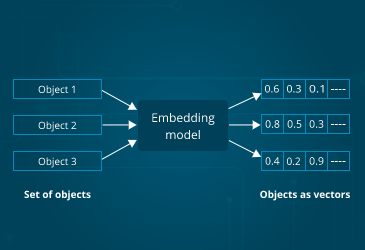
An embedding is a mathematical representation of data—text, images, audio—as a list of numbers (a vector) that captures its meaning. Think of it as a translation layer: raw text goes in, numbers come out, and those numbers encode the semantic content of the original text.
The magic is that similar concepts have similar numerical representations. The embedding for “king” is mathematically close to the embedding for “queen.” The embedding for “car” is close to “automobile.” This mathematical proximity allows computers to understand meaning without ever “understanding” language.
1.2 The Analogy: Coordinates on a Map
Imagine you are creating a map of all words. You place each word at coordinates based on its meaning. “King” and “queen” end up close together. “Car” and “automobile” are near each other. “Apple” the fruit is near “banana”; “Apple” the company is near “Microsoft.”
Embeddings are exactly that—coordinates in a high-dimensional space. But instead of two dimensions (latitude and longitude), embeddings often have hundreds or thousands of dimensions. This high-dimensional space allows the model to capture subtle distinctions and relationships.
1.3 What Embeddings Capture
Good embeddings capture:
- Semantic similarity. Words with similar meanings have similar vectors
- Analogical relationships. The relationship between “king” and “queen” is similar to “man” and “woman”
- Context. The same word can have different embeddings based on context (“bank” as river bank vs. financial bank)
- Domain specificity. Embeddings can be tuned for legal, medical, or technical domains
1.4 Why Embeddings Matter
Embeddings are the foundation of modern AI because they:
- Enable semantic search. Search by meaning, not just keywords
- Power retrieval-augmented generation (RAG). Find relevant documents for language models
- Drive recommendation systems. Find items similar to what a user likes
- Support multimodal applications. Connect text, images, and audio in a unified space
- Reduce hallucinations. Ground AI responses in retrieved, relevant information
Section 2: How Embeddings Work
2.1 From Text to Numbers: The Process
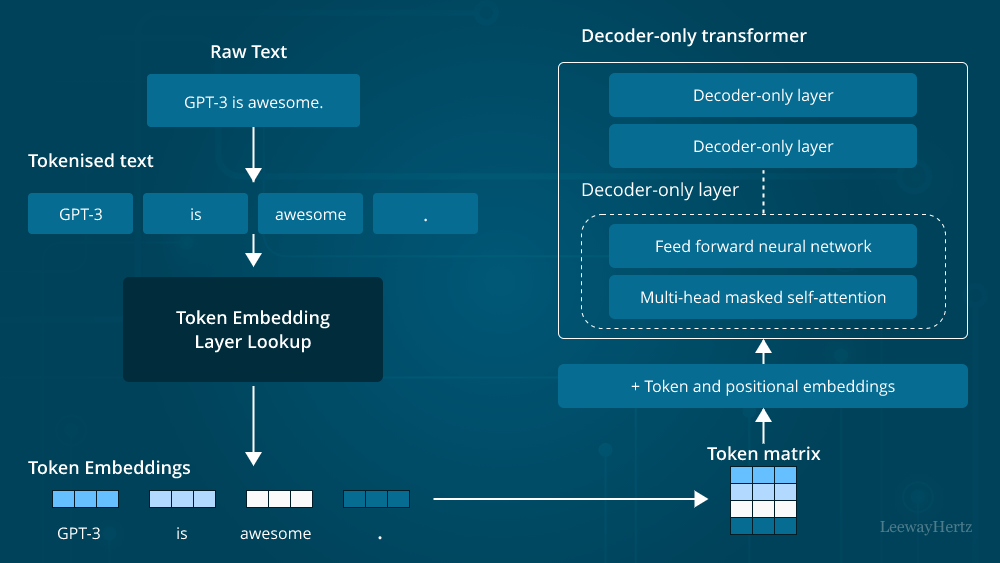
Creating an embedding involves three steps:
Tokenization. The text is broken into smaller pieces—words, subwords, or characters. “I love AI” becomes [“I”, “love”, “AI”] or [“I”, “lo”, “ve”, “A”, “I”].
Model Processing. The tokens pass through a neural network (embedding model) that has been trained on massive amounts of text. The network processes the tokens, considering context and relationships.
Vector Output. The final layer of the network produces a vector—a list of numbers (typically 384, 768, 1024, or 1536 dimensions). This vector is the embedding.
2.2 The Importance of Context
Early embedding models (like Word2Vec) gave each word a single embedding regardless of context. “Bank” had one vector representing both financial and river meanings.
Modern embedding models (like those from OpenAI, Cohere, and sentence-transformers) are contextual. They consider surrounding words. The same word can have different embeddings in different contexts. This allows them to capture nuance and ambiguity.
2.3 Embedding Dimensions
Embeddings have a fixed number of dimensions, typically ranging from 384 to 3072:
| Model | Dimensions | Characteristics |
|---|---|---|
| Sentence-BERT (MiniLM) | 384 | Lightweight, good for many applications |
| OpenAI text-embedding-3-small | 1536 | High quality, cost-effective |
| OpenAI text-embedding-3-large | 3072 | Highest quality, more expensive |
| Cohere embed-english-v3 | 1024 | Strong multilingual performance |
| BAAI/bge-large-en | 1024 | Excellent for retrieval tasks |
More dimensions can capture more nuance but require more storage and compute.
2.4 Similarity Metrics
Once you have embeddings, you can compare them using mathematical measures:
Cosine similarity. Measures the angle between two vectors. Ranges from -1 (opposite) to 1 (identical). Best for text embeddings where magnitude matters less than direction.
Euclidean distance. Measures straight-line distance. Smaller distance = more similar. Works well for many embedding types.
Dot product. Measures both magnitude and direction. Optimized for certain embedding models.
For most text embedding applications, cosine similarity is the default choice.
Section 3: Types of Embeddings
3.1 Word Embeddings
Word embeddings represent individual words. Classic examples include Word2Vec, GloVe, and FastText. These are useful for tasks that operate at the word level, but they lack context—each word has a single embedding regardless of meaning.
3.2 Sentence and Document Embeddings
Sentence embeddings represent entire sentences, paragraphs, or documents in a single vector. Models like sentence-transformers and OpenAI’s text-embedding models produce embeddings that capture the overall meaning of longer text.
These are the most common embeddings for modern AI applications—semantic search, RAG, and document retrieval.
3.3 Multimodal Embeddings
Multimodal embeddings place different types of data—text, images, audio—in the same vector space. This enables cross-modal search: finding images using text, or text using images.
CLIP (Contrastive Language-Image Pre-training) is the most famous example. It aligns text and image embeddings so that the text “a photo of a dog” is close to images of dogs.
3.4 Code Embeddings
Specialized models produce embeddings for code. These understand programming language syntax, semantics, and patterns. They power semantic code search, code similarity detection, and AI-assisted development tools.
3.5 Domain-Specific Embeddings
General embedding models work well for many tasks, but domain-specific models can perform better:
- Medical. BioBERT, ClinicalBERT trained on medical literature and notes
- Legal. LegalBERT trained on court opinions and contracts
- Scientific. SciBERT trained on scientific papers
For specialized domains, fine-tuning or using domain-specific models improves retrieval accuracy.
Section 4: Embedding Models Compared
4.1 Popular Embedding Models
| Model | Provider | Dimensions | Best For |
|---|---|---|---|
| text-embedding-3-small | OpenAI | 1536 | General purpose; cost-effective |
| text-embedding-3-large | OpenAI | 3072 | Highest quality; retrieval-intensive |
| embed-english-v3 | Cohere | 1024 | Multilingual; strong performance |
| all-MiniLM-L6-v2 | Sentence-Transformers | 384 | Lightweight; local deployment |
| all-mpnet-base-v2 | Sentence-Transformers | 768 | High quality; local deployment |
| BAAI/bge-large-en | BAAI | 1024 | Excellent retrieval; leaderboard-topping |
| voyage-2 | Voyage AI | 1024 | Specialized for RAG; code, finance variants |
4.2 Open Source vs. API Embeddings
Open source embeddings (sentence-transformers, BGE).
- Pros. Free (except compute), run locally, full control, no data sent to third parties
- Cons. Require infrastructure, lower performance than largest API models
API embeddings (OpenAI, Cohere, Voyage).
- Pros. State-of-the-art performance, no infrastructure management, easy to use
- Cons. Per-query cost, data sent to provider, vendor lock-in
4.3 Choosing an Embedding Model
| Factor | Consideration |
|---|---|
| Data sensitivity | Can data leave your infrastructure? If not, open source |
| Performance requirements | Highest quality? API models. Good enough? Open source. |
| Scale | Millions of documents? Consider cost and infrastructure |
| Domain | General? API models. Specialized? Domain-specific open source |
| Language | Multilingual? Cohere or multilingual open source models |
Section 5: Embeddings in Action
5.1 Semantic Search
Semantic search is the most common embedding application. Instead of matching keywords, it matches meaning.
How it works:
- All documents in your corpus are embedded and stored
- A user query is embedded using the same model
- The system finds the most similar document embeddings (using cosine similarity)
- Returns the corresponding documents
Example. Searching “machine learning book” returns documents about “artificial intelligence,” “neural networks,” and “deep learning”—even if those exact words are not present.
5.2 Retrieval-Augmented Generation (RAG)
RAG combines embeddings with large language models to create knowledge-augmented AI.
How it works:
- User asks a question
- The question is embedded
- The vector database retrieves relevant documents (using embeddings)
- The retrieved documents are added to the prompt
- The language model generates a response based on the retrieved information
Why it works. The language model can access current, private, and specific information not in its training data.
5.3 Recommendations
Embeddings power modern recommendation systems. Instead of simple “users who liked X also liked Y,” embedding-based recommendations:
- Create embeddings for items (products, movies, articles)
- Create embeddings for users based on their behavior
- Find items whose embeddings are close to the user’s embedding
- Recommend those items
This captures deeper preferences: a user who likes “thrillers with plot twists” will get recommendations that match that preference, not just broad categories.
5.4 Clustering and Categorization
Embeddings enable unsupervised clustering. Documents with similar content will have similar embeddings. By clustering embeddings, you can:
- Automatically group similar documents
- Detect topics in large document collections
- Identify duplicates or near-duplicates
- Understand the structure of your data
5.5 Multimodal Search
With multimodal embeddings (like CLIP), you can search across data types:
- Text-to-image. Find images that match a text description
- Image-to-text. Find descriptions that match an image
- Image-to-image. Find visually similar images
This powers visual search in e-commerce, content moderation, and creative tools.
Section 6: Best Practices for Working with Embeddings
6.1 Text Preprocessing
Before embedding, consider:
- Chunking. How large should your text chunks be? Too small = lost context. Too large = diluted meaning. Typically 200–500 words for RAG.
- Cleaning. Remove irrelevant formatting, fix encoding issues
- Metadata. Store alongside embeddings for filtering (date, category, source)
6.2 Normalization
Most embedding models produce vectors that are normalized (length 1). If your model does not normalize, you may want to normalize before computing cosine similarity.
6.3 Caching
Embedding generation can be expensive. Cache embeddings for:
- Frequently queried content
- Documents that do not change
- Test and development environments
6.4 Batch Processing
For large document collections, generate embeddings in batches rather than one at a time. Most embedding APIs and models support batch processing, which is more efficient and often cheaper.
6.5 Embedding Quality Testing
Not all embeddings are created equal. Test before committing:
- Intrinsic evaluation. Do similar documents have similar embeddings?
- Retrieval evaluation. Does embedding-based retrieval return relevant results?
- Task evaluation. Does using these embeddings improve your downstream task?
6.6 Model Updates
Embedding models improve over time. But updating the model changes embeddings for all existing documents—requiring re-embedding everything.
Best practice. Version your embeddings. If you update models, plan for migration. For many applications, consistency matters more than marginal quality improvements.
Section 7: Challenges and Limitations
7.1 The Black Box Problem
Embeddings capture meaning, but it is often unclear what they are capturing. You cannot look inside and see why two documents are considered similar. This makes debugging challenging.
Mitigation. Use interpretability tools (like embedding visualization) to understand what your embeddings are doing. Test with known examples.
7.2 Bias in Embeddings
Embedding models trained on internet text inherit societal biases. “Doctor” may be closer to “man” than “woman.” These biases can affect search and recommendation outcomes.
Mitigation. Test your embeddings for bias. Consider domain-specific models trained on curated data. Be transparent about limitations.
7.3 Domain Shift
A general embedding model may not capture the nuances of your specific domain. Technical terms, company jargon, and specialized concepts may be poorly represented.
Mitigation. Consider fine-tuning on domain-specific data or using domain-specific models (e.g., BioBERT for medical).
7.4 Computational Cost
Generating embeddings for millions of documents requires significant compute. API costs add up. Storage for high-dimensional vectors is not trivial.
Mitigation. Use smaller embedding dimensions where possible. Compress vectors with quantization. Cache aggressively.
7.5 The Curse of Dimensionality
In high-dimensional spaces, distances can become less meaningful. All points may seem equally far apart. This affects similarity search.
Mitigation. Use appropriate similarity metrics. Consider dimensionality reduction for analysis. Test retrieval quality empirically.
Section 8: How MHTECHIN Helps with Embeddings
Embeddings are powerful but require expertise to implement effectively. MHTECHIN helps organizations leverage embeddings for search, retrieval, and recommendations.
8.1 For Embedding Strategy
MHTECHIN helps organizations:
- Select the right model. Open source vs. API? General vs. domain-specific?
- Define chunking strategy. How to segment documents for optimal retrieval?
- Design embedding pipelines. Batch processing, caching, versioning
8.2 For Implementation
MHTECHIN builds embedding solutions:
- Data ingestion. Process documents, chunk, generate embeddings
- Storage integration. Connect to vector databases (pgvector, Pinecone, Weaviate)
- Search interfaces. Build semantic search, RAG pipelines
- Recommendation engines. User and item embeddings
8.3 For Optimization
MHTECHIN optimizes embedding systems:
- Performance tuning. Index selection, query optimization
- Cost reduction. Caching, quantization, efficient models
- Quality improvement. Fine-tuning, domain adaptation
8.4 The MHTECHIN Approach
MHTECHIN’s embedding practice combines deep understanding of both embedding models and the applications they power. The team helps organizations turn text into numbers—and numbers into actionable intelligence.
Section 9: Frequently Asked Questions
9.1 Q: What are embeddings in simple terms?
A: Embeddings are mathematical representations of text (or images, audio) as lists of numbers that capture meaning. Similar concepts have similar numbers. They allow computers to understand meaning without “understanding” language.
9.2 Q: How are embeddings created?
A: Embeddings are created by neural networks trained on massive amounts of text. The network learns to place similar concepts close together in vector space. The output vector—the embedding—captures the meaning of the input text.
9.3 Q: What is the difference between embeddings and one-hot encoding?
A: One-hot encoding represents each word as a unique vector with a single 1 and all other 0s. These vectors do not capture meaning—every word is equally different. Embeddings capture semantic relationships: similar words have similar vectors.
9.4 Q: How many dimensions do embeddings have?
A: It depends on the model. Common dimensions range from 384 (lightweight models) to 3072 (large models). More dimensions can capture more nuance but require more storage and compute.
9.5 Q: What is semantic search?
A: Semantic search uses embeddings to search by meaning rather than keywords. A query for “machine learning” will find documents about “AI,” “neural networks,” and “deep learning”—even if those exact words are not present.
9.6 Q: How do I choose an embedding model?
A: Consider: can data leave your infrastructure? (Open source if not). What performance do you need? (API models for highest quality). What domain? (General or specialized). What language? (Multilingual needs). MHTECHIN can help evaluate options.
9.7 Q: What is chunking and why does it matter?
A: Chunking is splitting documents into smaller pieces before embedding. Too small = lost context. Too large = diluted meaning. For RAG, 200–500 words is typical. Chunking strategy significantly affects retrieval quality.
9.8 Q: Can embeddings be used for images?
A: Yes. Multimodal models like CLIP produce embeddings for both images and text in the same space. This enables text-to-image search, image-to-text search, and image similarity.
9.9 Q: How much does it cost to generate embeddings?
A: Costs vary. OpenAI’s text-embedding-3-small costs about $0.02 per million tokens. For a typical document, that is fractions of a cent. Open source models cost compute time but no API fees. Large-scale embedding generation adds up; caching and optimization help.
9.10 Q: How does MHTECHIN help with embeddings?
A: MHTECHIN helps organizations select embedding models, design chunking strategies, implement embedding pipelines, integrate with vector databases, and optimize for performance and cost. We turn text into numbers—and numbers into intelligent applications.
Section 10: Conclusion—The Language of AI
Embeddings are the language of AI. They are the bridge between human meaning and machine computation. Without them, AI would be blind to nuance, deaf to context, and unable to understand the rich complexity of language.
With embeddings, we can search by meaning, not just keywords. We can give language models access to our private, current knowledge. We can build recommendation systems that understand what users truly want. We can cluster documents, detect duplicates, and uncover structure in vast text collections.
As AI continues to evolve, embeddings will remain foundational. They are not a passing trend—they are the mathematical representation of meaning, and meaning is what language is all about.
Ready to turn your text into intelligence? Explore MHTECHIN’s embedding and RAG services at www.mhtechin.com. From strategy through implementation, our team helps you build applications that understand.
This guide is brought to you by MHTECHIN—helping organizations leverage embeddings for search, retrieval, and intelligent applications. For personalized guidance on embedding strategy or implementation, reach out to the MHTECHIN team today.

Leave a Reply