Introduction
Imagine an AI agent that manages your enterprise’s sensitive customer data, processes financial transactions, and orchestrates supply chain operations—all without sending a single byte to the cloud. Imagine the same agent can reason, plan, and act autonomously while maintaining complete data sovereignty, meeting the strictest compliance requirements, and operating even when internet connectivity fails. This is the reality of local agentic AI in 2026.
For years, the narrative around AI has been cloud-first. The most powerful models, the largest compute clusters, and the most sophisticated agent frameworks all resided in the cloud. But a powerful counter-movement has emerged. Enterprises in regulated industries—finance, healthcare, defense, government—are demanding AI that stays within their perimeter. Data privacy concerns, latency requirements, and operational resilience are driving a fundamental shift: running autonomous AI agents on-premises.
According to recent industry data, 63% of enterprises now require on-premises deployment for AI systems handling sensitive data, and 47% of organizations are actively deploying local AI infrastructure . The market for local AI is projected to reach $42 billion by 2028, driven by advances in model compression, edge hardware, and open-source frameworks.
In this comprehensive guide, you’ll learn:
- What local agentic AI is and why it matters
- The architecture of on-premises autonomous agents
- Hardware and software requirements for local deployment
- How to deploy open-source models for agentic workflows
- Real-world use cases across regulated industries
- Security, privacy, and operational considerations
Part 1: What Is Local Agentic AI?
Definition and Core Concept
Local agentic AI refers to autonomous AI agents that run entirely within an organization’s own infrastructure—on-premises servers, edge devices, or private clouds—without relying on external APIs or cloud services for core reasoning and action capabilities.

*Figure 1: Cloud-based vs. local agentic AI architecture*
Cloud vs. Local: A Comparison
| Dimension | Cloud-Based AI | Local Agentic AI |
|---|---|---|
| Data Sovereignty | Data leaves premises | Data stays on-premises |
| Latency | Network-dependent | Deterministic, low |
| Compliance | Shared responsibility | Full control |
| Cost Model | Pay-per-use, variable | Capital expense, predictable |
| Connectivity | Internet required | Air-gap capable |
| Model Choice | Provider’s models | Any open-source model |
| Customization | Limited | Full control |
Why Local Agentic AI Matters in 2026
| Driver | Description | Impact |
|---|---|---|
| Data Privacy | Sensitive data cannot leave organization | 63% of enterprises require on-premises |
| Regulatory Compliance | GDPR, HIPAA, financial regulations | Non-negotiable for many industries |
| Operational Resilience | Internet outages don’t stop operations | Critical for mission-critical systems |
| Latency Requirements | Real-time applications need <10ms | Impossible with cloud round trips |
| Cost Predictability | No surprise API bills | Enterprise budgeting |
| Model Control | Fine-tuning, customization | Competitive advantage |
Part 2: The Architecture of Local Agentic AI
Core Components
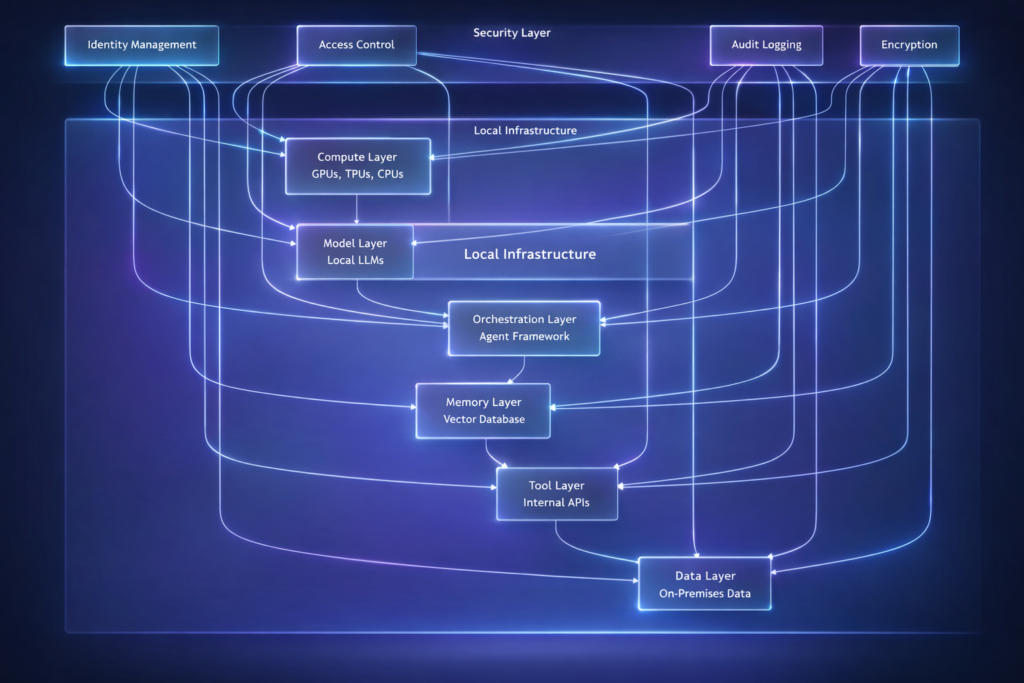
Figure 2: Local agentic AI architecture
Hardware Requirements
| Component | Minimum | Recommended | Enterprise |
|---|---|---|---|
| GPU | 1× RTX 4090 (24GB) | 2× A100 (80GB) | 8× H100 (80GB) |
| RAM | 64GB | 256GB | 1TB+ |
| Storage | 500GB SSD | 2TB NVMe | 10TB+ NVMe RAID |
| Network | 1Gbps | 10Gbps | 25Gbps+ |
| Power | 500W | 1500W | 5000W+ |
Model Sizes and Requirements
| Model | Size (Params) | Quantized Size | GPU Memory | Use Case |
|---|---|---|---|---|
| Llama 3.2 3B | 3B | 2GB | 4GB | Simple agents, edge |
| Llama 3.1 8B | 8B | 5GB | 8GB | General purpose |
| Llama 3.1 70B | 70B | 35GB | 48GB | Complex reasoning |
| Mixtral 8x7B | 45B | 25GB | 32GB | Multi-expert |
| DeepSeek-V2 | 236B | 120GB | 160GB | Enterprise scale |
| Command R+ | 104B | 52GB | 64GB | RAG, tool use |
Part 3: Software Stack for Local Agents
Open-Source Frameworks
| Framework | Description | Best For | Local Support |
|---|---|---|---|
| Ollama | Model runner with API | Quick deployment | Excellent |
| vLLM | High-performance inference | Production scale | Excellent |
| Llama.cpp | CPU/GPU inference | Resource-constrained | Excellent |
| LangChain | Agent orchestration | Complex workflows | Full |
| AutoGen | Multi-agent systems | Team coordination | Full |
| CrewAI | Role-based agents | Structured teams | Full |
Deployment Architecture
python
class LocalAgentDeployment:
    """Deploy autonomous agents on local infrastructure."""

    def __init__(self, config: dict):
        self.config = config
        self.model = self._load_model()
        self.vector_store = self._init_vector_store()
        self.tools = self._load_tools()

    def _load_model(self):
        """Load local model based on configuration."""
        if self.config["runtime"] == "ollama":
            import ollama
            return ollama.Client()
        elif self.config["runtime"] == "vllm":
            from vllm import LLM
            return LLM(
                model=self.config["model_name"],
                tensor_parallel_size=self.config.get("gpu_count", 1),
                trust_remote_code=True
            )
        elif self.config["runtime"] == "llama_cpp":
            from llama_cpp import Llama
            return Llama(
                model_path=self.config["model_path"],
                n_gpu_layers=self.config.get("gpu_layers", -1),
                n_ctx=self.config.get("context_length", 8192)
            )

    def _init_vector_store(self):
        """Initialize local vector database."""
        if self.config["vector_db"] == "chroma":
            import chromadb
            return chromadb.Client(
                settings=chromadb.config.Settings(
                    chroma_db_impl="duckdb+parquet",
                    persist_directory=self.config["vector_store_path"]
                )
            )
        elif self.config["vector_db"] == "qdrant":
            from qdrant_client import QdrantClient
            return QdrantClient(path=self.config["vector_store_path"])
        elif self.config["vector_db"] == "faiss":
            import faiss
            return faiss.IndexFlatL2(768)  # Embedding dimension

    def create_agent(self, name: str, system_prompt: str):
        """Create agent with local components."""
        from langchain.agents import create_react_agent
        from langchain.tools import Tool

        # Create tool for vector search
        search_tool = Tool(
            name="knowledge_search",
            func=self._search_knowledge,
            description="Search internal knowledge base"
        )

        # Create agent
        agent = create_react_agent(
            llm=self._create_langchain_llm(),
            tools=[search_tool],
            prompt=system_prompt
        )

        return agent

    def _create_langchain_llm(self):
        """Create LangChain LLM wrapper for local model."""
        from langchain.llms import Ollama, VLLM

        if self.config["runtime"] == "ollama":
            return Ollama(model=self.config["model_name"])
        elif self.config["runtime"] == "vllm":
            return VLLM(
                model=self.config["model_name"],
                trust_remote_code=True
            )
Model Serving with vLLM
python
# vLLM server configuration
from vllm import AsyncLLMEngine, SamplingParams
from vllm.engine.arg_utils import AsyncEngineArgs

engine_args = AsyncEngineArgs(
    model="meta-llama/Llama-3.1-70B-Instruct",
    tensor_parallel_size=4,  # 4 GPUs
    dtype="bfloat16",
    max_model_len=8192,
    enable_prefix_caching=True,
    enforce_eager=False
)

engine = AsyncLLMEngine.from_engine_args(engine_args)

# Sampling parameters
sampling_params = SamplingParams(
    temperature=0.7,
    top_p=0.9,
    max_tokens=2048,
    stop=["</s>", "<|eot_id|>"]
)

async def generate(prompt: str):
    """Generate response using local vLLM."""
    async for response in engine.generate(prompt, sampling_params):
        yield response
Part 4: Implementation Patterns
Pattern 1: Fully Local Autonomous Agent
python
class LocalAutonomousAgent:
    """Fully local autonomous agent with no cloud dependencies."""

    def __init__(self, model_path: str, knowledge_base_path: str):
        self.llm = self._load_llm(model_path)
        self.vector_store = ChromaDB(persist_directory=knowledge_base_path)
        self.tools = self._load_tools()
        self.memory = LocalMemory()

    def _load_llm(self, model_path: str):
        """Load LLM locally."""
        from llama_cpp import Llama
        return Llama(
            model_path=model_path,
            n_gpu_layers=-1,  # Use all GPU layers
            n_ctx=4096,
            verbose=False
        )

    def _load_tools(self):
        """Load local-only tools."""
        return {
            "database_query": self._query_local_db,
            "file_operation": self._file_operation,
            "internal_api": self._call_internal_api,
            "vector_search": self._vector_search
        }

    def _query_local_db(self, query: str) -> dict:
        """Query local database without external calls."""
        import sqlite3
        conn = sqlite3.connect("local_data.db")
        cursor = conn.execute(query)
        results = cursor.fetchall()
        conn.close()
        return {"results": results, "row_count": len(results)}

    def _vector_search(self, query: str) -> list:
        """Search local vector store."""
        return self.vector_store.similarity_search(query, k=5)

    def execute_task(self, task: str) -> dict:
        """Execute task using local resources only."""
        # Step 1: Retrieve relevant knowledge
        context = self._vector_search(task)

        # Step 2: Generate plan
        plan_prompt = f"""
        Task: {task}
        Context: {context}
        Available tools: {list(self.tools.keys())}

        Create a step-by-step plan.
        """
        plan = self.llm(plan_prompt)["choices"][0]["text"]

        # Step 3: Execute plan
        results = []
        for step in self._parse_plan(plan):
            tool = step["tool"]
            params = step["params"]
            result = self.tools[tool](**params)
            results.append(result)

        # Step 4: Generate final answer
        answer_prompt = f"""
        Task: {task}
        Execution Results: {results}

        Provide final answer.
        """
        answer = self.llm(answer_prompt)["choices"][0]["text"]

        return {
            "task": task,
            "plan": plan,
            "results": results,
            "answer": answer
        }
Pattern 2: Hybrid Local-Cloud Agent
For organizations that want the best of both worlds—local for sensitive data, cloud for heavy compute:
python
class HybridAgent:
    """Agent that routes tasks between local and cloud based on sensitivity."""

    def __init__(self):
        self.local_agent = LocalAutonomousAgent()
        self.cloud_client = CloudAPIClient()
        self.sensitivity_classifier = SensitivityClassifier()

    def execute(self, task: str, data: dict) -> dict:
        """Execute with intelligent routing."""
        # Classify sensitivity
        sensitivity = self.sensitivity_classifier.classify(task, data)

        if sensitivity["level"] == "high":
            # Keep everything local
            return self.local_agent.execute(task, data)

        elif sensitivity["level"] == "medium":
            # Local reasoning, cloud for heavy compute
            local_result = self.local_agent.reason(task, data)

            if local_result["needs_heavy_compute"]:
                cloud_result = self.cloud_client.compute(local_result["compute_task"])
                return self.local_agent.synthesize(local_result, cloud_result)

            return local_result

        else:
            # Low sensitivity - full cloud
            return self.cloud_client.execute(task, data)
Pattern 3: Air-Gapped Deployment
For environments with no internet connectivity:
python
class AirGappedAgent:
    """Fully autonomous agent for air-gapped environments."""

    def __init__(self):
        # All components must be pre-loaded
        self.model = self._load_model_from_airgap()
        self.knowledge_base = self._load_knowledge_base()
        self.tools = self._load_airgapped_tools()
        self.update_system = OfflineUpdateManager()

    def _load_model_from_airgap(self):
        """Load model from local storage."""
        import torch
        from transformers import AutoModelForCausalLM, AutoTokenizer

        # Models pre-staged during deployment
        model_path = "/opt/models/llama-3.1-70b"
        tokenizer = AutoTokenizer.from_pretrained(model_path)
        model = AutoModelForCausalLM.from_pretrained(
            model_path,
            torch_dtype=torch.bfloat16,
            device_map="auto"
        )
        return {"model": model, "tokenizer": tokenizer}

    def _load_airgapped_tools(self):
        """Tools that work without internet."""
        return {
            "local_db": LocalDatabaseQuery(),
            "file_system": FileSystemOperations(),
            "internal_api": InternalAPICaller(),
            "calculation": CalculatorTool(),
            "document_parser": LocalDocumentParser()
        }

    def update_from_secure_media(self, media_path: str):
        """Update model or knowledge from secure media."""
        # For air-gapped systems, updates come via secure media
        # (USB drives, DVDs, etc.) with validation
        self.update_system.apply_update(media_path)
Part 5: Real-World Use Cases
Use Case 1: Financial Services – On-Premises Trading Agent
| Requirement | Implementation |
|---|---|
| Data Privacy | All data stays on-premises |
| Latency | <5ms for trade execution |
| Compliance | Full audit trail, FINRA/SEC |
| Resilience | No internet dependency |
Architecture:
- Local LLM (Llama 3.1 70B) on H100 cluster
- Local vector database for market analysis
- Direct exchange APIs (no cloud intermediaries)
- Hardware security modules for keys
Use Case 2: Healthcare – HIPAA-Compliant Clinical Agent
| Requirement | Implementation |
|---|---|
| PHI Protection | No PHI leaves premises |
| Audit | Complete access logs |
| Availability | 24/7 with backup |
| Validation | Clinical validation required |
Architecture:
- Local LLM (Med-PaLM style fine-tuned)
- Encrypted local storage
- Role-based access control
- Immutable audit logs
Use Case 3: Government – Classified Information Processing
| Requirement | Implementation |
|---|---|
| Air-Gap | No network connectivity |
| Classification | Multi-level security |
| Accountability | Non-repudiation |
| Supply Chain | Verified hardware/software |
Architecture:
- Isolated infrastructure
- Pre-deployed models
- Physical security
- Offline update mechanism
Use Case 4: Manufacturing – Factory Edge Agent
python
class FactoryEdgeAgent:
    """Local agent running on factory floor."""

    def __init__(self, edge_device):
        self.device = edge_device  # NVIDIA Jetson or similar
        self.model = self._load_optimized_model()
        self.sensors = self._connect_sensors()

    def _load_optimized_model(self):
        """Load quantized model for edge."""
        from transformers import AutoModelForCausalLM, AutoTokenizer
        import torch

        # 4-bit quantized model for edge
        model = AutoModelForCausalLM.from_pretrained(
            "meta-llama/Llama-3.2-3B-Instruct",
            load_in_4bit=True,
            device_map="auto"
        )
        return model

    def monitor_production(self):
        """Monitor production line locally."""
        while True:
            # Collect sensor data
            sensor_data = self.sensors.read_all()

            # Detect anomalies
            anomalies = self._detect_anomalies(sensor_data)

            if anomalies:
                # Generate alert locally
                alert = self._generate_alert(anomalies)

                # Trigger local actions
                self._trigger_action(alert)

            time.sleep(1)  # 1 second interval
Part 6: Performance Optimization
Model Quantization
| Quantization | Bit Width | Memory Reduction | Quality Impact | Use Case |
|---|---|---|---|---|
| FP16 | 16-bit | 50% | None | Maximum quality |
| INT8 | 8-bit | 75% | Minimal | Production |
| INT4 | 4-bit | 87% | Small | Edge devices |
| INT2 | 2-bit | 94% | Moderate | Extreme compression |
python
from transformers import BitsAndBytesConfig

# 4-bit quantization configuration
quantization_config = BitsAndBytesConfig(
    load_in_4bit=True,
    bnb_4bit_compute_dtype=torch.bfloat16,
    bnb_4bit_quant_type="nf4",
    bnb_4bit_use_double_quant=True
)

model = AutoModelForCausalLM.from_pretrained(
    "meta-llama/Llama-3.1-8B-Instruct",
    quantization_config=quantization_config,
    device_map="auto"
)
GPU Memory Optimization
python
class GPUOptimizer:
    """Optimize GPU memory usage for local inference."""

    def __init__(self):
        self.available_memory = self._get_available_gpu_memory()

    def optimize_batch_size(self, model_size_gb: int) -> int:
        """Calculate optimal batch size."""
        # Reserve 20% for overhead
        usable_memory = self.available_memory * 0.8

        # Calculate per-batch memory
        per_batch_memory = model_size_gb * 1.2  # With KV cache

        max_batch = int(usable_memory / per_batch_memory)
        return max(1, max_batch)

    def enable_attention_slicing(self):
        """Enable memory-efficient attention."""
        import torch
        torch.backends.cuda.enable_mem_efficient_sdp(True)

    def enable_flash_attention(self):
        """Enable Flash Attention for faster inference."""
        import flash_attn
        # Configure model to use Flash Attention
Part 7: Security and Compliance
Security Architecture
| Layer | Controls |
|---|---|
| Physical | Data center access controls, hardware security modules |
| Network | Air-gap, VLAN isolation, no external routing |
| Identity | MFA, service accounts, certificate-based auth |
| Data | Encryption at rest and in transit, data masking |
| Audit | Immutable logs, real-time monitoring, alerting |
Compliance Checklist
| Regulation | Local AI Requirements |
|---|---|
| GDPR | Data localization, right to deletion, audit trails |
| HIPAA | PHI protection, access controls, BAA |
| FINRA | Record retention, supervision, business continuity |
| EU AI Act | High-risk system requirements, human oversight |
Part 8: MHTECHIN’s Expertise in Local Agentic AI
At MHTECHIN, we specialize in deploying autonomous AI agents on-premises for regulated industries. Our expertise includes:
- Infrastructure Design: GPU clusters, storage, networking for local AI
- Model Deployment: Optimized, quantized models for local inference
- Agent Frameworks: LangChain, AutoGen, CrewAI with local models
- Security & Compliance: Air-gapped deployments, audit trails, encryption
- Performance Optimization: GPU memory tuning, batching, caching
MHTECHIN helps organizations deploy autonomous agents that stay within your perimeter—secure, compliant, and resilient.
Conclusion
Local agentic AI represents a critical evolution in enterprise AI deployment. For organizations with stringent data privacy requirements, regulatory obligations, or operational resilience needs, on-premises autonomous agents are not just an option—they are a necessity.
Key Takeaways:
- Local deployment ensures data sovereignty, compliance, and resilience
- Hardware requirements scale from edge devices to GPU clusters
- Open-source models (Llama, Mixtral) enable local reasoning
- Frameworks (Ollama, vLLM, LangChain) support local agents
- Security and compliance are built-in, not add-ons
The future of enterprise AI is hybrid—with cloud for scale and local for sovereignty. Organizations that invest in local agentic AI today will be positioned to meet the strictest security and compliance requirements while still benefiting from autonomous intelligence.
Frequently Asked Questions (FAQ)
Q1: What is local agentic AI?
Local agentic AI refers to autonomous AI agents that run entirely within an organization’s own infrastructure, without relying on external cloud APIs for core reasoning and action capabilities .
Q2: Why would I run agents locally instead of in the cloud?
Key reasons: data privacy (sensitive data never leaves premises), regulatory compliance (GDPR, HIPAA), latency (no network delays), resilience (works without internet), and cost predictability .
Q3: What hardware do I need for local agentic AI?
Requirements vary: for small agents, a single RTX 4090 (24GB) suffices. For enterprise-scale agents, you need multi-GPU servers (2-8× A100/H100) with 256GB+ RAM .
Q4: What models can I run locally?
Open-source models like Llama 3.1 (8B, 70B), Mixtral 8x7B, DeepSeek-V2, and Command R+ can be run locally with proper hardware .
Q5: How do I deploy models locally?
Use frameworks like Ollama for quick deployment, vLLM for production-scale inference, or llama.cpp for resource-constrained environments .
Q6: Can I run multi-agent systems locally?
Yes. Frameworks like AutoGen, LangGraph, and CrewAI work fully locally with local models through Ollama or vLLM integrations .
Q7: How do I keep local models updated?
For connected environments, use model registries. For air-gapped environments, update via secure media with cryptographic verification .
Q8: Is local agentic AI more expensive than cloud?
Initial capital expense is higher, but operational costs are predictable. For high-volume workloads, local deployment often has lower total cost of ownership .

Leave a Reply