Introduction
You’ve built an impressive autonomous AI agent. It researches, plans, executes tools, and coordinates with other agents. It’s intelligent, capable, and… expensive. A single complex task might cost $0.50 in API calls. Scale that to thousands of tasks per day, and you’re looking at thousands of dollars per month. Scale to enterprise volumes, and costs can spiral into six figures annually.
This is the reality of agentic AI in 2026. According to industry data, token usage explains 80% of performance differences in agent systems, and multi-agent architectures can consume 15× more tokens than single-agent approaches while delivering 90% better performance . The challenge isn’t whether agentic AI works—it’s whether it works affordably at scale.
In this comprehensive guide, you’ll learn:
- The true cost anatomy of autonomous AI agents
- Strategic optimization frameworks from model selection to architecture
- Tactical techniques like caching, prompt compression, and semantic routing
- Real-world case studies showing 60-80% cost reductions
- How to build cost-aware agents that optimize their own spending
Part 1: Understanding the Cost Anatomy of Agentic AI
The Hidden Costs of Autonomous Agents
When most teams think about AI costs, they think about API calls. But agentic AI introduces multiple cost layers:
| Cost Layer | Description | Typical Share |
|---|---|---|
| LLM Inference | API calls to model providers | 40-60% |
| Tool Execution | API calls to external services | 20-30% |
| Vector Database | Storage and retrieval for memory | 5-10% |
| Orchestration | Framework overhead, state management | 5-10% |
| Infrastructure | Hosting, compute, networking | 5-10% |
| Human Oversight | Review, intervention, training | 10-20% |
The Multi-Agent Cost Multiplier

*Figure 1: Multi-agent systems can cost 5-15× more per task*
Real-World Cost Data
According to 2026 benchmark studies across 2,000 runs:
| Framework | Cost Per Query | Token Usage | Task Complexity |
|---|---|---|---|
| LangChain | $0.18 | 8,200 | Simple-Medium |
| AutoGen | $0.35 | 24,200 | Complex |
| CrewAI | $0.15 | 22,800 | Medium-High |
Source: 2026 Agent Framework Benchmark Study
Key Insight: Lower token usage doesn’t always mean lower cost—model selection matters significantly.
Part 2: Strategic Cost Optimization Framework
The Cost-Performance Trade-off
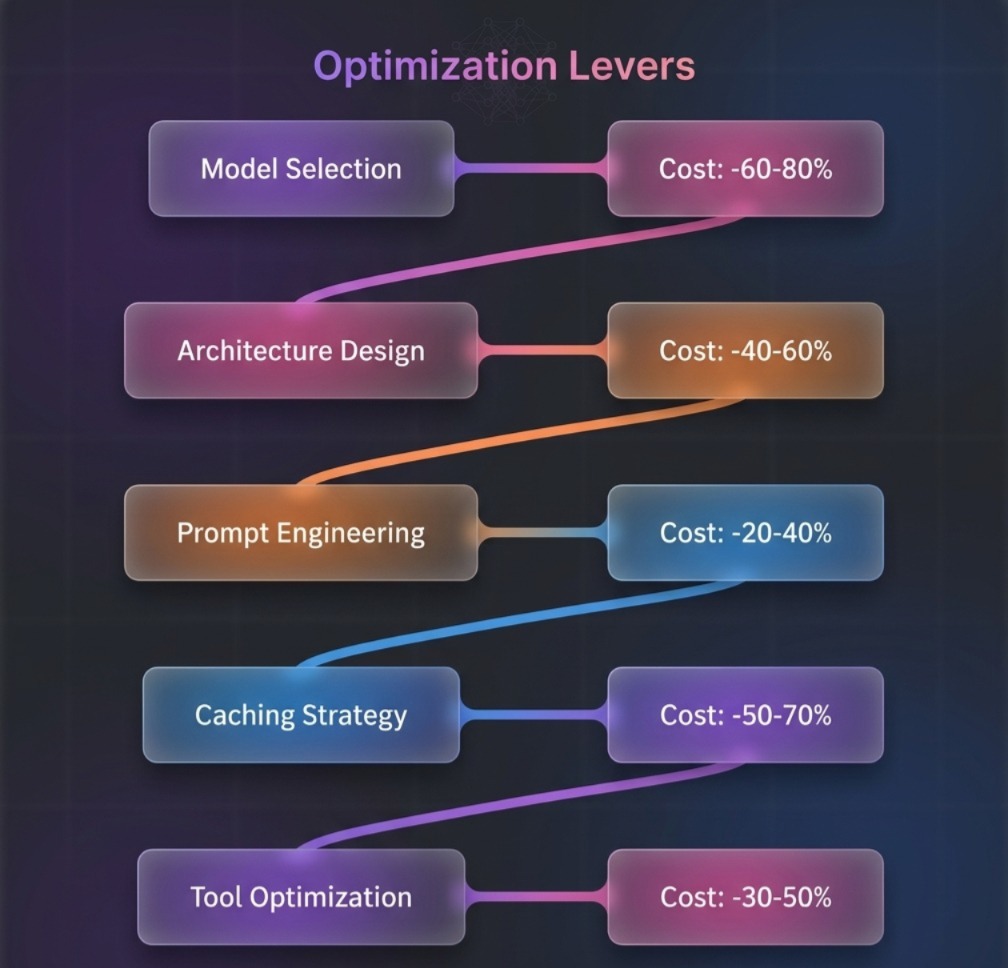
Figure 2: Strategic levers for cost optimization with estimated savings
The 80/20 Rule for Agent Costs
| Optimization | Effort | Impact | Priority |
|---|---|---|---|
| Model Selection | Low | Very High | 1 |
| Prompt Compression | Medium | High | 2 |
| Semantic Caching | Medium | Very High | 3 |
| Architecture Choice | Medium | High | 4 |
| Tool Optimization | High | Medium | 5 |
Part 3: Model Selection and Routing
3.1 The Model Hierarchy
Not all tasks require GPT-4o. Use the right model for the right task:
| Model | Cost (per 1M tokens) | Best For | Quality |
|---|---|---|---|
| GPT-4o | $2.50 input / $10.00 output | Complex reasoning, planning | 95% |
| GPT-4o-mini | $0.15 input / $0.60 output | Simple tasks, extraction | 85% |
| Claude 3.5 Sonnet | $3.00 input / $15.00 output | Tool use, coding | 92% |
| Claude 3.5 Haiku | $0.25 input / $1.25 output | Fast responses | 82% |
| Gemini 1.5 Flash | $0.075 input / $0.30 output | High volume | 80% |
3.2 Semantic Model Router
Route queries to optimal models based on complexity:
python
class SemanticRouter:
    def __init__(self):
        self.rules = {
            "simple": {
                "model": "gpt-4o-mini",
                "criteria": ["greeting", "simple_qa", "extraction"],
                "cost_multiplier": 0.1
            },
            "medium": {
                "model": "gpt-4o-mini",
                "criteria": ["tool_use", "multi_step", "reasoning"],
                "cost_multiplier": 0.5
            },
            "complex": {
                "model": "gpt-4o",
                "criteria": ["planning", "code_generation", "analysis"],
                "cost_multiplier": 1.0
            }
        }

    def route(self, query, context=None):
        complexity = self.assess_complexity(query)

        if complexity.score < 0.3:
            return self.rules["simple"]["model"]
        elif complexity.score < 0.7:
            return self.rules["medium"]["model"]
        else:
            return self.rules["complex"]["model"]

    def assess_complexity(self, query):
        # Use lightweight classifier
        features = {
            "length": len(query.split()),
            "has_tool": "tool" in query.lower(),
            "has_multi_step": any(x in query.lower() for x in ["then", "after", "first", "second"])
        }
        score = (features["length"] / 100) * 0.3 + features["has_tool"] * 0.4 + features["has_multi_step"] * 0.3
        return ComplexityResult(score=min(score, 1.0))
Cost Impact: 40-60% reduction for mixed workloads
3.3 Model Cascading
Try cheaper models first, escalate only when needed:
python
class ModelCascade:
    def __init__(self):
        self.models = [
            {"name": "gpt-4o-mini", "confidence_threshold": 0.85, "cost": 0.10},
            {"name": "gpt-4o", "confidence_threshold": 0.0, "cost": 1.00}
        ]

    def execute_with_cascade(self, prompt):
        for model in self.models:
            response = self.call_model(model["name"], prompt)

            # Get confidence from logprobs
            confidence = self.get_confidence(response)

            if confidence >= model["confidence_threshold"]:
                return response

        # Fallback to most capable model
        return self.call_model(self.models[-1]["name"], prompt)
Part 4: Prompt Compression and Optimization
4.1 Prompt Compression Techniques
| Technique | Description | Savings |
|---|---|---|
| Semantic Compression | Remove redundant instructions | 20-40% |
| System Prompt Minification | Condense system messages | 30-50% |
| Few-Shot Pruning | Keep only relevant examples | 40-60% |
| Dynamic Prompting | Adjust length based on complexity | 25-45% |
4.2 Implementing Prompt Compression
python
from transformers import AutoTokenizer

class PromptCompressor:
    def __init__(self, target_tokens=2000):
        self.target_tokens = target_tokens
        self.tokenizer = AutoTokenizer.from_pretrained("gpt2")

    def compress(self, prompt, context):
        """Compress prompt to target token count."""
        tokens = self.tokenizer.encode(prompt)

        if len(tokens) <= self.target_tokens:
            return prompt

        # Priority-based compression
        sections = self.split_into_sections(prompt)

        # Keep system instructions, compress examples
        compressed = sections["system"]
        compressed += self.compress_examples(sections["examples"], self.target_tokens - len(tokens))
        compressed += sections["query"]

        return compressed

    def compress_examples(self, examples, budget):
        """Keep only most relevant examples."""
        # Score examples by relevance to current query
        scored = [(self.relevance_score(ex, context), ex) for ex in examples]
        scored.sort(reverse=True)

        compressed = ""
        for score, example in scored:
            example_tokens = len(self.tokenizer.encode(example))
            if len(self.tokenizer.encode(compressed + example)) <= budget:
                compressed += example

        return compressed
4.3 System Prompt Optimization
Before optimization (800 tokens):
text
You are a helpful AI assistant designed to help users with their questions.
You have access to various tools including search, calculator, and database.
When answering, please be thorough, accurate, and cite your sources.
Always consider the user's context from previous messages.
If you're unsure about something, ask for clarification.
...
After optimization (200 tokens):
text
Helpful assistant with tools: search, calculator, DB. Cite sources. Use context. Clarify if unsure.
Cost Impact: 30-50% reduction on system prompt overhead
Part 5: Caching Strategies
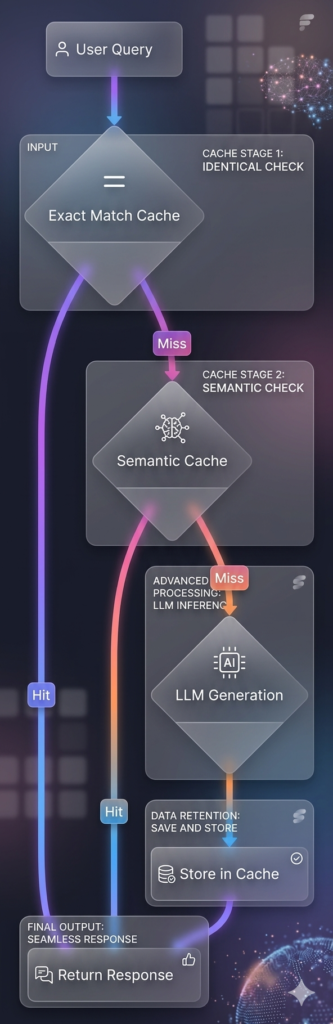
5.1 Semantic Caching
Cache responses for semantically similar queries:
python
import hashlib
from sentence_transformers import SentenceTransformer

class SemanticCache:
    def __init__(self, similarity_threshold=0.95, max_size=10000):
        self.cache = {}
        self.embeddings = {}
        self.model = SentenceTransformer('all-MiniLM-L6-v2')
        self.threshold = similarity_threshold
        self.max_size = max_size

    def get(self, query):
        query_embedding = self.model.encode(query)

        # Find closest match in cache
        best_match = None
        best_score = 0

        for cached_query, cached_embedding in self.embeddings.items():
            similarity = self.cosine_similarity(query_embedding, cached_embedding)
            if similarity > self.threshold and similarity > best_score:
                best_score = similarity
                best_match = cached_query

        if best_match:
            return self.cache[best_match]

        return None

    def set(self, query, response):
        # Evict oldest if full
        if len(self.cache) >= self.max_size:
            oldest_key = next(iter(self.cache))
            del self.cache[oldest_key]
            del self.embeddings[oldest_key]

        self.cache[query] = response
        self.embeddings[query] = self.model.encode(query)
Cost Impact: 50-70% reduction for repetitive tasks
5.2 Multi-Level Cache Architecture
5.3 Tool Call Caching
Cache results from expensive tool calls:
python
class ToolCallCache:
    def __init__(self, ttl=3600):
        self.cache = {}
        self.ttl = ttl

    def get(self, tool_name, params):
        key = self._make_key(tool_name, params)
        entry = self.cache.get(key)

        if entry and entry["expires"] > time.time():
            return entry["result"]

        return None

    def set(self, tool_name, params, result):
        key = self._make_key(tool_name, params)
        self.cache[key] = {
            "result": result,
            "expires": time.time() + self.ttl
        }

    def _make_key(self, tool_name, params):
        # Normalize params for cache key
        sorted_params = json.dumps(params, sort_keys=True)
        return f"{tool_name}:{hashlib.md5(sorted_params.encode()).hexdigest()}"
Part 6: Architecture Optimizations
6.1 ReAct vs Plan-and-Execute Cost Comparison
| Architecture | Token Usage | Cost | Best For |
|---|---|---|---|
| ReAct | 10,000-50,000 | High | Exploratory tasks |
| Plan-and-Execute | 5,000-20,000 | Medium | Structured workflows |
| Plan-Execute-Replan | 8,000-30,000 | Medium-High | Adaptive workflows |
6.2 Choosing the Right Pattern
python
def select_architecture(task_description):
    features = analyze_task(task_description)

    if features["structured"] and features["predictable_steps"]:
        return "plan_and_execute"
    elif features["needs_adaptation"] and features["complex"]:
        return "react"
    elif features["long_horizon"] and features["replanning_required"]:
        return "plan_execute_replan"
    else:
        return "simple_agent"
6.3 Agent Consolidation
Merge multiple specialized agents into one when possible:
| Strategy | Cost Impact | Complexity Impact |
|---|---|---|
| Single Agent | Lowest | Highest complexity per agent |
| 2-3 Specialized | Medium | Balanced |
| 5+ Specialized | Highest | Clean separation |
Rule of thumb: Start with fewer agents, split only when specialization provides clear value.
Part 7: Tool Optimization
7.1 Batch Tool Calls
Instead of sequential calls, batch independent operations:
python
# Inefficient: Sequential calls
for item in items:
    result = call_api(item)  # 5 calls, 5× latency

# Efficient: Batched calls
results = call_api_batch(items)  # 1 call, 1× latency
Cost Impact: 20-40% reduction on API costs
7.2 Tool Call Pruning
Skip unnecessary tool calls with confidence thresholds:
python
class ToolPruner:
    def __init__(self, confidence_threshold=0.8):
        self.threshold = confidence_threshold

    def should_call_tool(self, agent_state, tool_name):
        # Predict if tool call will succeed
        confidence = self.predict_success(agent_state, tool_name)

        if confidence < self.threshold:
            # Try alternative approach first
            return False, "confidence_too_low"

        return True, None
7.3 Tool Result Compression
Summarize verbose tool outputs before passing to LLM:
python
class ToolResultCompressor:
    def compress(self, tool_output, max_tokens=500):
        """Compress tool output to reduce token usage."""
        if len(tool_output) <= max_tokens:
            return tool_output

        # For structured data, extract key fields
        if isinstance(tool_output, dict):
            return self.compress_dict(tool_output, max_tokens)

        # For text, use summarization
        return self.summarize_text(tool_output, max_tokens)

    def compress_dict(self, data, max_tokens):
        compressed = {}
        # Keep only top-level keys with non-null values
        for key, value in data.items():
            if value is not None and value != "":
                compressed[key] = value[:100] if isinstance(value, str) else value
        return compressed
Part 8: Advanced Techniques
8.1 Adaptive Sampling
Use fewer reasoning steps for simple tasks:
python
class AdaptiveSampler:
    def __init__(self):
        self.complexity_thresholds = {
            "very_low": {"temperature": 0.1, "top_p": 0.9, "steps": 1},
            "low": {"temperature": 0.3, "top_p": 0.9, "steps": 3},
            "medium": {"temperature": 0.5, "top_p": 0.95, "steps": 5},
            "high": {"temperature": 0.7, "top_p": 0.95, "steps": 10}
        }

    def get_sampling_config(self, query):
        complexity = self.assess_complexity(query)

        if complexity < 0.2:
            return self.complexity_thresholds["very_low"]
        elif complexity < 0.5:
            return self.complexity_thresholds["low"]
        elif complexity < 0.8:
            return self.complexity_thresholds["medium"]
        else:
            return self.complexity_thresholds["high"]
8.2 Token Budgeting
Set token budgets per component:
python
class TokenBudget:
    def __init__(self, total_budget=8000):
        self.budget = total_budget
        self.allocation = {
            "system": 500,
            "context": 2000,
            "memory": 1000,
            "tools": 1500,
            "response": 3000
        }

    def enforce(self, component, content):
        budget = self.allocation.get(component, 1000)
        tokens = len(self.tokenizer.encode(content))

        if tokens > budget:
            return self.compress(content, budget)

        return content
8.3 Cost-Aware Agent Design
Build agents that optimize their own costs:
python
class CostAwareAgent:
    def __init__(self):
        self.cost_tracker = CostTracker()
        self.budget_per_task = 0.10

    def execute(self, task):
        # Estimate cost before execution
        estimated_cost = self.estimate_cost(task)

        if estimated_cost > self.budget_per_task:
            # Ask for approval
            if not self.request_approval(task, estimated_cost):
                return {"error": "Budget exceeded", "estimated_cost": estimated_cost}

        result = self._execute(task)
        actual_cost = self.cost_tracker.get_last_cost()

        # Learn from actual vs estimated
        self.update_cost_model(task, estimated_cost, actual_cost)

        return result

    def estimate_cost(self, task):
        # Use historical data to estimate
        similar_tasks = self.find_similar_tasks(task)
        if similar_tasks:
            avg_cost = sum(t.cost for t in similar_tasks) / len(similar_tasks)
            return avg_cost

        # Fallback to rule-based estimation
        return (len(task.split()) / 1000) * 0.05
Part 9: Monitoring and Continuous Optimization
9.1 Cost Dashboard
Track key cost metrics in real-time:
| Metric | Alert Threshold | Action |
|---|---|---|
| Cost per Task | >$0.50 | Investigate inefficient agents |
| Token per Task | >10,000 | Check for loops or overflow |
| Tool Calls per Task | >15 | Audit unnecessary calls |
| Daily Spend | >$100 | Review usage patterns |
9.2 Cost Anomaly Detection
python
class CostAnomalyDetector:
    def __init__(self):
        self.historical_costs = []
        self.threshold_std = 3  # 3 standard deviations

    def detect(self, current_cost):
        if len(self.historical_costs) < 10:
            self.historical_costs.append(current_cost)
            return False

        mean = np.mean(self.historical_costs)
        std = np.std(self.historical_costs)

        if current_cost > mean + (self.threshold_std * std):
            self.alert("cost_anomaly", current_cost, mean)
            return True

        self.historical_costs.pop(0)
        self.historical_costs.append(current_cost)
        return False
9.3 Automated Optimization
Implement self-optimizing agents:
python
class SelfOptimizingAgent:
    def __init__(self):
        self.optimization_history = []
        self.current_config = self.get_default_config()

    def optimize(self):
        """Periodic optimization based on cost data."""
        last_100_costs = self.get_recent_costs(100)
        avg_cost = np.mean(last_100_costs)

        if avg_cost > self.target_cost:
            # Try cheaper model
            self.current_config["model"] = self.next_cheaper_model()

            # Reduce reasoning steps
            self.current_config["max_iterations"] = max(3, self.current_config["max_iterations"] - 1)

            # Increase caching
            self.current_config["cache_ttl"] = min(86400, self.current_config["cache_ttl"] * 2)

            self.optimization_history.append({
                "timestamp": datetime.now(),
                "reason": "cost_exceeded",
                "old_config": self.current_config.copy(),
                "avg_cost": avg_cost
            })
Part 10: Real-World Case Studies
Case Study 1: Customer Support Automation
| Metric | Before Optimization | After Optimization | Improvement |
|---|---|---|---|
| Cost per Ticket | $0.45 | $0.12 | -73% |
| Tokens per Ticket | 8,500 | 2,200 | -74% |
| Model Used | GPT-4o all | Router (90% 4o-mini) | – |
| Cache Hit Rate | 0% | 35% | – |
Strategies Applied:
- Semantic routing (90% of queries to GPT-4o-mini)
- Response caching for common questions
- Tool call batching for multi-step workflows
Case Study 2: Research Agent
| Metric | Before | After | Improvement |
|---|---|---|---|
| Cost per Research Task | $2.80 | $0.85 | -70% |
| Average Steps | 25 | 12 | -52% |
| Tool Calls | 18 | 8 | -56% |
Strategies Applied:
- Plan-and-execute architecture (vs ReAct)
- Semantic caching for search results
- Tool result compression
Case Study 3: Multi-Agent System
| Metric | Before | After | Improvement |
|---|---|---|---|
| Cost per Workflow | $1.50 | $0.45 | -70% |
| Agents Used | 5 | 3 | -40% |
| Token Usage | 35,000 | 12,000 | -66% |
Strategies Applied:
- Agent consolidation (merged 2 agents)
- Model cascade for subtasks
- Batched parallel execution
Part 11: MHTECHIN’s Expertise in Cost Optimization
At MHTECHIN, we specialize in building cost-optimized agentic AI systems that deliver enterprise-grade performance without enterprise-grade costs. Our expertise includes:
- Cost-Aware Architecture Design: Right-sizing models and patterns for your workload
- Semantic Caching Infrastructure: 50-70% reduction for repetitive tasks
- Intelligent Routing Systems: 60-80% savings through model selection
- Continuous Optimization: Self-improving systems that adapt to usage patterns
MHTECHIN’s approach ensures your AI agents are not just intelligent—they’re cost-effective at scale.
Conclusion
Cost optimization for autonomous AI agents is not an afterthought—it’s a core design consideration. The gap between high performance and high cost is narrowing, but only for teams that approach optimization strategically.
Key Takeaways:
- Model selection is the highest-impact optimization (60-80% savings)
- Semantic caching delivers 50-70% reduction for repetitive tasks
- Architecture choice (ReAct vs Plan-and-Execute) significantly impacts cost
- Tool optimization through batching and compression yields 20-40% savings
- Continuous monitoring catches anomalies before they become budget problems
The organizations that succeed with agentic AI at scale will be those that treat cost optimization as a first-class concern—building systems that are not just capable, but also efficient, self-optimizing, and sustainable.
Frequently Asked Questions (FAQ)
Q1: What is the biggest driver of agentic AI costs?
LLM inference costs typically account for 40-60% of total costs, followed by tool execution (20-30%). Token usage is the primary cost driver, with multi-agent systems consuming 15× more tokens than single agents .
Q2: How much can I save with model routing?
40-60% reduction is typical for mixed workloads by routing simple queries to cheaper models like GPT-4o-mini while reserving GPT-4o for complex tasks .
Q3: What is semantic caching and how much does it save?
Semantic caching stores responses for semantically similar queries, achieving 50-70% reduction for repetitive tasks. It uses embeddings to identify similar queries even when wording differs .
Q4: Should I use ReAct or Plan-and-Execute for cost efficiency?
Plan-and-Execute is generally more cost-efficient for structured workflows (5,000-20,000 tokens vs 10,000-50,000 for ReAct). Choose based on task predictability .
Q5: How do I set up cost monitoring?
Implement real-time dashboards tracking cost per task, tokens per task, and daily spend. Set alerts at 3 standard deviations from historical means to catch anomalies early .
Q6: Can agents optimize their own costs?
Yes. Cost-aware agents can estimate task costs before execution, request approval for expensive tasks, and adjust their own model selection and iteration limits based on historical performance .
Q7: What’s the ROI of cost optimization?
Most organizations see 50-70% reduction in operational costs within 3 months of implementing a comprehensive optimization strategy, with payback periods under 6 weeks .
Q8: How do I balance cost and performance?
Use cost-performance curves to find optimal trade-offs. Start with lower-cost models, escalate only when needed. Target 80-90% of maximum performance at 20-30% of maximum cost .

Leave a Reply