Introduction
Business process automation isn’t new — rule-based tools have handled repetitive, structured tasks for over a decade. What’s changed is the addition of AI that can understand unstructured data, make judgment-based decisions, and adapt when conditions change, rather than simply executing a fixed script.
AI Workflow Automation uses AI to automate complete business processes, not just isolated repetitive tasks. Where traditional automation follows a rigid, predefined path and breaks the moment something unexpected happens, AI-powered automation can interpret context, decide how to handle exceptions, and coordinate across multiple systems to get a process to completion.
What Is AI Workflow Automation?
AI Workflow Automation uses AI to automate complete business processes rather than isolated repetitive tasks. Traditional automation follows predefined rules — if X happens, do Y. AI-powered automation goes further. It can:
- Understand data — including unstructured inputs like emails, documents, and free-form text, not just structured fields
- Make decisions — evaluating context and choosing between possible next steps rather than following one fixed path
- Learn from feedback — improving over time based on outcomes rather than requiring manual reprogramming
- Trigger actions — initiating steps across connected systems based on its own analysis
- Work across multiple systems — coordinating a process end-to-end rather than automating one isolated step
Why AI Workflow Automation Matters
- Digital transformation — a foundational capability for organizations modernizing how work actually gets done
- Faster decisions — reducing the time between a trigger event and a completed action
- Reduced manual work — freeing people from repetitive, judgment-light tasks
- Better customer experience — faster, more consistent responses to customer requests
- Lower operational costs — less manual handling per transaction or process instance
- Improved productivity — teams spend more time on work that actually requires human judgment
How AI Workflow Automation Works
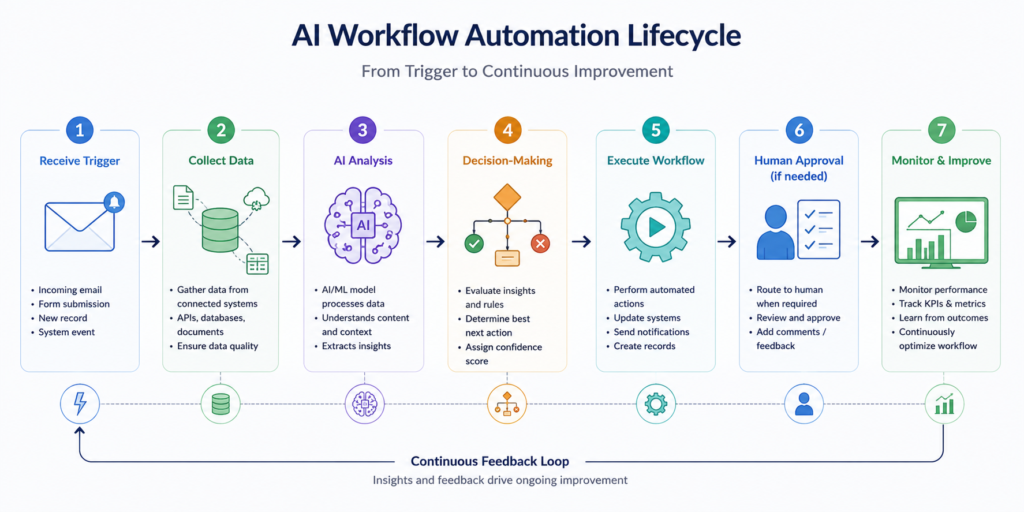
A typical AI-driven workflow follows this lifecycle:
Receive trigger → Collect data → AI analysis → Decision-making → Execute workflow → Human approval (if needed) → Monitor & improve
A trigger — an incoming email, a submitted form, a new record — starts the process. Relevant data is gathered from connected systems, analyzed by an AI model, and used to decide the next step. That step is executed automatically, routed to a human for approval if the situation calls for it, and the whole process is monitored so it can be refined over time.
Core Components
- Workflow engine — coordinates the overall process and hand-offs between steps
- AI model / LLM — interprets data and supports decision-making
- APIs — connect the workflow to the systems it needs to read from or act on
- Databases — store the data the workflow depends on
- Business rules — define constraints and guardrails the AI operates within
- Human approval — a checkpoint for decisions that warrant oversight
- Monitoring dashboard — visibility into workflow performance and outcomes
User/Trigger → Workflow Engine → AI → APIs → Enterprise Systems → Dashboard
Traditional Automation vs. AI Workflow Automation
| Traditional Automation | AI Workflow Automation |
|---|---|
| Rule-based | AI-driven decisions |
| Fixed workflows | Adaptive workflows |
| Structured data only | Structured + unstructured data |
| Limited intelligence | Learns from context |
| Manual updates | Continuously improves |
Traditional rule-based automation (RPA) is fragile in a specific way: it mimics human clicks and keystrokes against a fixed interface, so when a vendor updates a UI or a document format shifts slightly, the automation breaks. AI workflow automation instead interprets intent and adapts to variation — which is exactly where it adds the most value, on the judgment-heavy, unstructured parts of a process that used to require a person.
Enterprise Use Cases
- Customer Support Automation — Automatically classify, prioritize, and respond to customer queries while routing complex cases to human agents.
- Invoice Processing — Extract invoice data, validate information, and automate approval and payment workflows.
- IT Ticket Routing — Categorize support tickets, assign them to the right teams, and automate common issue resolution.
- Financial Approvals — Speed up expense, budget, and payment approvals using AI-driven validation and routing.
- Supply Chain Automation — Monitor inventory, forecast demand, and automate procurement and logistics workflows.
Benefits
- Increased productivity — automating work that previously consumed significant staff time
- Faster processing — shorter cycle times from trigger to completion
- Reduced costs — lower per-transaction handling costs at scale
- Better compliance — consistent, logged execution of defined processes
- Fewer human errors — reduced manual data entry and handling
- Scalable operations — handling growth in volume without proportional headcount growth
- Better customer experience — faster, more consistent responses
Challenges
- Data quality — AI decision-making is only as good as the data it’s working from
- Integration complexity — connecting AI-driven steps reliably to existing enterprise systems takes real engineering effort
- Security — automated systems with broad system access need carefully scoped permissions
- Governance — decisions made by AI within a workflow need to be auditable
- AI bias — decision-making systems can reflect biases present in their training data or historical process data
- Human oversight — high-stakes decisions still warrant a human checkpoint
- Change management — teams need to trust and adapt to workflows that now behave adaptively rather than predictably
- ROI measurement — quantifying the value of adaptive, judgment-based automation is less straightforward than measuring simple task automation
Technologies Behind AI Workflow Automation
A common set of technologies underlies most AI workflow automation implementations:
- Large language models (LLMs) — interpreting unstructured inputs and supporting decisions
- AI agents — handling multi-step, judgment-based portions of a workflow
- Workflow orchestration platforms — coordinating steps and hand-offs across a process
- APIs — connecting the workflow to enterprise systems
- RAG — grounding AI decisions in relevant enterprise knowledge
- Vector databases — supporting retrieval within AI-driven steps
- Business Process Management (BPM) — the discipline and tooling for defining and managing processes
- Cloud platforms — providing the infrastructure workflows run on
- MLOps — keeping the AI components of a workflow monitored and reliable
- Event-driven architecture — triggering workflow steps in response to system events rather than fixed schedules
These are presented as common industry technologies, not a specific vendor stack — the right combination depends on existing systems and process complexity.
Best Practices
- Start with high-impact workflows — pick processes where automation clearly saves meaningful time or cost, rather than automating broadly and shallowly
- Keep humans involved in critical decisions — automate the judgment-light majority of a process while keeping a person on genuinely high-stakes steps
- Monitor workflow performance — track outcomes continuously, not just at launch
- Ensure data quality — clean, reliable data feeding the workflow matters more than the sophistication of the AI model
- Apply governance and security — scope permissions and maintain auditability from the start
- Integrate with existing systems — a workflow that doesn’t connect cleanly to current tools creates more friction than it removes
- Continuously optimize workflows — treat automation as an evolving system, not a one-time project
Future Trends
- Agentic workflow automation — AI agents handling increasingly complex, multi-step portions of a workflow autonomously
- Multi-agent collaboration — specialized agents coordinating on different parts of a larger process
- Hyperautomation — combining RPA, AI, machine learning, and analytics into a single coordinated automation layer, rather than deploying each in isolation
- Autonomous business processes — end-to-end processes running with minimal manual intervention
- AI copilots — AI assistance embedded directly into how employees already work, rather than as a separate system
- Predictive workflow optimization — using historical process data to anticipate bottlenecks before they occur
- Human-AI collaboration — clearer patterns for where automation acts independently and where people stay involved
How MHTECHIN Helps Enterprises Implement AI Workflow Automation
Organizations exploring AI workflow automation often need guidance on integrating AI with existing enterprise systems while maintaining security, governance, and scalability. MHTECHIN focuses on enterprise AI development, system integration, and modern AI architectures that help businesses design intelligent workflows aligned with their operational goals. By emphasizing practical implementation and scalable solutions, MHTECHIN supports organizations as they modernize business processes through AI-driven automation.
Conclusion
AI Workflow Automation is about automating entire business processes, not just repetitive tasks. It extends what automation can handle — from rigid, rule-based scripts to adaptive workflows that interpret unstructured data and make judgment-based decisions. Successful adoption depends less on the sophistication of the AI itself and more on integrating it responsibly with existing enterprise systems, keeping humans in the loop where it matters, and treating governance as a starting requirement rather than an afterthought.
Frequently Asked Questions (FAQs)
1. What is AI Workflow Automation? AI Workflow Automation uses AI to automate complete business processes — understanding data, making decisions, and coordinating actions across systems — rather than simply executing fixed, rule-based steps.
2. How does AI Workflow Automation work? A trigger initiates the process, relevant data is collected, an AI model analyzes it and determines the next step, the workflow executes that step (with human approval where needed), and the process is monitored and refined over time.
3. What is the difference between workflow automation and AI automation? Traditional workflow automation (RPA) follows fixed, rule-based scripts and struggles when conditions change. AI automation interprets context, handles unstructured data, and adapts its approach, making it better suited to judgment-based or variable processes.
4. Which industries benefit the most? Healthcare, financial services, insurance, manufacturing, and government are among the largest adopters, largely because these industries combine high transaction volume with processes that involve both structured and unstructured data.
5. Is AI Workflow Automation secure? It can be, but security depends on deliberate design — scoped system permissions, auditable decision logs, and human checkpoints for high-stakes actions are essential.
6. What technologies power AI Workflow Automation? Common components include large language models, AI agents, workflow orchestration platforms, RAG, vector databases, APIs, and event-driven architecture, often combined with existing BPM tooling.
7. How is AI Workflow Automation different from RPA? RPA automates structured, rule-based tasks by mimicking clicks and keystrokes against a fixed interface, and breaks when that interface changes. AI workflow automation interprets intent and adapts to variation, handling unstructured data and judgment-based decisions RPA can’t. Most enterprises in 2026 use both together — AI handling the interpretation and decision-making, RPA executing the deterministic steps, particularly against legacy systems without modern APIs.
8. Can small businesses adopt AI Workflow Automation? Yes — cloud-based automation platforms have lowered the barrier to entry considerably, though the same principles of starting with a high-impact, well-scoped workflow apply regardless of company size.

Leave a Reply