Introduction
Imagine a customer contacts support with a complex issue: their premium subscription was canceled incorrectly, they’re missing critical features, and they need a refund for the last two months. A traditional chatbot would provide a scripted apology, collect basic information, and create a ticket for human review—leaving the customer waiting for hours or days.
Now imagine an agentic AI support system. It instantly verifies the customer’s account, analyzes subscription history, identifies the cancellation error, automatically reinstates the subscription with retroactive credits, processes the refund, sends a personalized apology email, and schedules a follow-up call—all within seconds. The customer’s issue is resolved before they finish describing it.
This is the promise of agentic AI for customer support in 2026. According to industry data, AI-powered customer support has reduced resolution times by 60-80% and increased CSAT scores by 20-35% . More importantly, agentic systems are moving beyond simple question-answering to become true autonomous service agents that can investigate, decide, and act.
In this comprehensive guide, you’ll learn:
- How agentic AI transforms every stage of customer support
- The architecture of support agents—from triage to resolution
- Real-world implementation patterns with measurable ROI
- How to integrate agents with CRM, ticketing, and communication systems
- Best practices for balancing automation with human empathy
Part 1: The Evolution of AI in Customer Support
From Chatbots to Autonomous Support Agents

Figure 1: The evolution of AI in customer support – from simple scripts to autonomous agents
| Era | Capabilities | Human Role | Resolution Rate |
|---|---|---|---|
| Rule-Based Chatbots | FAQ answers, scripted flows | Full escalation | 20-30% |
| LLM-Powered Chatbots | Natural conversation, context understanding | Review, approve | 40-50% |
| Agent-Assisted Support | Suggestion generation, draft responses | Execute, refine | 60-70% |
| Autonomous Support Agents | Investigation, action, resolution | Monitor, handle exceptions | 80-90% |
The Business Impact
| Metric | Traditional Support | With Agentic AI | Improvement |
|---|---|---|---|
| First Response Time | 2-4 hours | <1 minute | 98% faster |
| Resolution Time | 24-48 hours | 5-30 minutes | 90% faster |
| CSAT Score | 75-80% | 85-95% | +10-15 points |
| Cost per Ticket | $5-15 | $1-3 | 70-80% reduction |
| Agent Productivity | Baseline | 3-5× more tickets handled | 200-400% increase |
Part 2: The Architecture of Autonomous Support Agents
Multi-Agent Support System
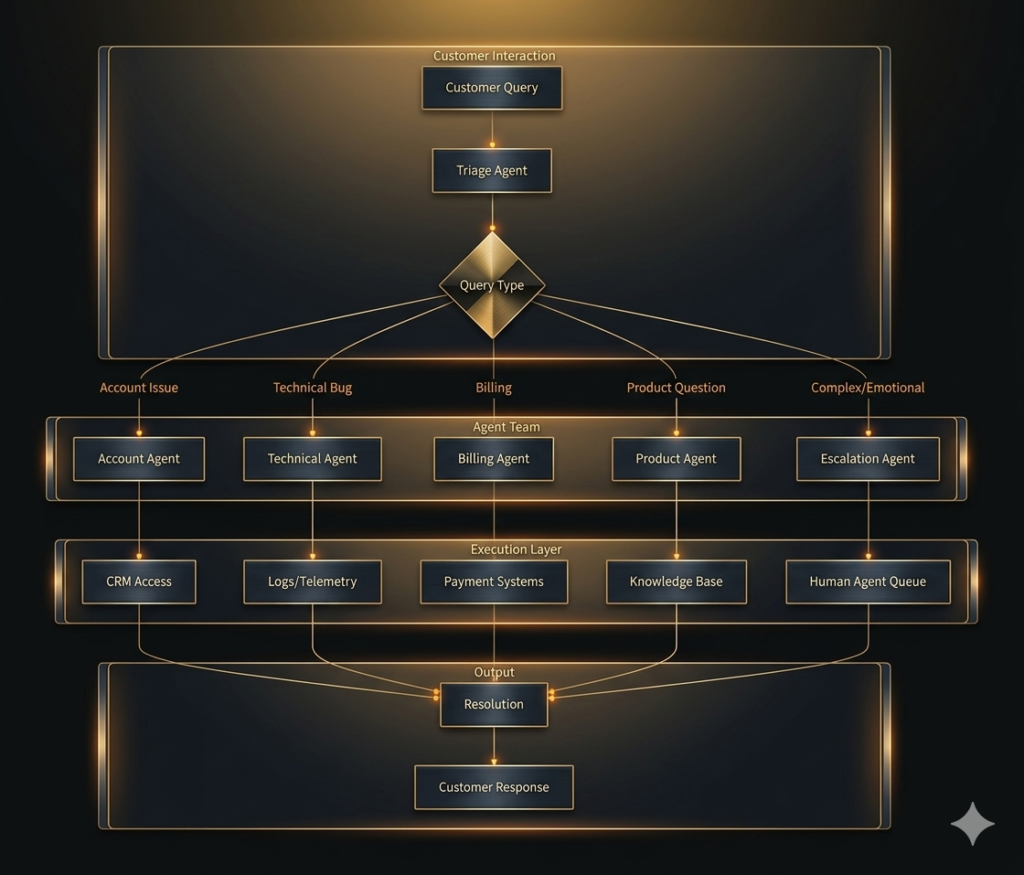
*Figure 2: Multi-agent architecture for autonomous customer support*
Core Agent Roles
| Agent | Role | Key Capabilities | Actions |
|---|---|---|---|
| Triage Agent | Query classification | Identifies intent, sentiment, urgency | Route to specialist, set priority |
| Account Agent | Identity verification | Retrieves customer data, verifies authentication | Lookup account, validate identity |
| Technical Agent | Bug investigation | Analyzes logs, checks system status | Diagnose issue, apply fixes |
| Billing Agent | Payment resolution | Accesses transaction history, processes refunds | Verify charges, issue credits |
| Product Agent | Feature guidance | Searches knowledge base, explains capabilities | Provide instructions, suggest alternatives |
| Escalation Agent | Human handoff | Manages transfer, preserves context | Queue management, context handoff |
Part 3: Implementation Patterns
Pattern 1: Intelligent Triage and Routing
python
from langchain.agents import create_openai_tools_agent
from langchain_openai import ChatOpenAI

class TriageAgent:
    """Intelligent query classification and routing."""

    def __init__(self):
        self.llm = ChatOpenAI(model="gpt-4o", temperature=0)
        self.routes = {
            "account": AccountAgent(),
            "technical": TechnicalAgent(),
            "billing": BillingAgent(),
            "product": ProductAgent(),
            "escalate": EscalationAgent()
        }

    def triage(self, query: str, customer_id: str = None) -> dict:
        """Classify query and route to appropriate agent."""

        # Step 1: Analyze intent and sentiment
        analysis = self._analyze_query(query)

        # Step 2: Check for escalation triggers
        if analysis["sentiment"] == "angry" and analysis["urgency"] > 0.8:
            return self._escalate_to_human(query, analysis)

        # Step 3: Retrieve customer context
        context = self._get_customer_context(customer_id) if customer_id else {}

        # Step 4: Route to appropriate agent
        agent = self.routes.get(analysis["intent"], self.routes["escalate"])

        # Step 5: Execute with context
        result = agent.handle(query, context)

        return {
            "intent": analysis["intent"],
            "sentiment": analysis["sentiment"],
            "confidence": analysis["confidence"],
            "response": result["response"],
            "actions_taken": result.get("actions", [])
        }

    def _analyze_query(self, query: str) -> dict:
        """Analyze query for intent, sentiment, and urgency."""
        prompt = f"""
        Analyze this customer support query:

        Query: {query}

        Return JSON with:
        - intent: (account/technical/billing/product/escalate)
        - sentiment: (positive/neutral/negative/angry)
        - urgency: (0-1)
        - confidence: (0-1)
        """
        return llm.generate_json(prompt)

    def _escalate_to_human(self, query: str, analysis: dict) -> dict:
        """Escalate to human agent with full context."""
        # Create ticket in system
        ticket_id = self._create_ticket(query, analysis)

        # Find available agent
        available_agent = self._find_available_agent()

        # Initiate warm transfer
        return {
            "escalated": True,
            "ticket_id": ticket_id,
            "agent": available_agent,
            "message": "I'm connecting you with a specialist who can help."
        }
Pattern 2: Autonomous Resolution Agent
python
class ResolutionAgent:
    """Autonomously investigate and resolve issues."""

    def __init__(self):
        self.tools = {
            "crm": CRMConnector(),
            "billing": BillingConnector(),
            "logs": LogAnalyzer(),
            "knowledge": KnowledgeBase()
        }

    def resolve(self, issue: str, customer_id: str, context: dict) -> dict:
        """Autonomously resolve customer issue."""

        # Step 1: Investigate – gather all relevant data
        investigation = self._investigate(issue, customer_id, context)

        # Step 2: Diagnose – identify root cause
        diagnosis = self._diagnose(investigation)

        # Step 3: Plan – determine resolution steps
        plan = self._plan_resolution(diagnosis)

        # Step 4: Execute – perform resolution actions
        execution = self._execute_resolution(plan, customer_id)

        # Step 5: Verify – confirm issue resolved
        verification = self._verify_resolution(execution, customer_id)

        # Step 6: Communicate – craft response
        response = self._craft_response(execution, verification)

        return {
            "investigation": investigation,
            "diagnosis": diagnosis,
            "actions": execution,
            "verified": verification,
            "response": response
        }

    def _investigate(self, issue: str, customer_id: str, context: dict) -> dict:
        """Gather all relevant data about the issue."""
        investigation = {
            "customer": self.tools["crm"].get_customer(customer_id),
            "recent_activity": self.tools["crm"].get_activity(customer_id, days=30),
            "billing": self.tools["billing"].get_transactions(customer_id, months=6),
            "support_history": self.tools["crm"].get_tickets(customer_id, limit=10)
        }

        # Add technical logs if applicable
        if "error" in issue.lower() or "bug" in issue.lower():
            investigation["logs"] = self.tools["logs"].get_errors(customer_id, hours=24)

        return investigation

    def _diagnose(self, investigation: dict) -> dict:
        """Identify root cause from investigation data."""
        prompt = f"""
        Based on this investigation data, diagnose the root cause:

        {json.dumps(investigation, indent=2)}

        Return JSON with:
        - root_cause: description
        - confidence: 0-1
        - affected_systems: list
        - severity: (low/medium/high/critical)
        """
        return llm.generate_json(prompt)

    def _plan_resolution(self, diagnosis: dict) -> list:
        """Create step-by-step resolution plan."""
        prompt = f"""
        Create a resolution plan for this diagnosis:

        {json.dumps(diagnosis, indent=2)}

        Available actions:
        - update_crm: Update customer records
        - process_refund: Issue refund/credit
        - reset_service: Reset or reconfigure service
        - send_notification: Send email/SMS
        - create_ticket: Create support ticket

        Return JSON list of steps with action and parameters.
        """
        return llm.generate_json(prompt)

    def _execute_resolution(self, plan: list, customer_id: str) -> list:
        """Execute resolution steps with safety checks."""
        executed = []

        for step in plan:
            # Check if action requires approval
            if self._requires_approval(step):
                approval = self._request_approval(step)
                if not approval["approved"]:
                    executed.append({"step": step, "status": "pending_approval"})
                    continue

            # Execute action
            action = step["action"]
            params = step.get("params", {})
            params["customer_id"] = customer_id

            if action == "update_crm":
                result = self.tools["crm"].update(params)
            elif action == "process_refund":
                result = self.tools["billing"].refund(params)
            elif action == "reset_service":
                result = self._reset_service(params)

            executed.append({
                "step": step,
                "status": "executed",
                "result": result
            })

        return executed

    def _requires_approval(self, step: dict) -> bool:
        """Check if action requires human approval."""
        sensitive_actions = ["process_refund", "reset_service", "update_crm"]
        return step["action"] in sensitive_actions
Pattern 3: Intelligent Escalation and Handoff
python
class EscalationAgent:
    """Manage human handoff with full context preservation."""

    def __init__(self):
        self.queue = HumanAgentQueue()

    def escalate(self, customer_id: str, issue: str, context: dict) -> dict:
        """Escalate to human with complete context."""

        # Step 1: Create summary for human agent
        summary = self._create_summary(issue, context)

        # Step 2: Check for available agents
        available_agent = self.queue.find_available_agent(
            skills=context.get("required_skills", [])
        )

        if available_agent:
            # Warm transfer
            return self._warm_transfer(customer_id, issue, summary, available_agent)
        else:
            # Queue for callback
            return self._queue_for_callback(customer_id, issue, summary)

    def _create_summary(self, issue: str, context: dict) -> str:
        """Create comprehensive summary for human agent."""
        prompt = f"""
        Create a concise but comprehensive summary for a human agent:

        Issue: {issue}

        Context:
        - Customer: {context.get('customer', {})}
        - Recent Activity: {context.get('recent_activity', [])}
        - Actions Taken: {context.get('actions_taken', [])}

        Include:
        1. What the customer needs
        2. What has been tried
        3. What information is missing
        4. Suggested next steps
        """
        return llm.generate(prompt)

    def _warm_transfer(self, customer_id: str, issue: str, summary: str, agent: dict) -> dict:
        """Warm transfer with context."""
        # Notify agent
        notification = self._notify_agent(agent["id"], {
            "customer_id": customer_id,
            "issue": issue,
            "summary": summary
        })

        # Initiate transfer
        return {
            "escalated": True,
            "agent_name": agent["name"],
            "estimated_wait": 0,
            "message": f"Connecting you with {agent['name']} who can help with this."
        }

    def _queue_for_callback(self, customer_id: str, issue: str, summary: str) -> dict:
        """Queue for callback when agent available."""
        ticket_id = self.queue.add_ticket({
            "customer_id": customer_id,
            "issue": issue,
            "summary": summary,
            "priority": self._calculate_priority(issue),
            "created_at": datetime.now()
        })

        return {
            "escalated": True,
            "ticket_id": ticket_id,
            "estimated_wait_minutes": self.queue.estimated_wait_time(),
            "message": "All agents are currently assisting other customers. We'll call you back within X minutes."
        }
Part 4: Real-World Use Cases
Use Case 1: Subscription Management
Scenario: Customer reports being charged after canceling subscription
Agent Workflow:
- Triage: Identifies as billing issue with negative sentiment
- Account Agent: Verifies customer identity, retrieves subscription history
- Billing Agent: Analyzes charges, identifies double-billing error
- Resolution Agent: Processes refund, reinstates if desired, sends confirmation
- Outcome: Resolved in 2 minutes, CSAT 4.8/5
Use Case 2: Technical Issue Resolution
Scenario: Customer can’t access dashboard after update
Agent Workflow:
- Triage: Identifies as technical issue, high urgency
- Account Agent: Verifies account status (active)
- Technical Agent: Checks logs, identifies session token expiration
- Resolution Agent: Sends reset instructions, validates fix
- Outcome: Resolved in 3 minutes, no escalation needed
Use Case 3: Complex Multi-Issue Resolution
Scenario: Customer has billing, technical, and account issues
Agent Workflow:
- Triage: Identifies multiple issues, flags for multi-agent coordination
- Coordinator Agent: Creates sub-tasks for each issue type
- Parallel Execution: Billing, technical, and account agents work simultaneously
- Integration: Results combined, final resolution crafted
- Outcome: All issues resolved in 5 minutes, single cohesive response
Part 5: Integration with Support Systems
CRM Integration
python
class CRMIntegration:
    """Integrate agents with CRM systems."""

    def __init__(self, crm_type="salesforce"):
        self.crm = self._connect_crm(crm_type)

    def get_customer_context(self, customer_id: str) -> dict:
        """Retrieve comprehensive customer context."""
        return {
            "profile": self.crm.get_customer(customer_id),
            "tickets": self.crm.get_tickets(customer_id, limit=10),
            "interactions": self.crm.get_interactions(customer_id, days=30),
            "subscriptions": self.crm.get_subscriptions(customer_id),
            "sentiment_score": self.crm.get_sentiment(customer_id)
        }

    def create_ticket(self, customer_id: str, issue: str, resolution: str) -> str:
        """Create support ticket with full context."""
        ticket = {
            "customer_id": customer_id,
            "issue": issue,
            "resolution": resolution,
            "channel": "ai_agent",
            "status": "resolved" if resolution else "open",
            "agent_id": "ai_agent_v2"
        }
        return self.crm.create_ticket(ticket)

    def update_customer(self, customer_id: str, updates: dict):
        """Update customer record based on resolution."""
        self.crm.update_customer(customer_id, updates)
Ticketing System Integration
python
class TicketingIntegration:
    """Integrate with Zendesk, ServiceNow, etc."""

    def __init__(self, platform="zendesk"):
        self.ticketing = self._connect(platform)

    def sync_resolution(self, ticket_id: str, resolution: dict):
        """Sync AI resolution to ticket system."""
        self.ticketing.update_ticket(ticket_id, {
            "status": "resolved",
            "resolution": resolution["summary"],
            "actions_taken": resolution["actions"],
            "resolved_by": "ai_agent",
            "resolution_time_seconds": resolution["duration"]
        })
Part 6: Quality and Performance Metrics
Key Performance Indicators
| Metric | Definition | Target | How to Measure |
|---|---|---|---|
| First Contact Resolution (FCR) | Issue resolved without escalation | >80% | Tickets marked resolved in first interaction |
| Average Handle Time (AHT) | Time from start to resolution | <5 minutes | System timestamps |
| CSAT | Customer satisfaction score | >90% | Post-interaction survey |
| Agent Utilization | Human agents on complex issues | 100% | Time spent on escalated issues |
| Auto-Resolution Rate | Resolved without human | >70% | Tickets resolved by AI |
| Customer Effort Score (CES) | Ease of resolution | <2 (on 1-5 scale) | Post-interaction survey |
Quality Assurance Framework
python
class QualityAssurance:
    """Monitor and improve agent quality."""

    def __init__(self):
        self.quality_checks = [
            self.check_resolution_accuracy,
            self.check_sentiment_improvement,
            self.check_escalation_appropriateness,
            self.check_compliance
        ]

    def evaluate_interaction(self, interaction: dict) -> dict:
        """Evaluate interaction quality."""
        scores = {}

        for check in self.quality_checks:
            scores[check.__name__] = check(interaction)

        overall = sum(scores.values()) / len(scores)

        return {
            "overall_score": overall,
            "scores": scores,
            "passed": overall >= 0.8,
            "needs_review": overall < 0.7
        }

    def check_resolution_accuracy(self, interaction: dict) -> float:
        """Check if resolution correctly addressed the issue."""
        # Use LLM to evaluate
        prompt = f"""
        Did the resolution correctly address the customer's issue?

        Issue: {interaction['issue']}
        Resolution: {interaction['resolution']}

        Score 0-1:
        - 1: Fully resolved
        - 0.5: Partially resolved
        - 0: Not resolved
        """
        return float(llm.generate(prompt))

    def check_sentiment_improvement(self, interaction: dict) -> float:
        """Check if sentiment improved during interaction."""
        before = interaction.get('initial_sentiment', 0.5)
        after = interaction.get('final_sentiment', 0.5)

        improvement = after - before
        return max(0, min(1, 0.5 + improvement))
Part 7: MHTECHIN’s Expertise in Agentic Customer Support
At MHTECHIN, we specialize in building autonomous customer support systems that transform service delivery. Our expertise includes:
- Custom Support Agents: Tailored to your products, services, and customer base
- Multi-Agent Orchestration: Coordinated teams for complex issues
- CRM Integration: Seamless connection to Salesforce, Zendesk, ServiceNow
- Quality Assurance: Continuous monitoring and improvement
- Analytics Dashboards: Real-time visibility into agent performance
MHTECHIN helps organizations deliver faster, more effective support while reducing costs and improving customer satisfaction.
Conclusion
Agentic AI is revolutionizing customer support. What began as simple chatbots that could answer FAQs has evolved into autonomous agents that can investigate, decide, and act—resolving complex issues without human intervention.
Key Takeaways:
- Multi-agent architectures enable specialized handling of different issue types
- Autonomous resolution reduces handle time from hours to minutes
- Intelligent escalation ensures complex issues reach the right humans with full context
- Integration with CRM and ticketing creates seamless workflows
- Quality frameworks ensure consistent, high-quality service
The future of customer support is autonomous, empathetic, and efficient. Organizations that embrace agentic AI will deliver superior experiences at lower cost.
Frequently Asked Questions (FAQ)
Q1: What makes agentic AI different from chatbots?
Chatbots answer questions; agentic AI resolves issues. Agentic systems can access systems, execute actions, process refunds, update accounts, and verify resolutions—not just provide information .
Q2: Can agentic AI handle angry customers?
Yes, through sentiment analysis and intelligent escalation. Angry customers can be routed to human agents with full context, or handled by specialized agents trained for de-escalation .
Q3: How do agents access customer data?
Through secure integrations with CRM, billing, and support systems, with least privilege access and full audit trails for compliance .
Q4: What happens if an agent makes a mistake?
Implement human-in-the-loop for sensitive actions, rollback capabilities, and quality assurance to catch and correct errors .
Q5: How do I measure agent performance?
Track First Contact Resolution, Average Handle Time, CSAT, Auto-Resolution Rate, and Customer Effort Score .
Q6: Can agents handle multiple issues in one interaction?
Yes, through coordinated multi-agent systems where different agents handle different aspects of complex issues in parallel .
Q7: How do I get started?
Start with a pilot for a single issue type (e.g., billing inquiries), measure results, then expand to more complex scenarios .
Q8: What security considerations exist?
Implement read-only access for most agents, approval workflows for write actions, PII redaction, and immutable audit logs .

Leave a Reply