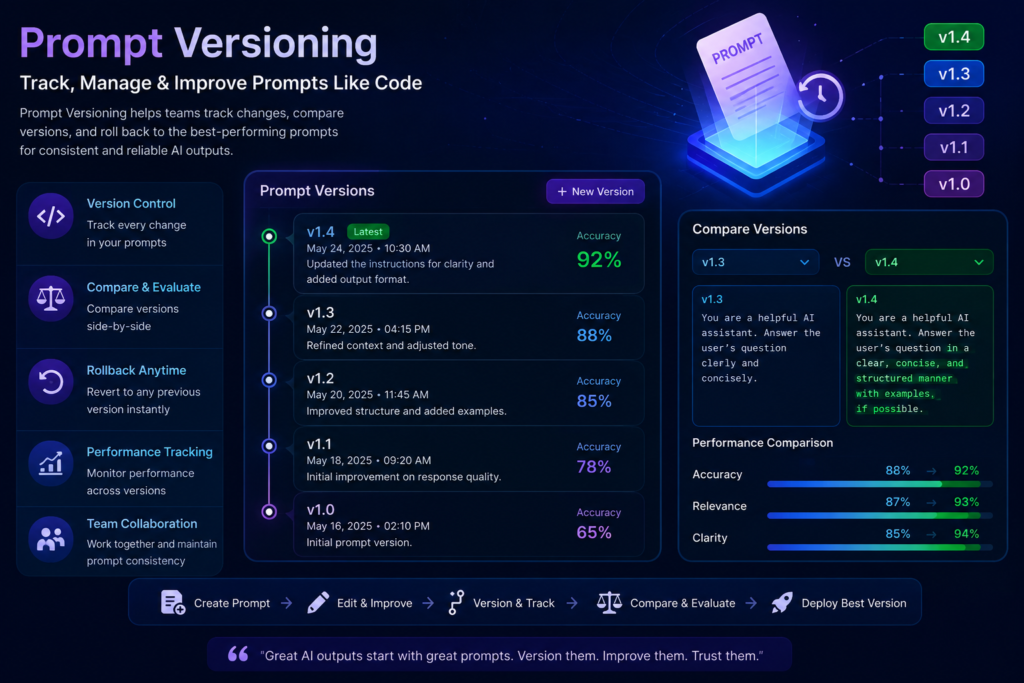
Prompt Versioning: The Complete Enterprise Guide to Managing AI Prompts at Scale
Introduction: The 4:07 PM Incident That Changed Everything
It’s 4:07 PM on a Tuesday. A senior AI engineer ships what looks like a harmless 12-line refinement to the support agent’s groundedness prompt. The change passed a quick Slack review and a smoke test on three hand-picked examples. By 4:23 PM, the refusal rate on legitimate refund queries is up 14 points. P95 latency is up 38%. The on-call engineer pulls up the recent changes and stares at a 200-line diff that touched the prompt file plus four other unrelated files. Rolling back means reverting everything. The semantic cache keeps serving the new prompt’s response shape for another 90 seconds. By 5 PM, the team is running a half-revert, praying nothing else breaks .
This scenario plays out in enterprises every single day. A prompt change—seemingly trivial—becomes a production incident. Without prompt versioning, teams cannot answer the most basic debugging question: “What prompt was running when this bad answer happened in production?” .
This guide is the complete playbook for prompt versioning in enterprise AI. We’ll cover why it matters, how it works, the infrastructure you need, and the practices that separate teams shipping reliable LLM products from teams whose AI features regress every time someone tweaks a system prompt .
What Is Prompt Versioning?
Prompt versioning is the practice of treating prompts with the same rigor you apply to application code: versions, diffs, branches, deployments, A/B testing, and one-click rollback . It’s the boring infrastructure that makes LLM products reliable at scale.
Think of it as Git for AI prompts—but with important differences. While Git tracks changes to source code, prompt versioning adds capabilities specific to AI workflows: deployment-aware fetching, traffic splitting, A/B testing on live traffic, and evaluation-gated promotion .
The Core Definition
Prompt versioning involves systematically tracking, documenting, and managing changes to the instructions that guide AI models and agents . Every prompt gets a version identifier, and every change is diffed, reviewed, and deployed independently of the application code.
Why it matters in plain terms: When a customer reports a bad AI response three weeks from now, you need to know exactly which version of the prompt produced it. Without versioning, that’s a guess. With versioning, it’s a database query .
Why Prompt Versioning Is Critical for Enterprise AI
1. Consistency and Reliability
In production, a prompt is a contract between your application and the model. The contract says “given these instructions, produce output in this shape.” When the contract changes, behavior changes—intentionally or accidentally .
Without versioning, you cannot guarantee consistent behavior across requests. Teams shipping reliable LLM products use prompt versioning; teams whose features regress every time someone “tweaks the system prompt” don’t .
2. Collaboration and Team Productivity
When multiple teams or contributors work on AI systems, uncontrolled prompt updates create confusion, conflicts, and duplicated effort . A prompt that lives in a Python string literal is invisible to non-engineers. The product team, support team, and content team often have the best judgment about prompt tone and wording, but they cannot contribute when prompts are buried in code .
Versioning enables synchronized workflows, shared understanding, and safer experimentation. Everyone can see what changed, who changed it, and why .
3. Rollbacks Without Code Deploys
The rollback button is the test. If rolling back a prompt requires a code deploy, you do not have prompt versioning—you have prompts in code with a registry on top .
In a proper versioning system, rollback is one click or one API call. The application never references version numbers directly; it asks for “latest prod” and gets it. Setting an older version to prod and archiving the current version is the rollback .
4. Governance and Compliance
Regulated industries require auditability. Enterprises must be able to show what the AI was instructed to do at any point in time . Prompt versioning provides the evidence—author, timestamp, change description, deployment history, and evaluation scores .
5. Faster Troubleshooting and Debugging
Every span that records an LLM call should carry the prompt template ID and version it used . With this in place, “did the prompt change between Monday and Tuesday” stops being a guess. “Which prompt version produced this bad answer” stops being a guess .
6. Enterprise Scalability
As organizations scale AI across workflows, applications, and business units, prompts become one of the most critical and fragile components of the modern AI stack . Prompt versioning adds the structure and discipline needed to make AI systems predictable, auditable, and scalable .
How Prompt Versioning Works: The Production-Grade Setup
The Five Essential Fields
Every prompt version needs these five attributes :
| Field | Purpose |
|---|---|
| template_id | Logical identity of the prompt (e.g., support_agent_system_prompt) |
| version | Monotonic integer (v1, v2, v3…) or semantic version |
| change_notes | Commit message describing what changed and why |
| rendered_hash | SHA256 of the template body for prompt caching |
| deployment_stage | Where this version is live (dev, staging, prod) |
The Fetch Pattern That Works
Application code should never have a prompt string literal. Instead, fetch the prompt by template_id and environment :
text
prompt = prompts.get(template_id="support_agent", stage="prod")
Cache the result locally for the lifetime of the process and refresh on a schedule (every few minutes). Do NOT refresh on every call—it adds latency and creates inconsistency mid-conversation .
The Complete Workflow
text
┌─────────────┐
│    IDEA     │ - Business requirement, user feedback, or quality gap
└──────┬──────┘
       ▼
┌─────────────┐
│   CREATE    │ - Write prompt as YAML/JSON with variables
└──────┬──────┘
       ▼
┌─────────────┐
│    TEST     │ - Run against golden dataset (100-300 cases)
└──────┬──────┘
       ▼
┌─────────────┐
│  EVALUATE   │ - Rubric scores: groundedness, refusal rate, task completion
└──────┬──────┘
       ▼
┌─────────────┐
│   VERSION   │ - Assign version ID, metadata, author, timestamp
└──────┬──────┘
       ▼
┌─────────────┐
│   DEPLOY    │ - Promote to production via canary ramp (5% → 100%)
└──────┬──────┘
       ▼
┌─────────────┐
│   MONITOR   │ - Per-version metrics: cost, latency, quality
└──────┬──────┘
       ▼
┌─────────────┐
│  IMPROVE    │ - Use production traces to iterate next version
└─────────────┘
The Prompt Lifecycle: Three Stages, Two Gates, One Rollback
Forget seven-stage diagrams that look great on slides but fail in practice. What you need at runtime is three stages :
Stage 1: Draft
The iteration loop. Prompts live as versioned YAML files with three components moving together: template body, variable schema, and generation parameters .
text
# prompts/support_agent/v24.yaml
id: support_agent
version: v24
parent: v23
model: anthropic/claude-sonnet-4-5
temperature: 0.2
max_tokens: 800
template: |
  You are a support agent for {{company_name}}.
  Use only the retrieved context to answer.
  Context: {{context}}
  Question: {{question}}
variables:
  - { name: company_name, type: string, required: true }
  - { name: context, type: string, required: true }
  - { name: question, type: string, required: true }
owners: [support-eng@company.com]
- Store prompts as YAML or JSON, not Python f-strings (diff is unreadable)
- Carry generation parameters inside the version (temperature change is a prompt change)
- Pin the dataset the prompt was validated against
Stage 2: Gated Promotion
Two layers of gates:
Layer 1: Eval-on-PR. Every PR that touches a prompts/ file triggers a regression suite. The gate fires if :
- Any rubric’s mean drops below the pinned floor (e.g., Groundedness < 0.85)
- Paired CI on any rubric sits entirely below zero
- Any safety rubric flips a case from pass to fail
Layer 2: Canary Ramp at the Gateway. The new version starts at 5% of traffic and ramps to 25% → 50% → 100%, gated at each step by the same triggers running against live traffic .
Stage 3: Deprecation
Stop the old version from serving. Label it as archived, drain the warm cache, and prevent ghost-serving .
Components of Prompt Versioning
A complete prompt version record includes:
🟢 Prompt Content: The actual instruction text with variable placeholders
🟢 Version ID: Sequential number (v1, v2, v3) or semver
🟢 Metadata: Author, change description, creation timestamp
🟢 Tags: Labels for search and categorization (e.g., “RAG,” “support,” “compliance”)
🟢 Evaluation Score: Performance metrics from test runs
🟢 Model Used: Which LLM this prompt was tested with
🟢 Deployment Status: Where this version is currently serving (dev/staging/prod)
🟢 Parent Version: Which version this was derived from
🟢 Rendered Hash: SHA256 for cache keying
Enterprise Use Cases
💼 Customer Support
A support team iterates prompts to reduce refusal rates while maintaining accuracy. Each version is A/B tested on 5% of traffic before full rollout. When a new product launches, the prompt is updated to include the new product in its knowledge scope .
🏥 Healthcare
Compliance-required prompts must be auditable. Every version change is recorded with author, approval workflow, and validation against a medical benchmark dataset. Rollback is immediate if safety metrics drop .
🏦 Banking
Fraud detection prompts require strict governance. Prompt changes are reviewed by both engineering and compliance before promotion. The system maintains a full history of what instructions ran when for regulatory reporting .
🛒 E-commerce
Product recommendation prompts change weekly based on seasonality, inventory, and marketing campaigns. Non-engineers (marketing team) can edit prompts through a UI while maintaining version history and rollback capability .
⚖ Legal
Contract analysis prompts must meet strict accuracy thresholds. Every prompt version is evaluated against a golden dataset of legal documents before deployment. The evaluation scores become part of the version record .
Prompt Versioning vs Model Versioning
| Aspect | Prompt Versioning | Model Versioning |
|---|---|---|
| What changes | Instructions to the model | Model weights and architecture |
| Change frequency | Daily to weekly | Monthly to yearly |
| Who changes it | Engineers, product, support, content | ML researchers, platform engineers |
| Rollback | Instant (configuration change) | Requires redeployment |
| Impact | Behavioral change, no cost change | Behavioral and cost change |
| Testing | Eval-on-PR + canary A/B | Offline benchmarks + staged rollout |
| Dependency | Changes can be made independently | Requires infrastructure updates |
20+ Best Practices for Enterprise Prompt Versioning
- Treat prompts as configuration, not code . They should live outside your application source.
- Every prompt deserves five things: version number, change notes, rendered hash, deployment stage, and author .
- Version the template, not the rendered output. Variables like
{{user_name}}belong in the template; their values come from runtime context . - Log the prompt version on every LLM call. This solves the biggest debugging problem .
- Use eval-on-PR to block bad prompts. Run regression suites on every prompt change before merge .
- Deploy via canary ramps. Start at 5%, monitor, ramp to 25%, 50%, 100% .
- One-click rollback. If rollback requires a code deploy, you don’t have prompt versioning .
- Store prompts as YAML or JSON. Python f-strings make diffs unreadable .
- Carry generation parameters inside the version. A temperature change is a prompt change .
- Pin the evaluation dataset. The baseline that gates promotion must be a real reference .
- Give non-engineers edit access. Product, support, and content people have the best judgment about tone .
- Use change notes like commit messages. “Added empathy guideline per CSAT feedback” beats “updated prompt” .
- Cache locally, refresh on a timer. Do not fetch the prompt on every request .
- Use rendered_hash as the cache key. Two identical prompt bodies share cache; differ by whitespace and they don’t .
- Define per-route evaluation floors. A medical assistant’s safety floor is 1.0; a summarizer’s completeness floor might be 0.70 .
- Use paired bootstrap for evaluating changes. Pairing kills between-example variance .
- Tag every span with prompt template_id and version. Enables precise replay capability .
- A/B test prompts on live traffic. Offline evals catch known regressions; live traffic catches new user questions you didn’t anticipate .
- No secrets in prompts. API keys, passwords, and sensitive data should never appear in a prompt registry .
- Version approval workflows for regulated industries. High-stakes surfaces (compliance answers, legal responses) need review processes .
- Connect prompt versions to eval results. Accumulate scores over time so you can see which versions performed best .
- Use a dedicated prompt registry. Git works for small projects but breaks at production scale .
Common Mistakes to Avoid
❌ Editing prompts directly in production
No diff, no review, no rollback. The classic anti-pattern .
❌ Hardcoding prompts in code
Every prompt change requires a code deploy. Slows iteration and forces co-location of unrelated changes .
❌ Not logging versions on spans
When a regression appears, you can’t tell which version caused it .
❌ Refreshing the prompt cache on every call
Adds 50-200ms per request and creates inconsistency mid-conversation .
❌ Skipping evals on prompt changes
You find regressions in customer complaints instead of in CI .
❌ Prompt body still in code as a fallback
The fallback becomes the actual prompt the day someone forgets to update it .
❌ No A/B testing before shipping prompt changes
“It looked fine in dev” is what people say before the incident .
❌ Treating major rewrites as small versions
If you rewrote the entire system message, that’s a v18 to v25 jump, not v18 to v19 .
❌ Prompt registry only engineers can edit
Non-engineers often have the best judgment about prompt tone and wording .
❌ No connection between prompt versions and eval results
Each prompt version should accumulate eval scores over time .
Popular Prompt Versioning Tools
🔹 LangSmith
LangChain’s managed platform for prompt/version management, dataset evals, and tracing. Tightest integration for teams already building with LangChain. Stores prompt versions, creates datasets, runs evaluators, and compares runs across branches .
🔹 Respan
Prompt management platform with versioning, traces, evals, and a gateway in one platform. Versioning + A/B deployment + observability connected so prompt versions show up automatically on traces .
🔹 PromptLayer
Non-technical-friendly editing with version history. Good for teams where non-engineers need to contribute to prompts .
🔹 LangFuse
Open-source platform for tracing, evaluating, and managing prompts and LLM workflows. Great for teams that want self-hosted control and data residency .
🔹 Helicone
Observability-first platform with prompt management capabilities. Captures traces, supports versioning, and provides quality feedback mechanisms.
🔹 Weights & Biases
ML experiment tracking platform with prompt versioning capabilities. Good for teams already using W&B for model development.
🔹 MLflow
Open-source ML lifecycle platform. Has a Prompt Engineering UI for versioning and tracking prompts.
🔹 GitHub (with CI/CD)
Works for small projects. Prompts live in Git with PR reviews and CI eval gates. Breaks at production scale because prompt changes require redeployment .
🔹 Vellum
Visual playground with versioning. Good for teams that want a no-code/low-code approach to prompt iteration.
🔹 Promptfoo (Open Source)
CLI-first prompt testing with versioning patterns. Great for teams that want open-source, developer-centric tooling .
Security Considerations for Prompt Versioning
API Keys
Never store API keys in prompt templates. Use environment variables or secrets management .
Sensitive Data
Prompts should not contain PII, PHI, or other sensitive information as static content. Use variables for runtime values .
Prompt Injection
Versioning helps track when a prompt becomes vulnerable. Safety rubrics like PromptInjection should gate promotion .
Access Control
Use RBAC/permissions for who can view, edit, and deploy prompt versions .
Audit Logs
Every change must be logged with author, timestamp, and change description. CloudTrail or equivalent auditing is essential .
Encryption
Prompt registries should encrypt stored prompts at rest and in transit .
Compliance
Regulated environments need approval workflows, evaluation gates, and complete version history .
The Enterprise Workflow in Production
Here’s the complete workflow used by production AI systems :
Step 1: Prompt authored in YAML/JSON
- Template body, variable schema, generation parameters as one versioned object
- Owner metadata, change notes
Step 2: PR created with evaluation
- Eval-on-PR regression suite runs against 100-300 golden cases
- Three triggers: floor (mean drops below threshold), paired CI (worse than prior), safety flip (critical failure)
- PR blocked if any trigger fires
Step 3: Promoted to dev/staging
- Version assigned (v24, v25…)
- Deployed to dev environment for integration testing
Step 4: Canary deployment to production
- Starts at 5% traffic, hashed by user ID (same user stays in same arm)
- Monitors per-version metrics: cost, latency, quality rubrics
- Ramps to 25% → 50% → 100% with gates at each step
Step 5: Production monitoring
- Every LLM call tagged with prompt template_id and version
- Traces and metrics sliceable by version
- Automated alerts on regression triggers
Step 6: Rollback when needed
- One click/API call: set older version’s stage to
prod - Current version archived
- Cache refreshes within refresh interval (few minutes)
Step 7: Iterate
- Production traces feed into next version iteration
- Golden dataset updated with new edge cases
- Process repeats
SEO FAQ Section
1. What is prompt versioning?
Prompt versioning is the practice of tracking, managing, and deploying changes to AI prompts with the same rigor as application code—with versions, diffs, deployments, A/B testing, and rollback capability .
2. Why is prompt versioning important?
It ensures consistency, enables rollbacks without code deploys, provides auditability for compliance, supports collaboration across teams, and enables faster troubleshooting .
3. How does prompt versioning differ from Git?
Git tracks code changes; prompt versioning adds deployment-aware fetching, traffic splitting, A/B testing on live traffic, and evaluation-gated promotion . Git works for small projects but breaks at production scale .
4. What are the key components of a prompt version?
Version ID, prompt content, author, change description, timestamp, evaluation scores, model used, deployment status, and rendered hash .
5. What is the prompt lifecycle?
Draft → Testing (eval-on-PR) → Approval → Production deployment (canary ramp) → Monitoring → Optimization → New version .
6. How do you roll back a prompt version?
One click or API call: set an older version’s deployment stage to prod and archive the current version. No code deploy required .
7. What tools support prompt versioning?
LangSmith, Respan, PromptLayer, LangFuse, Helicone, Vellum, Promptfoo, Weights & Biases, and MLflow .
8. What is eval-on-PR?
Automated regression testing on every PR that changes a prompt. Blocks the PR if evaluation metrics drop below thresholds .
9. How do you A/B test prompts?
Deploy two versions to production, route traffic split (e.g., 95/5 or 50/50), tag each request with the version used, compare quality/cost/latency metrics, promote the winner .
10. What is the three-stage prompt lifecycle?
Draft (iteration), Gated Promotion (eval-on-PR + canary ramp), and Deprecation (archive old versions) .
11. Should prompts be stored in Git or a separate system?
A separate system for production. Git’s strength is code review; prompts change often, by non-engineers, and need a UI for diffing rendered output across versions .
12. How often should prompt changes be shipped?
As often as you have a reason. Daily is fine if you are iterating on quality. The point of versioning is that frequent changes become safe .
13. What is the enterprise workflow for prompt versioning?
Author in YAML/JSON → PR with eval-on-PR → Promote to dev/staging → Canary ramp to production → Monitor per-version metrics → Rollback if needed → Iterate .
14. What are common prompt versioning mistakes?
Editing prompts directly in production, hardcoding prompts in code, not logging versions on traces, refreshing cache on every request, and skipping evals on prompt changes .
15. How does prompt versioning support compliance?
Every version has author, timestamp, change description, and deployment history. Regulated environments can show what the AI was instructed to do at any point in time .
Future Trends in Prompt Versioning
AI Agents
As AI systems become more autonomous, prompt versioning extends to agent instructions, tool schemas, and workflow definitions. Version control becomes critical for understanding why an agent made a particular decision.
LLMOps Maturity
Prompt versioning is becoming a core capability of LLMOps platforms. The integration between versioning, evaluation, and observability is deepening .
Context Engineering
Prompts are evolving from standalone instructions to systems that manage context, memory, and tool use. Versioning must track the entire context engineering stack.
Model Context Protocol (MCP)
Emerging standards for prompt and context exchange will require versioning across systems and providers .
AI Memory and State
As AI systems maintain state across interactions, prompt versioning expands to include memory schema and state management configurations.
Autonomous Systems
Self-improving systems that iterate on their own prompts will need robust versioning to audit and understand changes made by the AI itself.
Automated Prompt Optimization
AI-driven prompt optimization generates many iterations per minute. Versioning becomes a historical record of the optimization process.
AI Governance Maturity
As regulations catch up with AI, prompt versioning will be a required capability for demonstrating control over AI behavior .
Conclusion: The Investment That Pays Back in Hours
Prompt versioning is not a nice-to-have. It is a foundational capability for any organization shipping AI to users . The cost is small—a registry, a hash, a deployment-aware fetch in your application code, and a UI for non-engineers to read the history . The return is immediate.
The first time you have to roll back a prompt regression in 30 seconds instead of 30 minutes, you will never go back . The first time a product manager independently refines a prompt and deploys it to production through a safe review workflow, you’ll see how prompt versioning unlocks team productivity.
Three steps to get started:
- Move prompts out of application code. Use a database, config service, or prompt management tool .
- Wire prompt version into your traces. Every LLM call records which prompt version it used .
- Add environments and explicit promotion. Dev, staging, prod with review workflows .
The teams that do this ship better AI products faster. The teams that don’t spend their weekends debugging prompt incidents. Choose wisely.
This article was written based on production experience from teams deploying LLM applications at scale, with insights from Respan, Future AGI, Kore.ai, and Azure prompt engineering best practices

Leave a Reply