Introduction
Imagine an AI agent that can watch a cooking video, listen to the chef’s instructions, read the recipe card, and then guide you through preparing the dish—answering questions about technique, identifying ingredients from photos of your pantry, and even listening to the sizzle of your pan to tell you when it’s the right temperature. This isn’t science fiction. This is the reality of multi-modal agents in 2026.
For years, AI systems operated in silos—text models for language, vision models for images, audio models for speech. But the world doesn’t come in separate modalities. We perceive, understand, and act using a seamless integration of sight, sound, and language. Multi-modal agents are the first AI systems that mirror this human capability, processing and reasoning across text, image, and audio simultaneously.
According to recent industry data, multi-modal AI adoption has grown by 340% in the past 18 months, with enterprises deploying agents that can analyze documents with embedded images, understand video content, and respond to voice commands with visual context. Leading models like GPT-4o, Gemini, and Claude now offer native multi-modal capabilities, fundamentally changing what’s possible with AI agents.
In this comprehensive guide, you’ll learn:
- What multi-modal agents are and why they represent a paradigm shift
- The architecture of multi-modal processing—from encoding to fusion to reasoning
- How to build agents that process text, image, and audio together
- Real-world applications across industries
- Best practices for training and deploying multi-modal systems
- The future of multi-modal AI
Part 1: What Are Multi-Modal Agents?
Definition and Core Concept
A multi-modal agent is an AI system capable of processing, understanding, and generating content across multiple modalities—typically text, image, and audio—integrating them to perform complex tasks that require holistic understanding.
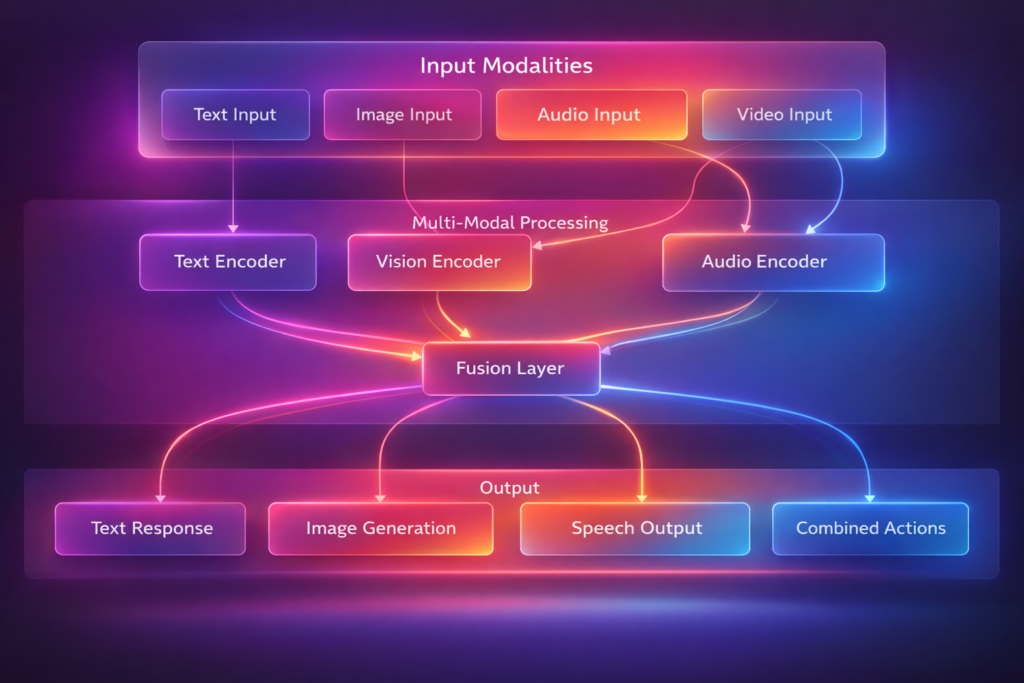
*Figure 1: Multi-modal agent architecture – processing diverse inputs into integrated understanding*
Why Multi-Modal Matters
| Challenge | Single-Modal AI | Multi-Modal AI |
|---|---|---|
| Document Analysis | Reads text only | Understands charts, diagrams, layout |
| Video Understanding | Captions only | Combines visuals, audio, speech |
| User Interaction | Text or voice separately | Natural multimodal conversation |
| Real-World Tasks | Limited context | Full sensory understanding |
The Evolution of Multi-Modal AI
| Era | Models | Capabilities |
|---|---|---|
| 2020-2022 | CLIP, DALL-E 1 | Basic image-text alignment |
| 2023 | GPT-4V, LLaVA | Vision-language understanding |
| 2024 | Gemini, GPT-4o | Native multi-modal (text+image+audio) |
| 2025-2026 | Multi-modal Agents | Reasoning across all modalities, action |
Part 2: The Architecture of Multi-Modal Agents
Core Components
| Component | Function | Technologies |
|---|---|---|
| Modality Encoders | Convert raw inputs to embeddings | CLIP (vision), Whisper (audio), Transformer (text) |
| Fusion Layer | Combine embeddings across modalities | Cross-attention, concatenation, gating |
| Reasoning Engine | Process fused representations | LLM with multi-modal understanding |
| Memory System | Store and retrieve multi-modal context | Vector databases, knowledge graphs |
| Action Module | Generate outputs across modalities | Text generation, image generation, speech synthesis |
Modality Encoding
python
class ModalityEncoders:
    """Encode different input modalities to unified representations."""

    def __init__(self):
        self.text_encoder = TextEncoder(model="text-embedding-3-large")
        self.image_encoder = ImageEncoder(model="clip-vision-large")
        self.audio_encoder = AudioEncoder(model="whisper-large-v3")
        self.video_encoder = VideoEncoder(model="video-llava")

    def encode_text(self, text: str) -> list:
        """Convert text to embeddings."""
        return self.text_encoder.encode(text)

    def encode_image(self, image_path: str) -> list:
        """Convert image to embeddings."""
        image = Image.open(image_path)
        return self.image_encoder.encode(image)

    def encode_audio(self, audio_path: str) -> dict:
        """Convert audio to text and embeddings."""
        # Transcribe audio
        transcript = self.audio_encoder.transcribe(audio_path)

        # Extract audio features
        audio_embeddings = self.audio_encoder.encode(audio_path)

        return {
            "transcript": transcript,
            "embeddings": audio_embeddings,
            "duration": self._get_duration(audio_path),
            "speaker_count": self._detect_speakers(audio_path)
        }

    def encode_video(self, video_path: str, sample_fps: int = 1) -> dict:
        """Extract frames and audio from video."""
        frames = self._extract_frames(video_path, sample_fps)
        audio = self._extract_audio(video_path)

        # Encode frames
        frame_embeddings = [self.image_encoder.encode(f) for f in frames]

        # Encode audio
        audio_data = self.encode_audio(audio)

        return {
            "frames": frames,
            "frame_embeddings": frame_embeddings,
            "audio": audio_data,
            "fps": sample_fps,
            "duration": len(frames) / sample_fps
        }
Fusion Strategies
python
class MultiModalFusion:
    """Combine embeddings from multiple modalities."""

    def __init__(self, fusion_strategy="cross_attention"):
        self.strategy = fusion_strategy
        self.cross_attention = CrossAttentionLayer()

    def fuse(self, embeddings: dict) -> list:
        """Fuse embeddings from different modalities."""
        if self.strategy == "concatenation":
            return self._concatenate(embeddings)
        elif self.strategy == "weighted_sum":
            return self._weighted_sum(embeddings)
        elif self.strategy == "cross_attention":
            return self._cross_attention_fusion(embeddings)
        elif self.strategy == "gated_fusion":
            return self._gated_fusion(embeddings)

    def _concatenate(self, embeddings: dict) -> list:
        """Simple concatenation of embeddings."""
        result = []
        for modality, emb in embeddings.items():
            result.extend(emb)
        return result

    def _weighted_sum(self, embeddings: dict) -> list:
        """Weighted sum with learned weights."""
        weights = self._get_modality_weights(embeddings.keys())
        result = None
        for modality, emb in embeddings.items():
            if result is None:
                result = weights[modality] * np.array(emb)
            else:
                result += weights[modality] * np.array(emb)
        return result.tolist()

    def _cross_attention_fusion(self, embeddings: dict) -> list:
        """Use cross-attention to align modalities."""
        # Use text as query, others as key/value
        text_emb = embeddings.get("text", [])
        if not text_emb:
            # Default to first modality
            text_emb = list(embeddings.values())[0]

        other_modalities = {k: v for k, v in embeddings.items() if k != "text"}

        fused = text_emb
        for modality, emb in other_modalities.items():
            attended = self.cross_attention(
                query=text_emb,
                key=emb,
                value=emb
            )
            fused = self._combine(fused, attended)

        return fused
Multi-Modal Reasoning
python
class MultiModalReasoner:
    """Reason across multiple modalities."""

    def __init__(self, model="gpt-4o"):
        self.model = self._load_model(model)
        self.memory = MultiModalMemory()

    def reason(self, inputs: dict, query: str) -> dict:
        """Reason across modalities to answer query."""
        # Step 1: Encode all inputs
        encoded = self._encode_inputs(inputs)

        # Step 2: Fuse into unified representation
        fused = self._fuse_modalities(encoded)

        # Step 3: Retrieve relevant memories
        context = self.memory.retrieve(query, encoded)

        # Step 4: Multi-modal reasoning
        prompt = self._build_prompt(encoded, fused, context, query)
        response = self.model.generate(prompt)

        # Step 5: Parse response and extract actions
        actions = self._parse_actions(response)

        return {
            "response": response,
            "actions": actions,
            "reasoning_trace": self._get_reasoning_trace(),
            "confidence": self._calculate_confidence(encoded, response)
        }

    def _build_prompt(self, encoded: dict, fused: list, context: list, query: str) -> str:
        """Build multi-modal prompt with all inputs."""
        prompt_parts = []

        # Add text inputs
        if "text" in encoded:
            prompt_parts.append(f"Text Input: {encoded['text']}")

        # Add image descriptions
        if "image" in encoded:
            prompt_parts.append(f"Image Description: {self._describe_image(encoded['image'])}")

        # Add audio transcript
        if "audio" in encoded:
            prompt_parts.append(f"Audio Transcript: {encoded['audio']['transcript']}")

        # Add context from memory
        if context:
            prompt_parts.append(f"Relevant Context: {context}")

        # Add query
        prompt_parts.append(f"Question: {query}")

        return "\n".join(prompt_parts)

    def _describe_image(self, image_embeddings: list) -> str:
        """Generate text description of image."""
        # Use vision-language model for description
        description_prompt = "Describe this image in detail: [IMAGE]"
        return self.model.generate(description_prompt, image_embeddings)
Part 3: Implementation Patterns
Pattern 1: Document Understanding Agent
python
class DocumentUnderstandingAgent:
    """Process documents with text, images, and layout."""

    def analyze_document(self, document_path: str, query: str) -> dict:
        """Analyze multi-modal document."""
        # Extract all modalities
        text = self._extract_text(document_path)
        images = self._extract_images(document_path)
        tables = self._extract_tables(document_path)
        layout = self._extract_layout(document_path)

        # Process each modality
        analysis = {
            "text": self._analyze_text(text),
            "images": [self._analyze_image(img) for img in images],
            "tables": [self._analyze_table(table) for table in tables],
            "layout": self._analyze_layout(layout)
        }

        # Cross-modal reasoning
        answer = self._cross_modal_reasoning(analysis, query)

        # Extract insights
        insights = self._extract_insights(analysis, answer)

        return {
            "answer": answer,
            "insights": insights,
            "visualizations": self._generate_visualizations(analysis),
            "confidence": self._calculate_confidence(analysis, answer)
        }

    def _analyze_image(self, image) -> dict:
        """Extract information from images."""
        return {
            "type": self._classify_image(image),
            "content": self._extract_text_from_image(image),
            "objects": self._detect_objects(image),
            "charts": self._extract_chart_data(image) if self._is_chart(image) else None
        }

    def _cross_modal_reasoning(self, analysis: dict, query: str) -> str:
        """Reason across text, images, and tables."""
        prompt = f"""
        Analyze this document with multi-modal content:

        Text Summary: {analysis['text']['summary']}
        Images: {[img['content'] for img in analysis['images'][:3]]}
        Tables: {analysis['tables']}

        Query: {query}

        Synthesize information across modalities to answer.
        """

        return self.model.generate(prompt)
Pattern 2: Video Understanding Agent
python
class VideoUnderstandingAgent:
    """Process and understand video content."""

    def analyze_video(self, video_path: str, query: str) -> dict:
        """Analyze video across frames and audio."""
        # Extract video components
        video_data = self._extract_video_data(video_path)

        # Process visual stream
        visual_analysis = self._analyze_visual_stream(video_data["frames"])

        # Process audio stream
        audio_analysis = self._analyze_audio_stream(video_data["audio"])

        # Temporal reasoning
        timeline = self._build_timeline(visual_analysis, audio_analysis)

        # Answer query
        answer = self._answer_query(timeline, query)

        # Extract key moments
        key_moments = self._extract_key_moments(timeline, query)

        return {
            "answer": answer,
            "key_moments": key_moments,
            "timeline": timeline,
            "transcript": video_data["transcript"],
            "scene_summary": self._summarize_scenes(visual_analysis)
        }

    def _analyze_visual_stream(self, frames: list) -> list:
        """Analyze sequence of frames."""
        scene_analysis = []
        current_scene = []

        for i, frame in enumerate(frames):
            # Detect scene change
            if i > 0 and self._scene_change(frames[i-1], frame):
                if current_scene:
                    scene_analysis.append(self._analyze_scene(current_scene))
                current_scene = []

            current_scene.append(frame)

        # Last scene
        if current_scene:
            scene_analysis.append(self._analyze_scene(current_scene))

        return scene_analysis

    def _analyze_scene(self, scene_frames: list) -> dict:
        """Analyze a single scene."""
        # Extract key frame
        key_frame = scene_frames[len(scene_frames) // 2]

        # Detect objects and actions
        objects = self._detect_objects(key_frame)
        actions = self._detect_actions(scene_frames)

        # Detect text overlay
        text = self._extract_text(key_frame)

        return {
            "start_time": scene_frames[0]["timestamp"],
            "end_time": scene_frames[-1]["timestamp"],
            "duration": scene_frames[-1]["timestamp"] - scene_frames[0]["timestamp"],
            "key_frame": key_frame,
            "objects": objects,
            "actions": actions,
            "text": text,
            "description": self._generate_scene_description(key_frame, objects, actions)
        }
Pattern 3: Conversational Multi-Modal Agent
python
class ConversationalMultiModalAgent:
    """Engage in multi-modal conversation with users."""

    def __init__(self):
        self.context = MultiModalContext()
        self.memory = ConversationalMemory()

    def process_turn(self, user_input: dict) -> dict:
        """Process a turn in multi-modal conversation."""
        # Parse input modalities
        text = user_input.get("text", "")
        image = user_input.get("image")
        audio = user_input.get("audio")

        # Update context
        self.context.add({
            "text": text,
            "image": image,
            "audio": audio,
            "timestamp": datetime.now()
        })

        # Understand intent across modalities
        intent = self._understand_intent(text, image, audio)

        # Generate response
        if intent["type"] == "question_about_image":
            response = self._answer_about_image(image, text, self.context)
        elif intent["type"] == "describe_scene":
            response = self._describe_scene(image or self.context.get_last_image())
        elif intent["type"] == "analyze_speech":
            response = self._analyze_speech(audio, text)
        else:
            response = self._general_response(text, self.context)

        # Generate multi-modal output
        output = {
            "text": response["text"],
            "image": response.get("image"),
            "audio": response.get("audio"),
            "suggested_actions": response.get("actions", [])
        }

        # Store in memory
        self.memory.add(user_input, output)

        return output

    def _understand_intent(self, text: str, image, audio) -> dict:
        """Understand user intent across modalities."""
        # Combine modalities for intent classification
        prompt = f"""
        Determine user intent:
        Text: {text}
        Image Present: {image is not None}
        Audio Present: {audio is not None}

        Possible intents:
        - question_about_image: Asking about visual content
        - describe_scene: Request for scene description
        - analyze_speech: Understanding spoken content
        - general_conversation: Regular chat
        - multimodal_instruction: Complex multi-modal task

        Return intent and confidence.
        """

        return self.model.generate_json(prompt)
Part 4: Real-World Applications
Application 1: Medical Diagnosis Support
| Input Modality | What It Provides |
|---|---|
| Text | Patient history, symptoms, lab results |
| Images | X-rays, MRIs, CT scans, dermatology photos |
| Audio | Heart sounds, lung sounds, speech patterns |
Agent Workflow:
- Text Analysis: Parse patient history and symptoms
- Image Analysis: Analyze medical imaging for anomalies
- Audio Analysis: Detect abnormalities in heart/lung sounds
- Cross-Modal Fusion: Correlate findings across modalities
- Diagnosis Support: Generate differential diagnosis with confidence scores
Application 2: Customer Support with Visuals
python
class VisualSupportAgent:
    """Customer support agent that processes text and images."""

    def handle_issue(self, description: str, image_path: str = None) -> dict:
        """Handle customer issue with optional visual."""
        # Understand issue from text
        issue_type = self._classify_issue(description)

        if image_path:
            # Analyze image
            image_analysis = self._analyze_image(image_path)

            # Cross-modal understanding
            diagnosis = self._diagnose_with_visual(description, image_analysis)

            # Generate solution with visual guidance
            if diagnosis["needs_visual_guidance"]:
                return {
                    "response": diagnosis["explanation"],
                    "visual_guide": self._generate_visual_guide(diagnosis),
                    "steps": self._generate_step_by_step(diagnosis)
                }

        return self._standard_response(description)
Application 3: Education and Tutoring
| Modality | Educational Application |
|---|---|
| Text | Explain concepts, answer questions |
| Images | Visualize concepts, diagram analysis |
| Audio | Language pronunciation, lecture transcription |
| Video | Step-by-step demonstrations, experiment walkthroughs |
Example: A multi-modal tutor that watches a student solve a math problem, listens to their verbal reasoning, and provides visual corrections.
Application 4: Accessibility
python
class AccessibilityAgent:
    """Multi-modal agent for accessibility applications."""

    def assist_visually_impaired(self, scene_image, user_question: str) -> dict:
        """Describe scene and answer questions."""
        # Scene understanding
        scene_description = self._describe_scene(scene_image)
        objects = self._detect_objects(scene_image)
        text = self._extract_text(scene_image)

        # Answer specific question
        if "read" in user_question.lower():
            return {"audio": self._text_to_speech(text), "text": text}
        elif "object" in user_question.lower():
            object_name = self._extract_object_from_question(user_question)
            location = self._locate_object(scene_image, object_name)
            return {"audio": f"The {object_name} is {location}"}
        else:
            return {"audio": scene_description, "text": scene_description}

    def assist_hearing_impaired(self, audio_input, visual_context) -> dict:
        """Transcribe and visualize audio."""
        # Transcribe speech
        transcript = self._transcribe_audio(audio_input)

        # Detect speaker emotion
        emotion = self._detect_emotion(audio_input)

        # Generate visual representation
        visual_representation = self._generate_visualization(transcript, emotion)

        return {
            "text": transcript,
            "visualization": visual_representation,
            "emotion": emotion
        }
Part 5: Training and Fine-Tuning Multi-Modal Agents
Data Requirements
| Modality Pair | Dataset Examples | Size | Use Case |
|---|---|---|---|
| Text-Image | LAION-5B, COCO, Conceptual Captions | 5B+ pairs | Vision-language understanding |
| Text-Audio | LibriSpeech, Common Voice | 100k+ hours | Speech recognition, audio captioning |
| Image-Audio | AudioSet, VGG-Sound | 2M+ clips | Audio-visual event detection |
| Text-Image-Audio | YouTube-8M, HowTo100M | 100M+ videos | Multi-modal understanding |
Fine-Tuning Strategy
python
class MultiModalFineTuner:
    """Fine-tune multi-modal models for specific tasks."""

    def __init__(self, base_model="gpt-4o"):
        self.model = base_model
        self.train_data = []

    def prepare_data(self, examples: list):
        """Prepare multi-modal examples for fine-tuning."""
        formatted = []

        for ex in examples:
            formatted.append({
                "messages": [
                    {"role": "system", "content": "You are a multi-modal assistant."},
                    {"role": "user", "content": self._format_user_input(ex)},
                    {"role": "assistant", "content": ex["response"]}
                ],
                "modalities": ex.get("modalities", ["text"])
            })

        return formatted

    def fine_tune(self, task, epochs=3):
        """Fine-tune model on specific task."""
        # Implementation depends on platform (OpenAI, Anthropic, etc.)
        pass
Part 6: MHTECHIN’s Expertise in Multi-Modal AI
At MHTECHIN, we specialize in building multi-modal agents that understand and act across text, image, and audio. Our expertise includes:
- Custom Multi-Modal Agents: Tailored for document analysis, video understanding, and conversational AI
- Fusion Architecture Design: Optimized fusion strategies for your specific use case
- Fine-Tuning Pipelines: Domain adaptation for specialized multi-modal tasks
- Deployment & Scaling: Production-ready multi-modal systems
MHTECHIN helps organizations harness the power of multi-modal AI to understand the world the way humans do—through integrated sight, sound, and language.
Conclusion
Multi-modal agents represent the next frontier in artificial intelligence. By processing and reasoning across text, image, and audio simultaneously, they can understand the world with the richness and nuance that single-modality systems cannot.
Key Takeaways:
- Multi-modal agents integrate text, image, and audio for holistic understanding
- Modality encoders, fusion layers, and reasoning engines form the core architecture
- Real-world applications span healthcare, customer support, education, and accessibility
- Training requires diverse datasets across modality pairs
- The future is unified models that natively process all modalities
As multi-modal models become more capable and accessible, the range of problems AI can solve will expand dramatically—from helping doctors diagnose complex cases to enabling truly natural human-computer interaction.
Frequently Asked Questions (FAQ)
Q1: What is a multi-modal agent?
A multi-modal agent is an AI system capable of processing, understanding, and generating content across multiple modalities—typically text, image, and audio—integrating them for complex tasks .
Q2: How do multi-modal agents work?
They use modality-specific encoders to convert inputs to embeddings, fusion layers to combine them, and reasoning engines (often LLMs) to process the unified representation .
Q3: What models support multi-modal processing?
Leading models include GPT-4o (OpenAI), Gemini (Google), Claude 3.5 (Anthropic), and open-source models like LLaVA, ImageBind, and Video-LLaMA .
Q4: What are the main challenges in multi-modal AI?
Key challenges include alignment across modalities, data scarcity for paired modalities, computational cost, and evaluation metrics for cross-modal tasks .
Q5: How do I get started building multi-modal agents?
Start with pre-trained multi-modal models (GPT-4o, Gemini), use embedding-based retrieval for multi-modal memory, and iterate on fusion strategies for your use case .
Q6: What are the best use cases for multi-modal agents?
Top use cases: document analysis, video understanding, medical diagnosis, customer support with visuals, education, and accessibility .
Q7: How accurate are multi-modal agents?
Accuracy varies by task. On benchmarks like MMMU (multi-modal understanding), top models achieve 60-70% accuracy, with rapid improvement year-over-year .
Q8: What’s the future of multi-modal AI?
Expect unified models that natively process all modalities, efficient architectures for edge deployment, and embodied agents that combine perception with physical action .

Leave a Reply