Introduction
“What’s for dinner?” It is a simple question, but for millions of people, it is a daily source of stress. Between busy schedules, dietary preferences, budgets, and the mental load of planning, grocery shopping, and cooking, meal planning has become one of the most time-consuming—and exhausting—household chores.
What if you could eliminate that mental burden? What if an AI could plan your meals for the week, create a grocery list organized by aisle, and even suggest recipes based on what you already have in your fridge?
Artificial intelligence is making this possible. AI meal planners can generate personalized weekly menus, create optimized shopping lists, help you use up ingredients before they spoil, and adapt to dietary restrictions, family preferences, and budget constraints. And the best part? Many of these tools are free or inexpensive.
This article is a practical guide to using AI for meal planning and grocery lists. We will cover how AI meal planners work, which tools to use, how to prompt effectively, and how to integrate AI into your weekly routine. Whether you are a busy professional, a parent juggling family meals, or simply someone who wants to spend less time thinking about food, this guide will help.
For a foundational understanding of how to instruct AI systems effectively, you may find our guide on Prompt Engineering Basics for Beginners helpful as a starting point.
Throughout, we will highlight how MHTECHIN helps individuals and families build AI-powered routines that save time, reduce waste, and simplify daily life.
Section 1: Why Use AI for Meal Planning?
1.1 The Problem with Meal Planning
Meal planning seems simple, but it involves multiple cognitive tasks:
- Deciding what to eat. Endless choices, decision fatigue.
- Balancing preferences. Different family members like different things.
- Managing dietary restrictions. Allergies, intolerances, preferences.
- Working with what you have. Using ingredients before they spoil.
- Staying within budget. Avoiding expensive or wasteful choices.
- Creating a shopping list. Organizing by aisle, avoiding duplicates.
- Cooking efficiently. Balancing prep time, cooking time, and leftovers.
Doing this manually takes time—often 1–2 hours per week. For many, it becomes a dreaded chore.
1.2 What AI Meal Planners Can Do
| Capability | What It Does | Time Saved |
|---|---|---|
| Generate meal plans | Create weekly menus based on preferences | 80–90% on planning |
| Create grocery lists | Generate organized shopping lists from menus | 70–80% on list-making |
| Use up ingredients | Suggest recipes based on what you have | 50–70% on using leftovers |
| Adapt to restrictions | Filter for dietary needs (vegan, gluten-free, etc.) | Eliminates manual checking |
| Optimize for budget | Suggest affordable recipes | 30–50% on cost optimization |
| Scale recipes | Adjust serving sizes automatically | Eliminates manual scaling |
1.3 AI Does Not Cook for You
The goal of AI meal planning is not to replace your cooking. It is to handle the thinking—the planning, the list-making, the ingredient matching—so you can focus on the enjoyable parts: cooking and eating.
Section 2: AI Tools for Meal Planning
2.1 Standalone AI Assistants (ChatGPT, Claude, Gemini)
General-purpose AI tools like ChatGPT, Claude, and Gemini are excellent for meal planning. You can have a conversation with them, provide your constraints, and receive personalized plans.
Advantages. Highly flexible. You can specify exactly what you want, iterate, and refine. Works with any dietary preference, budget, or cuisine.
Disadvantages. Requires manual transfer to a shopping list or app. No direct integration with grocery delivery services.
Best for. Customized planning, complex requirements, iterating on plans.
2.2 Specialized Meal Planning Apps
Mealime. AI-powered meal planning app with recipe suggestions, grocery lists, and cooking instructions. Free tier available; Pro adds more features.
Whisk (Samsung Food). Recipe management and meal planning with AI recommendations. Creates grocery lists and integrates with delivery services.
Paprika. Recipe manager with meal planning and grocery list features. AI capabilities are more limited but excellent for organization.
Eat This Much. AI meal planner focused on nutrition goals, calorie targets, and dietary preferences. Generates complete meal plans with recipes.
AnyList. Grocery list app with recipe import and meal planning. Works well with AI-generated lists.
2.3 Integrated Smart Home Assistants
Amazon Alexa. “Alexa, add milk to my shopping list” works, but for meal planning, you can use skills like “Meal Planner” or integrate with other apps.
Google Assistant. Similar capabilities—voice add to lists, but meal planning requires third-party integration.
2.4 How to Choose
| If You Want… | Recommended Tool |
|---|---|
| Maximum flexibility, complex preferences | ChatGPT, Claude, Gemini |
| Nutrition-focused planning | Eat This Much |
| Easy recipe-to-list workflow | Mealime, Whisk |
| Simple grocery list management | AnyList, Alexa/Google |
| Free, no-fuss solution | ChatGPT (free tier) or Claude (free) |
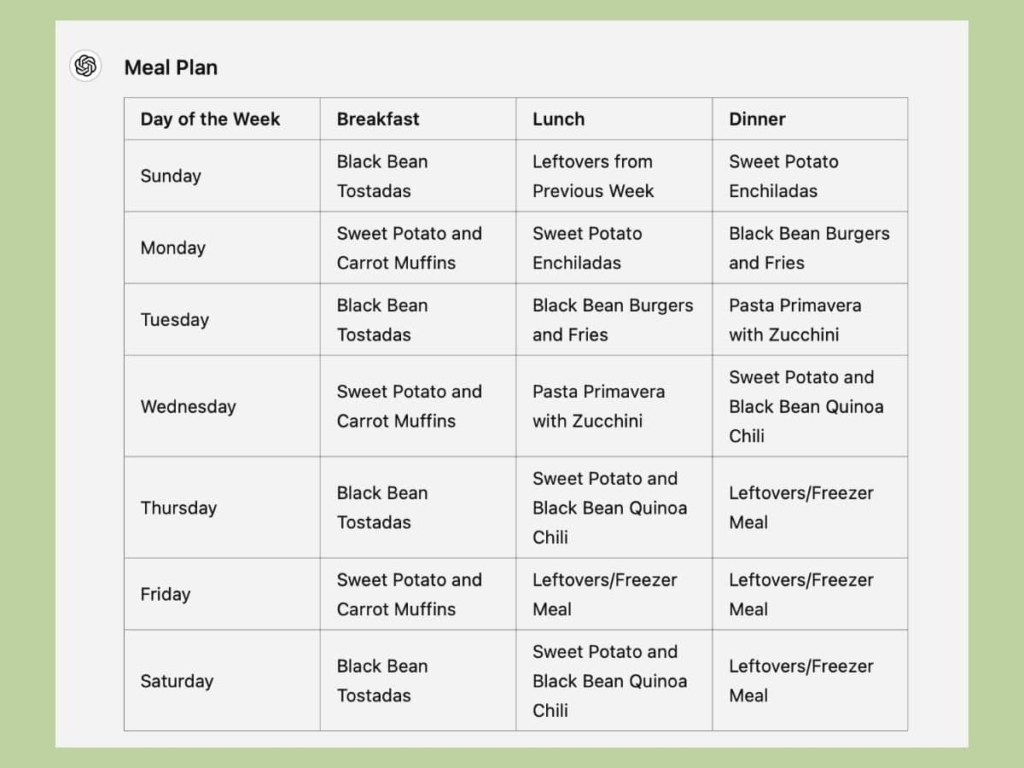
Section 3: How to Prompt AI for Meal Planning
3.1 The Anatomy of a Good Meal Planning Prompt
A good meal planning prompt includes:
- Number of people. How many are you feeding?
- Number of meals. Breakfast, lunch, dinner? How many days?
- Dietary restrictions. Allergies, intolerances, preferences (vegetarian, vegan, gluten-free, etc.)
- Cuisine preferences. What types of food do you like? What do you want to avoid?
- Budget. Affordable, moderate, or flexible?
- Time constraints. Quick meals, slow cooking, batch cooking?
- Ingredients on hand. What do you already have that needs using?
- Output format. How do you want the information presented?
Example prompt:
I need a meal plan for two adults for 5 days (Monday to Friday). We eat mostly vegetarian but occasionally fish. No nuts. We like Mediterranean and Asian flavors. Budget is moderate. I have brown rice, canned chickpeas, onions, garlic, and spinach that need using. Please provide:
- A daily dinner menu
- A consolidated grocery list organized by aisle
- Prep notes for any make-ahead steps
3.2 Prompt Templates by Scenario
Basic weekly meal plan:
Create a 5-day dinner meal plan for 2 adults. We eat everything but prefer healthy, balanced meals. Keep prep time under 30 minutes. Include a grocery list organized by aisle.
Family with kids:
Plan 7 dinners for a family of 4 (two adults, two children ages 6 and 9). Kids are picky—they like pasta, chicken, and mild flavors. No spicy food. Include one meal that uses leftovers. Provide a grocery list sorted by category.
Using up ingredients:
I have the following ingredients that need using: [list]. Suggest 3–4 meals I can make with these plus minimal additional ingredients. Include a shopping list for the additional items.
Dietary restrictions:
Create a 5-day meal plan for one person. Vegan, gluten-free, soy-free. I like quick meals (under 20 minutes). Focus on high-protein options. Include a grocery list.
Budget-conscious:
Plan 6 dinners for two adults on a tight budget. Aim for meals under $5 per serving. Focus on beans, lentils, eggs, and seasonal vegetables. Include a grocery list with estimated costs.
Batch cooking / meal prep:
I want to batch cook on Sunday for the week ahead. Suggest 2–3 meals that reheat well, for 4 servings each. Include a grocery list and prep schedule. I have a slow cooker and an Instant Pot.
3.3 Iterating on Plans
The first plan is rarely perfect. Refine with follow-up prompts:
- Change a meal. “Replace Tuesday’s meal with something using chicken instead.”
- Adjust servings. “Scale everything to 6 servings instead of 4.”
- Simplify. “Simplify the grocery list—fewer specialty ingredients.”
- More leftovers. “Add one more leftover-friendly meal.”
- Change cuisine. “Swap the Asian dishes for Mediterranean instead.”
Section 4: From Meal Plan to Grocery List
4.1 Generating the List
Once you have a meal plan, the next step is the grocery list. AI can generate this automatically.
Prompt:
From this meal plan, create a consolidated grocery list organized by aisle (produce, dairy, meat, pantry, etc.). Exclude items I already have: [list of items on hand].
4.2 List Organization
A good grocery list is organized by store layout. Common categories:
- Produce. Fruits, vegetables, herbs
- Dairy & eggs. Milk, cheese, yogurt, eggs
- Meat & seafood. Chicken, beef, fish, deli
- Pantry. Canned goods, pasta, rice, oils, spices
- Frozen. Vegetables, fruits, prepared foods
- Bakery. Bread, tortillas, bagels
- Beverages. Coffee, tea, juice
Ask AI to organize by categories that match your store.
4.3 Estimating Quantities
AI can estimate quantities based on the meal plan:
For this grocery list, add estimated quantities (e.g., “3 onions,” “2 pounds of chicken”) based on the recipes.
4.4 Avoiding Waste
AI can help you buy only what you need:
Identify any ingredients that are used in multiple meals. For those, tell me the total quantity needed so I can buy the right amount.
Section 5: Advanced Meal Planning with AI
5.1 Nutrition Tracking
AI can help you meet nutritional goals:
Create a 7-day meal plan for one person targeting 2,000 calories per day with 100g protein, 50g fat, and 250g carbs. Include a grocery list and estimated nutrition per meal.
5.2 Seasonal Eating
Suggest a 5-day meal plan using seasonal produce for [location/month]. Keep it affordable and simple.
5.3 Reducing Food Waste
AI can help you plan around what you already have:
I have these ingredients that need using this week: [list]. Suggest a meal plan that uses all of them, plus minimal additional ingredients.
5.4 Recipe Scaling
Scale this recipe to serve 6 instead of 4: [paste recipe]. Update the grocery list accordingly.
5.5 Dietary Variety
I tend to make the same meals repeatedly. Suggest 5 new dinner ideas I haven’t tried, based on my preference for Mediterranean and Asian flavors.
5.6 Special Occasions
Plan a dinner party menu for 8 people. Dietary restrictions: one vegetarian, one gluten-free. Cuisine: Italian. Budget moderate. Include a timeline for prep and cooking.
Section 6: Putting It All Together—A Step-by-Step Example
Let us walk through a practical example.
Scenario. You are a busy professional cooking for yourself and a partner. You want a simple, healthy meal plan for the week with minimal waste.
Step 1: Set your parameters.
I need a meal plan for two adults for 5 days (Monday to Friday). We eat mostly vegetarian but sometimes fish. No restrictions. We like Mediterranean and Asian flavors. Budget is moderate. I already have: onions, garlic, canned chickpeas, brown rice. Please provide:
- A daily dinner menu
- A consolidated grocery list organized by aisle
- Any make-ahead notes
Step 2: AI generates a plan.
The AI responds with:
Monday: Chickpea and spinach curry with brown rice
Tuesday: Mediterranean roasted vegetable quinoa bowls with tahini dressing
Wednesday: Salmon with roasted asparagus and sweet potato
Thursday: Lentil soup with crusty bread
Friday: Stir-fried tofu with broccoli and bell peppers over brown rice
Grocery list:
- Produce: spinach (use what you have), bell peppers (2), broccoli (1 head), asparagus (1 bunch), sweet potatoes (2), lemons (2), fresh herbs (cilantro, parsley)
- Dairy: feta cheese (optional)
- Protein: salmon fillets (2), tofu (1 block)
- Pantry: lentils (1 cup), tahini, vegetable broth, soy sauce, sesame oil
Make-ahead: Cook brown rice in bulk. Make lentil soup on Wednesday for Thursday’s dinner.
Step 3: Review and refine.
You decide you want to swap the tofu stir-fry for a chickpea version to use up the chickpeas you already have.
Replace Friday’s tofu stir-fry with a chickpea and vegetable stir-fry. Use the same vegetables. Update the grocery list.
The AI updates: removes tofu, adjusts list accordingly.
Step 4: Generate the final grocery list.
You ask AI to output the grocery list in a format you can copy to your phone.
Time spent. 3–5 minutes for a full week’s meal plan. Without AI, this could take 30–60 minutes.
Section 7: Tips for Success
7.1 Start Simple
If you are new to AI meal planning, start with a 3-day plan rather than a full week. Refine your prompts based on what works.
7.2 Save Successful Prompts
When you get a meal plan you like, save the prompt. Next week, you can reuse it with minor tweaks.
7.3 Use AI to Learn New Recipes
AI is great for suggesting dishes you might not have considered. Be open to trying something new.
7.4 Combine with Delivery Services
Many grocery delivery services (Instacart, Amazon Fresh, etc.) accept AI-generated lists. Copy and paste directly.
7.5 Adjust for Reality
AI plans are suggestions, not commands. If you end up swapping meals or skipping a day, that is fine. The goal is to reduce mental load, not add stress.
7.6 Respect Privacy
If using consumer AI tools (free ChatGPT, Claude, etc.), avoid pasting sensitive information. Your grocery list is low-risk, but be mindful.
Section 8: How MHTECHIN Helps with AI Lifestyle Tools
AI meal planning is just one example of how artificial intelligence can simplify daily life. MHTECHIN helps individuals and families build AI-powered routines that save time, reduce waste, and reduce stress.
8.1 For Individuals
MHTECHIN offers:
- Tool selection. Which AI tools fit your needs?
- Prompt engineering. How to get better results from AI assistants.
- Workflow design. Integrate AI into your weekly routine.
- Best practices. Privacy, security, and effective use.
8.2 For Families
MHTECHIN helps families:
- Customize plans. Meal plans that work for different preferences.
- Manage dietary restrictions. AI that accommodates allergies and preferences.
- Reduce waste. Plans that use what you have.
- Save time. Reclaim hours spent on planning.
8.3 The MHTECHIN Approach
MHTECHIN’s approach is practical: start with the problem, not the tool. Whether it is meal planning, email, or another daily chore, the team helps you identify where AI can have the biggest impact and build workflows that work for you.
Section 9: Frequently Asked Questions
9.1 Q: Can AI really create a meal plan for me?
A: Yes. AI can generate personalized meal plans based on your preferences, dietary restrictions, and available ingredients. It handles the mental load of deciding what to eat and creating a grocery list.
9.2 Q: What is the best AI tool for meal planning?
A: For maximum flexibility, ChatGPT, Claude, or Gemini work well. For specialized features like nutrition tracking or app integration, Eat This Much, Mealime, or Whisk are excellent. Start with a free AI assistant and see if it meets your needs.
9.3 Q: Can AI handle dietary restrictions?
A: Yes. You can specify allergies, intolerances, and preferences in your prompt. AI will filter recipes accordingly. Be specific: “gluten-free, no nuts, vegetarian” works well.
9.4 Q: Can AI use ingredients I already have?
A: Yes. List what you have, and AI will suggest meals that use those ingredients. This is one of the most powerful features—it helps reduce food waste.
9.5 Q: Can AI generate a grocery list organized by aisle?
A: Yes. Ask AI to organize the list by produce, dairy, meat, pantry, etc. You can also specify the layout of your store for more accuracy.
9.6 Q: Is AI meal planning free?
A: Many AI assistants have free tiers (ChatGPT, Claude, Gemini). Specialized apps often have free versions with limited features. You can get started without spending money.
9.7 Q: How much time does AI save on meal planning?
A: Manual meal planning can take 30–60 minutes per week. AI reduces this to 5–10 minutes. Over a year, that is 20–40 hours saved.
9.8 Q: Can AI scale recipes?
A: Yes. AI can adjust recipe servings automatically. Just ask: “Scale this recipe to serve 6 instead of 4.”
9.9 Q: Can AI help with nutrition goals?
A: Yes. Apps like Eat This Much specialize in nutrition tracking. General AI assistants can also estimate nutrition if you ask, though accuracy varies.
9.10 Q: How does MHTECHIN help with AI meal planning?
A: MHTECHIN helps individuals and families select AI tools, craft effective prompts, and build routines that simplify meal planning. We provide guidance and support to make AI work for your life.
Section 10: Conclusion—Let AI Handle the Thinking
Meal planning does not have to be a chore. With AI, you can offload the mental load of deciding what to eat, creating grocery lists, and managing ingredients. You get back time—and mental energy—for the things that matter.
The best part? You are still in control. AI suggests; you decide. You can refine, tweak, and adapt to your tastes. The AI handles the mechanics; you handle the joy of cooking and eating.
Start small. Try a 3-day plan this week. See how it feels. Then expand to a full week. Before long, you will wonder how you ever managed without it.
Ready to simplify meal planning? Explore MHTECHIN’s AI lifestyle training at www.mhtechin.com. From meal planning to email to personal organization, our team helps you build AI-powered routines that save time and reduce stress.
This guide is brought to you by MHTECHIN—helping individuals and families build AI-powered routines that simplify daily life. For personalized guidance on AI tools or workflows, reach out to the MHTECHIN team today.

Leave a Reply