Introduction
Behind every AI model—whether it is a chatbot answering questions, a vision system detecting defects, or a language model generating text—there is infrastructure. Massive computing power. Specialized hardware. Cloud platforms that scale to millions of requests. Without the right infrastructure, even the most sophisticated AI model is useless.
AI infrastructure has evolved rapidly. What once required supercomputers now runs on specialized chips designed specifically for AI workloads. And the choices are expanding: GPUs, TPUs, cloud platforms, edge devices, and hybrid deployments. Each has trade-offs in cost, performance, flexibility, and ease of use.
This article explains the key components of AI infrastructure—GPUs, TPUs, and cloud platforms—and helps you understand which choices matter for your AI projects. Whether you are a data scientist training models, an engineer deploying systems, or a business leader making infrastructure decisions, this guide will help you navigate the hardware and platform landscape.
For a foundational understanding of the trade-offs between different AI deployment options, you may find our guide on Open Source AI vs Proprietary AI: Pros and Cons helpful as a starting point.
Throughout, we will highlight how MHTECHIN helps organizations design, deploy, and optimize AI infrastructure that balances performance, cost, and scalability.
Section 1: Why AI Infrastructure Is Different
1.1 AI Has Unique Compute Requirements
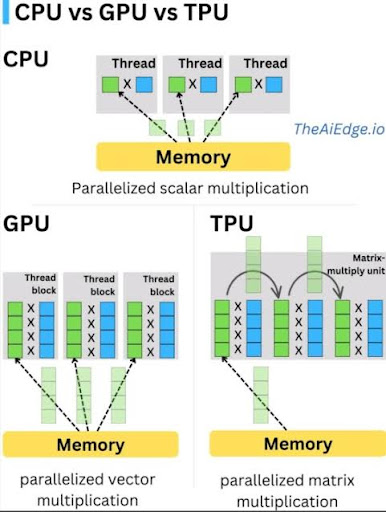
Traditional software runs on central processing units (CPUs)—general-purpose processors designed for sequential logic. AI workloads, particularly deep learning, are fundamentally different.
Deep learning models perform massive parallel computations—thousands or millions of simple operations simultaneously. CPUs are inefficient for this type of workload. Specialized hardware—graphics processing units (GPUs) and tensor processing units (TPUs)—is designed specifically for the parallel matrix math that powers modern AI.
1.2 The Two Phases: Training vs Inference
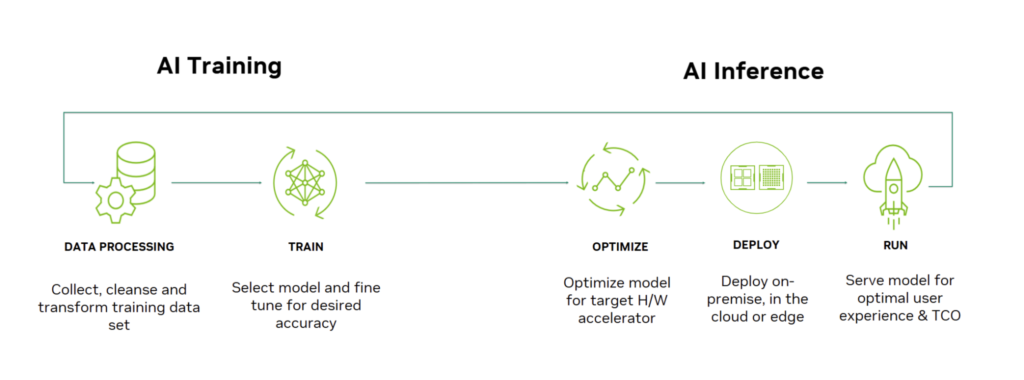
AI infrastructure needs differ dramatically between training and inference:
Training. Building a model requires processing massive datasets through billions of parameters. Training a large language model can take weeks on thousands of specialized chips. Training demands maximum compute density and high-speed interconnects.
Inference. Running a trained model to make predictions requires lower compute but must be fast and efficient. Inference often runs on different hardware than training—sometimes on edge devices, sometimes in the cloud, sometimes on specialized inference chips.
1.3 The Infrastructure Stack
AI infrastructure spans multiple layers:
| Layer | What It Is | Examples |
|---|---|---|
| Hardware | Physical chips | GPUs (NVIDIA), TPUs (Google), Inferentia (AWS) |
| Orchestration | Managing clusters | Kubernetes, Slurm, cloud orchestration |
| Platform | Managed services | AWS SageMaker, Google Vertex AI, Azure ML |
| Frameworks | Software for building models | PyTorch, TensorFlow, JAX |
Choosing the right combination across these layers determines cost, performance, and developer productivity.
Section 2: Graphics Processing Units (GPUs)
2.1 What Are GPUs?
Graphics processing units (GPUs) were originally designed for rendering graphics—a task that requires massive parallel processing. In the mid-2000s, researchers discovered that the same parallel architecture was ideal for deep learning. Today, GPUs are the dominant hardware for AI training.
2.2 Key GPU Players
| Provider | Products | Strengths |
|---|---|---|
| NVIDIA | A100, H100, H200, L4, L40 | Market leader; best software ecosystem (CUDA); highest performance |
| AMD | MI250, MI300 | Competitive performance; open software stack; cost advantage |
| Intel | Gaudi 2, Gaudi 3 | Emerging alternative; strong for inference |
NVIDIA remains the dominant player, with its CUDA software ecosystem creating significant lock-in. Most AI frameworks (PyTorch, TensorFlow) are optimized for NVIDIA GPUs.
2.3 GPU Use Cases
Training. Large-scale model training requires the highest-performance GPUs—NVIDIA H100 or AMD MI300. These chips offer massive memory bandwidth and high-speed interconnects for cluster training.
Inference. For production inference, lower-cost GPUs (NVIDIA L4, L40) or older generation chips are often sufficient. The choice depends on latency requirements and throughput needs.
2.4 Strengths of GPUs
- Performance. State-of-the-art for training large models
- Ecosystem. Extensive software support (CUDA, PyTorch, TensorFlow)
- Flexibility. Works for both training and inference; supports all model types
- Availability. Available from all major cloud providers and on-premises
2.5 Limitations of GPUs
- Cost. High-end GPUs are expensive (tens of thousands of dollars per unit)
- Power consumption. High power and cooling requirements
- Supply constraints. High demand has led to shortages
- Complexity. Optimizing GPU utilization requires expertise
Section 3: Tensor Processing Units (TPUs)
3.1 What Are TPUs?
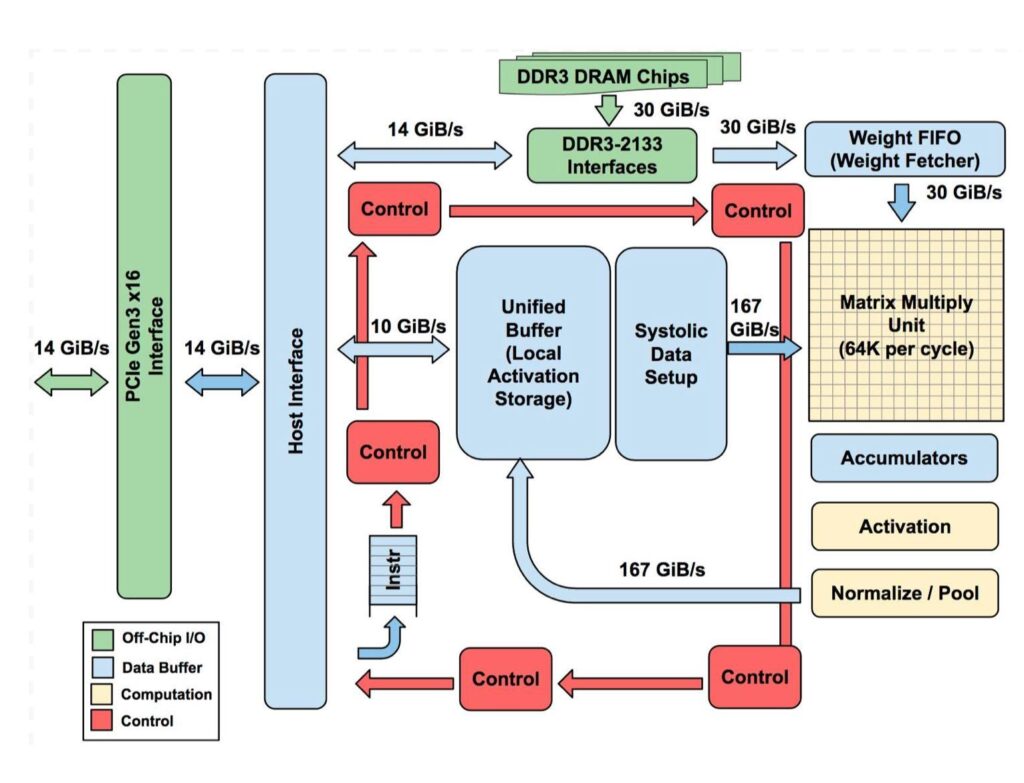
Tensor processing units (TPUs) are custom application-specific integrated circuits (ASICs) developed by Google specifically for machine learning. Unlike GPUs (designed for graphics, adapted for AI), TPUs are purpose-built for the matrix math at the heart of neural networks.
3.2 TPU Offerings
Google offers TPUs in several form factors:
- TPU v4. High-performance chips for large-scale training; up to 4,096 chips in a pod
- TPU v5e. Balanced for both training and inference; cost-optimized
- TPU v5p. Performance-optimized for largest models
TPUs are available exclusively through Google Cloud—you cannot buy TPUs for on-premises deployment.
3.3 TPU Use Cases
Training. TPUs excel at large-scale transformer model training. Google uses TPUs to train its own Gemini models. For organizations already on Google Cloud, TPUs can offer cost and performance advantages over GPUs.
Inference. TPU v5e is optimized for inference, offering competitive cost-per-token for deployed models.
3.4 Strengths of TPUs
- Purpose-built. Designed specifically for AI workloads, especially transformers
- Performance. Excellent for large-scale training, particularly on Google Cloud
- Cost. Can be more cost-effective than GPUs for certain workloads
- Integration. Tight integration with Google Cloud and JAX framework
3.5 Limitations of TPUs
- Exclusivity. Only available on Google Cloud; no on-premises option
- Frameworks. Optimized for JAX and TensorFlow; PyTorch support is improving but not as mature
- Flexibility. Less flexible than GPUs for non-standard architectures
- Lock-in. Using TPUs ties you to Google Cloud infrastructure
Section 4: Cloud AI Platforms
4.1 Why Cloud for AI?
Cloud platforms offer on-demand access to AI infrastructure without upfront capital investment. For most organizations, cloud is the default choice for AI development and deployment.
Benefits include:
- No hardware procurement. Access GPUs and TPUs instantly
- Scalability. Scale from one GPU to thousands
- Managed services. Reduce operational overhead
- Global availability. Deploy near users
- Pay-per-use. Pay only for what you use
4.2 Major Cloud AI Platforms
Google Cloud
Key offerings.
- TPUs. Exclusive access to Google’s custom AI chips
- GPUs. NVIDIA A100, H100, L4, etc.
- Vertex AI. Managed ML platform for training and deployment
- JAX and TensorFlow. Strong framework integration
Best for. Organizations already on Google Cloud; projects that can leverage TPUs; teams using JAX or TensorFlow.
Amazon Web Services (AWS)
Key offerings.
- GPUs. Wide selection (NVIDIA, AMD, AWS Inferentia)
- Inferentia. AWS custom inference chips
- Trainium. AWS custom training chips
- SageMaker. Comprehensive ML platform
Best for. Organizations already on AWS; cost-sensitive inference workloads (Inferentia); broadest GPU selection.
Microsoft Azure
Key offerings.
- GPUs. NVIDIA A100, H100, etc.
- ND-series. Specialized AI training VMs
- Azure Machine Learning. Enterprise ML platform
- OpenAI Service. Managed access to OpenAI models
Best for. Organizations already on Azure; Microsoft enterprise customers; teams using OpenAI models.
4.3 Managed AI Services vs Raw Infrastructure
| Approach | What It Provides | Best For |
|---|---|---|
| Raw Infrastructure (VMs) | Direct access to GPUs/TPUs; you manage everything | Teams with ML ops expertise; custom infrastructure needs |
| Managed Platforms (SageMaker, Vertex, Azure ML) | Pre-built pipelines, experiment tracking, model serving | Teams wanting to focus on models, not infrastructure |
| Serverless Inference | Auto-scaling endpoints; pay-per-invocation | Variable workloads; reducing operational overhead |
4.4 Cost Considerations
Cloud AI costs vary significantly based on:
- Instance type. High-end GPUs cost substantially more than CPUs
- Region. Prices vary by geographic region
- Commitment. Reserved instances or savings plans reduce costs
- Spot/preemptible. Interruptible instances at deep discounts (ideal for training)
- Data transfer. Moving data in/out of cloud incurs costs
Section 5: Training vs Inference Infrastructure
5.1 Training Infrastructure Requirements
Training large models demands:
- High memory bandwidth. Moving data between compute and memory is often the bottleneck
- High-speed interconnects. Training across multiple chips requires fast communication (NVLink, InfiniBand)
- Large memory capacity. Model parameters, optimizer states, and activations require significant memory
- Fault tolerance. Long-running jobs need resilience
Typical training cluster. Multiple high-end GPUs (H100) or TPUs connected via high-speed networking, with parallel storage for datasets.
5.2 Inference Infrastructure Requirements
Inference has different priorities:
- Low latency. Responses must be fast (milliseconds)
- High throughput. Handle many concurrent requests
- Cost efficiency. Per-request cost matters more than raw performance
- Elasticity. Scale with demand
Typical inference setup. Lower-cost GPUs (L4), inference-optimized chips (AWS Inferentia), or CPUs for smaller models. Auto-scaling to handle load.
5.3 Optimizing for Cost
| Strategy | How It Saves | Best For |
|---|---|---|
| Spot/Preemptible instances | Use idle capacity at 60-90% discount | Training jobs that can tolerate interruption |
| Reserved instances | Commit to 1-3 years for significant discount | Steady-state inference workloads |
| Right-sizing | Choose appropriate hardware for workload | Avoiding over-provisioning |
| Inference optimization | Quantization, pruning, caching | Reducing per-request cost |
| Multi-cloud | Use best price across providers | Cost-sensitive, portable workloads |
Section 6: On-Premises vs Cloud vs Hybrid
6.1 On-Premises AI Infrastructure
When on-premises makes sense:
- Data sovereignty requirements (data cannot leave premises)
- Very high, predictable usage (cloud costs exceed on-premises)
- Existing data center investment
- Regulatory constraints (classified work, certain government contracts)
Challenges:
- High upfront capital investment (millions for GPU clusters)
- Long procurement lead times
- Capacity planning risk (under- or over-provisioning)
- Operational complexity (cooling, power, maintenance)
6.2 Cloud AI Infrastructure
When cloud makes sense:
- Variable or uncertain workload
- No data sovereignty restrictions
- Fast time-to-market
- Limited in-house infrastructure expertise
Advantages:
- No capital investment
- Instant scalability
- Pay-per-use pricing
- Access to latest hardware
6.3 Hybrid AI Infrastructure
Many organizations adopt hybrid approaches:
- Training in cloud, inference on-premises. Use cloud for elastic training capacity; deploy models on-premises for data privacy or low latency
- Sensitive data on-premises, public data in cloud. Keep regulated data internal; use cloud for non-sensitive workloads
- Burst to cloud. Maintain baseline capacity on-premises; scale to cloud for peak demand
6.4 Edge AI Infrastructure
For applications requiring low latency, privacy, or offline operation, AI runs at the edge:
- Smartphones. On-device AI for face unlock, camera features
- Cameras. Edge AI for person detection, retail analytics
- Industrial equipment. Predictive maintenance, quality inspection
- Automotive. Self-driving, driver monitoring
Edge AI uses specialized chips (NPUs, TPUs) designed for low power consumption and efficient inference.
Section 7: How to Choose Your AI Infrastructure
7.1 Key Questions to Ask
| Question | Considerations |
|---|---|
| What phase? | Training or inference? Different needs. |
| What scale? | Small models or large language models? |
| What latency? | Real-time or batch processing? |
| What data sensitivity? | Can data go to cloud? Must it stay on-premises? |
| What expertise? | In-house ML ops? Or need managed services? |
| What budget? | Capital expense or operational expense? |
7.2 Decision Framework
| Scenario | Recommended Infrastructure |
|---|---|
| Prototyping / small models | Cloud GPUs (spot instances) or free tiers |
| Large model training | Cloud with high-end GPUs (A100/H100) or TPUs; consider reserved instances |
| Production inference (low volume) | Serverless inference; managed endpoints |
| Production inference (high volume) | Optimized inference instances (AWS Inferentia, NVIDIA L4); consider reserved instances |
| Regulated data / on-premises requirement | On-premises GPU clusters; hybrid training-in-cloud, inference-on-premises |
| Edge deployment | Edge-optimized chips; NPUs on device |
Section 8: How MHTECHIN Helps with AI Infrastructure
Designing and managing AI infrastructure requires expertise across hardware, cloud platforms, and optimization. MHTECHIN helps organizations build infrastructure that balances performance, cost, and scalability.
8.1 For Infrastructure Strategy
MHTECHIN helps organizations:
- Assess requirements. Training vs inference; scale; latency; data sensitivity
- Evaluate options. On-premises, cloud, hybrid, edge
- Design architecture. Compute, storage, networking, orchestration
- Estimate costs. Total cost of ownership models
8.2 For Cloud AI Deployment
MHTECHIN implements cloud AI infrastructure:
- Platform selection. AWS, Google Cloud, Azure—which fits your needs?
- Managed services. SageMaker, Vertex AI, Azure ML—reducing operational overhead
- Cost optimization. Spot instances, reserved capacity, right-sizing
- Security and compliance. VPCs, IAM, encryption, data residency
8.3 For On-Premises AI
MHTECHIN helps with on-premises deployments:
- Hardware selection. GPUs, servers, storage, networking
- Cluster design. Scaling, interconnects, cooling, power
- Orchestration. Kubernetes, Slurm, job scheduling
- Management. Monitoring, maintenance, upgrades
8.4 For Edge AI
MHTECHIN designs edge AI solutions:
- Hardware selection. NPUs, edge GPUs, embedded systems
- Model optimization. Quantization, pruning, compression
- Deployment. Over-the-air updates, device management
- Integration. Edge-to-cloud synchronization
8.5 The MHTECHIN Approach
MHTECHIN’s infrastructure practice combines deep technical expertise with practical experience deploying AI at scale. The team helps organizations navigate the complex infrastructure landscape—choosing the right hardware, platforms, and architectures to deliver AI that performs.
Section 9: Frequently Asked Questions
9.1 Q: What is the difference between GPU and TPU?
A: GPUs (graphics processing units) were originally designed for graphics but adapted for AI. TPUs (tensor processing units) are custom-built by Google specifically for AI workloads, particularly transformers. GPUs are more flexible and widely available; TPUs offer performance advantages for certain workloads but are only available on Google Cloud.
9.2 Q: Do I need GPUs or TPUs to run AI?
A: For small models or inference, you may not need specialized hardware—CPUs can suffice. For training large models or high-volume inference, GPUs or TPUs are essential. Many organizations start with cloud GPUs and scale as needed.
9.3 Q: Which cloud platform is best for AI?
A: There is no single “best.” AWS offers the broadest selection and largest market share. Google Cloud offers unique TPUs and strong AI heritage. Microsoft Azure offers deep enterprise integration and OpenAI service. The choice depends on your existing cloud footprint, specific workload, and team expertise.
9.4 Q: How much does cloud AI infrastructure cost?
A: Costs vary widely. A single high-end GPU can cost $10–$30 per hour on-demand; reserved instances reduce costs significantly. Training a large model can cost hundreds of thousands to millions of dollars. Inference costs depend on volume and optimization. MHTECHIN can help estimate costs for your specific use case.
9.5 Q: Should I use managed AI services or raw infrastructure?
A: Managed services (SageMaker, Vertex AI, Azure ML) reduce operational overhead and accelerate development—ideal for teams focused on models rather than infrastructure. Raw infrastructure gives more control and can be cheaper at very large scale, but requires ML ops expertise.
9.6 Q: What is spot/preemptible instance pricing?
A: Spot (AWS) or preemptible (Google) instances offer access to unused cloud capacity at 60–90% discounts. The trade-off is they can be interrupted with short notice. These are ideal for training jobs that can tolerate interruption and resume from checkpoints.
9.7 Q: Can I run AI on-premises?
A: Yes. Many organizations run AI on-premises for data sovereignty, regulatory compliance, or cost reasons. This requires significant capital investment and operational expertise. Hybrid approaches—training in cloud, inference on-premises—are common.
9.8 Q: What is edge AI infrastructure?
A: Edge AI runs models on devices—smartphones, cameras, sensors, cars—rather than in the cloud. Edge AI uses specialized chips (NPUs) optimized for low power and efficient inference. It enables low latency, privacy, and offline operation.
9.9 Q: How do I optimize AI infrastructure costs?
A: Strategies include: using spot/preemptible instances for training; right-sizing instances (don’t over-provision); using reserved instances for steady workloads; optimizing models (quantization, pruning); and designing auto-scaling for inference.
9.10 Q: How does MHTECHIN help with AI infrastructure?
A: MHTECHIN helps organizations design, deploy, and optimize AI infrastructure—from hardware selection to cloud platforms to edge deployments. We provide strategy, implementation, and ongoing management to ensure infrastructure meets performance and cost goals.
Section 10: Conclusion—Infrastructure as a Strategic Choice
AI infrastructure is not just a technical detail—it is a strategic choice that shapes cost, performance, and time-to-market. The right infrastructure accelerates development, reduces operational burden, and scales with your needs. The wrong infrastructure leads to wasted spend, frustrated teams, and missed opportunities.
The landscape is rich with options: GPUs for flexibility, TPUs for Google Cloud optimization, cloud platforms for instant scalability, on-premises for control, edge for low latency. The best choice depends on your workload, your data, your expertise, and your budget.
For organizations serious about AI, infrastructure deserves the same strategic attention as models and data. With thoughtful design and the right partners, you can build infrastructure that enables innovation—not constrains it.
Ready to build AI infrastructure that performs? Explore MHTECHIN’s AI infrastructure services at www.mhtechin.com. From cloud strategy to on-premises clusters, our team helps you design and deploy infrastructure that delivers.
This guide is brought to you by MHTECHIN—helping organizations design, deploy, and optimize AI infrastructure for real-world impact. For personalized guidance on AI infrastructure strategy, reach out to the MHTECHIN team today.

Leave a Reply