Introduction: What Happens After You Click?
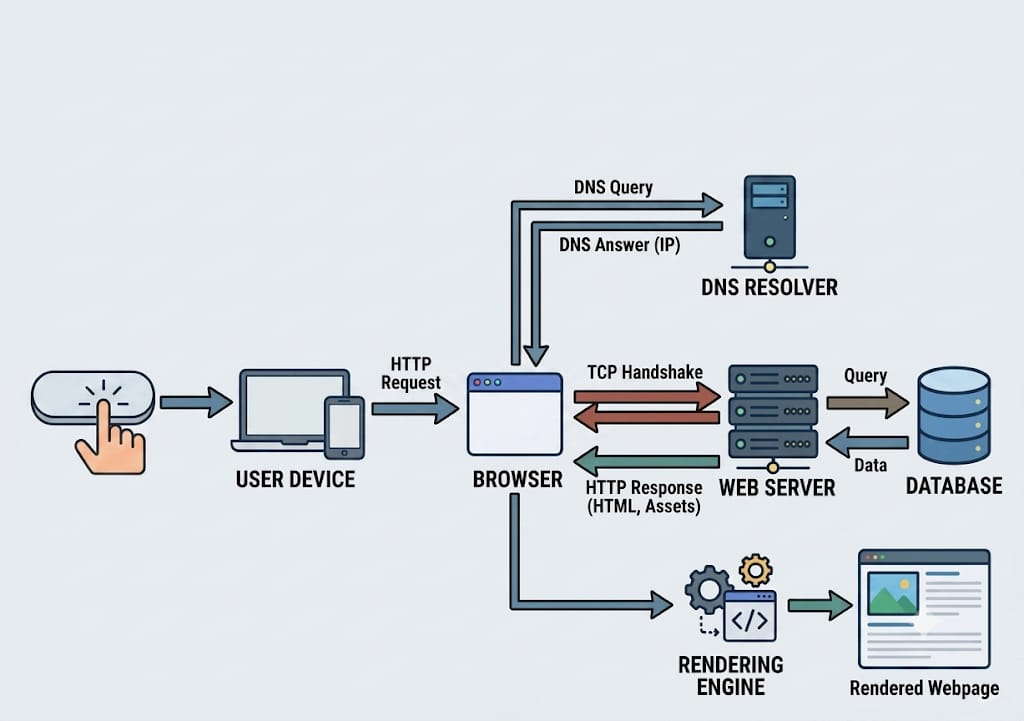
The moment you click a link or press Enter, a cascade of networked events begins. Your browser must resolve the domain, establish a secure connection, request resources, and render the page—all in under a second. This introduction outlines the entire flow, from your device to the server and back.
The Journey Begins: Your Device Sends a Request
Your browser creates an HTTP request (or HTTPS) containing the URL, headers (user-agent, cookies, etc.), and method (GET, POST). This packet is sent to the operating system’s network stack, which adds TCP/IP headers. The request leaves your device through a network interface (Wi-Fi, Ethernet, cellular) to your router, then to your ISP.
Key steps:
- DNS resolution (if not cached)
- TCP three-way handshake (SYN, SYN-ACK, ACK)
- TLS handshake (if HTTPS)
Table: OSI model layers involved
| Layer | Protocol | Function |
|——-|———-|———-|
| Application | HTTP/HTTPS | Request data |
| Transport | TCP | Reliable delivery |
| Internet | IP | Routing |
| Link | Ethernet/Wi-Fi | Physical transmission |
How DNS Finds the Website
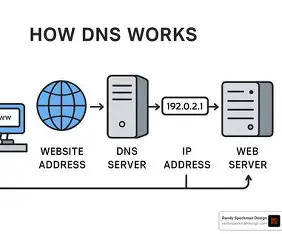
DNS (Domain Name System) translates human-readable domain names (e.g., example.com) into IP addresses. Your device first checks its local cache (browser, OS, router). If not found, it queries a recursive resolver (often your ISP or a public DNS like 8.8.8.8). The resolver then queries root servers, TLD servers (.com, .org), and authoritative name servers for the domain.
Average DNS lookup time: 20–120 ms, but caching reduces this to near zero on repeat visits.
Connecting to the Web Server
After obtaining the IP, your browser opens a TCP connection to the server on port 80 (HTTP) or 443 (HTTPS). The TCP three-way handshake ensures reliable communication. For HTTPS, a TLS handshake follows: the server sends its certificate, the client verifies it, and symmetric keys are exchanged.
Table: TCP vs TLS handshake steps
| TCP | TLS |
|—–|—–|
| SYN | ClientHello |
| SYN-ACK | ServerHello + Certificate |
| ACK | ClientKeyExchange + Finished |
Once established, the browser sends the HTTP request. The server may be a single machine or a load balancer routing to multiple backend servers.
How HTTPS Keeps Your Data Secure
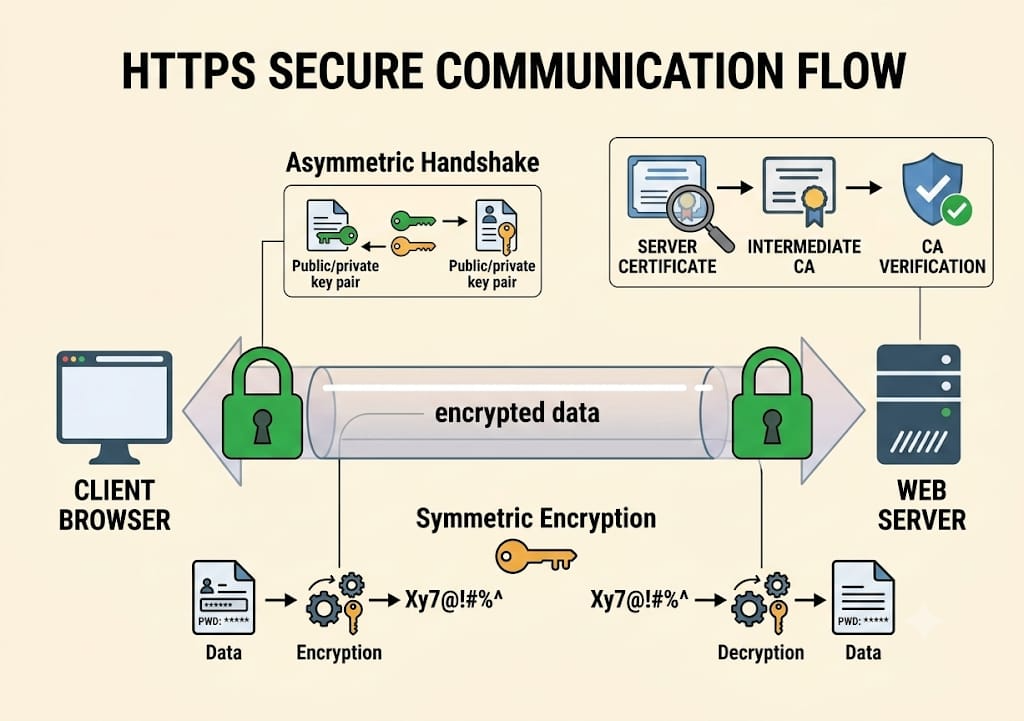
HTTPS uses TLS (Transport Layer Security) to encrypt data between client and server. The handshake authenticates the server via a digital certificate issued by a Certificate Authority (CA). This prevents eavesdropping, tampering, and impersonation.
Key components:
- Public/private key pair: Used for asymmetric encryption during handshake.
- Symmetric session key: Generated after handshake for fast bulk encryption.
- Certificate chain: Server cert → intermediate CA → root CA.
Image description: A diagram showing a padlock icon, with encrypted tunnel between browser and server, and a certificate being verified by a CA.
Why it matters: Without HTTPS, anyone on the same network (Wi-Fi, ISP) can read your request data, including passwords and credit card numbers.
The Server Processes Your Request
The web server (e.g., Nginx, Apache, IIS) receives the HTTP request. It checks the URL, headers, and cookies. Static files (HTML, CSS, JS) may be served directly from disk or a cache. Dynamic requests (e.g., to view a user profile) are forwarded to an application server (e.g., Node.js, PHP, Python, Java).
Processing steps:
- Parse request (method, path, parameters)
- Route to appropriate handler (controller)
- Execute business logic (e.g., authenticate user, fetch data)
- Generate response (HTML, JSON, XML)
- Add headers (Content-Type, Set-Cookie, Cache-Control)
- Send response back to client
Table: Common server software roles
| Software | Role |
|———-|——|
| Nginx | Reverse proxy, static file serving |
| Apache | Web server, mod_php |
| Gunicorn | Python WSGI server |
| Express.js | Node.js web framework |
Databases: Where the Information Comes From
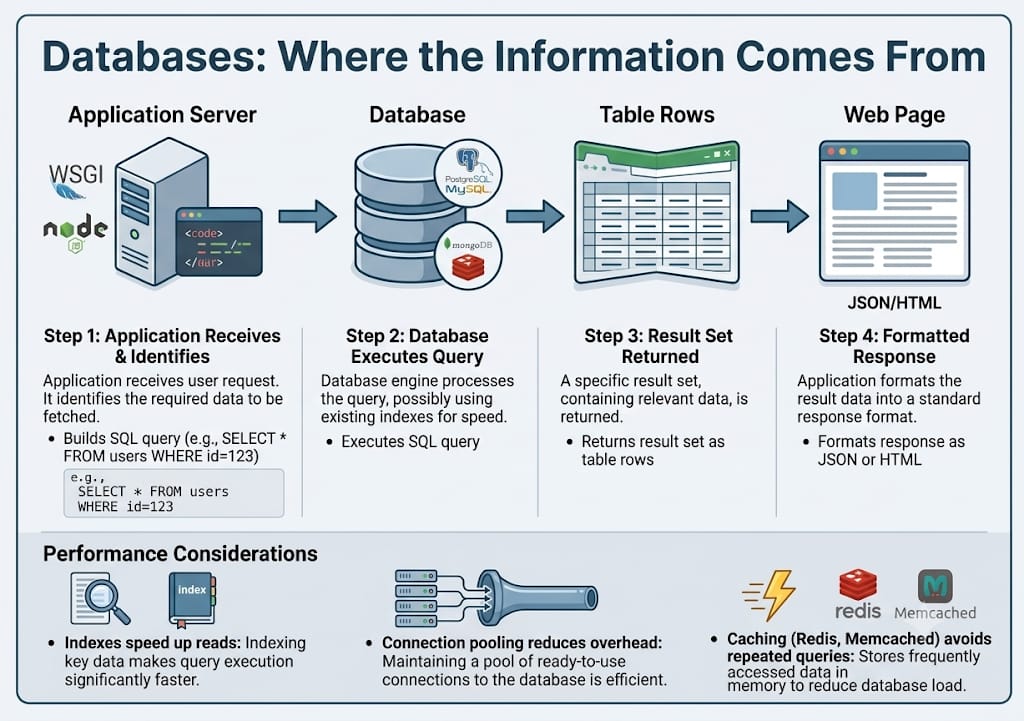
For dynamic content, the application server queries a database (relational like PostgreSQL/MySQL, or NoSQL like MongoDB/Redis). The database stores user data, posts, products, etc. Queries are written in SQL or via an ORM.
Typical flow:
- Application receives request → identifies required data
- Builds SQL query (e.g.,
SELECT * FROM users WHERE id=123) - Database executes query, possibly using indexes
- Returns result set to application
- Application formats into response (JSON/HTML)
Performance considerations:
- Indexes speed up reads
- Connection pooling reduces overhead
- Caching (Redis, Memcached) avoids repeated queries
CDNs: Why Websites Load Faster
Content Delivery Networks (CDNs) are geographically distributed servers that cache static assets (images, CSS, JS, videos). When a user requests a resource, the CDN serves it from the nearest edge server, reducing latency and load on the origin server.
How it works:
- User requests
cdn.example.com/image.jpg - DNS resolves to a CDN edge server (closest to user)
- Edge server checks cache – if miss, fetches from origin
- Caches the file with a TTL (Time To Live)
- Serves the file to user
Table: CDN benefits
| Metric | Without CDN | With CDN |
|——–|————-|———-|
| Latency (US→Asia) | 200 ms | 30 ms |
| Origin server load | 100% | 10% |
| Availability | Single point | Redundant |
Popular CDNs: Cloudflare, Akamai, Fastly, Amazon CloudFront.
How HTML, CSS, and JavaScript Build the Page
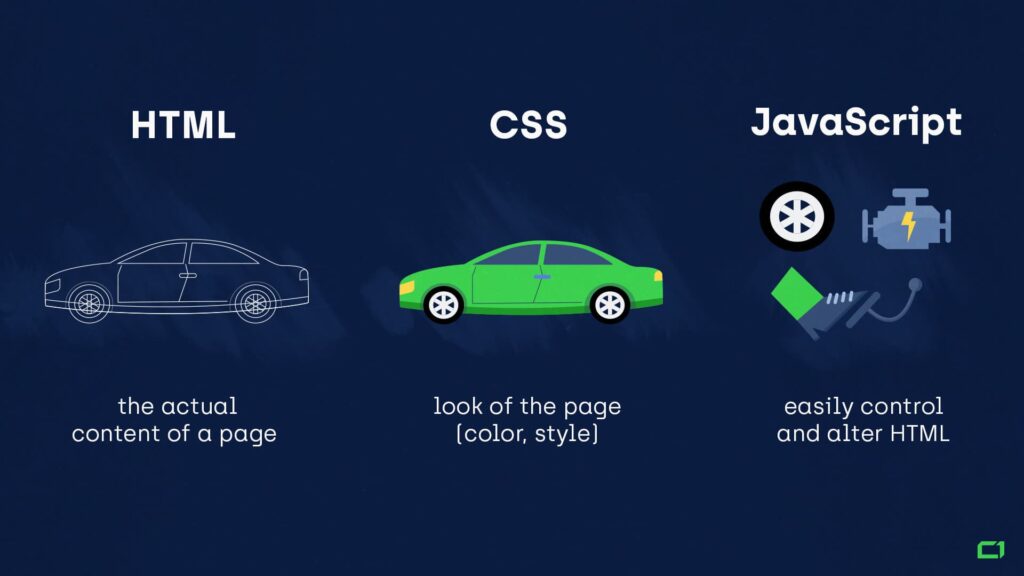
After receiving the HTML document, the browser parses it and constructs the DOM (Document Object Model). It encounters <link> and <script> tags, which trigger additional requests for CSS and JS. The CSS is parsed into the CSSOM (CSS Object Model). The browser combines DOM + CSSOM into the Render Tree, then performs layout (calculating positions) and painting (pixel output).
JavaScript execution:
- Blocks HTML parsing unless
asyncordeferis used - Can modify DOM and CSSOM dynamically
- Executes after parsing (or during, depending on placement)
| Technology | Role in Building a Page |
|---|---|
| HTML | Provides the structure and content of the page — it defines elements like headings, paragraphs, sections, and forms, forming the skeleton of the website. |
| CSS | Controls the visual presentation — it handles layout, colors, fonts, spacing, and responsiveness, making the page attractive and user‑friendly. |
| JavaScript | Adds interactivity and dynamic behavior — it enables logic, user interaction, data handling, animations, and updates without reloading, making the page functional and engaging. |
Critical rendering path: Minimizing render-blocking resources (CSS, JS) is key to fast load times.
Images, Videos, and Other Files Loading
Images and videos are typically loaded asynchronously after the HTML is parsed. The browser sees <img src="..."> and sends a separate HTTP request for each. Modern formats (WebP, AVIF) offer better compression. Lazy loading (loading="lazy") defers off-screen images until the user scrolls near them.
Table: Image formats and typical use
| Format | Compression | Transparency | Browser Support |
|——–|————-|————–|—————–|
| JPEG | Lossy | No | Excellent |
| PNG | Lossless | Yes | Excellent |
| WebP | Both | Yes | 96% |
| AVIF | Lossy/Lossless | Yes | ~80% (growing) |
Video: HTML5 <video> with multiple sources ensures compatibility. Streaming protocols like HLS or DASH adapt quality based on bandwidth.
Cookies, Cache, and Session Data
Cookies: Small text files stored by the browser per domain. Sent with every request via Cookie header. Used for session IDs, preferences, tracking. Can be HttpOnly (not accessible via JS) and Secure (only over HTTPS).
Local Storage / Session Storage: HTML5 APIs to store larger data (up to 5-10 MB) on the client side. Not sent with requests automatically.
Browser Cache: The browser caches responses based on Cache-Control headers (e.g., max-age=3600). When the same resource is requested again, it loads from cache instead of the network.
Table: Storage mechanisms
| Feature | Cookies | LocalStorage | SessionStorage |
|———|———|————–|—————-|
| Capacity | 4KB | 5-10MB | 5-10MB |
| Sent with requests | Yes | No | No |
| Expiration | Manual | Until cleared | Tab closed |
Session data: Usually stored server-side (e.g., in Redis) with a session ID stored in a cookie. The server looks up the session on each request.
How Analytics Track User Clicks
Analytics services (Google Analytics, Mixpanel, etc.) collect data about user behavior. When you click a link, the browser sends a small HTTP request (often a GET to a tracking pixel or a POST with event data) to analytics servers.
Data collected:
- URL clicked, timestamp, page referrer
- User agent, device type, screen size
- IP address (geolocation)
- Unique identifier (cookie or fingerprint)
Implementation:
- JavaScript event listeners on clicks
navigator.sendBeacon()for reliable delivery even when page is unloading- No cookies required for basic event tracking (though they help with user identity)
- Privacy concerns: GDPR and ePrivacy require consent for tracking cookies. Many sites now use first-party tracking or anonymized data.
How AI Personalizes What You See
AI models (recommendation engines, personalization algorithms) use your past behavior, demographics, and real-time context to tailor content. Examples: YouTube suggested videos, Amazon product recommendations, Google search results.
Techniques:
- Collaborative filtering: “Users who liked X also liked Y”
- Content-based filtering: Recommend items similar to those you’ve interacted with
- Deep learning: Neural networks process user embeddings and item features
Workflow:
- Collect user data (clicks, purchases, time spent)
- Preprocess (normalize, encode)
- Run inference on a model (often deployed on GPU servers)
- Return ranked list of items
- Display in UI (e.g., “Recommended for you”)
Table: AI personalization layers
| Layer | Example | Speed |
|——-|———|——-|
| Rule-based | “Most popular” | Instant |
| Lightweight ML | Logistic regression | <10ms |
| Deep learning | Transformer | 10-100ms |
Edge deployment: Some personalization happens on-device (e.g., predictive text) to preserve privacy.
Common Delays: Why Some Websites Load Slowly
Slow loading can result from bottlenecks at any stage. Common causes:
- DNS resolution: Slow DNS provider or uncached queries.
- TCP/TLS handshake: High latency or packet loss (especially on mobile).
- Server processing: Heavy database queries, unoptimized code, slow API calls.
- Large assets: Uncompressed images, excessive JavaScript, lack of code splitting.
- Third-party scripts: Trackers, ads, social widgets that block rendering.
- No caching: Every request hits origin server instead of CDN or browser cache.
- Render-blocking resources: CSS and JS in the
<head>that delay first paint.
Table: Common delays and mitigations
| Delay | Solution |
|——-|———-|
| DNS | Use fast DNS (Cloudflare, Google) |
| TLS | Enable TLS 1.3, session resumption |
| Server | Query optimization, caching, CDN |
| Large images | Compress, use WebP, lazy load |
| Third-party | Defer async, limit number |
| No caching | Set Cache-Control, use CDN |
Tools to diagnose: Lighthouse, WebPageTest, Chrome DevTools Network tab.
The Complete Journey of a Single Click (Flow Diagram)
A visual summary of the entire process from click to fully rendered page:
textCopy
[User Click] → Browser URL → DNS Resolver → Server IP
     ↓
TCP Handshake → TLS Handshake (HTTPS) → HTTP Request
     ↓
Load Balancer (optional) → Web Server → App Server
     ↓
Database Query → Cache Check (Redis) → Response Generation
     ↓
HTTP Response → Browser Receives HTML
     ↓
Parse HTML → Request CSS, JS, Images (CDN or origin)
     ↓
DOM + CSSOM → Render Tree → Layout → Paint → Display
     ↓
JavaScript Execution → AJAX requests → Dynamic updates
     ↓
Analytics Beacon → AI Personalization → Final Page
Real-World Example: Clicking a YouTube Video or Google Search Result
Example: Clicking a YouTube video titled “How DNS Works”
- Click on the link (e.g., from Google search results).
- Browser resolves
youtube.com(DNS likely cached from previous visit). - Opens TCP + TLS to YouTube’s nearest edge server (Google’s CDN).
- Sends HTTPS GET request for
/watch?v=abc123. - YouTube’s load balancer routes to an application server.
- Server checks your session cookie → identifies you (logged in?).
- Queries backend databases (video metadata, user preferences, recommendations).
- Returns HTML with embedded video player, comments, and suggested videos.
- Browser parses HTML → requests CSS, JS, poster image, and video chunks.
- Video streaming starts (adaptive bitrate via DASH).
- Analytics sends a “watch” event to Google’s servers.
- AI personalization updates the “Recommended” sidebar.
Google Search Result click:
- Click on a blue link.
- Browser sends request to the target site.
- Google’s search result page logs the click (via a redirect URL) for ranking feedback.
- The target site loads as described above.
Key Takeaways
- Every click triggers a complex, multi-step process involving DNS, TCP, TLS, HTTP, servers, databases, CDNs, and browser rendering.
- Optimization at each stage (caching, compression, CDN, efficient code) reduces latency.
- Security (HTTPS) is now standard and essential for privacy.
- AI and personalization add value but require careful data handling.
- Understanding the full journey helps diagnose slow sites and build faster web experiences.
What’s Next? The Future of Every Click
Emerging technologies will further accelerate and change the click journey:
- HTTP/3 and QUIC: Faster connection establishment (0-RTT), eliminates TCP head-of-line blocking.
- Edge computing: Run server logic closer to users (Cloudflare Workers, AWS Lambda@Edge) for sub-10ms responses.
- WebAssembly (Wasm): Run compiled code in browser for near-native performance.
- Progressive Web Apps (PWAs): Enable offline loading and app-like experiences.
- AI-driven prefetching: Predict clicks and preload content before the user clicks.
- Privacy-first analytics: Shift to aggregated, anonymized data without third-party cookies.
DEVELOPED BY: ASMIT MALL

Leave a Reply